Vivo V60 Battery Replacement in Kenya
The Vivo V60 smartphone has garnered a reputation for its impressive performance and sleek design. However, like any electronic device, it is not immune to battery-related issues. Users may experience several common battery problems that could impact their overall device experience. Understanding these issues is crucial for users to maintain optimal performance and prolong the lifespan of their smartphones.
One of the primary indicators of a failing battery is rapid draining. Users may notice that their Vivo V60 depletes power at an accelerated rate, even with minimal usage. This can lead to frequent charging sessions, which not only disrupt daily routines but can also contribute to the degradation of the battery over time. It is essential for users to monitor their battery usage and identify applications or functions that may be causing excessive consumption.
Another common issue that Vivo V60 users face is the device’s failure to charge properly. This problem may manifest as a slow charging process or, in some cases, the device might not charge at all. Such occurrences may point towards a defective battery or issues with the charging cable and port. Promptly addressing these symptoms is vital to prevent further complications, such as sudden shutdowns.
Unexpected shutdowns represent another significant concern that users may encounter with their Vivo V60. If the device powers off randomly, particularly when the battery meter indicates sufficient charge, it can be frustrating and disruptive. This symptom is often linked to battery health deterioration and should prompt an evaluation of the battery’s condition.
Timely battery replacement plays a critical role in ensuring the device continues to perform effectively. Ignoring these signs may lead to diminished performance, ultimately impacting the usability of the Vivo V60. Regular monitoring and prompt action can help users enjoy the full functionality of their devices, maintaining satisfaction with their investment.
Understanding Your Vivo V60 Battery
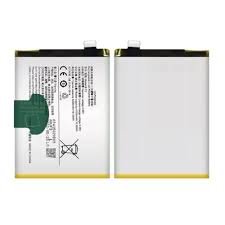
The Vivo V60 is equipped with a high-performance lithium-polymer battery, specifically designed to provide efficient power management for the device’s demanding functionalities. With a battery capacity of 4500 mAh, the Vivo V60 strikes a balance between a slim profile and substantial energy reserves. This type of battery chemistry, lithium polymer, is known for its lightweight characteristics and ability to maintain energy density, which supports the device’s overall performance.
The performance of the Vivo V60 battery is influenced by several factors, including its capacity and chemistry. The 4500 mAh capacity allows users to enjoy extended periods of usage, making it suitable for daily tasks such as browsing, streaming, and gaming. The lithium polymer battery also features a low self-discharge rate, ensuring that unused power is conserved over time. The design of the Vivo V60 battery incorporates safety mechanisms to prevent overheating and overcharging, which enhances user safety and prolongs battery longevity.
When considering the lifespan of the original battery, users can expect approximately 2 to 3 years of optimal performance, depending on usage patterns. Frequent intensive activities, such as high-definition video streaming or gaming, might decrease the battery’s lifespan. Likewise, the temperature of the environment plays a critical role; prolonged exposure to extreme temperatures can adversely impact battery health. By adopting mindful usage practices, such as avoiding excessive charging and discharging cycles, users can significantly enhance the longevity of their Vivo V60 battery.
In summary, understanding the technical specifications and chemistry of the Vivo V60 battery is essential for maintaining its health and performance. By being aware of the factors that influence battery life, users can make informed decisions to optimize their mobile experience.
When to Replace Your Vivo V60 Battery
Recognizing when to replace your Vivo V60 battery is crucial for maintaining optimal smartphone performance. Several telltale signs indicate that the battery may be nearing the end of its lifespan. One of the most common symptoms is diminished battery life. If you find that your device fails to hold a charge throughout the day, or if it discharges rapidly even with minimal use, it may be time to consider a replacement. Users often report that their Vivo V60 requires more frequent charging, which is a significant indication of battery degradation.
Another alarming sign to watch for is physical swelling of the battery. This condition can manifest as a bulging back cover or separation between the screen and the phone body. Swelling can pose safety risks, as it may lead to further damage or, in extreme cases, battery leakage. If you notice any physical deformities in your device, it is advisable to seek a replacement as soon as possible.
Overheating is also a critical indicator of battery issues. If your Vivo V60 becomes excessively hot during use, charging, or even while in standby mode, this could suggest that the battery is malfunctioning. High temperatures can affect not only the battery’s efficiency but can also damage other internal components of the device.
Furthermore, disruptive charging behavior, such as the device failing to charge or charging sporadically, can indicate underlying battery problems. These symptoms, whether experienced individually or collectively, should prompt users to consider getting a new Vivo V60 battery. By staying vigilant about these signs, you can ensure that your smartphone continues to function efficiently, contributing to a smoother user experience.
Options for Vivo V60 Battery Replacement
When considering a battery replacement for the Vivo V60, users have several options available. Each choice comes with its unique advantages and disadvantages, enabling users to select the most suitable route based on their preferences and technical capabilities.
One of the most reliable options is to utilize authorized service centers. These centers often employ trained technicians who understand the specific needs of Vivo devices. The primary advantage of this option is that it typically ensures high-quality replacement batteries that meet manufacturer standards. Additionally, most authorized service providers offer warranties on their services, providing peace of mind to users. However, this option can be relatively costly compared to other alternatives.
Another option is to consider third-party repair shops. These establishments vary in expertise and quality, which can result in a broad range of service costs. While many third-party shops can perform a battery replacement efficiently, the quality of the battery used may not always match that of original manufacturer products. Thus, it is crucial for users to research and select reputable providers. Furthermore, the cost tends to be lower than that of authorized service centers, making it an appealing choice for budget-conscious individuals.
Lastly, a DIY battery replacement is an option for those with technical skills and confidence. This route generally involves purchasing a compatible Vivo V60 battery online and following a guide to perform the replacement. The primary advantage here is the cost savings associated with avoiding service fees. However, it is essential to understand that this method comes with risks, including potential damage to the device, voiding warranties, and the need for specific tools. Therefore, this option is best suited for individuals familiar with electronics repair.
Ultimately, each option for Vivo V60 battery replacement carries its pros and cons. Assessing an individual’s comfort level with technology and budget considerations will help inform the best choice for their specific circumstances.
How to Prepare for Battery Replacement
Preparing for the battery replacement of your Vivo V60 is crucial to ensure a smooth and effective process. This preparation involves several critical steps designed to safeguard both your data and the device itself. The first step is to back up all important data stored on your smartphone. This includes contacts, photos, documents, and app data. Utilizing cloud services or external storage solutions is advisable to prevent data loss during the replacement process. Once backed up, ensure that your mobile device is charged to at least 30% before beginning the battery replacement. This action helps prevent potential shutdowns during disassembly.
Next, it is essential to gather all necessary tools required for the task. You will need a screw driver set, a plastic opening tool, tweezers, and possibly a suction cup for better grip. These tools will aid you in safely opening the device without causing damage. Additionally, it is advisable to procure a replacement battery that is compatible with the Vivo V60 model. Always select a battery from a reputable source to ensure optimal performance and safety.
Furthermore, setting up a suitable environment is paramount. Aim for a clean and well-lit workspace, as this assists in locating tiny components and prevents any foreign particles from entering the device. A static-free mat can provide an excellent surface for working, minimizing the risk of any electrostatic discharge. Keeping all your tools and replacement parts organized will streamline the replacement process, making it easier to find what you need when you need it. By adhering to these preparatory steps, you will significantly enhance the overall experience of the Vivo V60 battery replacement, making it a more effective and less stressful task.
Step-by-Step Guide to Replacing Your Vivo V60 Battery
In order to replace the battery of your Vivo V60, it is essential to follow a systematic approach to ensure a smooth process. Begin by gathering the necessary tools, which typically include a small screwdriver, a plastic prying tool, and a suction cup. Having these items handy will facilitate the disassembly of the device.
The first step is to power off your Vivo V60 completely. This step is crucial to avoid any accidental damage or short circuits. Once the phone is turned off, use the heating pad or hairdryer to warm the edges of the device; this will help soften the adhesive that holds the back cover in place. After a minute or so, carefully apply the suction cup near the edge of the device while using the prying tool to gently lift and separate the back cover. Patience is key here, as excessive force can result in damage.
Once the back cover is removed, locate the screws securing the battery connector. Carefully unscrew them and use the plastic prying tool to disconnect the battery from the motherboard. Take extra care, as the fragile connectors can easily be damaged. To remove the old battery, gently lift it from its compartment, ensuring not to cause any damage to the surrounding components. After the old battery has been removed, it is time to install the new battery. Simply place the new Vivo V60 battery into its compartment, making sure it aligns properly. Reconnect the battery connector by pressing it firmly in place.
Finally, reassemble the device by placing the back cover onto the smartphone and pressing down securely to ensure the adhesive adheres. Reinsert any screws that were removed and power on your Vivo V60 to confirm that the new battery functions correctly. Adhering to these steps will help ensure a successful battery replacement, restoring your device’s performance.
Troubleshooting Common Issues After Battery Replacement
After replacing the battery of your Vivo V60, it is not uncommon to encounter a few issues that may affect the functionality of your device. Understanding these problems and their potential solutions can help in ensuring your device operates efficiently. One of the most frequently reported problems post-replacement is the device not charging correctly. If your Vivo V60 fails to charge or shows intermittent charging behavior, first, check that the charging cable and adapter are functioning properly. Testing with another cable or adapter can often resolve the issue. If the charging port is obstructed by dust or lint, gently clean it using a soft brush or compressed air.
Another significant concern after a battery replacement is regarding the new battery draining too quickly. This issue can be caused by several factors, including background applications and settings. To tackle this, navigate to the app settings and disable any applications that are not necessary during your day-to-day use. Additionally, check your device’s battery usage menu to identify apps that might be consuming excessive power. You may also consider adjusting display settings, reducing screen brightness, or enabling battery saver mode to extend battery life.
If you experience unexpected phone malfunctions, including random restarts or failure to power on, it may indicate improper installation of the new battery or further underlying issues. In such cases, revisiting the installation steps to ensure connectors are properly secured can often remedy the problem. Never hesitate to seek professional help if problems persist after these troubleshooting measures. A certified technician can provide a thorough diagnosis and ensure your Vivo V60 is restored to optimal performance, as self-diagnosing might inadvertently lead to more complications.
Tips for Maintaining Your Vivo V60 Battery Health
Maintaining the health of your Vivo V60 battery after a replacement is crucial for ensuring its longevity and performance. Adopting a few best practices in your daily usage can significantly extend the lifespan and efficiency of your device’s power source.
Firstly, charging habits play a vital role in battery health. It is generally advisable to avoid letting your battery fully deplete on a regular basis. Lithium-ion batteries, like the one in your Vivo V60, perform better when kept between 20% and 80% charge. Instead of waiting until your device is critical, try to recharge it when it drops to around 30%. Additionally, it is beneficial to remove any case or cover that may generate excess heat while charging, as overheating can lead to diminished capacity over time.
Another integral component of battery maintenance is optimizing your device’s settings. Dimming the screen brightness or enabling adaptive brightness can help conserve battery life. Furthermore, utilizing the power-saving mode can reduce background processes that drain battery resources, making it a reliable option for heavy users. Disabling features that you do not need, such as location services and Bluetooth when not in use, can also help mitigate unnecessary battery drain.
Avoiding certain common pitfalls is crucial as well. For instance, using your Vivo V60 while it is charging can create additional strain on the battery. Similarly, subjecting your device to extreme temperatures can be detrimental; both excessive heat and cold can accelerate battery degradation. Lastly, be cautious of utilizing third-party chargers that may not be compatible with your device, as they can also pose risks to battery health.
By following these tips, you can help maintain the battery health of your Vivo V60, ensuring optimal performance and longevity after replacement.
Conclusion
In this comprehensive guide to Vivo V60 battery replacement, we have examined the essential aspects of maintaining and enhancing the longevity of your smartphone’s battery. The sheer importance of battery health cannot be overstated, as it directly impacts your device’s performance and overall user experience. Understanding the signs of battery deterioration, such as decreased charge retention and unexpected shutdowns, is crucial for timely interventions. If you notice these signs, it is advisable to consider a battery replacement to restore your Vivo V60 to peak performance.
Moreover, regular maintenance practices, such as avoiding extreme temperatures, minimizing the use of power-hungry applications, and keeping your device updated, can extend battery life significantly. We have also discussed the procedures to follow if you choose to replace the battery yourself, as well as the benefits of seeking professional assistance when necessary. Proceeding cautiously and using high-quality replacement parts are vital to ensure the functionality and safety of your device during this process.
For those looking for more insights, various resources are available, such as manufacturer guidelines and reputable repair services specializing in Vivo smartphones. Utilizing these resources can facilitate informed decision-making regarding battery replacement. By staying proactive about battery maintenance and recognizing the importance of timely replacements, users can enhance their overall experience with the Vivo V60, ensuring that it remains a reliable companion for years to come.

 Tecno Portable WiFi
1 × KSh 5,900.00
Tecno Portable WiFi
1 × KSh 5,900.00  Tecno H6 (BL-23AT) Battery Replacement
1 × KSh 1,000.00
Tecno H6 (BL-23AT) Battery Replacement
1 × KSh 1,000.00  Sony WF-C700N True Wireless Earbuds
1 × KSh 10,500.00
Sony WF-C700N True Wireless Earbuds
1 × KSh 10,500.00  TL-MR100 Router
1 × KSh 9,000.00
TL-MR100 Router
1 × KSh 9,000.00  Google Pixel 9a 128GB
1 × KSh 63,500.00
Google Pixel 9a 128GB
1 × KSh 63,500.00  Samsung Galaxy M16 6GB/128GB 5G
1 × KSh 18,500.00
Samsung Galaxy M16 6GB/128GB 5G
1 × KSh 18,500.00  Vivo X200 Pro
1 × KSh 127,000.00
Vivo X200 Pro
1 × KSh 127,000.00 


There are no reviews yet.