
-
×
 Redmi Note 14S 8GB/256GB
1 × KSh 32,800.00
Redmi Note 14S 8GB/256GB
1 × KSh 32,800.00 -
×
 Archer C86 Router
1 × KSh 7,500.00
Archer C86 Router
1 × KSh 7,500.00
Subtotal: KSh 40,300.00
Availability:In Stock!
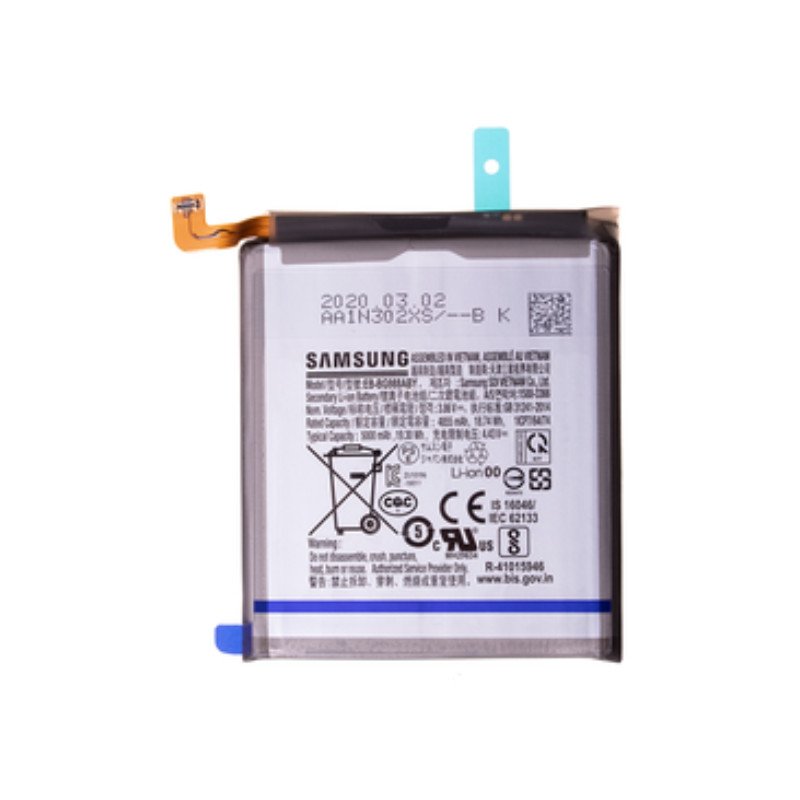
Original Samsung Galaxy S24 Ultra battery
High-capacity 5000mAh Li-Ion
Fast charging support
Long-lasting performance
Reliable and safe replacement
Compatible with Samsung Galaxy S24 Ultra only
KSh 3,500.00
CompareThe Samsung Galaxy S24 Ultra, renowned for its cutting-edge technology and remarkable features, may encounter several battery-related issues that can hinder its overall performance. Among the most common concerns are rapid battery drainage, overheating during use, and instances where the device does not charge despite being connected. These problems can stem from various factors, including software glitches, excessive app consumption, or inherent battery aging. Understanding these issues is crucial for users seeking to maintain an optimal experience with their device.
Rapid battery drainage is often a primary frustration for users, as it can lead to diminished functionality throughout the day. When an app or system process consumes excessive power, it can significantly shorten the time a user has to enjoy their phone’s features. For example, continuous background updates or high-use applications like gaming and streaming can substantially deplete battery life, prompting users to consider their options for an effective resolution.
Overheating is another pressing issue that not only affects the battery life but may also compromise the device’s longevity. Users often report that their Galaxy S24 Ultra becomes uncomfortably warm during periods of intensive use or even while charging. Frequent overheating can lead to reduced battery efficiency and might result in further complications if left unaddressed.
Moreover, a device that fails to charge properly presents a significant inconvenience. Users may find their phones stuck at a certain battery percentage or completely unresponsive to charging cables. This challenge could arise from a malfunctioning battery, faulty charging port, or defective charging accessories. Therefore, identifying these battery-related issues can be the first step towards restoring functionality and enhancing the overall user experience of the Samsung Galaxy S24 Ultra.
Recognizing the signs that indicate your Samsung Galaxy S24 Ultra battery may require replacement is crucial for maintaining device performance and longevity. Several symptoms can alert users to potential battery issues. One of the most apparent signs is swelling. If the back cover of your device begins to bulge or if you notice increased pressure on the screen, it is a clear indication of battery swelling, which can pose safety risks and should be addressed immediately.
Another symptom to look for is unusual charging patterns. If your device takes an excessive amount of time to charge or does not hold a charge adequately, it may be time to consider a battery replacement. Users may also observe that their phone discharges rapidly, even with minimal usage. This decline in battery life can significantly affect the overall user experience, leading to unexpected shutdowns and interruptions.
Performance slowdowns can also be a telltale sign of a failing battery. Users often notice that their devices become sluggish or unresponsive during multitasking or when running applications that require substantial power. If these performance issues coincide with poor battery health, it may point to the need for a new battery. Frequent system crashes or overheating during charging can likewise indicate underlying battery problems.
Understanding these symptoms allows users of the Samsung Galaxy S24 Ultra to identify potential battery issues early, addressing them before they escalate. By recognizing the signs such as swelling, unusual charging behavior, decreased longevity, and performance deterioration, users can take proactive steps to ensure their device remains functional and efficient. Regular monitoring of these factors will aid in maintaining optimal device performance in the long run.
The Samsung Galaxy S24 Ultra is equipped with a robust Lithium-ion battery, which is pivotal for powering its advanced features and ensuring optimal performance. The battery capacity of the Galaxy S24 Ultra stands at an impressive 5000 mAh, enabling it to support long hours of usage without requiring frequent recharging. This significant capacity allows users to engage in intensive activities such as gaming, video streaming, and multitasking without experiencing rapid depletion of power.
Lithium-ion batteries are favored in modern smartphones due to their high energy density, low self-discharge rate, and longevity. The chemistry behind Lithium-ion technology permits the S24 Ultra’s battery to deliver a noticeable performance boost. Typically, a well-maintained Lithium-ion battery can last for about 2 to 3 years, depending on usage patterns and charging habits. Elements such as the frequency of charging, exposure to high temperatures, and usage intensity can influence the overall lifespan of the battery.
Another essential aspect to consider is that different batteries may have varying specifications, affecting their compatibility with the S24 Ultra. Utilizing batteries that are specifically designed for this model is crucial, as they adhere to the manufacturer’s standards regarding sizing, voltage, and capacity. An incompatible battery can lead to performance issues and may even risk damaging the device. Therefore, when planning for a battery replacement, it is advisable to source a high-quality, genuine replacement or a certified equivalent. This measure not only prolongs the battery’s life but also enhances overall device efficiency, ensuring that users can continue to enjoy the full range of capabilities offered by their Samsung Galaxy S24 Ultra.
When it comes to replacing the battery of your Samsung Galaxy S24 Ultra, sourcing a genuine replacement is of utmost importance. An authentic battery not only ensures optimal performance but also safeguards your device’s integrity. Here are several avenues for purchasing reliable replacement batteries.
One of the most secure options is visiting an official Samsung store. These stores guarantee that the batteries sold are original and come with a manufacturer’s warranty. In addition, the staff members are trained to assist with battery installation, providing a seamless experience. Official stores are present in many locations globally, making them a convenient choice for many consumers.
If you prefer shopping from the comfort of your home, online marketplaces can be a viable option. Websites like Samsung’s official online shop or trusted e-commerce platforms, such as Amazon, maintain sections for genuine Samsung accessories, including batteries. Always verify the seller’s authenticity and read reviews to ensure that others have had positive experiences with the product. This diligence can help mitigate risks associated with counterfeit items, which can adversely affect your Galaxy S24 Ultra.
Moreover, authorized repair shops are another valid avenue for acquiring a replacement battery. These establishments are certified by Samsung and boast trained professionals who can guide you through the purchasing process. They not only sell genuine batteries but often provide installation services, ensuring that your device is handled with care. Additionally, repair shops often offer warranties on their products and services, providing extra peace of mind.
Regardless of the purchasing method, it is crucial to prioritize authenticity when acquiring a replacement battery for your Samsung Galaxy S24 Ultra. This will enhance the performance of your device and contribute to its longevity.
The decision between DIY battery replacement and seeking professional assistance is one that many Samsung Galaxy S24 Ultra users face. Each option has its own set of advantages and disadvantages that warrant careful consideration based on individual circumstances.
One significant benefit of DIY replacement is cost savings. Performing the battery replacement yourself eliminates labor costs charged by professional technicians. Additionally, replacement batteries can often be found at a lower price than professional service fees. For the tech-savvy individual who has experience with smartphone repair, this option can be both budget-friendly and rewarding.
However, engaging in a DIY battery replacement also comes with inherent risks. The Samsung Galaxy S24 Ultra is a sophisticated device, and attempting to replace the battery without the necessary expertise and proper tools may lead to complications. There is a potential for damaging internal components, which could result in a more costly repair in the long run. Furthermore, many manufacturers void warranties if unauthorized repairs are conducted, which is a crucial consideration for those still under warranty.
On the other hand, professional replacement services offer expertise and experience that can be invaluable. Trained technicians possess the skills necessary to handle the intricate details of battery replacement, ensuring that the process is conducted safely and efficiently. Moreover, professional services often guarantee their work, providing peace of mind for users. Time considerations also play a role; a professional repair is typically faster, as they are equipped to handle such tasks regularly.
Ultimately, the choice between DIY and professional battery replacement for the Samsung Galaxy S24 Ultra will depend on individual preferences, skills, and financial considerations. Balancing the potential benefits and drawbacks will lead to a more informed decision that best suits the user’s needs.
Replacing the battery of your Samsung Galaxy S24 Ultra can seem daunting, but with the right tools and a careful approach, it can be accomplished successfully. Before you begin, ensure you have the necessary tools at your disposal: a small Phillips screwdriver, a plastic opening tool, tweezers, and a suction cup. Additionally, it is advisable to have an anti-static wrist strap to prevent damage to the device’s internal components.
Prior to starting the replacement process, it is crucial to take safety precautions. Make sure to power down your device completely and remove any external accessories. To avoid any potential accidents, work on a clean, flat surface, and ensure that your hands are dry. It is also recommended to wear safety glasses to protect your eyes from any debris.
Once you have all the necessary preparations in place, follow these steps: First, use the suction cup to gently lift the screen, creating a gap. Insert the plastic opening tool into the gap and carefully work your way around the device to detach the adhesive securing the screen. Take care to avoid damaging the display or any internal components.
After the screen is removed, locate the battery connectors and unscrew any screws holding the battery in place. Use the tweezers to disconnect the battery connector from the motherboard gently. Next, remove the old battery and replace it with the new one, ensuring that it is securely placed and properly connected. Once everything is in position, reverse the disassembly steps to reattach the screen. Activate the device to verify whether the new battery works correctly.
Completing these steps allows you to effectively carry out a DIY battery replacement for your Samsung Galaxy S24 Ultra. Should you encounter any challenges during the process, referring to online videos or forums may provide additional assistance.
Following the replacement of your Samsung Galaxy S24 Ultra battery, adopting certain best practices can significantly enhance battery longevity and performance. First and foremost, it is essential to establish proper charging habits. Avoid letting the battery drain completely before recharging; instead, aim to keep the battery level between 20% and 80%. This helps to mitigate the stress on the battery and prolong its lifespan. Similarly, utilizing the device’s adaptive charging feature can be beneficial, as it regulates charging speed based on your habits.
It is also advisable to manage your settings effectively to conserve battery life. Reducing screen brightness, enabling battery saver mode, and turning off location services when not in use are all practical steps. Additionally, applications running in the background can significantly drain resources; thus, reviewing and limiting background app activity will contribute positively to battery performance. Notifications and syncing options for applications should also be judiciously adjusted to prevent unnecessary battery drain.
Regular maintenance of the device can further support optimal battery function. Performing routine software updates can ensure your device runs smoothly and efficiently, often addressing issues related to battery consumption. Cleaning the charging port and avoiding exposure to extreme temperatures are other preventive measures to consider. Keeping your device and battery contacts clean minimizes the chance of connectivity issues which can disrupt charging and discharging cycles.
To summarize, after replacing the battery in your Samsung Galaxy S24 Ultra, implementing appropriate charging habits, managing settings prudently, and conducting regular maintenance all play vital roles in extending the life and performance of your new battery.
When considering a battery replacement for the Samsung Galaxy S24 Ultra, it is essential to understand how this may influence the device’s warranty. Typically, a warranty is designed to cover manufacturing defects and issues occurring under normal use conditions. However, any unauthorized alterations to the device, including battery replacements performed by non-certified technicians, can lead to warranty voiding. Therefore, users should be cautious and aware of the implications of replacing the battery.
In instances where the battery replacement is carried out through an authorized service center, the warranty coverage may remain intact. Samsung’s official service providers are knowledgeable about the device specifications and ensure that the replacement process adheres to company standards, thereby minimizing the risk of damage. It is recommended to keep all receipts and documentation related to the service performed, as these may be necessary for any future warranty claims.
If the battery replacement was executed independently or by a non-authorized service, it is important to note that any complications arising from that process may not be eligible for warranty coverage. For example, if post-replacement performance issues are reported, Samsung may deem the warranty void due to the unauthorized part replacement. Users are advised to thoroughly examine the terms of their warranty documentation and consult customer support for clarity on their specific situation.
In dealing with warranty claims post-battery replacement, it is advisable to contact Samsung directly or an authorized service provider. Providing comprehensive records of all service activities, including details of the battery replacement, will assist in presenting a strong case for any warranty-related issues. Keeping organized documentation not only demonstrates compliance with warranty policies but also helps streamline the resolution process.
In this guide, we have explored various aspects of the Samsung Galaxy S24 Ultra battery replacement process, focusing on identifying battery issues, understanding replacement options, and the significance of proper maintenance. Recognizing the signs of battery failure, such as decreased battery life, unexpected shutdowns, and overheating, is crucial for any user aiming to prolong their device’s lifespan. These symptoms often indicate the need for a battery replacement, which can be carried out either through professional services or as a do-it-yourself (DIY) project.
When considering battery replacement, it is essential to weigh the pros and cons of professional services against the DIY approach. Professional technicians not only possess the necessary tools but also have the expertise to handle complex repairs, which may save time and prevent potential damage to the device. Conversely, opting for a DIY replacement can be cost-effective for those with technical proficiency, offering a rewarding experience that can deepen one’s understanding of the device.
As Samsung Galaxy S24 Ultra users, it is paramount to remain proactive about battery health. Regular software updates and caring for charging habits can significantly impact battery performance. Ultimately, whether one decides to seek professional help or engage in DIY repairs, being informed about the available options and taking appropriate action is vital. This knowledge empowers users to make decisions that enhance the longevity and performance of their devices. The functionality and reliability of smartphones largely depend on battery health, making it critical for users to stay vigilant and responsive to any concerning signs. Taking prompt action can lead to a markedly improved experience with your Samsung Galaxy S24 Ultra.
Select at least 2 products
to compare


There are no reviews yet.