


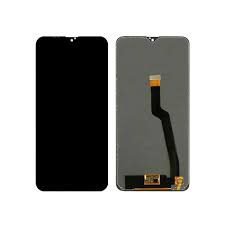
Samsung Galaxy S22 Plus Screen Replacement
Availability:In Stock!
-
Compatible with Galaxy S22 Plus
-
High-quality AMOLED display
-
Touchscreen functionality
-
Scratch-resistant glass
-
Precise fit and finish
-
Supports fingerprint sensor
-
OEM standard quality
-
Durable and long-lasting
-
Professional installation recommended
KSh 22,000.00
CompareSamsung Galaxy S22 Plus Screen Replacement Description
The Samsung Galaxy S22 Plus is a sophisticated device that combines advanced technology with delicate components. However, like any smartphone, it is vulnerable to physical damage, particularly to its screen. There are several common reasons why users may find themselves in need of a screen replacement. One primary cause is accidental drops. Even with precautions in place, such as protective cases, an unexpected slip can result in significant damage to the screen, ranging from cracks to complete shattering.
Another prevalent issue arises from scratches, which can develop over time due to regular usage or exposure to abrasive materials. These seemingly minor blemishes can affect the aesthetic appeal of the device, making it less visually pleasing. However, they can also impair functionality, impacting how users interact with their smartphone. A scratched screen can disrupt touch responsiveness, making it challenging to navigate apps or input text accurately.
In addition to physical damage, hardware malfunctions can also necessitate a screen replacement. Internal issues related to the display components can lead to problems such as flickering screens, unresponsive touch areas, or color distortions. These technical failures can severely hinder the usability of the device and diminish the user experience.
It is crucial to address screen damage promptly. Ignoring a damaged screen can lead to further complications, including increased difficulty in using the device. Additionally, prolonged exposure to damage may exacerbate the issue, rendering the phone entirely unusable. For these reasons, maintaining the integrity of the Samsung Galaxy S22 Plus screen is vital for ensuring the overall performance and aesthetics of the device.
Options for Screen Replacement
When faced with a damaged screen on a Samsung Galaxy S22 Plus, users have several options for replacement. Each choice comes with its own set of advantages and disadvantages, making it essential to evaluate them based on cost, quality, warranty, and required skill level.
One of the first options to consider is the official service center repair. Authorized Samsung service centers provide high-quality repairs with genuine parts, ensuring the integrity of the device. Typically, repairs through official channels come with a warranty, offering peace of mind in case of future issues. However, this option can be the most expensive, often costing significantly more than third-party services or DIY solutions.
On the other hand, third-party repair shops present a compelling alternative. These shops may offer competitive pricing compared to official centers and can often perform repairs more swiftly. However, the quality of parts used may vary, and there is a risk of using non-genuine replacement screens, which might not offer the same durability or performance as original components. Additionally, repairs conducted outside of authorized services generally void any existing warranty on the device.
For those who are more technically inclined, a DIY replacement kit might be an appealing option. Several online retailers offer kits that include all necessary tools and parts to replace the screen oneself. This method can be the most cost-effective, as service fees are eliminated. However, it requires a reasonable skill level and meticulous attention to detail. Users should be aware that improper installation can lead to further damage, and most DIY kits do not come with a warranty on the parts.
In conclusion, each screen replacement option for the Samsung Galaxy S22 Plus has unique characteristics that cater to different user requirements. Considering factors such as cost, quality of parts, and warranty implications will guide users in making the most suitable choice based on their situation.
Step-by-Step Guide to DIY Screen Replacement
Replacing the screen of your Samsung Galaxy S22 Plus can seem like a daunting task, but with the right tools and careful attention to detail, it is entirely feasible to undertake this repair at home. Before beginning, gather the necessary tools to ensure a smooth and efficient process. You will need a heat gun or hairdryer, a suction cup, a spudger or plastic prying tool, a T5 Torx screwdriver, and a replacement screen specifically designed for the Galaxy S22 Plus.
Begin by powering off your device and removing the SIM card tray. Apply gentle heat around the edges of the screen using a heat gun to soften the adhesive that holds the screen in place. This step is crucial as it makes it easier to pry the screen away from the frame without causing additional damage. Once the adhesive is sufficiently softened, use the suction cup to create a small gap between the screen and the frame. Insert the spudger into this gap and slowly work your way around the edges of the device, carefully lifting the screen. Be cautious not to apply too much force, as this can crack the glass.
Upon removing the screen, you will need to disconnect the display cable, typically located near the battery. Gently lift the connector with your spudger until it disconnects easily. Before proceeding, it is wise to inspect the inner components for any additional damage. To install the new screen, first, connect the display cable to the motherboard. Position the new screen onto the device, ensuring it aligns properly with the frame. Finally, press around the edges firmly to secure the adhesive, and allow it to set as recommended by the manufacturer. Reinsert the SIM tray, power on the device, and check that everything functions correctly.
Remember to take safety precautions throughout this process, such as using an anti-static wrist strap to prevent static damage to the electronic components. With patience and care, you can successfully replace the screen of your Samsung Galaxy S22 Plus and restore its functionality.
Post-Replacement Care and Maintenance Tips
Once the screen of your Samsung Galaxy S22 Plus has been successfully replaced, ensuring its longevity requires diligent care and maintenance. Investing in a high-quality screen protector is one of the most effective ways to safeguard the newly installed display. A tempered glass protector not only enhances durability but also provides additional resistance against scratches and minor impacts. It is advisable to choose a screen protector specifically designed for the Galaxy S22 Plus to ensure proper fit and functionality.
Safe handling practices are crucial following a screen replacement. Always use both hands when handling the device to minimize the risk of drops. It is also wise to avoid placing the phone in pockets with keys or other metallic objects that could potentially scratch the surface. Consider utilizing a protective case that offers substantial coverage and shock absorption, as this can further prevent damage from accidental drops or impacts.
Regular maintenance checks can significantly enhance the lifespan of your new screen. Periodically inspect the display for signs of wear, such as scratches or cracks, and ensure that the screen is clean from smudges, dust, or debris. Use a microfiber cloth to gently clean the surface, avoiding the use of harsh chemicals that could harm the screen’s coating. Additionally, watch out for common post-replacement issues, such as unresponsive touch areas or display flickering. If these problems arise, it’s essential to troubleshoot them promptly by restarting your device or adjusting screen settings. Should the issues persist, seeking assistance from a professional technician is recommended.
Ultimately, proper care and maintenance are paramount in preserving the functionality of your Samsung Galaxy S22 Plus. By implementing these tips on screen protectors, safe handling, and regular check-ins, you can enjoy a durable and efficiently functioning device.



There are no reviews yet.