

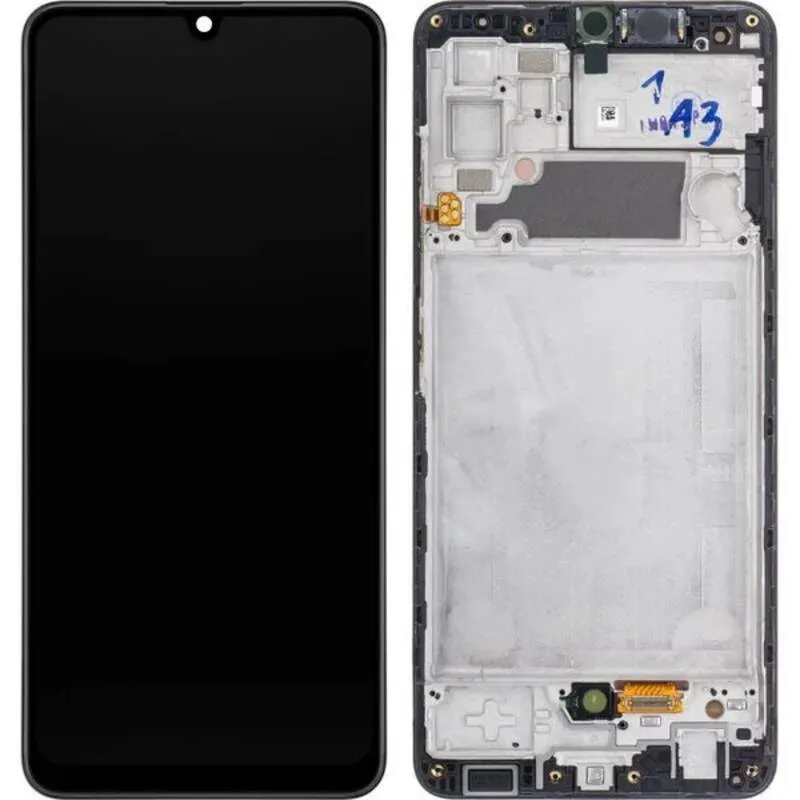
Samsung Galaxy M34 Screen Replacement
Availability:In Stock!
-
6.5-inch Super AMOLED display
-
Full HD+ resolution
-
Corning Gorilla Glass protection
-
Touchscreen digitizer included
-
OEM quality replacement
-
Compatible with Samsung Galaxy M34 only
-
Requires professional installation
-
Tools may be needed
-
Black color option
KSh 14,500.00
CompareSamsung Galaxy M34 Screen Replacement Description
The Samsung Galaxy M34 is a robust and feature-rich smartphone that has garnered significant attention since its release. This device stands out with its sleek design, vibrant Super AMOLED display, and powerful performance capabilities, making it a popular choice among tech-savvy users. The phone is equipped with a high-resolution camera system, long-lasting battery life, and various connectivity options, enhancing the overall user experience. Its modern aesthetics and impressive hardware specifications contribute to its appeal in a competitive market.
Despite its durable build and advanced features, the Samsung Galaxy M34 is not immune to damage. One of the most common issues that users face is screen damage, which may occur due to accidental drops, cracks, or issues with the display quality, such as screen flickering or unresponsiveness. These problems can significantly impact the device’s usability, leading to frustration and diminished performance. In many cases, a screen replacement becomes necessary to restore the phone’s functionality and visual appeal.
Understanding the reasons behind screen damage is essential for every Galaxy M34 owner. Accidental drops are a frequent cause of cracked screens, often resulting from everyday mishaps or slips while handling the device. Moreover, environmental factors such as extreme temperature fluctuations can also affect the screen’s integrity over time. Some users might experience problems caused by manufacturing defects, leading to issues like dead pixels or color inconsistencies. Recognizing these potential risks emphasizes the importance of timely and proper screen replacement for maintaining the phone’s performance and longevity.
Signs You Need a Screen Replacement
Identifying the signs that indicate a need for a screen replacement on your Samsung Galaxy M34 is crucial for maintaining optimal device performance. One of the most apparent indicators is the presence of visible cracks or chips on the screen. These imperfections not only impair the aesthetic appeal of the device but can also worsen over time, leading to potential functionality issues. If you notice any cracks, it is advisable to seek a replacement promptly to prevent further damage.
Another sign to be aware of is discoloration on the screen. If the display exhibits irregular coloring, such as yellow or white patches, it may be a symptom of a failing display. Discoloration can affect the quality of images and videos, leading to a diminished user experience. This occurrence often signals that a screen replacement is necessary for restoring proper display functionality.
Touchscreen responsiveness is another critical factor to consider. If you find that the touchscreen is lagging, unresponsive, or intermittently registering inputs, this could indicate underlying issues with the display. Software troubleshooting may provide a temporary solution, but persistent problems likely require a screen replacement to ensure reliable performance.
Unusual screen behavior, such as flickering or ghost touch effects, should also not be overlooked. These symptoms can indicate hardware failures that simple repairs may not adequately address. In such cases, opting for a screen replacement is often a more effective choice than attempting to troubleshoot or repair the existing screen. Understanding these signs is essential for making informed decisions regarding your Samsung Galaxy M34 device and ensuring its longevity.
The Screen Replacement Process: DIY vs Professional Service
When faced with a cracked or malfunctioning screen on the Samsung Galaxy M34, users typically have two primary options for replacement: a DIY approach or enlisting professional repair services. Each method comes with its own set of tools, materials, risks, and considerations, which will be explored in detail.
For those opting to undertake a DIY screen replacement, it is crucial to prepare thoroughly. Essential tools include a precision screwdriver set, a plastic prying tool, tweezers, and adhesive strips specific for mobile screens. Additionally, purchasing a quality replacement screen designed specifically for the Samsung Galaxy M34 is paramount. The process generally involves powering down the device, carefully removing the back cover, unscrewing the screen assembly, applying the adhesive, and finally, fitting the new screen into place. While this method may save money, it requires a significant time commitment, often ranging from one to three hours, depending on the individual’s technical skills.
Moreover, the DIY approach carries inherent risks, including potential damage to internal components or voiding manufacturer warranties. Hence, it is essential for individuals without repair experience to assess their comfort level and capability before proceeding with this method.
On the other hand, utilizing a professional repair service presents a more convenient option. Repair technicians are equipped with the expertise and tools necessary to replace the screen efficiently. This approach not only minimizes personal risk but also ensures the job is done correctly, often within a matter of hours. Although the cost of professional repairs tends to be higher, typically ranging from $100 to $250, they often include warranties that provide additional peace of mind. In summary, both the DIY and professional service methods have distinct advantages and disadvantages, with the best choice depending on the user’s budget, available time, and technical ability.
Aftercare Tips for Your New Screen
After successfully replacing the screen of your Samsung Galaxy M34, it is crucial to implement aftercare practices that will help prolong the device’s lifespan and maintain its functionality. Adopting these tips will not only enhance your user experience but also prevent potential damages that could arise from everyday use.
Firstly, investing in a high-quality screen protector should be a priority. A tempered glass screen protector or a flexible film can offer an additional layer of defense against scratches, drops, and other impacts. This added protection is especially important for touchscreen devices like the Samsung Galaxy M34, as it helps preserve the screen’s clarity and responsiveness over time.
Next, ensure that you handle your device with care. Avoid placing your phone in a pocket with sharp objects such as keys or coins, as these can scratch or damage the new screen. Additionally, consider using a sturdy case that wraps around the edges of the device, providing further security against accidental falls and impacts.
Regular maintenance is essential to keeping your new screen in optimal condition. Wipe the screen with a microfiber cloth regularly to remove dust, fingerprints, and smudges. Avoid using harsh chemicals or abrasive materials, as these can degrade the screen’s quality.
In the event that you encounter any post-replacement issues, such as display problems or touch sensitivity failures, it is advisable to refer to the warranty provided by the repair service. Many establishments offer guarantees on their work, so be sure to keep your receipt. Don’t hesitate to seek professional help for further repairs if necessary, as addressing problems early can prevent further damage to your Samsung Galaxy M34.
By following these aftercare tips, you can enjoy a reliable performance from your new screen and extend the lifespan of your Samsung Galaxy M34.


There are no reviews yet.