
-
×
 Infinix Hot 60 Pro Plus (X6886) Screen Replacement
1 × KSh 8,000.00
Infinix Hot 60 Pro Plus (X6886) Screen Replacement
1 × KSh 8,000.00
Subtotal: KSh 8,000.00
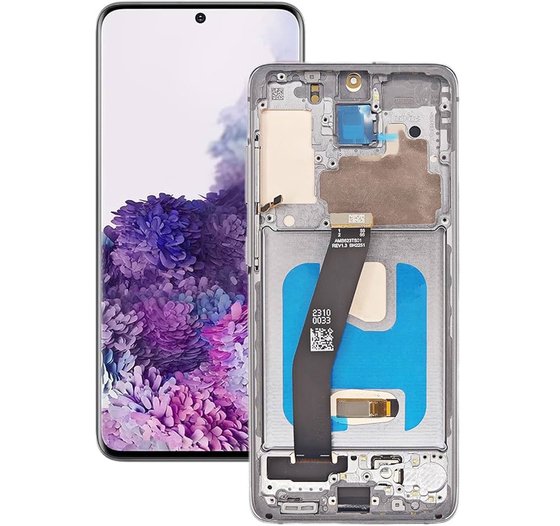
Availability:In Stock!
High-quality display
Precise touch response
Original fit design
Durable glass protection
Full HD resolution
Easy installation
Compatible with Galaxy F34 model
KSh 9,000.00
CompareThe Samsung Galaxy F34, like many smartphones, is susceptible to a variety of issues that may necessitate screen replacement. One of the most prevalent reasons users seek replacement screens is due to cracked or shattered displays, often resulting from accidental drops. Even a seemingly minor fall can lead to significant damage that compromises the structure and visual integrity of the screen. Such cracks not only detract from the aesthetic appeal of the device but can also worsen over time, potentially leading to further screen damage or injury.
In addition to physical damage, touchscreen malfunctions are another common concern that may require replacement. Users may experience unresponsive areas of the screen or erratic behavior, such as phantom touches, where the screen registers touches that have not occurred. These issues can severely hinder the usability of the Samsung Galaxy F34, affecting everything from simple navigation to more complex tasks that require precise inputs.
Moreover, display color issues can emerge, such as discoloration, ghosting, or dead pixels. Such problems can diminish the visual experience, making it difficult to enjoy multimedia content or visually demanding applications. A screen that does not accurately reproduce colors can significantly impact the overall user experience, leading many users to consider a screen replacement as an essential upgrade.
Prompt attention to these issues is crucial. A damaged screen not only impedes the functionality of the device but can also pose a risk of further damage to internal components if left unchecked. Thus, ensuring timely repairs is vital for maintaining the performance and longevity of the Samsung Galaxy F34, enhancing both functionality and user satisfaction.
When it comes to replacing the screen of your Samsung Galaxy F34, selecting the right replacement screen is paramount. The market typically offers two main types of screens: OEM (original equipment manufacturer) parts and third-party options. Each type has its own advantages and disadvantages, which can impact your decision based on budget and quality preferences.
OEM screens are manufactured by the original company that produced the phone, ensuring that they meet the specific quality and performance standards set by Samsung. One significant advantage of choosing an OEM screen is the assurance of compatibility and reliability. OEM screens are designed to fit perfectly and function optimally with your device. However, the downside lies in the cost; OEM parts tend to be more expensive than their third-party counterparts. For individuals who prioritize quality and longevity, the investment in an OEM screen might be worth it.
On the other hand, third-party replacement screens can be a more cost-effective solution. Many brands offer screens that are compatible with the Samsung Galaxy F34, often at lower prices. However, potential drawbacks include variable quality and durability, which may not match that of OEM parts. Buyers should be cautious, as some third-party options can result in subpar performance or a compromised display experience.
When considering where to purchase a replacement screen, options are plentiful. Both online and physical retail outlets provide choices, but it is vital to verify the authenticity of the parts being offered. Always opt for reputable sellers with positive reviews. Check for warranty options and return policies to safeguard your investment. In summary, whether you choose an OEM or third-party screen, thorough research will ensure that you select the best option for your Samsung Galaxy F34 replacement needs.
When faced with a cracked or damaged screen on your Samsung Galaxy F34, the decision to opt for a DIY screen replacement or to seek professional help is crucial. Each approach has its own set of advantages and disadvantages that should be carefully considered before making a choice.
Choosing to replace the screen yourself can be appealing, primarily due to the potential cost savings. DIY repairs often involve purchasing replacement parts and using readily available tools, such as screwdrivers and adhesive. Individuals with technical aptitude and some experience with electronic repairs may find this option feasible. Furthermore, tutorials and guides online can help streamline the process. However, the risks associated with DIY replacements cannot be overlooked. A lack of proper expertise may lead to further damage to the device or an incomplete repair that could affect performance. Additionally, many manufacturers, including Samsung, may void warranties if users attempt repairs independently, potentially incurring additional costs in the long run.
On the other hand, opting for professional screen replacement services provides several key benefits. Skilled technicians possess the experience and specialized tools necessary to ensure a successful repair. These professionals often offer warranties or guarantees on their work, providing peace of mind in the event of complications post-repair. Additionally, having a professional handle the replacement minimizes the risk of further damage, as they adhere to strict procedural standards. This not only safeguards the device but also preserves the device warranty. Therefore, while the DIY method may be appropriate for some, the long-term advantages of professional services often outweigh the initial expenses.
Replacing the screen on your Samsung Galaxy F34 can seem daunting, but with the right preparation and careful execution, it can be accomplished successfully. First, ensure that you have a clean, well-lit workspace to perform the screen replacement. Gather all required tools, including a heating pad or gun, a suction cup, plastic opening tools, a Phillips screwdriver, and a new Samsung Galaxy F34 screen replacement kit, which includes adhesive strips for the screen.
Begin by powering off your device completely and removing any SIM card and memory card. The next step involves using the heating pad to gently warm the edges of the phone to soften the adhesive. This makes it easier to detach the old screen. Using the suction cup, create a small gap between the screen and the phone body. Insert a plastic opening tool into the gap to further pry open the screen carefully. It is crucial to work slowly to avoid damaging the phone’s internals.
Once the screen is detached, take note of the connections and any screws that may need to be removed. Utilize the Phillips screwdriver to detach the screws securing the display connector. After disconnecting the old screen, prepare the new Samsung Galaxy F34 screen by aligning it with the connectors. Press firmly but gently to secure the connections and ensure they are aligned properly. Afterward, reassemble your device by following the steps in reverse order.
During the reassembly, pay attention to any additional screws and adhesive strips that need to be applied. After completing the reassembly, power on your Samsung Galaxy F34 and test the new screen for any issues such as display responsiveness or touch sensitivity. If problems arise, double-check connections and alignment. Additionally, it may be helpful to consult online forums or guides for troubleshooting tips specific to your Samsung Galaxy F34 model.
Color: Black
Manufacturer: SAMSUNG
Manufacturer code:GH82-21669A, GH82-21680A
Manufacturer title SVC ASSY SMT-OCTA(E/ZW),SM-A515F,CIS,SVC
Suitable for : Samsung A515FN/DS Galaxy A51
Content of delivery:As shown in the image
Packing :Boxed ,Service Pack
State:New
Warranty : No
Select at least 2 products
to compare


There are no reviews yet.