
-
×
 Powerology Vacuum & Mop Dual Desighn - Cordless
1 × KSh 11,200.00
Powerology Vacuum & Mop Dual Desighn - Cordless
1 × KSh 11,200.00
Subtotal: KSh 11,200.00
Availability:In Stock!
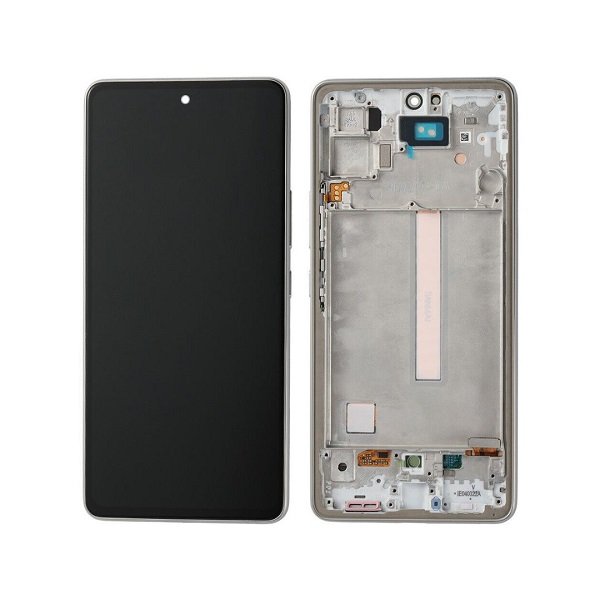
Samsung Galaxy A54 Screen Replacement
Original quality display
6.4-inch Super AMOLED
FHD+ resolution
120Hz refresh rate
Touch sensitivity restored
Durable glass protection
Professional fitting recommended
KSh 11,000.00
CompareThe Samsung Galaxy A54 is a popular choice for many users, thanks to its impressive features and functionality. However, like any other mobile device, it is not immune to screen-related problems. This section will delve into the common screen issues that owners of the Galaxy A54 may encounter, including cracks, scratches, and malfunctioning displays. Understanding these issues is essential for maintaining the device’s performance and usability.
One of the most prevalent issues faced by Galaxy A54 users is the appearance of cracks on the screen. These cracks can arise from accidental drops, excessive pressure, or impacts from other objects. Even minor falls can lead to significant damage, affecting not only the aesthetics of the device but also its functionality. Cracked screens can result in difficulty reading the display and can create further complications if left unaddressed.
Additionally, scratches on the screen surface, which may seem superficial, can detrimentally impact the user experience. Over time, these scratches can accumulate, obstructing visibility and making it challenging to interact with the device effectively. Such imperfections can diminish the overall enjoyment of using the Galaxy A54.
Beyond physical damage, malfunctioning displays pose another major concern. Users may experience issues such as unresponsive touch commands, flickering screens, or color distortion. These symptoms can significantly hinder the usability of the device, making it paramount to address them promptly.
In light of these potential issues, it is crucial for Galaxy A54 users to recognize the importance of timely intervention. Addressing screen problems not only aids in preserving the device’s longevity but also ensures optimal performance, thereby maximizing the user experience. Taking proactive measures can help maintain the integrity of the Galaxy A54 screen and its overall functionality.
The screen of a smartphone, particularly for popular models like the Samsung Galaxy A54, is essential for a seamless user experience. Recognizing the signs that indicate a screen replacement is necessary can help prevent further damage and ensure your device functions optimally. One of the most apparent signs is visible physical damage, such as cracks or chips. These imperfections can not only impair the aesthetic appeal of the device but also jeopardize its functionality. Cracks may expand over time, likely leading to more severe issues, including water ingress that could harm internal components.
In addition to physical damage, display issues are another critical indicator of the need for screen replacement. Users may experience problems such as dead pixels, wherein small areas of the screen fail to display any color, leaving black spots on the display. Another common display-related issue is flickering, which can manifest as intermittent flashes or screen blurring during usage. Such inconsistencies can hinder the user experience, making it essential to assess whether a screen replacement is needed.
Touch response problems further signal that your Samsung Galaxy A54 may require a new screen. If the device becomes unresponsive to taps or swipes, or if it registers touches inaccurately, this could be due to damage to the screen’s digitizer. These issues can severely affect navigation and overall operation. Being aware of these signs is crucial for Samsung Galaxy A54 users, as timely recognition can lead to effective solutions, ensuring the device remains in good working condition. If you notice any of these indications, it may be prudent to seek professional assistance to explore your screen replacement options.
When it comes to screen replacement for your Samsung Galaxy A54, opting for professional services can be a significant decision that impacts the overall quality and longevity of your device. One of the foremost advantages of choosing professional screen replacement is the protection of your warranty. Many manufacturers have strict policies that void warranties if unauthorized repairs are conducted. By relying on an authorized service center, you can ensure that your warranty remains intact, allowing you to access additional repairs and services if needed.
Moreover, quality assurance is a key factor when considering screen replacement. Professionals possess the technical expertise required to handle repairs accurately. They have undergone extensive training and are familiar with the specific components of the Samsung Galaxy A54. This ensures that the right procedures are followed, minimizing the risk of issues arising post-repair. A professional service typically offers guarantees or warranties on their work, providing further peace of mind that your device is in capable hands.
Access to specialized tools and parts is another compelling reason to choose professional screen replacement services. Many DIY methods rely on generic tools that might not be suitable for the intricate design of modern smartphones. Professionals use industry-standard tools and authentic parts, which are essential for a successful repair. Inadequate tools can result in improper installations or even additional damage to the device.
Finally, professional services bring invaluable experience to the table. Their familiarity with common issues and their troubleshooting skills ensure that any underlying problems are effectively addressed. This level of expertise not only accelerates the repair process but also safeguards your device against future complications. By choosing professional screen replacement, users can enjoy the peace of mind that comes from knowing their Samsung Galaxy A54 is being handled by qualified experts.
When it comes to Samsung Galaxy A54 screen replacement, selecting a reliable service provider is paramount for ensuring the quality and longevity of the repair. With numerous options available, it is essential to approach your decision with due diligence. One of the first steps is to research customer reviews. Platforms such as Google, Yelp, and social media can offer insights into other customers’ experiences. Positive feedback is a clear indicator of a trustworthy provider, while negative reviews may be a warning sign.
It is also important to check for certifications and qualifications of the service provider. A reputable business often possesses certifications that demonstrate their expertise in handling screen replacements, particularly for specific brands like Samsung. This entails not only technical skills but also adherence to industry standards, which can significantly affect the quality of the replacement parts used.
Another practical consideration is to compare costs among various service providers. While it may be tempting to opt for the cheapest option available, remember that lower prices can sometimes indicate subpar quality or degraded materials. Aim for a balance between affordability and quality. Investigate what each service entails—some providers may offer a basic replacement service while others include additional checks or parts, which can represent better value overall.
Lastly, assessing the warranty and after-service support is crucial. A solid warranty demonstrates a service provider’s confidence in their work and the parts they use. A longer warranty period is typically preferable, giving you peace of mind regarding the durability of the screen replacement. Additionally, inquire about after-service support, such as troubleshooting assistance or follow-up services, as this can enhance the overall customer experience.
The screen replacement process for the Samsung Galaxy A54 typically begins with a comprehensive diagnostic check. This step is crucial as it allows the technician to assess the device’s overall condition and determine the extent of the damage. During the diagnostic phase, the technician will examine not only the screen but also other components, such as the battery and internal hardware, to ensure there are no underlying issues that need to be addressed. This thorough evaluation helps prevent additional complications post-repair.
Once the diagnostic check is complete, the technician will provide an estimated timeline for the replacement process. Generally, screen replacements for the Samsung Galaxy A54 can take anywhere from 30 minutes to a few hours, depending on the specific nature of the repair and the availability of parts. It is essential to note that some service centers offer expedited services, allowing for quicker turnarounds if necessary. Nevertheless, it is advisable to be prepared for potential delays, especially if parts need to be ordered.
In addition to the actual screen replacement, many professional repair services offer supplementary services that enhance the overall experience. These may include device cleaning, which ensures that the phone is free from dust and grime, and software updates that can improve performance and security. Providing these additional services may add value to the repair process and assist in maintaining the device’s functionality post-repair.
Overall, understanding what to expect during the Samsung Galaxy A54 screen replacement process allows users to be well-informed and prepared for their repair experience. A thorough diagnostic, clear timeline, and additional services all contribute to ensuring that the device is returned in optimal condition.
When considering a Samsung Galaxy A54 screen replacement, several factors contribute to the overall cost. Understanding these elements can help users make informed decisions and budget accordingly. One of the primary considerations is the service provider’s fee. Authorized service centers typically charge higher rates due to their expertise and the use of original parts. Independent repair shops may offer lower prices, but it is crucial to assess their reputation and the quality of their replacement parts to avoid future issues.
The cost of the replacement screen itself is another significant factor. Prices can vary widely based on the type of display used—OEM (Original Equipment Manufacturer) parts tend to be more expensive than third-party alternatives. The average cost for a genuine Samsung Galaxy A54 replacement screen ranges from $150 to $250, while third-party options might reduce expenses to between $100 and $150. However, opting for cheaper components may compromise quality, leading to potential issues down the line, such as touch responsiveness or color fidelity.
In addition to the screen replacement, users should consider potential additional repairs. If the damage extends beyond the display, such as affecting the motherboard or battery, further costs may be incurred. Therefore, a comprehensive diagnostic check may be warranted before proceeding with repairs. Overall, the total cost for Samsung Galaxy A54 screen replacement can generally range from $150 to $350, dependent on the service provider, the parts used, and the extent of damage. Evaluating these components will ultimately help users manage their repair expenses more effectively.
The Samsung Galaxy A54, known for its vibrant display and sleek design, necessitates proper care to maintain its functionality and aesthetic appeal. Users can take several preventive measures to minimize the risk of future screen damage. One of the most effective ways to protect the device is through the use of high-quality protective cases. These cases are designed to absorb shocks and impacts, ensuring that the phone’s screen withstands accidental drops. Selecting a case that extends slightly beyond the screen can provide additional coverage, safeguarding against scratches as well.
Another essential tool in maintaining the integrity of the Samsung Galaxy A54 screen is the application of a screen protector. Screen protectors come in various materials, such as tempered glass and plastic, and serve as a barrier against scratches, fingerprints, and minor impacts. A tempered glass screen protector, in particular, enhances the overall durability of the display while maintaining touch sensitivity and clarity. Regularly replacing the screen protector when damaged is advisable to ensure continuous protection.
Moreover, practicing careful handling of the device can significantly lower the chances of screen damage. Users should avoid placing their smartphones in the same pockets or bags with sharp objects, such as keys or coins, which can cause scratches. It is also beneficial to incorporate techniques, such as holding the phone securely with two hands when in use, particularly when navigating or typing. Being mindful of the environment while using the Samsung Galaxy A54—such as avoiding precarious situations where it may fall—can further prevent unfortunate incidents that lead to screen damage.
Implementing these preventive measures will not only prolong the lifespan of the Samsung Galaxy A54 screen but also enhance the user experience by ensuring that the device remains in excellent condition throughout its usage. Ensuring conscious effort towards proper care can save users from the hassle and expense of screen replacements in the future.
When encountering issues with the screen of a Samsung Galaxy A54, understanding warranty and insurance coverage is pivotal in mitigating repair costs. Many consumers overlook the fine details of their device’s warranty, which could impact their financial responsibilities during repairs. The standard warranty for Samsung devices typically covers manufacturing defects, but it often does not extend to accidental damage, such as cracked screens. Therefore, if your Galaxy A54 has a damaged screen due to accidental impact, the warranty may not cover the repairs, resulting in out-of-pocket expenses.
Further exploring the importance of your warranty coverage can help in assessing potential repair costs. When purchasing a Samsung Galaxy A54, it is advisable to thoroughly review the warranty documentation. This will clarify what constitutes a covered issue and will assist in determining the avenues available for addressing repairs. If a screen replacement is required, note that Samsung’s authorized service centers may be the best option, as repairs performed elsewhere could void the warranty. Hence, ensuring the integrity of the warranty is crucial before proceeding with any repair work.
In addition to warranty considerations, device insurance emerges as a crucial factor in expense management when faced with screen damage. Many consumers opt for insurance policies that cover accidental damages, which can significantly lower out-of-pocket repair costs. It is important for Samsung Galaxy A54 users to check if their device is insured, as this can provide peace of mind in the event of unforeseen incidents. If insurance coverage is in place, filing a claim for screen repair can alleviate the financial burden associated with repairs or replacements, promoting a more affordable ownership experience.
In the process of understanding the Samsung Galaxy A54 screen replacement, several critical points have emerged that emphasize the importance of making informed decisions. The Samsung Galaxy A54, notable for its impressive display, becomes vulnerable to damage from drops or accidents, leading to potential screen problems. Users should recognize the options available to them when faced with such issues, including both DIY repairs and professional services.
Choosing to replace a screen is not just a matter of aesthetics; it significantly affects the overall functionality of the device. For those considering self-repair, it is crucial to evaluate one’s technical skills and the quality of replacement parts, as using substandard components may result in further complications. Conversely, professional repair services provide expertise and access to high-quality screens, ensuring that the repair is conducted efficiently and effectively. When selecting a repair service, it is advisable to research qualifications, reviews, and warranty options to ensure a satisfactory outcome.
Acting quickly when screen issues arise is also essential. Delaying repairs can lead to further damage or complications, which may increase repair costs and extend downtime. Therefore, users should prioritize addressing screen concerns promptly and wisely choose the most suitable repair option for their situation. In summary, by understanding the nuances of Samsung Galaxy A54 screen replacement and the available avenues for repair, users can make confident choices that extend the life of their devices while maintaining optimal performance. This comprehensive guide encourages proactive measures and informed decision-making, fostering a positive repair experience for Galaxy A54 users.
Select at least 2 products
to compare


There are no reviews yet.