

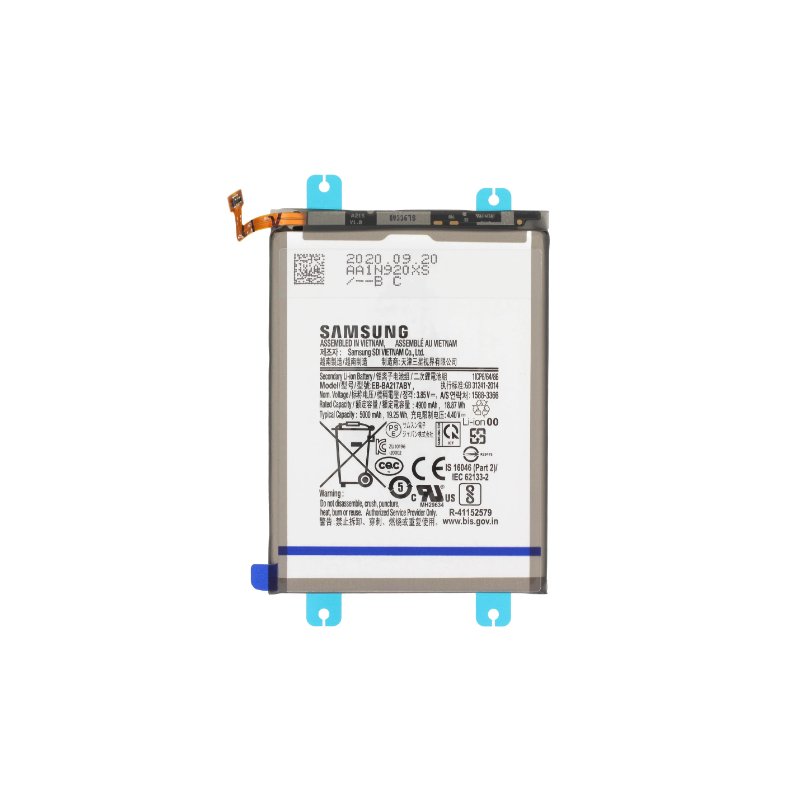
samsung galaxy A16 battery replacement
Availability:In Stock!
-
High-capacity Li-ion battery
-
Long-lasting performance
-
Original quality standard
-
Fast charging support
-
Safe and durable
-
Compatible with Galaxy A16 only
-
Professional installation recommended
KSh 2,000.00
Comparesamsung galaxy A16 battery replacement Description
The Samsung Galaxy A16, like many smartphones, is powered by a battery that can degrade over time due to regular usage and various environmental factors. Recognizing when the battery requires replacement is crucial for maintaining optimal performance. There are several signs that indicate a declining battery health, which can lead to reduced functionality and overall user experience.
One of the most common indicators of needing a battery replacement is rapid battery drainage. Users may notice that their Galaxy A16 discharges much quicker than it did when new. This can be particularly concerning if the device drains significantly, even with minimal use. For instance, if the phone loses a substantial percentage of battery life within a couple of hours, it may be time to consider a new battery.
Another sign that suggests the necessity of a battery replacement is difficulty charging the device. Users might experience slow charging, where the phone takes an unusually long time to reach a full charge, or it may not charge at all. This problem could lead to frustration and affect daily usage patterns, especially if the device is heavily relied upon for communication and other essential functions.
Unexpected shutdowns are also a critical sign of a failing battery. If the Samsung Galaxy A16 powers off suddenly and without warning, even when the battery shows a remaining charge, it could indicate an underlying battery issue. This not only disrupts the user experience but may also result in data loss or impede the ability to access essential applications and services.
In summary, being aware of these common battery-related issues can help users understand when it’s time to consider a replacement for their Samsung Galaxy A16. Timely intervention can prevent further complications and ensure the device continues to function effectively.
Preparing for the Battery Replacement Process
Before beginning the battery replacement process for your Samsung Galaxy A16, it is crucial to follow a series of preparatory steps that will ensure the task is completed efficiently and safely. First and foremost, gather the necessary tools and materials required for the replacement. You will need a set of precision screwdrivers, specifically Phillips and Torx screwdrivers that correspond to the screws used in your device. A pentalobe screwdriver may also be necessary, depending on the specific model of the Galaxy A16. Additionally, a pair of prying tools, such as plastic opening tools, will help you safely pry open the phone without damaging the case or internal components.
Alongside these tools, it is imperative to acquire a compatible replacement battery. Ensure that the battery you choose is designed specifically for the Samsung Galaxy A16 to guarantee optimal performance and safety. It may also be prudent to invest in an antistatic wrist strap to prevent any electrostatic discharge that could potentially harm the phone’s internal circuitry.
Another important step prior to replacing the battery is to create a safe and clean working environment. Choose a space with adequate lighting and a flat surface to avoid losing screws or small components during the process. It is advisable to work on a non-static surface, such as an ESD mat, to minimize the risk of static damage.
Additionally, backing up your data is critical before starting the battery replacement. This ensures that any important information stored on your device is safeguarded, as there may be a risk of losing data during the disassembly process. Utilize Samsung Cloud, Google Drive, or similar services to create a backup of your files. By carefully preparing these elements, you will set the stage for a smooth and successful battery replacement in your Samsung Galaxy A16.
Step-by-Step Guide to Replacing the Battery
Replacing the battery of your Samsung Galaxy A16 can seem daunting, but following this detailed guide will help ensure a smooth process. Before beginning, ensure you have the necessary tools: a small Phillips screwdriver, a plastic opening tool, and a new compatible battery. Additionally, it is advisable to work in a static-free environment.
1. **Power Off the Device**: Start by powering down your Samsung Galaxy A16 completely. This is crucial to prevent any short circuits during the battery replacement process.
2. **Remove the Back Cover**: Using the plastic opening tool, gently insert it into the gap between the back cover and the device frame. Carefully pry the back cover off, taking care not to damage any clips or the cover itself.
3. **Disconnect the Battery**: Locate the battery connector on the motherboard. Using the small Phillips screwdriver, carefully remove the screws that secure the connector. Once unscrewed, gently lift the connector off to disconnect the battery.
4. **Remove the Old Battery**: With the connector detached, grasp the edge of the battery and slowly pull it out. If the battery is stuck, use the plastic opening tool to pry it gently without applying too much force, which could damage the internals.
5. **Install the New Battery**: Take your new battery, align it properly within the compartment, and gently press it into place. Ensure it seats firmly without any gaps.
6. **Reconnect the Battery**: Reattach the battery connector to the motherboard, ensuring it clicks into place securely. If screws were removed, reinsert them now.
7. **Replace the Back Cover**: Align the back cover of your Samsung Galaxy A16 and press it down until it clicks into place. Ensure all edges are sealed properly to maintain the device’s integrity.
8. **Power On the Device**: Turn on your Samsung Galaxy A16 to ensure it powers up correctly. Confirm that the new battery is functioning by checking the battery percentage in settings.
By carefully following these steps, you can successfully replace the battery of your Samsung Galaxy A16. Always prioritize safety and take your time during each phase of the process to avoid any potential damage to your device.
Post-Replacement Care and Maintenance
After successfully replacing the battery in your Samsung Galaxy A16, it is imperative to implement best practices for care and maintenance to ensure the optimal performance and longevity of the new battery. One of the most critical factors affecting battery health is charging habits. It is advisable to charge the device when battery levels drop to around 20-30% and to unplug it once it reaches 100%. Keeping the battery within these charge thresholds can help mitigate stress and enhance its lifespan.
In addition to charging practices, proper storage and usage can significantly impact battery durability. If you plan on storing the device for an extended period, it is best to leave the battery at a charge level of around 50%, as this prevents both over-discharge and over-charge situations. Furthermore, avoid exposing the battery to extreme temperatures, both high and low, as such conditions can lead to decreased performance and potential failure.
Monitoring the battery health over time is also essential. Regularly check battery usage statistics within the device settings to identify any applications or processes that may be consuming excessive power. Identifying battery-draining apps enables you to make informed decisions about app management, ultimately prolonging battery life. A common misconception is that constantly charging the phone overnight harms the battery; however, modern devices are equipped with smart charging features that prevent overcharging.
In conclusion, by adopting these practices—proper charging habits, appropriate storage methods, and monitoring battery health—you can significantly enhance the lifespan and effectiveness of your Samsung Galaxy A16’s new battery. Careful attention to these aspects ensures that your device remains functional and efficient for the long term, providing you with reliable performance.


There are no reviews yet.