

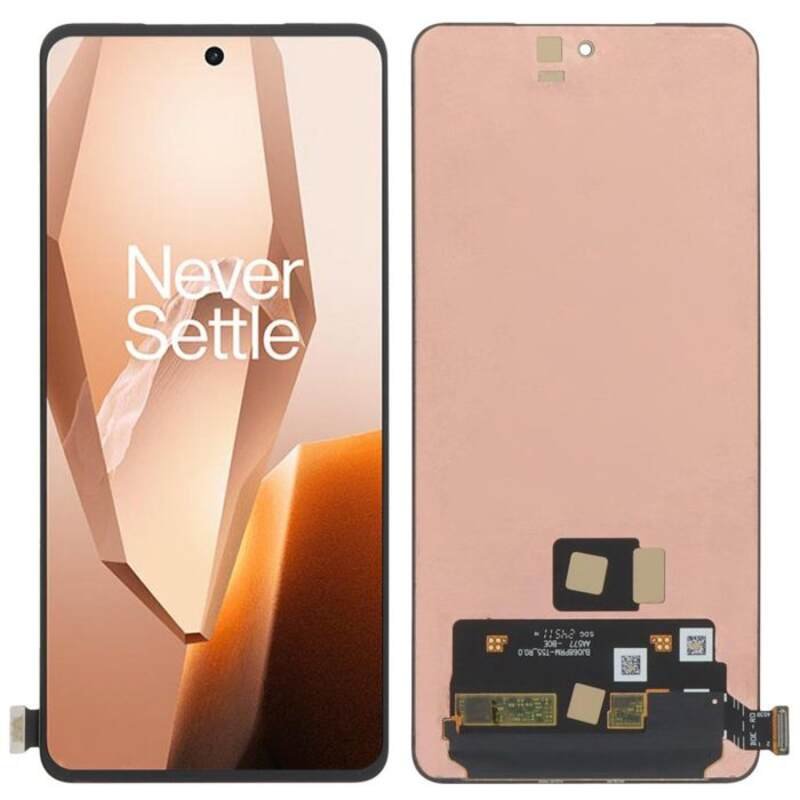
Oneplus 13R Screen replacement
Availability:In Stock!
-
OnePlus 13R screen replacement
-
Original quality display
-
Touchscreen digitizer included
-
Compatible with OnePlus 13R
-
High resolution screen
-
Durable glass panel
-
Professional fitting recommended
KSh 17,000.00
CompareOneplus 13R Screen replacement in Kenya
The OnePlus 13R is a notable addition to the OnePlus series, specifically designed to cater to the needs of smartphone users seeking high performance and affordability. With its sleek design, the OnePlus 13R showcases a premium look while embodying the essence of a flagship device. One of its key features is the vivid AMOLED display, which provides stunning visuals and an immersive experience for multimedia consumption.
Equipped with the latest Snapdragon processor, ample RAM, and a responsive GPU, the OnePlus 13R ensures smooth multitasking and gaming capabilities. The device supports fast charging, allowing users to power up quickly and minimize downtime. Additionally, it maintains a robust camera system that captures high-quality images, making it appealing to photography enthusiasts. Battery life is also commendable, designed to support users through their daily activities without the constant need for charging.
The screen of any smartphone plays a critical role in the overall user experience, acting as the primary interface for interaction and consumption of content. Unfortunately, users may encounter issues such as cracks, scratches, or malfunctioning touch sensitivity. These problems can arise from accidental drops, daily wear and tear, or environmental factors, significantly impacting the usability of the device. Therefore, understanding the importance of screen integrity in maintaining a seamless user experience is essential.
For users of the OnePlus 13R, the prospect of screen replacement might become inevitable due to such common damages. Recognizing the option of replacing the screen not only enhances the phone’s functionality but also prolongs its lifespan, providing users with a satisfactory device performance. This introduction serves as a precursor to understanding the screen replacement process, emphasizing both the device’s strengths and the inevitable need for maintenance that arises over time.
Understanding the Types of Screen Damage
The screen of a smartphone is often the most vulnerable component, susceptible to various types of damage that can impair its functionality. Understanding these damages is crucial for users of the OnePlus 13R seeking timely repairs or replacements. One common form of damage is cracks, which can occur due to drops or impacts. These cracks can range from minor surface blemishes to significant fractures that affect visibility and touch responsiveness. A cracked screen may still function but can lead to further deterioration if not addressed promptly.
Another issue that users may encounter is dead pixels. This occurs when certain pixels on the display fail to light up or respond to touch, resulting in spots or lines on the screen. Dead pixels can be particularly distracting during use and may indicate underlying issues with the display assembly. While some users may tolerate a small number of dead pixels, extensive cases can impair the viewing experience and may necessitate a complete screen replacement.
Water damage is another serious concern that can affect the OnePlus 13R screen. Exposure to moisture or liquid can lead to various malfunctions, including discoloration, screen flickering, or total failure to display. Unlike cracks or dead pixels, water damage may not always be immediately visible but can cause long-term effects on the device’s internal components. Users should be vigilant about the conditions their phone is exposed to and seek professional assessment if they suspect water-related issues.
Overall, recognizing these different types of screen damage is essential for OnePlus 13R owners. Understanding their implications helps users make informed decisions regarding repairs, thereby ensuring the longevity and performance of their device.
When to Consider a Screen Replacement
Determining when to opt for a OnePlus 13R screen replacement can be a crucial decision for users experiencing screen-related issues. Several scenarios warrant this option, primarily stemming from significant damage that affects usability and functionality. For instance, cracked or shattered screens not only hinder visibility but also pose a risk of injury, making immediate replacement necessary to ensure user safety.
Cost-effectiveness is another critical factor in deciding whether to replace the screen or pursue alternative fixes. When the damage is extensive, such as deep cracks or malfunctioning touch responsiveness, the cost for repairs may approach or even surpass that of a full screen replacement. In such cases, investing in a replacement may provide a more reliable and longer-lasting solution, restoring the device to its original condition.
Additionally, usability disruptions can heavily influence the need for a screen replacement. Screen issues such as discoloration, dead pixels, or persistent flickering significantly detract from the user experience. If these problems render the device difficult to use for everyday tasks—like texting, browsing, or gaming—then replacing the screen not only improves functionality but also enhances user satisfaction.
Timely repairs are vital in mitigating further damage. Delaying a screen replacement due to minor issues can lead to more severe problems over time, such as water damage through cracks or increased risk of electrical faults. Promptly addressing screen issues not only restores usability but also helps in avoiding cascading effects that could compromise the overall device performance.
In summary, evaluating the extent of screen damage, considering the cost implications, and acknowledging the impact on usability can guide OnePlus 13R users in making an informed choice about screen replacement. Taking prompt action ensures that minor issues do not escalate into more significant problems.
Cost of Screen Replacement for OnePlus 13R
When considering a screen replacement for the OnePlus 13R, a variety of factors influence the overall cost. Typically, the price for a genuine OnePlus screen replacement can range from $150 to $300, depending primarily on the quality of the parts used, labor costs, and the service center chosen for the repair.
The quality of screen components is paramount when assessing replacement costs. Genuine parts, sourced directly from OnePlus, tend to be more expensive than aftermarket alternatives. Utilizing authentic components ensures that the replacement matches the original performance and visual clarity of the OnePlus 13R. Conversely, aftermarket screens may present a more appealing price point, usually falling between $80 and $150. However, the quality can be significantly lower, sometimes resulting in issues such as diminished touch sensitivity or subpar color accuracy.
Labor costs represent another variable in the overall expense. Repair shops may charge anywhere from $50 to $100 for installation, depending on their expertise, location, and operating expenses. Authorized service centers typically align higher on the cost scale, while local repair shops may offer budget-friendly alternatives. It is advisable to read reviews and ensure that technicians possess the necessary skills to perform the replacement without risking further damage to the device.
In addition to the primary costs mentioned, potential hidden fees can arise, including diagnostic fees, shipping charges for parts, or warranties on parts and labor. Budgeting for a screen replacement also entails considering the impact of taxes and potential returns on defective screens. In planning for a screen replacement for the OnePlus 13R, it is crucial to gather as much information as possible about pricing and service options to make a well-informed decision.
DIY Screen Replacement vs. Professional Repair
When faced with a damaged OnePlus 13R screen, users often contemplate whether to undertake a DIY screen replacement or seek the assistance of a professional technician. Each option carries its own set of advantages and disadvantages that must be carefully evaluated.
One of the primary benefits of a DIY screen replacement is cost savings. By purchasing the necessary parts and tools online, one can avoid labor costs associated with professional repair services. Basic tools such as a heat gun, suction cup, and specialized screwdrivers are typically required for a successful replacement. Numerous online tutorials and videos can provide guidance, making the process more accessible for those with a moderate level of technical skill.
However, DIY screen replacement does come with significant risks. Inadequate skills can lead to further damage, which may render the device inoperable or complicate future repairs. Additionally, attempting a DIY replacement could void any existing warranty, leaving the user with no backup in case of subsequent issues. The challenge lies in balancing the allure of cost-effectiveness with the potential for greater expense due to unintentional damage.
On the other hand, hiring a professional ensures that the repair is carried out by someone with the expertise and tools necessary for a successful outcome. Professional technicians often use high-quality parts that align with manufacturer specifications, which can enhance the longevity of the repair. To find reliable professionals, consumers should seek recommendations, read online reviews, and verify any warranty offered on the repair work.
In contemplating a repair choice for the OnePlus 13R, one’s technical ability, budget constraints, and the importance of maintaining warranty coverage should heavily influence the decision-making process.
How to Prepare for Screen Replacement
Preparing for a OnePlus 13R screen replacement is crucial to ensure a smooth transition, whether you choose a do-it-yourself (DIY) approach or opt for professional assistance. The first step is to back up all your important data. This can be achieved using various cloud services or local storage options, allowing you to safeguard contacts, photos, videos, and any sensitive information. Ensuring that valuable data is secure will prevent data loss during the replacement process.
Next, it is essential to remove the SIM card and microSD card, if applicable. Doing so not only protects these components from potential damage during handling but also eliminates the risk of personal information being accessible in case of any mishap. Take a moment to power off your OnePlus 13R before removing these cards, as this can help to avoid any inadvertent data loss or corruption.
Another important consideration is performing a factory reset of the device. This step is particularly significant if you are handing your device over to a third-party repair service. A factory reset will erase all personal data, including your apps, settings, and files, thereby protecting your privacy. Prior to resetting, ensure that you have completed the backup process to restore your data later. To perform the reset, navigate to the settings menu, select ‘System,’ and then choose ‘Reset options.’ From there, you can execute a factory data reset
In addition to these steps, make sure to gather any necessary tools if you decide to undertake a DIY repair. This might include a screen removal tool, a cleaner for the screen, and new adhesive strips for the replacement screen. Being well-prepared can significantly ease the screen replacement process, minimizing risks and optimizing the chances of success.
Steps for DIY Screen Replacement
Replacing the screen of your OnePlus 13R can be a rewarding yet challenging task. For those who choose to take on this project, it is crucial to approach the process methodically. Here, we outline the steps to guide you through the screen replacement efficiently.
First, gather your tools. You will need a small Phillips screwdriver, a plastic opening tool, tweezers, and suction cups. Additionally, it’s advisable to have the replacement screen ready, along with a heat gun or hair dryer for softening adhesive. Preparing your workspace is also essential; ensure it’s clean, well-lit, and free of static electricity.
Begin the process by powering off your OnePlus 13R and removing the SIM card tray. The next step involves carefully heating the edges of the screen, making the adhesive easier to manage. Use the suction cup to lift the screen slightly, introducing the plastic opening tool to create a gap. Proceed cautiously, ensuring not to damage internal components while prying apart the device.
Once you’ve successfully separated the screen from the chassis, disconnect the battery to prevent any electrical shorts. This step is vital for ensuring your safety during the replacement. After disconnecting the battery, remove the screws that secure the cracked or faulty screen. Carefully detach the screen from its connectors, ensuring no cables are pinched or damaged in the process.
With the old screen removed, it’s time to install the new display. Align the new screen with the connectors and gently press it in place. Reattach all screws and cables, followed by reconnecting the battery. Before sealing the device, power it on to test functionality, ensuring the new screen responds correctly. Once confirmed, reassemble the device by applying light pressure to adhesive edges, ensuring a snug fit.
Finally, remember to take your time throughout this process. Rushing can lead to mistakes, such as misaligning screens or damaging delicate internal parts. Following these steps with precision will help you successfully perform the DIY screen replacement on your OnePlus 13R.
Finding the Right Replacement Screen
When it comes to replacing the screen of your OnePlus 13R, selecting the appropriate replacement is crucial for ensuring optimal performance and longevity. The market offers a variety of options, primarily categorized into Original Equipment Manufacturer (OEM) parts and third-party alternatives. Understanding the differences between these two options can significantly affect the function and durability of your device after the replacement.
OEM parts are created by the original manufacturer of the device, ensuring that the quality and fit are comparable to the original screen that came with your OnePlus 13R. These screens usually come with a warranty that guarantees their performance and longevity. On the other hand, third-party alternatives may be more affordable but can vary greatly in quality. Some may use lower-grade materials, leading to potential issues such as screen discoloration, touch sensitivity problems, or poor image quality.
To ensure you are sourcing a high-quality replacement screen, it is advisable to seek out reputable suppliers and retailers. Look for vendors with positive reviews and a track record of customer satisfaction. Websites specializing in smartphone repairs often provide details about the quality of their parts and warranties. Additionally, consider checking forums and communities dedicated to OnePlus users for recommendations on trustworthy suppliers.
Before making a purchase, evaluate the product specifications thoroughly. Look for compatibility details, material descriptions, and customer feedback regarding the performance of the replacement screen. It’s also beneficial to inquire about return policies, as this can provide peace of mind should the screen not meet your expectations. By taking the time to research and choose wisely, you can avoid potential difficulties stemming from low-quality screen replacements.
Post-Replacement Care and Maintenance
After successfully replacing the screen of your OnePlus 13R, it is essential to implement proper care and maintenance practices to ensure its longevity and optimal performance. The first step in this process is to apply a quality screen protector. These protectors come in various materials, such as tempered glass and plastic film, and serve as a barrier against scratches, cracks, and other damage. Choosing a screen protector that is specifically designed for the OnePlus 13R will ensure a precise fit and preserve the touch sensitivity of the device.
Regular cleaning is another crucial aspect of maintaining your new screen. To clean your OnePlus 13R, use a microfiber cloth, which is effective at removing dust and fingerprints without causing scratches. Avoid using paper towels or rough fabrics, as these can potentially damage the screen surface. For deeper cleaning, lightly dampen the cloth with water or isopropyl alcohol, ensuring that no liquid seeps into the device’s openings. This simple routine can significantly enhance the visual clarity and overall responsiveness of your screen.
In addition to cleaning and protecting your screen, general care practices can greatly affect its lifespan. Avoid exposing the OnePlus 13R to extreme temperatures and humidity, both of which can lead to screen issues over time. When storing your device, it is advisable to place it in a padded case to prevent physical damage, especially during travel. Moreover, be cautious when handling the phone; dropping it or applying excessive pressure can lead to screen complications, even with a new installation.
By following these care and maintenance practices, you can maximize the durability and functionality of your OnePlus 13R screen replacement, ensuring that your device serves you well for years to come.


There are no reviews yet.