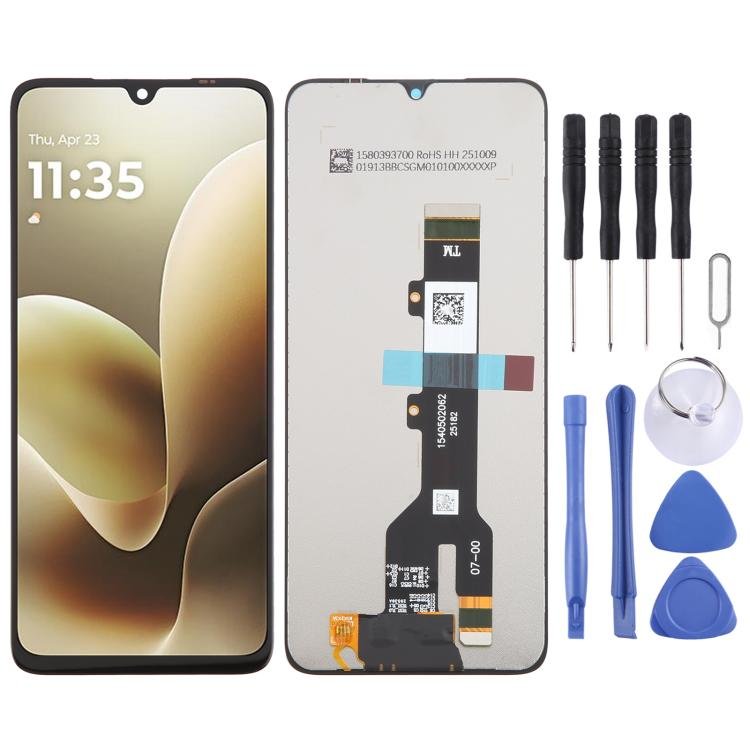
Motorola G06 Power Screen Replacement Specifications.
The Motorola G06 Power features a 6.6-inch display that boasts an impressive resolution of 720 x 1600 pixels. This configuration not only ensures vivid imagery but also allows for a crisp viewing experience, which is essential for consuming media and navigating applications. The display technology utilized in this smartphone is IPS LCD, providing wide viewing angles and enhanced color accuracy, characteristics that are crucial for a satisfying visual experience.
As with any electronic device, users may encounter various issues that could necessitate a screen replacement. One of the most common problems is cracks or physical damage sustained due to accidental drops. Such damage can impair both the aesthetic and functional aspects of the device. Additionally, users may face challenges with an unresponsive touch screen, which can be a significant hindrance in daily tasks. This issue often arises from internal damage or software bugs, and while some minor glitches can be resolved through troubleshooting, persistent issues may indicate a need for replacement.
Another prevalent concern is display discoloration, where the screen may exhibit faded colors or uneven brightness across its surface. This could be attributed to prolonged exposure to direct sunlight or manufacturing defects. Each of these issues highlights the importance of understanding the Motorola G06 Power screen specifications and common faults that can occur. By being informed, users can more accurately determine whether a screen replacement is indeed necessary and better comprehend the associated repair process.
Tools and Materials Needed for Screen Replacement
Replacing the screen on your Motorola G06 Power requires specific tools and materials to ensure a successful and efficient process. First and foremost, it is essential to have a replacement screen designed specifically for the Motorola G06 Power. These screens can typically be sourced from reputable online retailers or authorized repair shops. Always verify compatibility with your device model to avoid future issues.
Next, a precision screwdriver set is vital for the disassembly of your device. The most commonly needed size is a Phillips #00 screwdriver, which is ideal for the screws used in the Motorola G06 Power. In addition to the Phillips screwdriver, a Torx T2 may also be required, given that some manufacturers use Torx screws for better security.
Another indispensable tool is a plastic opening tool or a spudger. These tools facilitate the safe separation of the screen from the device casing without causing damage. Additionally, a set of tweezers can help handle small screws and components during the replacement process, ensuring precision and safety.
Adhesive is also significant when it comes to securing the new screen. Opting for a high-quality adhesive specifically designed for smartphone repairs can improve the durability of your replacement screen. A heat gun or a hairdryer may also be beneficial, as they can help soften the old adhesive, making it easier to remove the damaged screen.
Lastly, a clean workspace and a microfiber cloth are vital to avoid scratches on the new screen during installation. With the right tools and materials at hand, you will be well-prepared to successfully replace the screen on your Motorola G06 Power, ensuring its return to full functionality.
Step-by-Step Guide to Replace Your Motorola G06 Power Screen
Replacing the screen on your Motorola G06 Power can appear daunting, but by following these step-by-step instructions, you can manage the task effectively. Begin by ensuring that your Motorola G06 Power is powered down completely to prevent any electrical issues during the replacement process. Once it is off, use a plastic tool to gently pry open the back cover. Take your time with this step to avoid damaging the clips or the back cover itself.
Next, you will need to disconnect the battery. Locate the battery connector, which is typically secured with a small screw. Remove the screw with a precision screwdriver, and gently lift the connector to isolate the battery from the motherboard. This precaution is vital to avoid any short circuits during the repair.
With the battery disconnected, the next step is to remove the broken screen. Use a heat gun or hairdryer to warm up the edges of the screen. This softens the adhesive, making it easier to detach. Again, carefully use a plastic tool to lift the screen from the device. Be mindful of any cables that may still be connected to the screen; detach them gently to avoid tearing.
After the old screen has been successfully removed, it’s time to install the new screen. Align it with the device and press down firmly to ensure it adheres properly. Reconnect any connectors you may have detached earlier. Next, reattach the battery connector and secure it with the screw. Finally, replace the back cover, ensuring that all clips are secured, and power on your Motorola G06 Power to verify that the screen is functioning as intended. By following these detailed steps, you will have successfully completed the screen replacement with confidence.
Troubleshooting and Final Checks After Replacement
Once you have successfully replaced the screen on your Motorola G06 Power, it is crucial to perform a series of troubleshooting steps and final checks to ensure the device operates correctly. There are several common issues that may arise after a screen replacement, including improper display alignment, touchscreen responsiveness problems, or the device failing to power on.
Firstly, if the display appears misaligned or has any gaps between the screen and the frame, you may need to disassemble the device again to adjust the placement of the screen. Gently reapplying pressure at the edges of the screen can sometimes remedy minor misalignments. Ensure that all adhesive strips are securely tightened after the adjustment to prevent future issues.
Touchscreen responsiveness is another critical factor to assess. After the new screen installation, test the touchscreen by swiping in different directions and tapping various icons. If the touchscreen shows lapses in responsiveness or erratic behavior, check the flex cables connecting the screen to the motherboard. A loose or damaged connection could cause these functionality problems.
In cases where the device does not turn on, consider troubleshooting steps such as ensuring that the battery is properly connected and charged. If all connections seem intact, try performing a soft reset by holding down the power button for a prolonged period. This action sometimes resolves initial power issues after a major hardware change.
Finally, after all checks and adjustments, conduct a final inspection to ensure that the new screen is securely fitted. If functionality issues persist despite following the outlined methods, it may be advisable to seek professional help. An experienced technician can address any underlying problems that may have arisen during the screen replacement process, ensuring your Motorola G06 Power operates effectively.

 Sony Xperia Z2 Battery Replacement
1 × KSh 1,500.00
Sony Xperia Z2 Battery Replacement
1 × KSh 1,500.00  Samsung Galaxy A34 5G
1 × KSh 27,500.00
Samsung Galaxy A34 5G
1 × KSh 27,500.00  Tecno Spark 10C 4GB RAM
1 × KSh 16,900.00
Tecno Spark 10C 4GB RAM
1 × KSh 16,900.00  Samsung Galaxy Tab S9
1 × KSh 73,500.00
Samsung Galaxy Tab S9
1 × KSh 73,500.00  Infinix Hot 50i
1 × KSh 13,500.00
Infinix Hot 50i
1 × KSh 13,500.00  Tecno Camon 20 256GB
1 × KSh 24,300.00
Tecno Camon 20 256GB
1 × KSh 24,300.00 


There are no reviews yet.