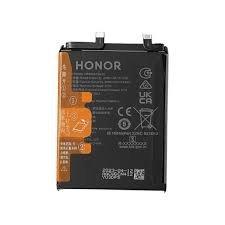
Honor 90 Battery Replacement in Kenya
Battery replacement is a critical aspect of maintaining the overall performance and longevity of the Honor 90 smartphone. As with any mobile device, the battery is one of its most essential components, directly impacting how effectively the device operates. Over time, batteries can experience degradation due to various factors, including usage patterns, charge cycles, and environmental conditions. Users may encounter several symptoms indicative of battery deterioration, such as a noticeable reduction in battery life, excessive heating during charging or usage, and in some instances, unexpected shutdowns.
One of the most common signs of battery degradation is a significant decline in the time the device can be used before recharging is necessary. As the battery ages, its capacity to hold a charge diminishes, which can lead to frustration and hinder daily activities reliant on the smartphone. Users may also experience overheating issues, which not only compromises user comfort but can pose risks to the device’s internal components. If these issues persist without timely intervention, they can exacerbate existing problems, potentially resulting in irreversible damage to the smartphone.
Moreover, prompt attention to battery concerns can optimize device performance. Addressing battery replacement needs ensures that the Honor 90 continues to operate smoothly and efficiently, allowing users to utilize its features without interruption. It is advisable for users to monitor their smartphone’s performance regularly and consider battery replacement when these symptoms emerge. By doing so, individuals can safeguard their device’s longevity while enhancing their overall user experience. Ultimately, being proactive about battery health is an investment in the smartphone’s future reliability and functionality.
Signs That Your Honor 90 Needs a New Battery
Identifying the need for a battery replacement in the Honor 90 is crucial for maintaining optimal device performance. Several signs can indicate that the battery may require attention. One of the most common issues users might experience is rapidly draining battery life. If the phone depletes its charge significantly faster than usual, this could signal that the battery is deteriorating and losing its ability to hold a charge effectively.
Another critical sign to consider is unexpected shutdowns. If your Honor 90 powers down even when there is still a substantial charge remaining, it may be time to evaluate the battery’s condition. This erratic behavior often occurs due to internal battery issues that prevent the device from drawing a consistent power supply, leading to abrupt interruptions during use.
Additionally, users may notice slower charging times as another indicator of battery failure. If the Honor 90 takes considerably longer to recharge than it should, the battery may be losing its efficiency. This delayed response can affect daily usage and highlights the need for potential replacement.
Physical indicators should not be overlooked when assessing battery health. Any swelling or visible damage to the battery itself is a significant warning sign. A swollen battery can not only impact the device’s performance but can also pose safety risks. Regularly inspecting the battery for such physical changes is essential for ensuring the safety and functionality of your Honor 90.
In conclusion, being aware of these signs can help users proactively manage potential battery issues with their Honor 90, ensuring a timely replacement and the optimal functioning of their device.
Choosing the Right Replacement Battery for Honor 90
When selecting a replacement battery for your Honor 90, it is crucial to consider several key specifications to ensure optimal performance and compatibility. The two main specifications to pay attention to are voltage and capacity. The original battery for the Honor 90 typically operates at a voltage of 3.85 volts, and it is advisable to choose a replacement that adheres to this standard. Additionally, capacity, measured in milliampere-hours (mAh), determines the amount of energy the battery can store. An original battery usually has a capacity of around 4000 mAh, and opting for a battery with a similar or higher capacity can enhance your device’s performance and longevity.
When it comes to choosing between original equipment manufacturer (OEM) batteries and third-party options, there are both advantages and disadvantages to consider. OEM batteries are specifically designed for the Honor 90, ensuring compatibility and reliability. They often come with warranties, providing peace of mind that if the battery fails, it can be replaced without additional cost. However, OEM batteries can be more expensive compared to third-party alternatives, which might be attractive for those looking to save on costs.
Third-party batteries may offer lower prices, but it is crucial to research their quality and performance. Not all third-party options are created equal, and some may not meet the necessary specifications, potentially leading to device malfunction or safety risks. If choosing this route, ensure the battery has positive customer reviews and certifications that validate its safety and compatibility with the Honor 90. Ultimately, taking the time to research and weigh the pros and cons of each option will lead to a more informed decision regarding your Honor 90 battery replacement.
DIY Battery Replacement: Tools and Preparation
When considering a DIY battery replacement for the Honor 90, it is essential to gather the necessary tools and materials beforehand to ensure a smooth and successful process. The first essential item on your list is the replacement battery itself designed specifically for the Honor 90 model. It is crucial to purchase a reliable battery from a reputable supplier to avoid issues related to power capacity and longevity.
Next, you will need a set of screwdrivers, particularly suitable for electronics. A Phillips #00 screwdriver is often used for removing the screws on the phone’s rear cover, while a Torx screwdriver may be needed for securing the battery. In addition to screwdrivers, a set of plastic pry tools is invaluable. These tools will allow you to gently lift and separate components without damaging the delicate internal parts of the phone.
Furthermore, having a pair of tweezers can make handling small screws and connectors easier, minimizing the risk of losing essential items during the replacement process. It’s advisable also to have a suction cup at hand to help lift the screen or back panel without applying excessive pressure, which could potentially cause cracks or breaks.
Preparing your workspace is another critical step before starting the battery replacement. Choose a clean, well-lit area free of clutter to ensure that all tools and components are easily accessible. Additionally, backing up any existing data on the Honor 90 is paramount. This precaution helps to prevent data loss during the battery replacement process, which can sometimes involve power cycling or affecting internal memory access. Taking these basic preparations into account will greatly enhance your chances of performing a successful and stress-free battery replacement.
Step-by-Step Guide to Replacing the Honor 90 Battery
Replacing the battery of your Honor 90 smartphone can seem daunting; however, by following this comprehensive guide, you can effectively complete the task. Prior to beginning, ensure that you are equipped with a new battery, a set of precision screwdrivers, and a plastic pry tool. It is also advisable to work in a clean, well-lit area to prevent any loss of small components.
The first step in the process is to power off your Honor 90 completely. Once the device is turned off, use the precision screwdriver to remove the screws located on the back cover. Typically, there will be several screws which must be carefully placed aside for later reassembly.
After the screws have been removed, utilize the plastic pry tool to gently detach the back cover of the device. Be cautious during this step to avoid damaging the internal components. Once the back cover is removed, you should be able to access the battery.
Locate the battery connector, which is often attached with adhesive or secured by additional screws. Carefully disconnect the battery connector using the plastic pry tool. Following this, cautiously lift the old battery out of its compartment. If the battery is stuck due to adhesive, you may need to apply slight heat to loosen it.
With the old battery removed, take the new battery and position it into the designated battery slot. Ensure that the battery connector aligns correctly with the motherboard. Once aligned, firmly reconnect the battery. It is crucial to avoid any contact with other components to prevent potential damage.
Finally, replace the back cover by carefully pressing it into place and reinsert the screws to secure it. Once everything is sealed, power on your Honor 90 to verify that the new battery is functioning correctly. By following these steps, you can successfully replace the battery with minimal risk of errors. Always remember to exercise caution and refer to specific manuals or guides for your model as variations may exist.
Professional Battery Replacement Services: When to Seek Help
When faced with the necessity of battery replacement for your Honor 90, it’s crucial to assess whether to undertake the task independently or to seek the assistance of professional services. While DIY approaches can be appealing due to their cost-effectiveness, several factors should guide this decision-making process.
Firstly, consider your technical skills. Replacing a smartphone battery requires a certain level of expertise, including knowledge of the device’s internal components and the necessary safety precautions. If you lack experience in handling delicate electronic parts, attempting a DIY battery replacement may lead to further damage, ultimately incurring higher costs. It is advisable to evaluate your comfort level with tools and whether you possess the required aptitude for such technical tasks.
Secondly, warranty considerations play a significant role in this decision. If your Honor 90 is still under warranty, replacing the battery by yourself could void any remaining coverage. Many manufacturers encourage users to utilize their authorized service providers to ensure that the integrity of the warranty is maintained. Thus, in such scenarios, seeking professional help is a prudent choice.
Additionally, the availability of appropriate tools should not be overlooked. A successful battery replacement requires specific equipment, often not readily found in most households. If you do not have access to these specialized tools, it may be more efficient to engage a professional service that is already equipped for the job.
To find reputable battery replacement service providers, begin with thorough research. Online reviews and testimonials can provide insights into the quality of service offered. Additionally, you may seek recommendations from peers or consult forums dedicated to Honor devices. Ultimately, a well-informed decision can lead to a successful battery replacement and extend the life of your Honor 90.
Post-Replacement Care for Your Honor 90 Battery
Once you have successfully replaced the battery of your Honor 90, it is crucial to adopt best practices to ensure the longevity and optimal performance of your new power source. Proper care can significantly extend the lifespan of the battery and enhance your device’s performance.
First and foremost, consider your charging habits. It is advisable to charge your Honor 90 battery when it drops below 20% capacity, and unplug it once it reaches about 80% to 90%. This practice helps prevent deep discharges and overcharging, both of which can harm lithium-ion batteries. Instead of letting your battery completely drain, maintaining it in the mid-range of its capacity can mitigate stress on its cells, optimizing overall battery health.
Temperature also plays a vital role in battery maintenance. Lithium-ion batteries, which power the Honor 90, are sensitive to extreme temperatures. Aim to keep your device in a temperature range of 10°C to 30°C (50°F to 86°F). Excessive heat can accelerate battery degradation, while cold conditions can temporarily diminish performance. Avoid exposing your device to direct sunlight or leaving it in a car on a hot day. Furthermore, consider removing any cases that may trap heat during charging.
Regular software updates can also contribute to battery health. Manufacturers often release updates to improve battery performance and provide optimal power management features. Make sure to keep your Honor 90 updated with the latest software versions, as these enhancements can help regulate battery usage and extend the overall lifespan of your new battery.
Lastly, monitor battery health through your device’s settings. Many smartphones offer battery performance metrics, which can provide insights into any potential issues. By adopting these practices, you can maximize the lifespan of your new Honor 90 battery and ensure its optimal performance over time.
Common Myths About Smartphone Batteries
Smartphone batteries, including the widely used Honor 90 model, are surrounded by several myths that often mislead users. One prevalent myth is that charging a smartphone overnight significantly damages its battery. While it is true that lithium-ion batteries, like those in the Honor 90, can degrade over time, modern smartphones are equipped with smart charging technology that prevents overcharging. Once the battery reaches 100%, the charging process slows significantly or stops altogether, mitigating potential damage. However, regular overnight charging can lead to sustained heat exposure, which might shorten the overall lifespan if done consistently.
Another common misconception pertains to the number of charge cycles a battery can endure. Some users believe a cycle is counted each time a device is charged from zero to 100%. In reality, a charge cycle is completed only when a cumulative total of 100% usage occurs. Therefore, for example, charging from 50% to 100% and then back down to 50% counts as half a cycle. This understanding can empower Honor 90 users to manage their charging habits more effectively and prolong battery life.
Moreover, many smartphone owners think that fully discharging their battery before charging it again is beneficial. This practice can actually be detrimental. Batteries are designed to perform best when kept between 20% and 80% charge. Frequently allowing a battery to drop to 0% can lead to increased wear over time. Therefore, maintaining a balanced charge level in devices like the Honor 90 can enhance overall battery longevity.
By debunking these common myths, users can adopt better practices that optimize their Honor 90’s battery health and extend its functional lifespan. Proper battery maintenance is key to ensuring that users enjoy their devices to the fullest without unnecessary interruptions due to battery issues.
Conclusion: Empowering Honor 90 Users for Better Battery Maintenance
In this comprehensive guide on Honor 90 battery replacement, we have explored various essential aspects that every user should consider to enhance the lifespan and performance of their device’s battery. Maintaining a healthy battery is vital, not only for ensuring the longevity of the mobile device but also for optimizing the overall user experience. We have highlighted the importance of recognizing the signs of battery wear, such as reduced capacity and longer charging times, which can indicate the need for a battery replacement.
Regular maintenance plays a crucial role in keeping your Honor 90 battery functioning efficiently. Users are encouraged to adopt practices such as monitoring app usage, optimizing device settings, and occasionally performing battery calibration to preserve battery health. Furthermore, understanding charging habits, and avoiding overcharging or discharging below 20%, can significantly bolster the lifespan of the battery. The importance of using original or certified replacement batteries was also emphasized, as these batteries meet the specifications needed for optimal compatibility and safety.
Additionally, being aware of the specific tools and procedures necessary for a battery replacement can empower users to take charge of their device’s health. Whether you opt for a DIY approach or seek professional assistance, knowing what to expect can help in making informed decisions. It’s essential for Honor 90 users to remain proactive and attentive to their battery’s condition, ensuring that they are ready to address any issues that may arise.
By equipping themselves with the right knowledge about battery maintenance and replacement, Honor 90 users can enjoy improved device performance and longevity. It’s this proactive management that enables individuals to maximize their smartphone’s capabilities, ensuring a seamless experience within today’s digital landscape.

 Redmi 9T Screen Replacement
1 × KSh 6,500.00
Redmi 9T Screen Replacement
1 × KSh 6,500.00  Samsung Galaxy S20 Ultra Battery Replacement
1 × KSh 4,500.00
Samsung Galaxy S20 Ultra Battery Replacement
1 × KSh 4,500.00  Samsung Galaxy A22 Battery Replacement
1 × KSh 1,800.00
Samsung Galaxy A22 Battery Replacement
1 × KSh 1,800.00  Amazfit GTS 2
1 × KSh 17,500.00
Amazfit GTS 2
1 × KSh 17,500.00 


There are no reviews yet.