

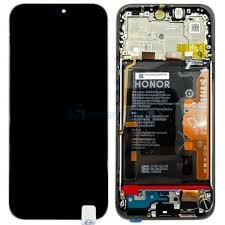
Honor 400 Screen Replacement in Kenya
The Honor 400 smartphone has garnered significant attention in the competitive mobile market due to its impressive specifications and user-friendly features. Launched as part of the Honor series, this device has established itself as a favorite among tech enthusiasts and everyday users alike. It boasts a vibrant display, powerful processing capabilities, and a robust battery life, making it an attractive option for various users. Equipped with a high-resolution camera, it enables users to capture stunning photographs and videos, further enhancing its appeal.
In terms of specifications, the Honor 400 is powered by an efficient processor that ensures smooth multitasking and responsiveness. The smartphone typically includes a substantial amount of RAM, allowing for seamless app usage and gaming experiences. Moreover, with expandable storage options, users can save large files, images, and videos without worrying about running out of space. The build quality of the Honor 400 is noteworthy; however, like many smartphones, it is not impervious to issues that may arise over time.
Screen quality is often a determining factor for smartphone users, as the display serves as the primary interface for all interactions. It is not uncommon for users to encounter various screen-related problems, such as cracks, scratches, or unresponsive touch functionality. These issues can significantly impact the overall user experience and can lead to frustration when attempting to navigate or utilize the device. Understanding the common problems associated with screens underscores the necessity for screen replacement services, which provide users with the opportunity to restore their Honor 400 to optimal working condition.
Understanding Screen Damage
Screen damage is a common concern for smartphone users, particularly for models like the Honor 400. Various types of damage can compromise the functionality and aesthetics of the device, with the most prevalent forms being cracks, scratches, and display issues. Each type of damage has its own causes, and understanding these can help users determine if they need a screen replacement.
Crashed screens are among the most visible forms of damage and usually result from accidental drops or impacts. A drop from a considerable height can cause spiderweb-like cracks on the screen surface, rendering the device unsightly and difficult to use. Pressure points can also contribute to this kind of damage; placing the phone under heavy objects or sitting on it can create stress on the screen, leading to significant cracks or even complete screen failure.
Scratches often occur from daily usage, particularly if the phone is kept in pockets or bags alongside keys or other sharp objects. While minor scratches may not impair functionality, they can become increasingly problematic as they accumulate. Additionally, users may notice discoloration or pixel failures on their displays. These display issues often stem from manufacturing defects or prolonged exposure to bright light, which can affect screen performance over time.
Identifying the type of damage on an Honor 400 is essential when contemplating repair options. Each type of screen damage may require different approaches for rectification. For instance, while some cracks can be mitigated with screen protectors, significant fractures or malfunctioning displays typically necessitate complete screen replacements. Recognizing these signs early can help users make informed decisions concerning their devices and the potential need for professional repair services.
Signs You Need a Screen Replacement
Identifying the need for a screen replacement on your Honor 400 is crucial to maintain its functionality and usability. Several key signs indicate that it may be time to consider a screen replacement. One of the most common indicators is an unresponsive touch screen. If your device does not respond to touch inputs or is sporadically failing to register swipes and taps, this could suggest underlying damage to the display, necessitating a replacement.
Another critical sign to watch for is discoloration on the screen. You may notice patches of color that appear different than the surrounding areas or general dimness that greatly diminishes the visual quality. Such discoloration can occur due to internal damage or manufacturing defects, ultimately affecting how you interact with your device.
Moreover, lines appearing on the display are a clear indication of a problem. These lines may manifest as vertical or horizontal streaks across the screen and can disrupt your visual experience significantly. Often, this occurs as a result of impact damage or internal connection failures, thereby signaling the need for a new screen.
Severe cracks on the surface of the Honor 400 screen are perhaps the most obvious sign of damage. Cracks not only obscure your view but can also lead to further issues such as shattered glass or deeper functional problems. Depending on the severity, these cracks can compromise touch functionality and safety. It is advisable to address cracked screens promptly to prevent escalating damage.
By recognizing these signs early, you can take proactive steps toward getting a necessary screen replacement. Ignoring these indications may lead to greater inconvenience and cost, ultimately affecting your overall user experience with the Honor 400.
DIY vs Professional Replacement: Pros and Cons
When it comes to replacing the screen of your Honor 400, you face a crucial decision: whether to take the DIY route or hire a professional service. Each option has its own advantages and disadvantages, which can significantly affect your experience and the quality of the replacement. Understanding these pros and cons is essential for making an informed decision.
Opting for a DIY screen replacement can be a cost-effective choice. Typically, DIY repairs are less expensive than enlisting professional help, as you can save on labor costs. Additionally, many online tutorials and guides provide step-by-step instructions, making it feasible for tech-savvy individuals or those willing to follow directions closely. However, the DIY approach requires specific tools, such as screwdrivers, suction cups, and a replacement screen. Acquiring the appropriate equipment can offset some of the savings.
On the other hand, a DIY screen replacement poses potential risks. If you lack experience or the necessary skill set, you may inadvertently damage your device further during the process, leading to more costly repairs. Furthermore, improper installation can result in compromised screen functionality, such as touch sensitivity issues or display problems. Another critical factor to consider is warranty implications; performing a DIY repair might void any existing warranty, leaving you without support from the manufacturer should future problems arise.
Conversely, hiring a professional for screen replacement often guarantees expertise and quality assurance. Professionals possess the required skills and experience to execute the job efficiently, reducing the likelihood of mistakes. They usually provide warranties on their workmanship and components, offering peace of mind that is invaluable. However, this convenience comes at a price, as the total cost will be higher when factoring in labor and parts.
Ultimately, the decision between DIY and professional replacement depends on your comfort level with technology, budget constraints, and the importance of risk management. Taking these aspects into account will help you achieve the best possible outcome in your Honor 400 screen replacement journey.
Tools and Materials Required for Replacement
When embarking on the task of replacing the screen of an Honor 400 device, having the right tools and materials is essential to ensure a smooth and successful repair process. This guide outlines the necessary items, catering to both DIY enthusiasts and professionals in the field of mobile repairs.
First and foremost, one will require a set of precision screwdrivers, specifically a Phillips #00 and a flathead screwdriver. These are vital for unscrewing the delicate components without causing damage. A suction cup is also a crucial tool; it aids in lifting the screen away from the device’s frame without exerting undue pressure on the surrounding areas.
In addition to these tools, obtaining quality adhesive is paramount. Throughout the replacement process, a strong adhesive, often a specialized double-sided tape or glue, will secure the new screen in place, ensuring durability and longevity. For those working in professional settings, consider using adhesive that is specifically formulated for mobile screens to achieve optimal results.
The most significant item on the list is, of course, the replacement screen itself. When searching for high-quality replacement screens, it is advisable to source components from reputable suppliers. Authorized retailers or certified online platforms often provide original equipment manufacturer (OEM) parts, which are recommended for their compatibility and performance.
Additionally, having the following materials on hand can facilitate the process: tweezers for handling small components, a heat gun or hairdryer to soften adhesive bonds, and a microfiber cloth to prevent scratches on the new screen. By ensuring access to these essential tools and materials, one can navigate the Honor 400 screen replacement process with confidence and efficiency.
Step-by-Step Guide for DIY Replacement
Replacing the screen of your Honor 400 smartphone can seem daunting, but with careful preparation and attention to detail, many users choose to undertake this task themselves. Below is a comprehensive guide to assist you in successfully replacing your screen.
Before you begin, ensure you have a clean, well-lit workspace and the necessary tools: a suction cup, plastic prying tool, tweezers, and a screwdriver set. It’s advisable to power off the device and remove the SIM card and memory card to prevent any potential damage during the process.
Start by gently heating the edges of the smartphone’s front panel, using a heat gun or hairdryer to soften the adhesive. Apply the suction cup to the screen and gently pull while inserting the plastic prying tool into the gap. Carefully work your way around the perimeter, releasing the adhesive until the screen is free. It is essential to take your time in this step to avoid cracking the glass.
Once the screen is removed, disconnect the battery to eliminate any risk of electric shock. Next, you will need to detach the broken screen from the device. This typically involves unscrewing various screws and disconnecting flex cables. Use tweezers and your plastic prying tool for careful maneuvering.
After the old screen has been removed, prepare the new screen for installation. Begin by connecting the flex cables and ensuring everything is aligned correctly. If applicable, replace any adhesive strips to secure the new screen in place.
Reattach the battery and test the new screen before sealing it entirely. If everything is functioning correctly, carefully press the edges of the screen to fix it back into position. Finally, reinsert screws if necessary and power on your device. Following these steps can ensure a successful Honor 400 screen replacement while minimizing the risk of damage.
Be cautious throughout the process; wearing anti-static gloves can protect the internal components, and following each step meticulously will ultimately lead to a successful DIY replacement.
Finding a Reliable Professional Repair Service
When it comes to replacing the screen of your Honor 400, locating a trustworthy and competent repair service is vital to ensuring a successful outcome. The array of options available can be daunting, but there are specific criteria that can assist you in making an informed choice. Firstly, examine customer reviews and ratings. Multiple platforms, such as Google or Yelp, provide insights into previous customers’ experiences, which can reveal the quality of service offered by a particular repair shop. High ratings and positive feedback are indicators of a reliable service provider.
Certifications are another important detail to consider. Reputable repair services often employ technicians who are qualified and certified by recognized organizations. This certification not only signifies a certain level of expertise but also ensures adherence to industry standards. Be sure to inquire about the technicians’ qualifications before entrusting your Honor 400 to a repair shop.
Warranties on repairs are equally crucial. A service provider should guarantee their work, offering a warranty that covers parts and labor for a specified period. This not only assures you of the quality of the repair but also provides peace of mind against potential future issues. When discussing repair options, don’t hesitate to ask about the warranty policy.
While assessing costs, it is vital to understand the average expenses involved in Honor 400 screen replacement. Prices may vary based on factors such as location, the severity of damage, and the quality of parts used. Seeking estimates from multiple shops can help you gauge a reasonable range. Opting for the lowest price may not always be the best approach, especially if it compromises the quality of service.
By utilizing customer reviews, verifying certifications, confirming warranty policies, and understanding average costs, you can effectively navigate the process of selecting a reliable professional repair service for your Honor 400 screen replacement.
Cost Analysis of Screen Replacement
The cost of screen replacement for the Honor 400 can vary significantly based on several factors, including whether one opts for a DIY approach or chooses professional repair services. Understanding these costs is essential for effective budget planning and making informed decisions.
When considering a DIY screen replacement, the primary costs involved are the replacement screen itself and any tools that may be required for the task. A replacement screen for the Honor 400 typically ranges from $50 to $100, depending on factors like the quality of the part and the vendor from whom it is sourced. It’s worth noting that cheaper options may lead to lower-quality screens that could affect the device’s performance and longevity. Additionally, if the necessary tools are not already in one’s possession, purchasing tools such as screwdrivers, suction devices, and prying tools can add another $20 to $50 to the overall expense.
On the other hand, opting for professional repair services provides a different cost structure. Professional screen replacement typically ranges from $100 to $200, inclusive of parts and labor. Labor costs can vary based on geographic location and the repair shop’s expertise, with some established services charging a premium for their experience. Furthermore, some repair shops may charge a diagnostic fee that could range from $20 to $50; however, this fee may be waived if the repair is completed with them.
When comparing the two options, while DIY may seem more economical at first glance, the risks associated with potential errors and the need for additional tools can lead to unexpected costs. Ultimately, the decision will depend on one’s confidence in performing the repair and the budget available for the Honor 400 screen replacement.
Preventive Measures to Avoid Screen Damage
Taking proactive measures to protect your Honor 400 screen can significantly extend its lifespan and reduce the chances of damage. One of the most effective ways to prevent screen damage is by using a high-quality screen protector. These are designed to absorb impact and resist scratches, providing an additional layer of defense against potential falls and abrasions. Tempered glass screen protectors are particularly recommended due to their durability and clarity, ensuring that your screen remains visible while offering excellent protection.
Another essential component of screen protection is utilizing a well-fitted case. Opting for a rugged case, particularly one with raised edges, can shield the screen from direct contact with surfaces during accidental drops. Various cases are available; some feature shock-absorbing materials that help minimize the impact if your Honor 400 should hit the ground. Selecting a case that complements your lifestyle and mobile usage can lead to better protection.
Safe handling practices also play a crucial role in maintaining your smartphone’s screen integrity. Always hold your device with both hands when texting or browsing to minimize the chances of dropping it. Additionally, avoid placing your phone in the same pocket as keys or other sharp objects that could scratch the surface. It is wise to create a specific spot for your device when not in use, ensuring it is placed on stable, soft surfaces instead of precarious locations.
Regular maintenance of your Honor 400 is vital in enhancing its longevity. Wiping the screen with a microfiber cloth can prevent dust and debris buildup, which could lead to scratches over time. Furthermore, keeping your device updated with the latest software can optimize its performance and reduce the risk of software glitches that might inadvertently lead to physical harm. By implementing these preventive strategies, users can effectively protect their Honor 400 screens and prolong the overall life of their smartphones.


There are no reviews yet.