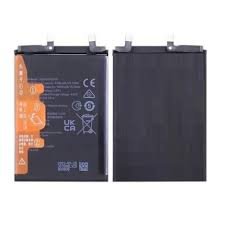
Honor 400 Battery Replacement in Kenya
The health of a smartphone battery plays a crucial role in ensuring optimal performance and usability, especially for devices such as the Honor 400. A deteriorating battery can lead to a range of issues that not only impair the functionality of the device but also affect the user’s overall experience. As the battery ages, its capacity to hold a charge diminishes significantly. This degradation often manifests in rapid energy drainage, which can be frustrating for users who rely on their devices for daily tasks.
One of the most evident indicators of battery deterioration is when the device fails to maintain its charge. Users may notice that their Honor 400 discharges rapidly even when minimal applications are in use. This behavior necessitates frequent charging, which can disrupt productivity and convenience. In severe cases, the battery may become unable to sustain a charge altogether, potentially rendering the device unusable unless it is perpetually connected to a power source.
Additionally, overheating is another common sign that the battery may require replacement. An Honor 400 battery that becomes warm to the touch during regular use can signal underlying issues. Overheating can be detrimental not just to the battery’s health but also to other internal components of the smartphone, potentially leading to more extensive damage over time.
Recognizing these symptoms is vital for users to make informed decisions about their device maintenance. Regularly monitoring battery health can prolong the lifespan of the Honor 400 and improve its overall efficiency. Ensuring optimal battery performance involves acknowledging these warning signs and potentially seeking a replacement when necessary.
Identifying the Right Replacement Battery
Choosing the appropriate replacement battery for your Honor 400 is crucial for maintaining the device’s performance and longevity. The first step in the identification process involves checking the specific model number of your device. This information is typically located on the back cover or within the device settings. Knowing the exact model number ensures that you purchase a compatible battery, preventing potential damage to your device.
Once you have the model number, the next step is to understand the technical specifications of the battery that corresponds with your Honor 400. Critical specifications include the voltage and capacity, which directly influence how long the battery will last between charges. It is advisable to select a battery with similar voltage and capacity ratings as the original to ensure optimal device performance. Researching the technical details can enhance your understanding of what to look for when shopping for a replacement.
Additionally, it is vital to prioritize high-quality components when choosing a replacement battery. Exploring options from reputable manufacturers and vendors can significantly reduce the risk of purchasing subpar products that may fail to meet the device’s requirements. Batteries from well-known brands are often subjected to rigorous testing, which guarantees reliability and safety for users. Be wary of excessively cheap alternatives, as these may compromise the overall performance and safety of your Honor 400.
Lastly, consider where to purchase replacement batteries safely. Online marketplaces, authorized retailers, and the manufacturer’s official website are generally trustworthy sources. Reading customer reviews and comparing multiple suppliers can also aid in making an informed choice. By following these guidelines, you can ensure a successful battery replacement process for your Honor 400.
DIY vs Professional Battery Replacement Services
When faced with the decision to replace the Honor 400 battery, users often weigh the options of undertaking the task themselves or enlisting professional services. Each approach has its own distinct advantages and disadvantages, which can significantly impact cost, risk of damage, and time investment.
Performing a DIY battery replacement can be appealing for individuals looking to save money. The cost of purchasing a replacement battery online or from a local store can be significantly lower than paying for professional services. Additionally, a DIY approach allows for the satisfaction of completing a task independently. However, this option is not without its risks. Replacing the battery without adequate knowledge and experience can lead to accidental damage to the device. This could result in voiding warranties or incurring further repair costs, which would ultimately negate any initial savings.
Time investment is another critical factor when considering DIY replacement. While the actual battery replacement might only take a short time, users must factor in the time spent researching the procedure, gathering tools, and potentially troubleshooting unexpected issues. For those with busy schedules or limited technical skills, this could become a significant burden.
On the other hand, professional battery replacement services provide a level of reassurance and expertise that can alleviate concerns regarding the procedure. Technicians are typically well-trained and familiar with the specific nuances of the Honor 400 model, ensuring that the replacement is carried out safely and effectively. Although the cost of professional service is generally higher, it often comes with warranties and guarantees, providing additional peace of mind.
In summary, the choice between DIY and professional services for replacing the Honor 400 battery depends on individual preferences and circumstances. Evaluating personal skill levels, the importance of device integrity, and readiness to invest time can help users arrive at the best decision for their specific needs.
Tools and Equipment Needed for Replacement
When preparing to replace the battery in the Honor 400, having the appropriate tools and equipment on hand is essential for a smooth process. A well-equipped toolkit will not only expedite the battery replacement but also minimize the risk of damaging the device. Below is a comprehensive list of the necessary items.
Firstly, a set of precision screwdrivers is crucial, particularly those that include Philips and Pentalobe heads. These tools enable you to safely remove the screws that secure the device’s casing without stripping them. You can find precision screwdriver sets at most electronics stores or online retailers.
In addition to screwdrivers, a plastic prying tool is indispensable. This tool allows for gentle separation of the casing without scratching or maring the surface. A wedge or spudger is often recommended for this purpose and can typically be purchased alongside smartphone repair kits.
Adhesive strips are another important item. They are used to secure the new battery in place, ensuring it remains stable during usage. Pre-cut adhesive sets designed specifically for the Honor 400 can be easily found online and are often included in battery replacement kits.
Additionally, safety gear should not be overlooked. A pair of safety goggles is advisable to protect your eyes from any small components that may accidentally dislodge during the process. Similarly, an anti-static wrist strap can help prevent static electricity buildup, which may damage delicate electronic components.
Lastly, having a clean, organized workspace is vital. A flat surface, free of clutter, allows for better access to tools and components, reducing the likelihood of losing screws or damaging the device. With these tools and equipment, you will be well-prepared to undertake the battery replacement tasks effectively.
Step-by-Step Guide to Replacing Your Honor 400 Battery
Replacing the battery in your Honor 400 requires careful attention and a systematic approach. Begin the process by gathering the necessary tools, including a small screwdriver set, plastic opening tools, and a replacement battery specifically designed for the Honor 400 model. Ensure you work in a clean, static-free environment to prevent damage to your device.
Before disassembly, it is essential to power off your Honor 400 completely. Once the device is off, use a plastic opening tool to gently pry open the back cover. Be cautious not to apply excessive force, as this may lead to cracks in the casing. After removing the back cover, you will see the battery secured in place. Disconnect any screws that hold the battery in place, using your screwdriver to avoid stripping the screws.
With the screws removed, carefully disconnect the battery connector using a plastic tool. This action minimizes the risk of damaging the internal components during the battery removal. Once the connector is loosened, gently lift the old battery out of the device. If it proves stubborn, you may need to apply a small amount of heat or leverage to dislodge it, taking care to avoid any surrounding components.
Now it’s time to install the new battery. Place the new Honor 400 battery into its designated compartment, ensuring it sits securely. Reconnect the battery connector, making sure it aligns correctly to avoid damage. After securing the battery, replace any screws that were removed to keep it in place.
Finally, reattach the back cover of your Honor 400. Make sure everything is sealed tightly to retain your device’s integrity. Power the device back on to confirm that the new battery is functioning properly. Following these steps will ensure a successful battery replacement, extending the life and performance of your Honor 400.
Testing the New Battery Post-Replacement
Following a battery replacement in your Honor 400 device, a thorough testing process is essential to ensure the new battery functions as intended. This process typically involves monitoring the charge cycles, battery percentage accuracy, and the overall performance of the device. Start by fully charging the new battery to its maximum capacity. Observing how the device behaves during this initial charge is crucial; the phone should indicate that it is charging without interruptions or unusual heat.
Once charged, detach the device from the charger and take note of the battery percentage reading. A healthy battery should maintain a percentage that corresponds closely to the actual charge level. Use your device for a varying range of activities, including calls, browsing, and using applications, to establish a baseline for performance. Keep track of how quickly the battery percentage depletes during these activities, as an excessive drop may indicate potential issues.
It is also advisable to monitor the device’s performance during charge and discharge cycles. Pay attention to any unexpected shutdowns or erratic behavior, which could signal underlying problems. This testing phase should ideally include repeated discharge and charge cycles to assess overall longevity and reliability. If any anomalies occur, such as the battery not charging at all, or rapid depletion of charge, troubleshooting becomes necessary. Check connections, ensuring the battery is properly seated and there is no debris obstructing the terminals. If issues persist, further investigation may be warranted, possibly leading to another assessment of the replacement battery itself or additional components within the device.
Caring for Your New Battery
To ensure the longevity and optimal performance of your Honor 400 battery, it is crucial to adopt proper care practices from the outset. The habits you form can significantly influence your battery’s lifespan and overall functionality. One of the first steps is establishing proper charging habits. It is recommended to avoid letting your battery drain to empty frequently, as this can lead to reduced capacity over time. Instead, aim to recharge your battery when it reaches around 20% capacity. Using a charger specifically designed for your device is also essential; third-party chargers may not provide the right voltage or current needed for your battery.
Additionally, it is vital to avoid exposing your Honor 400 battery to extreme temperatures. High heat can cause damage to the battery cells, while cold temperatures can impede performance. Both extremes can lead to short-term malfunctions and long-term degradation. Ideally, keep your device in a temperature-controlled environment and avoid leaving it in direct sunlight or in cold vehicles for extended periods.
Furthermore, certain software settings can directly impact battery performance and overall health. Enabling battery optimization features, which can be found in the settings menu, helps manage background processes that consume excessive power. Reducing screen brightness, limiting notifications, and disabling unnecessary apps running in the background can also contribute positively to battery conservation. Regular updates to your device’s software ensure that any bugs affecting battery efficiency are addressed promptly.
Incorporating these practices can help maintain the health of your Honor 400 battery, ensuring that it remains reliable throughout its lifespan. By developing good habits surrounding battery care and management, users can enjoy a longer-lasting and better-performing device.
Common Myths about Smartphone Batteries
Smartphone batteries, while crucial to our daily lives, often become the subject of various myths that can lead to poor handling and maintenance of these vital components. One common belief is that charging your smartphone overnight can cause significant battery damage. In reality, most modern smartphones, including the Honor 400, come equipped with built-in mechanisms that regulate charging. Once the battery reaches full charge, these devices automatically switch to a trickle charge, thus preventing overcharging and protecting battery longevity.
Another prevalent myth involves the concept of battery cycles. A battery cycle is defined as the process of charging the battery from 0% to 100%. Many users mistakenly believe that they should completely deplete their battery before recharging it to lengthen its lifespan. However, lithium-ion batteries, which are used in smartphones, perform optimally when kept between 20% and 80% charged. Frequent partial charges can actually contribute to healthier battery performance, debunking the idea that deep discharges are better for the battery’s health.
Additionally, another widespread misconception relates to the type of charger used for your smartphone. Some individuals assert that using third-party chargers is harmful and can result in overheating or battery damage. While it is advisable to use chargers from reputable manufacturers, many third-party options meet industry standards. It is crucial, however, to ensure that these chargers are compatible with your device, as using poorly designed chargers can indeed affect performance and safety in the long term.
By understanding these common myths surrounding smartphone batteries, users can better manage their devices’ battery health and longevity. Dispelling these misconceptions empowers individuals to make informed decisions regarding their smartphone usage and maintenance practices.
When to Consider Upgrading Your Device
Determining whether to upgrade your device or simply replace the battery can be a challenging decision, particularly when it comes to the Honor 400. Several factors may signal that it is time to consider an upgrade rather than just battery replacement. One crucial aspect is the overall performance of the device. If you notice that your Honor 400 is lagging, freezing, or experiencing frequent technical glitches, these performance issues may indicate that the device’s internal hardware is aging alongside the battery.
Additionally, software compatibility plays a significant role in the decision-making process. The Honor 400 may not support the latest operating system updates or essential apps that require more recent software versions. As technology progresses, compatibility with modern applications and features becomes increasingly important. If your device is unable to run newer apps or software due to OS restrictions, you might find it necessary to invest in a more up-to-date model to meet your needs.
Moreover, consider the evolving technological landscape and your personal usage requirements. If your daily activities demand high-performance apps, multitasking capabilities, or advanced features such as superior camera quality or enhanced security protocols, the Honor 400 may not suffice. Devices are continually improving in terms of battery life, processing speeds, and overall functionality. Assessing whether your current model aligns with these advancements can guide you toward making the right choice.
Ultimately, weighing the costs associated with battery replacement against the potential benefits of upgrading will help you reach a well-informed decision. In some cases, investing in a newer smartphone can offer greater long-term value, saving you both time and money on recurring repairs.

 Sunmi V3 Mix
1 × KSh 78,000.00
Sunmi V3 Mix
1 × KSh 78,000.00  Sunmi D3 Mini
1 × KSh 58,500.00
Sunmi D3 Mini
1 × KSh 58,500.00  Powerology Vacuum & Mop Dual Desighn - Cordless
1 × KSh 11,200.00
Powerology Vacuum & Mop Dual Desighn - Cordless
1 × KSh 11,200.00  Amazon Fire HD 8 Kids
1 × KSh 19,800.00
Amazon Fire HD 8 Kids
1 × KSh 19,800.00  Samsung Galaxy Tab S6 Lite (P615)
1 × KSh 36,300.00
Samsung Galaxy Tab S6 Lite (P615)
1 × KSh 36,300.00 


There are no reviews yet.