


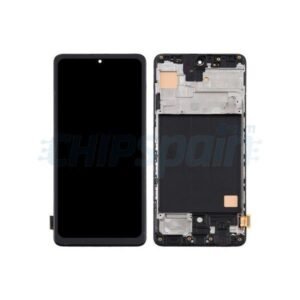
Google pixel 10 Screen Replacement
Availability:In Stock!
- Google Pixel 10 Screen Replacement
- High-quality display
- Touch sensitivity supported
- Durable glass protection
- Precise fit design
- OEM standard replacement
- Easy installation compatible
- Restores original clarity
KSh 17,500.00
CompareGoogle pixel 10 Screen Replacement and Repair in Kenya
The Google pixel 10 Screen Replacement is a flagship smartphone designed to showcase the latest advancements in mobile technology. Renowned for its exceptional camera capabilities and seamless integration with Google’s ecosystem, the Pixel 10 stands out with features that cater to both casual users and tech enthusiasts. With its cutting-edge hardware and a refined user interface, the Pixel 10 delivers an outstanding performance experience that includes rapid processing speeds, efficient battery management, and an array of smart functionalities.
A key highlight of the Pixel 10 is its state-of-the-art camera system. It incorporates advanced computational photography techniques that enable users to capture stunning photographs in various lighting conditions. The inclusion of features such as Night Sight and HDR+ further enhances its appeal, making it a favored choice among photography aficionados. Moreover, the device’s integration with Google Photos allows seamless backup and editing, reinforcing the overall user experience.
While the Google Pixel 10 boasts resilience and robust features, screen damage remains a common issue faced by many smartphone users. Various situations may lead to a cracked or shattered screen, including accidental drops, impacts while carrying the device, or environmental hazards. Despite its durability, the screen is a delicate component, and without proper protection, it can suffer from significant damage. Users should be aware of the signs that indicate a need for repair, such as unresponsive touch areas, display distortion, or visible cracks.
In evaluating the necessity for a screen replacement, understanding the benefits of maintaining the device in optimal condition becomes crucial. Not only does a functional screen enhance the overall usability of the Google Pixel 10, but it also preserves the investment made in this premium device, fostering its longevity and retaining its performance integrity. Thus, it is essential for users to address screen-related issues promptly to ensure they can continue enjoying the robust features that the Pixel 10 has to offer.
Common Reasons for Screen Damage
The Google Pixel 10, like any modern smartphone, is susceptible to various forms of screen damage that can compromise its functionality and aesthetics. Understanding these common reasons for screen damage can help users take better care of their devices.
One of the most frequent causes is accidental drops. Whether it occurs while taking a picture or simply moving from one place to another, dropping the device can lead to cracks or shattering of the screen. Impact from a height or on a hard surface increases the likelihood of significant damage, necessitating a screen replacement.
Scratches are another prevalent issue affecting Google pixel 10 Screen Replacement screens. Though minor abrasions may seem negligible, they can worsen over time, affecting visibility and usability. Scratches often occur due to contact with sharp objects or being placed in pockets alongside keys or coins. Utilizing protective cases or screen protectors can mitigate this risk considerably.
Water damage also poses a significant threat to the Pixel 10 display. Despite certain levels of water resistance, exposure to liquids can lead to internal issues that may not be immediately visible. This can result in malfunctioning touch sensitivity or display discoloration, ultimately requiring professional attention for repairs or replacement.
Manufacturing defects, although less common, can still lead to screen issues. Some users may experience problems with their displays right out of the box due to faulty components or assembly errors. It is crucial for buyers to inspect their devices thoroughly upon purchase and report any anomalies quickly, as this could provide options for warranty repair or replacement.
In essence, being aware of the common reasons for screen damage can help users adopt protective measures to safeguard their Google Pixel 10, ensuring its longevity and optimal performance.
Signs You Need a Screen Replacement
The Google Pixel 10, like any smartphone, is susceptible to screen damage resulting from accidental drops or impacts. Recognizing the signs indicating the need for a screen replacement is vital for maintaining optimal device functionality. One of the most apparent indicators is the presence of cracks on the screen. These cracks can vary in severity, and while minor ones may not significantly affect usability, extensive cracking can hinder interaction and worsen over time. Users should monitor these imperfections, as they may lead to further damage if not addressed promptly.
Another visual symptom to be aware of is the emergence of black spots on the display. These spots often indicate underlying damage to the screen itself or the display assembly. Similarly, unresponsive touch areas can result from a faulty digitizer or screen damage. If users notice a particular section of the screen that fails to register touch inputs, this could signal a need for immediate intervention. Effective functionality hinges on the responsiveness of the screen, and ignoring such signs can lead to a frustrating user experience.
Functional issues such as flickering screens or color distortion can also serve as vital indicators of a malfunctioning display. Flickering, especially when it occurs frequently, can be indicative of hardware malfunctions or problems with the screen connection. Color distortion may present as unusual hues or a lack of vibrancy in visual elements, further pointing to screen defects. As these issues can significantly detract from the overall usability of the device and impact user experience, it is essential to take them seriously. Recognizing these signs early on can help inform timely decisions regarding the need for a Google Pixel 10 screen replacement.
Finding the Right Replacement Screen
When it comes to replacing the screen on your Google Pixel 10, selecting the appropriate replacement screen is paramount for successful repair and long-term device satisfaction. First and foremost, compatibility is crucial. Ensure that the screen you are considering is specifically designed for the Google Pixel 10, as variations in models can lead to mismatched components. Using a screen that is compatible guarantees that it will fit correctly and function properly.
Next, consider the quality of the replacement screen. There are typically two primary options available: OEM (Original Equipment Manufacturer) screens and aftermarket screens. OEM screens are produced by the same company that manufactured the phone, ensuring optimal compatibility and quality. While they tend to come at a higher price, they often provide the best performance and durability. Conversely, aftermarket screens are produced by third-party manufacturers and can vary widely in quality. While they may be more affordable, it is essential to research and select high-quality aftermarket parts to avoid issues such as poor display performance or shorter lifespans.
Additionally, sourcing your replacement screen from reputable suppliers is critical in securing a dependable part for your Google Pixel 10. Look for suppliers with positive customer reviews and a history of reliable service in the mobile device repair industry. Reputable suppliers often provide clear warranties or guarantees for their screens, which can offer peace of mind in case of defects or compatibility issues. Take the time to compare different options, considering factors like price, quality, and supplier reputation. This diligence will facilitate a more successful screen replacement process and enhance the longevity of your device.
DIY Screen Replacement vs. Professional Repair
When considering a screen replacement for your Google Pixel 10, one must weigh the merits of undertaking a DIY approach versus enlisting professional repair services. Each option has its own advantages and drawbacks, which can significantly influence your decision.
Opting for a DIY screen replacement can be enticing, mainly due to cost savings. Purchasing the necessary parts and tools online might seem economical, as it typically ranges from $50 to $150, depending on the quality of the replacement screen. Furthermore, the ability to repair the device on your own time frame is appealing. However, this route requires a certain level of technical skill and knowledge. Access to reliable tutorials or guides is crucial, as the process can be intricate, involving delicate components. Additionally, the risk of causing further damage during the repair process is a significant concern. If done incorrectly, a DIY attempt can lead to additional costs that surpass the expense of professional help.
On the other hand, professional repair services for the Google Pixel 10 ensure a higher level of expertise. Technicians are trained to handle such repairs, often resulting in quicker and more reliable outcomes. The costs associated with professional repairs can vary significantly based on the repair shop but generally range from $150 to $300. Although this is more expensive than the DIY option, the peace of mind that comes from a guaranteed repair, along with potential warranty coverage, makes it worthwhile for many consumers. Moreover, professional services typically include a diagnostic check to ensure no further issues exist, which can prevent future headaches.
Ultimately, the choice between DIY screen replacement and professional repair hinges on your comfort level with technology, your budget, and the time you can allocate for the repair process. Both options have their unique advantages and challenges, making it essential to make an informed choice that best fits your needs.
Step-by-Step Guide for DIY Screen Replacement
Replacing the screen of your Google pixel 10 Screen Replacement can be a rewarding yet challenging task. To successfully carry out this repair, it is essential to gather specific tools and materials before beginning the process. You will need a Phillips screwdriver, a plastic opening tool, tweezers, a suction cup, and a replacement screen compatible with the Google Pixel 10.
Before diving into the repair, ensure that you take necessary safety precautions. Begin by powering off your device and removing any SIM cards. It is advisable to work in a well-lit area on a soft surface to prevent any accidental damage. Wearing an anti-static wrist strap can help minimize the risk of static discharge, which could harm sensitive components inside the device.
Once prepared, start by using the suction cup to gently lift the screen away from the frame. Carefully insert the plastic opening tool to create a gap between the screen and the body, then slide the tool along the edge to loosen the adhesive. It is crucial to be gentle at this stage to avoid damaging the internal components.
After successfully detaching the screen, locate the display connectors. Using the Phillips screwdriver, remove any screws securing the connector cover. With tweezers or your fingers, disconnect the old screen, ensuring no pins or connectors are damaged during the process. Now it’s time to install the new screen. Align the connectors of the replacement screen with the device’s motherboard and carefully press them into place.
Reattach the connector cover and screws, ensuring everything is secured properly. Finally, apply adhesive to the edges of the new screen, position it carefully onto the device, and press down to create a tight seal. Once this is complete, power on the device to check the functionality of the new screen. Follow these steps meticulously to ensure a successful repair of your Google Pixel 10 screen.
Cost Considerations for Screen Replacement
When contemplating a screen replacement for the Google Pixel 10, it’s essential to evaluate the associated financial aspects comprehensively. The overall costs can be broadly categorized into two approaches: do-it-yourself (DIY) repairs and professional services. Each option presents unique advantages and cost implications that should be considered carefully.
For DIY repairs, the primary expense will be the price of the replacement screen itself, which typically ranges between $100 to $200, depending on the quality and vendor. Furthermore, individuals may need to invest in specific tools for the repair process, such as screwdrivers, suction cups, and adhesive tape, with an additional cost of about $20 to $50. Therefore, the total expenditure for a DIY screen replacement could be estimated at around $120 to $250, based on parts and tool prices. However, this option requires a certain level of technical skill and comfort with mobile device disassembly, which can pose risks if not executed correctly.
On the other hand, opting for a professional repair service involves different cost structures. Repair shops may charge anywhere from $150 to $300 for screen replacement, factoring in labor and the installation of the new screen. Additionally, some services may provide warranties, typically covering repairs for a duration of 30 days to 1 year, adding value to the service. When assessing the professional option, it is also prudent to inquire about the quality of the parts used, as cheaper screens might be offered that may not match the quality of the original components.
In choosing between these options, potential users should weigh their personal skills, the value of warranties, and the risk of further damage to their device, alongside the financial implications. Understanding these considerations can help ensure an informed decision regarding Google Pixel 10 screen replacement costs.
Preventative Measures to Avoid Future Damage
Protecting your Google Pixel 10 screen from damage requires proactive measures that can significantly enhance its durability and longevity. Incorporating a few protective elements into your daily habits can prevent costly repairs and preserve the device’s functionality. One of the most effective steps is to use a high-quality screen protector. These thin layers of tempered glass or plastic can absorb impacts and prevent scratches, safeguarding your screen from everyday hazards.
In addition to screen protectors, selecting an appropriate phone case is crucial. A well-designed case can provide extra cushioning for your Google Pixel 10, minimizing the risk of damage from falls or bumps. Look for cases that have reinforced corners and shock-absorbing materials. This will not only protect the screen but also the overall structural integrity of the device.
Mindful handling of your smartphone is another essential practice. It is advisable to avoid placing the phone in pockets with sharp objects, like keys or coins, which can inadvertently scratch the screen. Furthermore, when placing your device on surfaces, ensure that the screen is facing upwards or use a soft cloth to prevent direct contact with anything abrasive.
Another valuable tip is to maintain a clutter-free area where you typically use your Google Pixel 10. Reducing the number of items on your desk or nightstand can help prevent accidental falls. Additionally, being cautious when engaging in activities that may lead to drops, such as exercising or working while multitasking, can also contribute to safeguarding your screen.
By implementing these preventative measures—using screen protectors, selecting suitable cases, and practicing mindful handling—you can significantly reduce the likelihood of screen damage for your Google Pixel 10, ensuring its functionality and appearance remain intact for years to come.
FAQs on Google Pixel 10 Screen Replacement
When considering a Google Pixel 10 screen replacement, several common questions arise that can help ease concerns before proceeding with the repair. One primary consideration is the impact on the warranty. If the device is still under warranty, users should be aware that self-repair or using an unauthorized repair service may void the warranty. To avoid this situation, it is advisable to consult the warranty terms and consider having the repair performed by an authorized service center.
Another frequent concern is the risks associated with self-repair. Replacing the screen on the Google Pixel 10 requires specific tools and careful handling to avoid inflicting additional damage. Potential risks include damaging internal components, leaving dust inside the device, or improperly reassembling the phone. For those lacking technical expertise, seeking professional assistance is recommended to ensure a successful replacement.
Post-replacement care is also an essential topic in the context of screen replacement. After having a new screen installed, it is crucial to allow adequate time for the adhesive to set properly. Avoid exposing the device to moisture and extreme temperatures for at least 24 hours following the repair. Furthermore, utilizing a protective case or screen protector can prevent future issues and prolong the life of the new screen. Regular maintenance checks will also help identify any arising problems early on and ensure the device remains in optimal condition.
Addressing these common questions about Google Pixel 10 screen replacement can empower users with the knowledge needed to make informed decisions regarding their device repair options. Always prioritize safety and quality to maintain the functionality of your smartphone.



There are no reviews yet.