The battery in the Google Pixel 10 Pro serves as a critical component that powers the device and influences its overall functionality. It stores electrical energy to facilitate the seamless operation of various features, from the camera and applications to connectivity options like Wi-Fi and Bluetooth. An efficient battery directly impacts user experience by enabling extended usage periods while maintaining optimal performance.
Typically, the Google Pixel 10 Pro is equipped with a high-capacity lithium-ion battery, providing a robust energy supply to support its advanced capabilities. The expected battery life can vary based on individual usage patterns, but users may anticipate several hours of web browsing, video playback, and call time on a full charge. As the device ages, batteries tend to degrade and may result in reduced performance, leading to shorter periods between charges and diminished capabilities.
Common issues users may encounter as their battery ages include slower charging times, unexpected shutdowns, or the device overheating during prolonged use. These problems are generally indicative of declining battery health and suggest that a replacement may be necessary for continued efficiency. Additionally, certain indicators can help users assess when it might be time for a new battery. For instance, if the battery percentage drops significantly without any apparent reason, or if the device struggles to hold a charge during regular tasks, these symptoms warrant a closer examination of the battery’s condition.
Overall, understanding the role of the battery in the Google Pixel 10 Pro is crucial for ensuring optimal device performance. The health of the battery not only affects how long users can rely on their phones between charges but also has implications for the overall longevity and functionality of the device. Maintaining battery health through careful usage and timely replacement can greatly enhance the Pixel 10 Pro experience.
Signs That You Need a Battery Replacement
Understanding the signs that indicate your Google Pixel 10 Pro may require a battery replacement is crucial for maintaining optimal performance. One of the most noticeable symptoms is rapid battery drain. If you find that your device’s battery percentage drops significantly within a few hours of light use, this could be an early indication that the battery is losing its capacity. Users frequently report situations where their phone shows 50% battery life only to shut down unexpectedly shortly afterward.
Another critical sign to watch for is device overheating. While it is normal for smartphones to generate some heat during intensive tasks such as gaming or video streaming, an unusually high temperature during simple activities can suggest a defective battery. If your Google Pixel 10 Pro feels excessively hot even when performing basic functions, it may be time to consider a replacement.
Random shutdowns are yet another common symptom that should not be overlooked. If your phone powers off without warning, particularly when the battery icon shows that it still has charge, this could indicate an internal problem with the battery. This issue tends to become more prevalent as the device ages, and many users report experiences where their phones turn off at critical moments, leading to data loss and frustration.
Finally, a failure to charge can be a clear sign that a battery replacement is necessary. If your Google Pixel 10 Pro is not responding to charging attempts—regardless of the cable or charging port used—it suggests that the battery may have reached the end of its lifespan. By keeping an eye out for these symptoms, you can make an informed decision about when to seek a replacement for your device’s battery.
Step-by-Step Battery Replacement Process
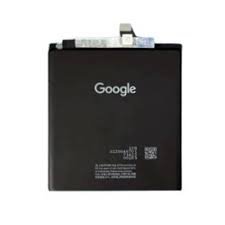
Replacing the battery in a Google Pixel 10 Pro can seem daunting, but by following this detailed guide, you can approach the process with confidence. To begin, you will need a set of essential tools: a small Phillips screwdriver, a plastic spudger, a suction cup, and a heat gun or hairdryer to soften adhesive. Additionally, a replacement battery specifically for the Google Pixel 10 Pro is imperative to ensure compatibility and performance.
Before disassembly, it is vital to power down your device completely and remove any SIM card tray. Once this is done, apply gentle heat around the edges of the screen with your heat gun or hairdryer. This step helps to soften the adhesive, making it easier to open the device without damage.
Next, use the suction cup to create a small gap between the screen and the device frame. Insert the plastic spudger into the gap to carefully pry the screen away from the body. Take your time with this step, avoiding excessive force to prevent cracking the screen. As you proceed, you will notice the battery connector attached to the motherboard. Once you have carefully lifted the screen, you may disconnect the battery connector using your spudger.
Now, remove the old battery from the compartment. If it is securely adhered, you may use the spudger to pry it out, ensuring that you avoid any surrounding components. Once the old battery is removed, place the new battery into the compartment, making sure it is aligned correctly. Reconnect the battery connector to the motherboard to ensure power delivery.
After the battery is installed and connected, it is time to reassemble your device. Carefully align the screen back onto the device and apply gentle pressure around the edges to seal it in place. If necessary, use specialized adhesive to reinforce the bond. Finally, power on your Google Pixel 10 Pro to verify that the battery replacement was successful. Following these steps ensures a seamless transition to a new battery, restoring your device’s performance efficiently.
When to Seek Professional Help
Replacing the battery of your Google Pixel 10 Pro can appear straightforward, but certain circumstances necessitate professional assistance. Understanding when to consult a technician is crucial to avoid damaging the device further. If the phone displays physical signs of damage, such as cracks, or if the device has been exposed to moisture, these conditions can complicate battery replacement. Attempting to replace the battery under such circumstances may lead to further damage or functional issues. Therefore, it is advisable to seek help from a professional technician in such scenarios.
Moreover, consider consulting with an expert if the complexity of reopening the device or disconnecting components exceeds your capability. If you are unfamiliar with smartphone repair, the risk of damaging delicate wiring or incorrectly installing the new battery increases significantly. A professional technician is well-equipped with expertise and specialized tools to handle these intricate tasks safely. If you experience unusual symptoms such as the phone not powering on, reboot loops, or erratic behavior post-battery replacement, contacting a qualified technician is essential.
Additionally, when a device is still under warranty, attempting a DIY approach may void it. Authorized service centers ensure that repairs comply with warranty terms, providing peace of mind that the device will remain covered for future issues. When selecting a reliable repair service, look for certifications, customer reviews, and warranties on the repairs offered. A technician should possess experience specifically with Google Pixel devices, ensuring familiarity with models like the Pixel 10 Pro. Keep in mind that professional battery replacement could incur costs ranging from $50 to over $150, depending on the service provider and the extent of the repairs needed. Weighing these factors will guide you in making a well-informed decision about battery replacement for your device.

 Samsung Galaxy A51 Screen Replacement
1 × KSh 10,500.00
Samsung Galaxy A51 Screen Replacement
1 × KSh 10,500.00 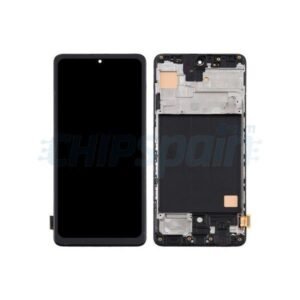 Samsung Galaxy M51 Screen Replacement
1 × KSh 13,000.00
Samsung Galaxy M51 Screen Replacement
1 × KSh 13,000.00  Huawei Y9 Prime 2019 Screen Replacement
1 × KSh 4,500.00
Huawei Y9 Prime 2019 Screen Replacement
1 × KSh 4,500.00  Oppo A15 Screen Replacement
1 × KSh 5,000.00
Oppo A15 Screen Replacement
1 × KSh 5,000.00  Archer MR200 WI-FI Router
1 × KSh 10,200.00
Archer MR200 WI-FI Router
1 × KSh 10,200.00  samsung galaxy m31 screen replacement
1 × KSh 9,500.00
samsung galaxy m31 screen replacement
1 × KSh 9,500.00  TL-MR100 Router
1 × KSh 9,000.00
TL-MR100 Router
1 × KSh 9,000.00  Huawei Router WS318 300Mbps WiFi Wireless
1 × KSh 3,800.00
Huawei Router WS318 300Mbps WiFi Wireless
1 × KSh 3,800.00 


There are no reviews yet.