

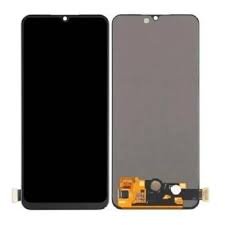
Vivo V50 Lite Screen Replacement
Availability:In Stock!
-
Compatible with Vivo V50 Lite
-
High-quality display replacement
-
Restores touch sensitivity
-
Clear and vibrant screen view
-
Durable and reliable build
-
Professional installation recommended
KSh 9,000.00
CompareVivo V50 Lite Screen Replacement in Kenya
The Vivo V50 Lite, known for its sleek design and impressive performance, is a popular choice among smartphone users. However, like any electronic device, it is susceptible to damage, and screen replacement may become necessary at some point during its lifespan. Understanding the common reasons for screen damage can help users proactively protect their devices and make informed decisions regarding repairs.
One of the most prevalent causes of screen damage is accidental drops. Accidents can happen to anyone, often resulting in a cracked or shattered screen. Such incidents not only affect the aesthetics of the Vivo V50 Lite but can also impair its functionality, making it challenging to navigate applications and utilize features. Additionally, impacts from hard surfaces or objects can trigger the need for a replacement, as even minor dents and scratches may escalate over time, leading to more significant damage.
Another factor contributing to screen damage is manufacturing defects. While Vivo maintains stringent quality control processes, occasional defects may sneak through, leading to vulnerabilities in the material. Issues such as poor adhesive bonding or manufacturing flaws can manifest over time, necessitating a replacement to restore the device’s original condition.
Understanding the screen replacement process not only helps users save time and money but also extends the overall life of the Vivo V50 Lite. By addressing screen issues promptly, users can prevent further complications that may arise from delayed repairs. Moreover, awareness of replacement options, either through professional services or DIY methods, equips users with the knowledge needed for effective decision-making. This guide will detail the steps and considerations involved in screen replacement, ultimately enhancing the user experience with the Vivo V50 Lite.
Understanding the Screen Component of Vivo V50 Lite
The Vivo V50 Lite is equipped with an advanced screen that integrates both LCD and touchscreen functionalities, which are vital for providing users with a seamless viewing experience. At the heart of the device’s display is the Liquid Crystal Display (LCD) technology. LCD screens are known for their ability to create vibrant colors and sharp images, which enhances the overall visual experience when using the smartphone.
In addition to its LCD component, the touchscreen functionality enables users to interact with the device easily. The touchscreen works through capacitive touch technology, which detects the presence of a finger or stylus on the screen, allowing for intuitive gestures such as swiping, tapping, and pinching. This dual-functionality makes the screen a crucial part of the Vivo V50 Lite, as it caters to both visual display and user interaction.
Understanding the components of the Vivo V50 Lite screen is essential for anyone considering a screen replacement. This knowledge can prevent mistakes during the replacement process and ensure that the new screen functions optimally. Different smartphone models may utilize various types of screens, such as OLED or AMOLED; however, the Vivo V50 Lite uniquely relies on the LCD technology that provides its distinct characteristics.
For effective screen replacement, familiarity with the specific parts involved, such as the digitizer, which is responsible for touch input, and the LCD panel itself is critical. The digitizer needs to be compatible with the LCD to guarantee proper functionality. By comprehending these key elements, users can better appreciate the importance of selecting the right replacement screen, thus ensuring their Vivo V50 Lite remains in optimal working condition.
Signs Your Vivo V50 Lite Needs a Screen Replacement
The Vivo V50 Lite, like any smartphone, is susceptible to wear and tear, particularly its screen, which is often the most vulnerable component of the device. Recognizing the signs that indicate a need for screen replacement is crucial for maintaining the device’s functionality. One of the most apparent indicators is the presence of visible cracks or scratches on the screen surface. Even minor damage can become exacerbated over time, leading to further complications.
Another common issue that suggests a screen replacement might be necessary revolves around touch responsiveness. If the touchscreen fails to register taps or swipes accurately, or if there are frequent unintentional inputs, this compromise in functionality points towards potential screen damage. Additionally, areas of the screen that fail to respond at all can be indicative of deeper issues that need immediate attention.
Discoloration is also a telling sign that the display may require replacement. This can manifest as spots, patches, or overall fading of colors, which not only affects the visual appeal but can interfere with media consumption and general usability. If you notice that colors are distorted or if the brightness fluctuates unexpectedly, it may indicate that the screen is failing.
Lastly, any complete display failures where the screen is unresponsive or shows no image at all should be treated with urgency. This can stem from internal damage caused by drops or liquid exposure. In such cases, it is prudent to consider a screen replacement to restore the device to its optimal state. Identifying these signs early can help avoid more extensive and expensive repairs down the line.
DIY vs. Professional Screen Replacement
When faced with a damaged Vivo V50 Lite screen, many users are often confronted with the decision of whether to undertake a DIY screen replacement or to seek professional assistance. Both approaches possess distinct advantages and disadvantages that should be carefully weighed before making a choice.
One of the primary factors influencing this decision is cost. DIY repairs typically come with lower expenses, as users can purchase replacement screens and necessary tools online without incurring labor charges. However, potential hidden costs arise when users mistakenly harm other components while attempting repairs, leading to additional expenses on replacement parts or professional help down the line.
Time is another crucial aspect to consider. Engaging a professional technician can expedite the process, often resulting in same-day service. In contrast, a DIY repair may take longer, especially for those with limited experience. It often involves research, gathering tools, and following detailed guides, which can be time-consuming.
Skill level is a determining factor as well. Individuals with technical abilities and a firm grasp of smartphone repairs may find success with a DIY approach. However, those without such expertise could risk improper installation, leading to further damage. If users lack confidence in their abilities, seeking professional help becomes the safer option.
Lastly, one must weigh the potential risks of DIY repairs. Improper techniques can void warranties or result in more substantial issues that require professional intervention later on. In contrast, professionals possess the experience and knowledge to effectively address repairs, often providing warranties on their work for added peace of mind.
Ultimately, weighing these factors will guide users toward a decision that best suits their skillset, budget, and urgency for repairing their Vivo V50 Lite screen.
Tools and Materials Needed for Replacement
Replacing the screen of the Vivo V50 Lite requires a careful selection of tools and materials to ensure a smooth and successful process. Here is a comprehensive list of the essential items needed for this task:
First and foremost, a set of screwdrivers is crucial. A small Phillips screwdriver is often necessary for removing the screws that hold the screen in place. Additionally, a specialized pentalobe screwdriver may be required depending on the specific model, as some screws can only be accessed with this type of tool.
Next, pry tools play an essential role in carefully separating the screen from the device casing. These tools are designed to prevent damage to the phone’s internal components while allowing for easy disassembly. Plastic pry tools are recommended as they minimize the risk of scratching or breaking the screen during the replacement process.
Moreover, you will need high-quality adhesive for reattaching the new screen. While some replacement screens come with adhesive pre-applied, having a tube of appropriate screen adhesive ensures a secure bond, preventing future issues. Look for adhesives specifically designed for smartphone display assembly to guarantee durability.
In addition to these essentials, a replacement screen is, of course, the centerpiece of this operation. Ensure that the replacement screen is genuine or of high quality to maintain the functionality and performance of the Vivo V50 Lite. Third-party options can vary in quality, so it is advisable to check product reviews and specifications before making a purchase.
Lastly, having a static-free work environment and soft cloth can help protect the phone’s sensitive components from electrostatic discharge and scratches during the replacement process. Collecting these tools and materials ahead of time will equip you thoroughly for a successful screen replacement on your Vivo V50 Lite.
Step-by-Step Screen Replacement Process
Replacing the screen of your Vivo V50 Lite can be a daunting task, but with the right guidance, it can be accomplished smoothly. Follow these steps to ensure an effective and safe screen replacement.
Begin by gathering the necessary tools: a heat gun or hairdryer, a suction cup, a plastic opening tool, and a set of precision screwdrivers. It is advisable to work in a clean environment to prevent any dust or debris from interfering with the replacement process.
Start the disassembly by heating the edges of the screen gently. This will soften the adhesive that holds the display in place. Use the suction cup to lift the screen slightly at one corner, creating a gap for the plastic opening tool. Be careful not to apply excessive force, as this may damage the internal components.
With the plastic opening tool, carefully run it along the edges to detach the screen from the frame. Once you have removed the old screen, you can proceed to disconnect the battery. This step is crucial to prevent any electrical issues during the replacement process. Locate the battery connector and gently unclip it using your precision screwdriver.
Next, remove the old display assembly by disconnecting its flex cables from the motherboard. Handle these components with care to avoid causing any permanent damage. Once all connections are free, you can set the old screen aside and prepare the new one for installation.
Align the new display with the frame, ensuring that all flex cables are appropriately positioned. Reconnect the flex cables and the battery connector. After that, press the new screen firmly into place. For a secure fit, it may help to apply gentle pressure all around the edges to ensure proper adhesion.
Finally, power on your Vivo V50 Lite to test the new screen. If everything functions as expected, tidy up your workspace by discarding any old components responsibly. Should you encounter any issues, refer to troubleshooting tips, which highlight common problems and their solutions. Through careful execution of these steps, you can confidently achieve a successful screen replacement for your Vivo V50 Lite.
Cost of Vivo V50 Lite Screen Replacement
When it comes to replacing the screen of your Vivo V50 Lite, several factors contribute to the overall cost. Understanding these factors can help consumers make informed decisions regarding their options for screen repair, whether pursuing a DIY approach or enlisting professional help.
The cost of screen replacement can vary widely based on the type of repair chosen. For those considering a DIY replacement, the expenses generally include the cost of the replacement screen and necessary tools. The price for a third-party Vivo V50 Lite screen may range from $50 to $150, depending on the supplier and the quality of the part. Additionally, if specific tools are needed, such as suction cups and screwdrivers, that may add another $20 to $50 to the budget. Therefore, DIY repair can potentially cost between $70 and $200 in total.
On the other hand, opting for professional repair services typically incurs higher costs but often guarantees a better outcome. Many repair shops charge a labor fee ranging from $50 to $100, in addition to the price of the replacement part. Depending on the quality of components used and the reputation of the repair service, the total cost for professional screen replacement of a Vivo V50 Lite can be anywhere from $100 to $300. It is crucial to consider that some repair services may also include warranties for their work, which can be beneficial in the event of future issues.
Factors influencing the final cost include the quality of replacement parts, the reputation and location of the service provider, and whether additional repairs are necessary. By assessing these variables, users can establish a realistic budget for the Vivo V50 Lite screen replacement and make an informed choice that best suits their needs.
Tips for Maintaining Your Vivo V50 Lite Screen
Maintaining the integrity of your Vivo V50 Lite screen after replacement is crucial for ensuring its longevity and optimal performance. One of the most effective preventive methods is to apply a high-quality screen protector. Whether you choose tempered glass or a film protector, these additional layers can absorb shock from accidental drops, reducing the risk of cracks and scratches. This simple yet effective tool can act as a formidable barrier between your device and potential damage.
Careful handling of the Vivo V50 Lite is also imperative. Avoid placing it face down on surfaces and keep it away from other objects that might cause scratches, such as keys or coins. When storing your device, consider using a dedicated pocket or a protective case that can shield it from everyday wear and tear. Such precautions can significantly reduce the chances of unintentional damage, preserving the pristine condition of your new screen.
Regular cleaning is another essential component of maintaining your Vivo V50 Lite screen. Use a microfiber cloth and a suitable screen cleaner to periodically remove dust, fingerprints, and smudges. It is advisable to avoid harsh chemicals, as they can strip away coatings applied to the screen. Gently wipe the screen with a damp cloth, ensuring that it is not overly wet, to prevent moisture from seeping into the device. Establishing a routine cleaning schedule will help keep the screen visually appealing and functional.
Incorporating these preventive measures not only enhances the aesthetics of your Vivo V50 Lite but also contributes to the functionality and lifespan of the newly replaced screen. By using screen protectors, practicing careful handling, and maintaining a regular cleaning routine, you can enjoy a durable and high-performing device.
Conclusion
Understanding the process of screen replacement for the Vivo V50 Lite is crucial for maintaining the longevity and functionality of your device. Given the reliance on smartphones in everyday life, a damaged screen can significantly hinder user experience, making it vital to address such issues promptly and efficiently. Knowing when to seek professional help or contemplating a DIY approach is a decision that requires careful consideration of various factors including cost, expertise, and access to quality parts.
When assessing screen replacement options, one must also factor in the warranty status of the device, as using unauthorized service providers may void warranties and lead to further complications. Evaluating the quality of replacement screens available in the market is equally important, as inferior products can result in decreased performance, touch sensitivity issues, or even physical damage to the device.
Moreover, regular maintenance can help mitigate screen damage, fostering a more enjoyable user experience with the Vivo V50 Lite. Precautionary measures such as using screen protectors and utilizing durable cases can extend the life of the original screen and minimize future repair needs. Therefore, investing time in understanding the nuances of screen replacement and maintenance is essential for all Vivo V50 Lite users. By making informed decisions and taking proactive steps, you can ensure that your smartphone remains in optimal condition for years to come.



There are no reviews yet.