Introduction to Vivo V40 Lite
The Vivo V40 Lite is a mid-range smartphone that has garnered attention for its impressive combination of features and performance. Launched as part of Vivo’s well-regarded V series, the phone boasts a stylish design and a range of specifications that cater to both casual users and tech enthusiasts alike. One of the standout attributes of the Vivo V40 Lite is its vibrant display. It features a 6.4-inch AMOLED screen that delivers stunning visuals, ensuring an engaging viewing experience for users, whether they are streaming videos or browsing social media.
Under the hood, the Vivo V40 Lite is powered by a robust processor, paired with ample RAM and storage options. This hardware configuration allows for smooth multitasking and efficient app performance, enabling users to run multiple applications seamlessly. Furthermore, the device’s camera system is another highlight, with a versatile setup that includes multiple lenses for capturing high-quality photos in various conditions. These features collectively contribute to the overall appeal of the Vivo V40 Lite, making it a worthy contender in the competitive smartphone market.
However, while the Vivo V40 Lite excels in many areas, it is essential to recognize the role that a functional battery plays in maintaining optimal performance. A smartphone is largely defined by its usability, and the battery’s longevity is crucial for uninterrupted operation throughout the day. Users might experience common battery issues such as rapid drainage or failure to charge, which can hinder their overall experience. Addressing these battery-related challenges is essential for allowing the Vivo V40 Lite to reach its full potential and for users to enjoy the valuable features that this smartphone offers.
Signs You Need a Battery Replacement
Recognizing when to replace your Vivo V40 Lite battery is essential to maintaining optimal performance and ensuring a smooth user experience. Several signs indicate that your device’s battery may need replacement. One of the most common symptoms is rapid battery drain. If you notice that your phone loses power significantly faster than it used to, even with similar usage patterns, this could signal a diminished battery capacity. It is crucial to monitor how long your device lasts between charges, as a significant decrease may necessitate a battery replacement.
Another clear indication is the inability to hold a charge. If your Vivo V40 Lite struggles to sustain its battery power, requiring frequent recharging throughout the day despite minimal use, it may be time to consider getting a new battery. This issue may arise from the battery’s age or internal degradation, meaning that it no longer effectively stores energy.
Random shutdowns are also a concerning sign of battery problems. If your phone occasionally powers off without warning, especially when the battery indicator shows that there is still power available, it’s likely that the battery is faulty. These unexpected shutdowns can disrupt tasks and can be indicative of deeper malfunctioning within the device’s power management system.
Lastly, physical deformities in the battery, such as bulging or swelling, are critical signs that should never be ignored. A swollen battery poses safety risks, including potential leaks or fires, and requires immediate action. If you observe any irregularities in the battery’s shape or if the back cover of your phone appears abnormally raised, seek a battery replacement promptly to avoid further complications.
Understanding the Battery Specifications
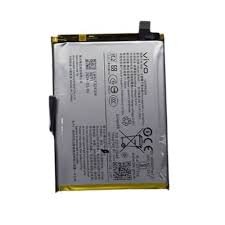
The Vivo V40 Lite features a robust battery that plays a critical role in the overall performance of the device. Understanding the specific battery specifications is essential for users who wish to maintain the longevity and functionality of their smartphones. The battery type used in the Vivo V40 Lite is a lithium polymer (Li-Po) battery, which is known for its lightweight and high energy density. This type of battery allows for faster charging and a more extended usage period, which is particularly beneficial for daily tasks.
The capacity of the Vivo V40 Lite battery is approximately 4100 mAh, which represents a significant power reserve for the device. A higher mAh rating indicates that the battery can store more energy, translating to a prolonged period between charges. With proper utilization, the Vivo V40 Lite can last through a full day of regular use, including gaming, video playback, and browsing.
Another critical aspect is the lifespan of the battery, which typically refers to the number of charge cycles a battery can undergo before its performance begins to degrade significantly. For lithium polymer batteries such as the one in the Vivo V40 Lite, users can generally expect about 300-500 full charge cycles before experiencing noticeable decline in capacity. Factors such as temperature, charging habits, and the applications used can significantly influence the battery’s lifespan.
When considering battery replacement for the Vivo V40 Lite, it is crucial to use an OEM (Original Equipment Manufacturer) replacement or a compatible battery to maintain performance and safety. Using substandard or incompatible batteries may lead to overheating, reduced performance, and potential hazards. Understanding these battery specifications empowers users to make informed decisions when it comes time to replace their device’s battery.
Where to Find a Replacement Battery
When it comes to finding a replacement battery for your Vivo V40 Lite, several options are available that cater to different needs and preferences. One of the safest choices is an authorized service center, where you can acquire a battery that meets the manufacturer’s quality standards. Authorized service centers utilize genuine components and have trained technicians who understand the specific requirements of Vivo devices. By choosing this route, you can ensure that the replacement battery is reliable and compatible with your smartphone.
Another viable alternative is to explore online retailers. Websites such as Amazon, eBay, and specialized electronics sites often list replacement batteries for various smartphone models, including the Vivo V40 Lite. When shopping online, it’s crucial to read customer reviews and check ratings to avoid counterfeit products. Always look for sellers who provide thorough descriptions and clear images of the battery, verifying that it is an authentic Vivo part. The return policy of the retailer can also offer some assurance in case the product does not meet your expectations.
Additionally, local phone repair shops can be a convenient option when searching for a replacement battery. Many of these establishments stock a range of accessories and components for various phone models. However, it is advisable to inquire about the source of their replacement batteries and confirm that they are original parts to ensure compatibility and longevity. Always opt for shops that have established a reputation for quality service and offer warranties on their products.
In summary, whether you choose an authorized center, an online retailer, or a local repair shop, ensure that you prioritize authenticity and quality when looking for a replacement battery for your Vivo V40 Lite. This careful selection process will help prolong the life of your device and enhance its performance.
DIY vs Professional Replacement
When it comes to battery replacement for devices such as the Vivo V40 Lite, individuals often face the decision between undertaking the task themselves or enlisting a professional service. Each option presents unique advantages and disadvantages that should be carefully considered before proceeding.
Opting for a DIY battery replacement offers several benefits. Primarily, it can be a cost-effective solution, as purchasing a replacement battery and using available tools may be less expensive than professional services. Moreover, for those with a reasonable degree of technical skill and familiarity with smartphones, the satisfaction of successfully completing the task can be rewarding. There are numerous online tutorials and videos that provide step-by-step guidance specifically for models like the Vivo V40 Lite, making the process more accessible to the average user.
However, DIY replacements may pose risks, particularly for individuals lacking experience. There is a possibility of damaging delicate components within the phone if not handled properly. Additionally, the absence of essential tools can make the process cumbersome, potentially leading to further complications. Furthermore, undertaking a battery replacement on your own may void any existing warranty, which is a significant consideration for many users.
On the other hand, hiring a professional service guarantees expertise and minimizes the risk of damage to the device. Trained technicians have the necessary tools and knowledge to handle replacements safely and efficiently. While this option generally incurs a higher cost than a DIY approach, the peace of mind associated with professional assistance can offset the expense for many users.
In evaluating whether to replace the Vivo V40 Lite battery independently or to seek professional help, individuals should weigh their technical skills, the cost implications, the availability of tools, and warranty concerns. These factors are crucial in making an informed decision that aligns with their particular circumstances.
Step-by-Step Battery Replacement Guide
Replacing the battery of the Vivo V40 Lite requires precision and careful handling. Before starting the process, ensure you have the necessary tools: a small screwdriver set, a plastic opening tool, tweezers, and a suction cup. Always ensure that your working environment is clean and static-free to prevent damage to the components.
Firstly, turn off your Vivo V40 Lite to avoid any electrical hazards during disassembly. Begin by carefully using a plastic opening tool around the edges of the phone to detach the back cover. It is essential to apply gentle force to avoid cracking the casing. Once removed, locate the screws securing the mid-frame. Use your screwdriver to remove these screws carefully.
After the screws are taken out, use the plastic opening tool to lift the mid-frame, revealing the device’s internals. Be attentive at this stage as there may be ribbon connectors attached to the mid-frame. Gently disconnect these ribbon connectors to free the mid-frame completely. Now that you have access to the battery, identify the battery connector positioned at the bottom of the device.
Using your tweezers, disconnect the battery connector by pulling it straight out. Proceed to remove the old battery; this may require a gentle prying motion. Once the old battery is out, it is time to install the new one. Align the new Vivo V40 Lite battery with the battery slot, ensuring it fits snugly. Reconnect the battery connector to the motherboard, ensuring it clicks into place securely.
To complete the reassembly, reverse the disassembly process. Reattach the mid-frame, ensuring all ribbon connectors are secured. Tighten the screws and carefully snap the back cover into place. Finally, power on the device to verify that the new battery is functioning correctly. Remember to dispose of the old battery responsibly, following local environmental regulations.
Post-Replacement Care and Maintenance
After replacing the battery of your Vivo V40 Lite, it is crucial to adopt a meticulous approach in caring for the new component. Proper battery maintenance can significantly prolong its lifespan and enhance overall device performance. One of the primary practices to observe is the charging cycle. Ideally, your new battery should undergo a complete charge cycle, which involves charging it to 100% and then allowing it to discharge to around 20% before recharging. This practice is beneficial for lithium-ion batteries, helping to calibrate the battery indicator accurately and establishing a healthy charge routine.
Moreover, avoiding extreme temperatures is paramount for maintaining the integrity of the new battery. Lithium-ion batteries are sensitive to heat and cold; therefore, it is advisable to keep your device out of direct sunlight and refrain from leaving it in environments with temperatures exceeding 35°C (95°F). Extreme cold can also adversely affect battery performance, causing it to drain faster than normal. A controlled and moderate environment will encourage optimal functioning of the battery.
Additionally, managing the applications that drain battery life is another critical aspect of post-replacement care. Certain applications, particularly those that require constant background activity or high processing power, can lead to rapid battery depletion. Regularly monitoring and restricting permissions for apps that consume excessive energy can help in extending battery life. Additionally, utilizing battery-saving modes available in your Vivo V40 Lite can also mitigate unnecessary power usage.
Incorporating these practices will not only optimize the performance of your new battery but also sustain its capacity over the long term. By exercising these care strategies, users can ensure that their Vivo V40 Lite delivers consistent and reliable functionality, enhancing overall user experience.
Troubleshooting Common Battery Issues
Even after successfully replacing the battery of your Vivo V40 Lite, users may encounter several common issues that can affect the device’s functionality. Recognizing and addressing these problems early can help optimize battery performance and extend the device’s lifespan. This section outlines some prevalent battery-related complications and offers troubleshooting tips to assist users in resolving these matters independently.
One of the most frequent issues reported is charging problems. If your Vivo V40 Lite does not charge correctly after a battery replacement, first ensure that the charging cable and adapter are functioning properly. Faulty or damaged cables can lead to inadequate charging, thereby reducing battery efficiency. If possible, test with another charging cable or adapter to confirm whether the issue lies within the accessories. Additionally, inspect the charging port on your device for debris or dirt; a clean port ensures proper connectivity and fast charging.
Unexpected shutdowns are another common concern, often occurring even after a battery replacement. If your device shuts down abruptly, despite having a seemingly sufficient charge, it could indicate a software-related issue or an improperly installed battery. To troubleshoot, first update your device’s operating system; manufacturers often release updates that address known bugs affecting battery performance. Ensuring that all applications are up to date also promotes better efficiency and prevents unexpected shutdowns due to software conflicts.
Moreover, excessive battery drain can sometimes remain even after replacing the battery. This issue may arise from specific applications consuming unusually high battery percentages. Users should check the battery usage in the settings menu to identify which apps are draining power. Removing unused applications or adjusting their background activity settings can significantly improve battery performance.
By following these troubleshooting tips, Vivo V40 Lite users can tackle common battery-related issues, ensuring an optimal user experience.
Conclusion and Final Thoughts
In this blog post, we have explored the essential aspects of battery replacement for the Vivo V40 Lite, emphasizing the critical role that battery health plays in the overall performance and longevity of the device. A well-functioning battery is integral to the seamless operation of any smartphone, and users must be aware of the symptoms that may indicate the need for replacement, such as rapid drain or failure to hold a charge. Recognizing these signs early on can significantly extend the life of the device.
We discussed various options available for Vivo V40 Lite battery replacement, including DIY methods and seeking professional help. The DIY approach can be appealing for those who are technically inclined; however, it comes with risks, such as potential damage to the device if not executed correctly. Conversely, consulting with professionals ensures that the replacement procedure adheres to safety standards, often utilizing high-quality components that can enhance the performance of your device.
It is crucial for users to consider their specific situations when deciding between these options. Factors such as warranty, technical skills, and budget should all play a part in determining the best course of action. While a DIY replacement might seem cost-effective, it is essential to weigh this against the potential issues that could arise from improper handling.
Ultimately, taking proactive measures to address battery health is vital. Delaying a battery replacement can lead to more significant problems down the line, affecting not only the Vivo V40 Lite’s performance but also the user experience as a whole. We encourage all readers to make informed decisions when faced with battery issues and to prioritize maintaining their smartphone’s functionality through timely action.

 Google Pixel Buds Pro
1 × KSh 22,500.00
Google Pixel Buds Pro
1 × KSh 22,500.00  Google Pixel 7a
1 × KSh 42,500.00
Google Pixel 7a
1 × KSh 42,500.00  Sony WH-1000XM5
1 × KSh 34,000.00
Sony WH-1000XM5
1 × KSh 34,000.00  OnePlus 13R 12GB/256GB
1 × KSh 60,000.00
OnePlus 13R 12GB/256GB
1 × KSh 60,000.00  Samsung Galaxy Tab A9
1 × KSh 13,500.00
Samsung Galaxy Tab A9
1 × KSh 13,500.00 


There are no reviews yet.