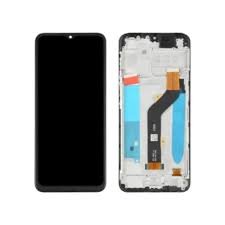
Tecno Spark 40 Pro KM6 Screen Replacement in Kenya
The Tecno Spark 40 Pro KM6 is an innovative smartphone that has attracted considerable attention due to its compelling features and practical design. Positioned in the mid-range segment, it presents a well-rounded package for users looking for functionality without breaking the bank. One of its standout attributes is the vibrant display, which measures 6.8 inches diagonally, boasting a resolution that enhances overall visual experiences, whether for gaming, viewing videos, or browsing social media.
This device is equipped with an IPS LCD screen, known for its excellent color reproduction and wide viewing angles. Such attributes make the display an integral component of the Tecno Spark 40 Pro KM6, significantly influencing user interaction. The expansive screen allows for immersive experiences; however, it is also relatively prone to damage from drops or impacts, which may necessitate a screen replacement. The importance of the display extends beyond aesthetics, impacting functionality. A well-maintained screen is crucial for touch sensitivity and visual clarity, ensuring users have a seamless experience when operating their device.
Furthermore, the significance of the Tecno Spark 40 Pro KM6’s screen cannot be overstated, as it serves as the primary interface between the user and the device. Its clarity and responsiveness contribute to the overall satisfaction of smartphone usage, making it essential to address any damage promptly. Understanding the features and specifications of this smartphone not only highlights its capabilities but also underscores the importance of maintaining its key components, particularly the screen. As users rely heavily on their smartphones for various tasks, the need for potential replacements becomes paramount as part of responsible ownership.
Common Screen Issues with Tecno Spark 40 Pro KM6
The Tecno Spark 40 Pro KM6 is a popular device, but like any smartphone, it may encounter certain screen-related issues over time. Understanding these common screen problems can assist users in determining whether a screen replacement is necessary. One of the most frequently reported issues is cracking of the screen. Accidental drops or impacts can lead to cracks, ranging from minor surface fractures to significant breaks that hinder visibility and usability.
Another issue that users often face is the presence of dead pixels. These are small dots on the screen that remain unlit, creating an annoying visual distraction. Dead pixels can be caused by manufacturing defects or physical damage to the display. Users may sometimes mistake these for dust particles, but they typically require professional attention for resolution.
Touch sensitivity problems are also prevalent among Tecno Spark 40 Pro KM6 users. If the touchscreen becomes unresponsive in specific areas or displays erratic behavior, it may indicate that the device needs repair. This can significantly affect user experience, making navigation cumbersome. Factors contributing to these issues may include software glitches or hardware malfunctions.
Display discoloration is another concern, where colors appear faded, inverted, or inconsistent across the screen. This problem can stem from both software issues and hardware failures, leading to an unsatisfactory visual experience. Such discoloration often hints at the deterioration of the screen’s components, signaling potential need for replacement.
Identifying these common screen issues early can prevent further complications and ensure that the Tecno Spark 40 Pro KM6 remains functional and aesthetically pleasing. Users experiencing any of these problems should consider consulting a professional to evaluate their device’s condition accurately.
Signs That Indicate a Screen Replacement is Necessary
A malfunctioning screen can severely detract from the usability of your Tecno Spark 40 Pro KM6. It is crucial for users to recognize specific signs that indicate a screen replacement is necessary, allowing for an informed decision regarding device maintenance or repair. One of the primary visual cues to watch for is the presence of cracks or significant scratches on the screen’s surface. Even minor cracks can compromise the structural integrity of the display and lead to further damage if not addressed promptly.
Additionally, discoloration or dead pixels are critical indicators that a replacement may be due. Users may notice patches of discolored areas, which can affect the overall viewing experience. If the screen displays persistent black spots or unresponsive areas, that is often a sign that the internal components are failing, and a replacement would be more beneficial than simple repairs.
Another functional problem to note is touch sensitivity. If users experience inconsistencies when tapping or swiping on the screen, it can signal that the digitizer is malfunctioning. Continuous problems with responsiveness can hinder device functionality. Moreover, if the screen flashes or flickers during usage, it could point to underlying hardware issues, further suggesting that a replacement is warranted.
In scenarios where liquid damage occurs, it is advisable to consider replacing the screen. Liquid exposure may lead to lasting damage that can negatively affect both the display and connected components, making repair insufficient. Lastly, if the screen is detached from the device’s body, it not only affects aesthetics but can also lead to catastrophic failures if further action is not taken.
Options for Screen Replacement: DIY vs Professional Service
When it comes to replacing the screen of the Tecno Spark 40 Pro KM6, users have two primary options: undertaking the task themselves (DIY) or opting for a professional repair service. Each route presents its distinct advantages and disadvantages.
Going the DIY route is often attractive due to the potential cost savings involved. By purchasing a replacement screen online and acquiring the necessary tools, such as screwdrivers, adhesive, and suction cups, individuals can complete the repair at a fraction of the cost of a professional service. However, DIY repairs require a certain level of technical skill and confidence. Those lacking experience may risk damaging their device further, leading to more expensive fixes down the line.
Moreover, individuals must consider the time investment required for a DIY replacement. Researching repair guides, gathering tools, and executing the repair can take several hours. Additionally, if a mistake occurs, one might find themselves without a functioning device while trying to rectify the errors.
On the other hand, hiring a professional service provides access to experienced technicians who possess the necessary tools and expertise to ensure a proper screen replacement. While the costs may be higher, typically ranging from $100 to $200 depending on the service provider, the assurance of a correctly executed repair, often accompanied by a warranty, adds significant value. This minimizes the risk associated with improperly handling delicate components of the Tecno Spark 40 Pro KM6.
Ultimately, the choice between DIY and professional repair hinges on an individual’s comfort level with technology, budget, and urgency. For those with the skills and resources, a DIY replacement can be a rewarding challenge. Conversely, those prioritizing reliability and warranty support may find a professional service to be the more prudent path.
Tools and Materials Needed for DIY Screen Replacement
When embarking on the journey of replacing the screen of your Tecno Spark 40 Pro KM6, gathering the right tools and materials is crucial for a successful DIY project. The quality and precision of the tools utilized will significantly influence the outcome of your screen replacement task.
First and foremost, you will need a set of screwdrivers. A precision screwdriver set with Phillips and flat-head options is essential to tackle the various screws holding the device together. These screwdrivers must be of high quality to prevent stripping screws during the disassembly process.
Next, adhesive is a vital material for securely placing the new screen. It is advisable to procure a high-strength adhesive tape specifically designed for smartphone repairs, such as double-sided adhesive tape or a specialized glue for electronic devices. This will ensure that the new screen adheres correctly without causing damage to other components.
Additionally, a replacement screen is paramount. Ensure you source a compatible Tecno Spark 40 Pro KM6 screen from reputable suppliers either online or in local repair shops. It is important to verify the warranty and return policy of the replacement screen in case of defects.
Other useful tools include a plastic opening tool, which aids in prying open the phone without damaging its casing, and tweezers to manipulate small parts more easily. A heat gun or hairdryer can also prove beneficial for gently warming the adhesive, making it easier to separate the broken screen from the device.
Lastly, before starting the replacement process, ensure that you have a clean, well-lit workspace and a small container to keep screws organized. By gathering these tools and materials, you can confidently proceed with the DIY screen replacement of your Tecno Spark 40 Pro KM6, ensuring a smoother and more efficient repair experience.
Step-by-Step Guide to Replacing the Screen
Replacing the screen of the Tecno Spark 40 Pro KM6 can seem daunting, but with a bit of patience and the right tools, it can be accomplished successfully. This guide will walk you through the process step-by-step to ensure a smooth screen replacement.
First, gather your tools. You will need a heat gun or hairdryer, a suction cup, a prying tool, a set of screwdrivers (including a Phillips and a Torx), and adhesive tape or glue suitable for phone screens. Ensure you have a clean workspace, free from distractions.
Begin by powering off the Tecno Spark 40 Pro KM6 and removing the SIM card tray. This step prevents any potential damage during the replacement process. Next, apply gentle heat around the perimeter of the phone’s display using the heat gun. This will soften the adhesive, making it easier to remove the screen.
Once the adhesive is warmed, use the suction cup to create a small gap between the screen and the phone frame. Insert a prying tool into this gap and gently slide it around the edges of the screen to loosen it. Take care not to apply excessive force as this could damage internal components.
After detaching the screen, disconnect it from the motherboard by removing any screws and carefully lifting the connector. Set the broken screen aside and prepare the new screen for installation. Be sure to check that the new display is free of dust and debris before proceeding.
Connect the new screen to the motherboard, ensuring all connectors are securely in place. Proceed to reattach the screen to the frame, applying adhesive tape or glue as necessary to secure it. Once installed, press firmly around the edges to ensure a proper seal.
Finally, reinsert the SIM card tray, power on the Tecno Spark 40 Pro KM6, and test the new screen functionality. If everything works properly, congratulations on your successful screen replacement!
Cost Analysis of Screen Replacement
The cost of a screen replacement for the Tecno Spark 40 Pro KM6 can vary significantly, depending on whether you choose to perform the repair yourself or opt for professional services. Understanding the associated costs is crucial for making an informed decision that best suits your budget and technical capabilities.
For DIY enthusiasts, the first step is to procure the necessary replacement screen, which can generally be found within a price range of $30 to $90. This wide variability in pricing can be attributed to factors such as the supplier, screen quality, and warranty offered. It is advisable to prioritize sourcing a genuine part to ensure optimal performance and compatibility with the device.
Additionally, if you decide to go the DIY route, you will likely need specific tools to facilitate the installation process. A basic toolkit might include a screwdriver set, prying tools, and tweezers, with a total estimated cost of around $20 to $50. It is also important to consider that some repairs may require specialized tools, which can add to the overall expenditure. Furthermore, if you choose to purchase the replacement screen online, shipping costs could range from $5 to $25, depending on the retailer’s policies.
On the other hand, seeking professional assistance typically results in a higher overall expenditure. Professional repair services often charge between $100 and $200 for screen replacements, factoring in labor and parts. This alternative might be more appealing to those who lack the required skills or equipment to handle the DIY approach. Furthermore, opting for a professional repair may also yield certain guarantees and warranties on the service provided, which can be invaluable in the long term.
In conclusion, the cost of screen replacement for the Tecno Spark 40 Pro KM6 encompasses various factors ranging from parts and tools in a DIY scenario to professional service expenses. Each option entails distinct advantages and may be suitable for different users based on their skills and budget constraints.
Aftercare Tips Post-Screen Replacement
Once you have successfully replaced the screen of your Tecno Spark 40 Pro KM6, proper aftercare becomes essential to ensuring its longevity and functionality. The following tips can help prolong the life of your newly replaced screen and maintain its optimal performance.
First and foremost, handling the device with care is crucial. Avoid dropping your phone or applying excessive pressure on the screen, as this can lead to cracks or damage. When holding the Tecno Spark 40 Pro KM6, use both hands when necessary and refrain from placing heavy objects on top of it. Establishing a habit of treating your device gently can significantly reduce the risk of damage.
Furthermore, it’s vital to protect the screen from moisture. Exposure to liquids can seep into the cracks of the phone, even if it appears to be sealed properly. Always keep your device in a dry environment and avoid using it in humid locations, such as bathrooms or kitchens. If your phone does come into contact with moisture, immediately dry it off with a soft, lint-free cloth.
Investing in a high-quality screen protector is another effective method for safeguarding your Tecno Spark 40 Pro KM6 screen. A screen protector can shield against scratches, smudges, and minor impacts. Choose a protector that allows for easy application and does not impede touch sensitivity. This will contribute to enhanced durability and added layer of protection for your newly replaced screen.
Should you encounter issues shortly after replacement, such as touch sensitivity problems or display issues, it is prudent to seek professional help. Do not attempt to fix these problems yourself, as this can exacerbate the damage and void any warranties. Instead, consult with a qualified technician who specializes in Tecno devices for appropriate troubleshooting and repairs.
Conclusion and Final Thoughts
In conclusion, understanding the complexities surrounding the Tecno Spark 40 Pro KM6 screen replacement is pivotal for any user experiencing screen issues. This blog has highlighted the significance of recognizing common screen problems, such as cracks, unresponsive touch functionality, and display malfunctions, which can severely affect device usability. By being aware of these issues, users can promptly address them before they escalate, ensuring their devices remain functional for an extended period.
Equally important is the evaluation of various screen replacement options. Users have multiple pathways available, including DIY repairs, professional services, and authorized service centers. Each option offers distinct advantages and challenges. DIY repairs may save money and provide satisfaction, but they require specific skills and tools. Professional services ensure a high level of expertise and efficiency, albeit at a higher cost. Authorized service centers maintain the manufacturer’s quality standards, which can, in some cases, be crucial for warranty or insurance reasons. Making an informed decision tailored to one’s skill level, budget, and urgency is vital for effective screen repairs.
Furthermore, adherence to proper replacement procedures cannot be overstressed. Whether opting for a DIY approach or seeking professional help, following the correct guidelines will ensure a successful screen replacement. This includes sourcing the right parts, utilizing appropriate tools, and following step-by-step instructions carefully. Any misstep can lead to additional damage, including affecting internal components or compromising device performance.
We encourage readers to share their personal experiences with screen replacements, offer tips that have proven effective in their cases, or ask questions if uncertainties remain. Engaging in this discourse not only helps individuals resolve their specific challenges but also fosters a community where collective knowledge enhances the overall understanding of Tecno Spark 40 Pro KM6 screen maintenance.

 Google Pixel Buds Pro
1 × KSh 22,500.00
Google Pixel Buds Pro
1 × KSh 22,500.00  Google Pixel 7a
1 × KSh 42,500.00
Google Pixel 7a
1 × KSh 42,500.00  Sony WH-1000XM5
1 × KSh 34,000.00
Sony WH-1000XM5
1 × KSh 34,000.00  OnePlus 13R 12GB/256GB
1 × KSh 60,000.00
OnePlus 13R 12GB/256GB
1 × KSh 60,000.00  Samsung Galaxy Tab A9
1 × KSh 13,500.00
Samsung Galaxy Tab A9
1 × KSh 13,500.00 


There are no reviews yet.