

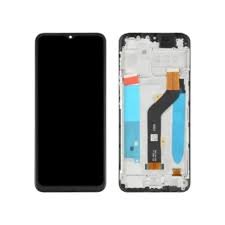
Tecno Spark 40 KM5 Screen Replacement in Kenya
The Tecno Spark 40 KM5 is a smartphone designed to balance performance and affordability, making it a popular choice among budget-conscious users. One of its most notable features is its display, which comprises a 6.6-inch screen. This sizable display is ideal for media consumption, gaming, and everyday tasks. It offers a resolution of 720 x 1612 pixels, providing a satisfactory viewing experience for users while keeping battery consumption in check.
The display employs IPS LCD technology, which enhances color accuracy and offers wide viewing angles. This technology is particularly advantageous for users who enjoy watching videos or playing games where screen integrity is crucial. However, despite these advantages, there are certain vulnerabilities associated with the Tecno Spark 40 KM5 screen. One common issue is its susceptibility to scratches and cracks, especially if the device is dropped or mishandled. Users often report incidents where the screen gets damaged due to accidental falls, leading to the need for replacement.
Moreover, the screen can sometimes suffer from issues such as unresponsive touch or display discoloration, which can be detrimental to the overall user experience. These problems may arise from manufacturing defects or wear and tear over time. Since the Tecno Spark 40 KM5 is positioned as an entry-level device, users need to be mindful of how they handle the phone, employing protective cases or screen protectors to mitigate potential damage.
In summary, while the Tecno Spark 40 KM5 screen offers solid capabilities for its price point, users should remain vigilant regarding its vulnerabilities to ensure longevity and optimal performance.
Signs You Need a Screen Replacement
Diagnosing whether your Tecno Spark 40 KM5 screen requires replacement is crucial for maintaining the device’s functionality and overall user experience. Several indicators can alert users to potential issues with their smartphone display. One of the most common signs is the presence of cracks. Physical damage not only affects the aesthetic value of the phone but can also compromise the integrity of the display, making it essential to consider a screen replacement.
Another significant indicator of screen issues is if certain areas of the touch screen become unresponsive. This may manifest as a lack of functionality in specific spots or a complete inability to register touch commands. Such symptoms can hinder navigation and drastically impact usability, suggesting that a replacement may be necessary. Additionally, if users experience inconsistent responsiveness where taps do not register or open unintended applications, it further points toward the need for a new screen.
Discoloration is yet another prominent sign that a Tecno Spark 40 KM5 screen requires attention. Users may observe unusual color shifts, such as yellowing or overly dark areas, which can indicate damage to the screen’s LCD or LED components. Moreover, encountering unusual lines or artifacts on the display—often referred to as “ghosting”—is a clear indication of underlying hardware issues that may necessitate replacement. These artifacts can distract from the content, making it vital to address them in a timely manner.
Being proactive about these signs can help maintain your device’s performance. Observing these symptoms closely and acting swiftly can result in an optimal smartphone experience, ensuring that your Tecno Spark 40 KM5 remains functional and visually appealing.
Choosing the Right Replacement Screen
When selecting a replacement screen for the Tecno Spark 40 KM5, several critical factors warrant consideration to ensure a satisfactory outcome. Firstly, there are two primary categories of screens available: original manufacturer parts and aftermarket alternatives. Original screens, often referred to as OEM (Original Equipment Manufacturer) parts, are designed and produced by the phone’s manufacturer, ensuring precise fit and functionality. In contrast, aftermarket screens are produced by third-party companies and may vary in quality and performance. While they are typically more affordable, it’s essential to thoroughly research the brand and read customer reviews to gauge the screen’s reliability.
Another important aspect to consider is compatibility. It is crucial to confirm that the replacement screen is specifically designed for the Tecno Spark 40 KM5 model. Mismatched components can lead to operational issues and further damage to the device. Ensure that you check the specifications, such as display size, resolution, and connector type, to avoid compatibility problems.
Price is a significant consideration when purchasing a replacement screen. Prices can range widely based on the type, brand, and seller. While it may be tempting to opt for the cheapest option available, investing in a quality screen, whether OEM or high-rated aftermarket, can save you money in the long run by providing durability and enhanced performance. Often, reputable online platforms and local electronics stores will offer warranties on their products, which can provide peace of mind.
Lastly, always prioritize purchasing from trusted vendors. Well-known e-commerce websites, authorized retailers, or local repair shops often stock reliable parts and offer customer support, increasing your chances of a successful repair.
DIY vs Professional Replacement: Pros and Cons
When faced with a cracked screen on a Tecno Spark 40 KM5, one of the primary decisions is whether to tackle the replacement as a DIY project or to enlist the services of a professional. Each option comes with its distinct advantages and disadvantages, making it crucial for users to evaluate their needs and capacities before proceeding.
One of the primary benefits of a DIY screen replacement is cost savings. Performing the repair yourself can significantly reduce expenses, as professional repair services often include high labor charges. Moreover, there is a wealth of online resources, including video tutorials and step-by-step guides, that can facilitate the DIY process. However, this approach demands a good degree of technical skill. Individuals need to familiarize themselves with the necessary tools, such as screwdrivers, suction cups, and adhesive agents, and have a steady hand for the delicate work involved. Any mistakes during the replacement process could lead to further complications, potentially damaging the device beyond repair.
On the other hand, seeking professional help enables the user to rely on an expert’s experience and skills, ensuring a higher likelihood of a successful screen replacement. Professionals typically possess the right tools and expertise to expedite the replacement process, often completing it faster than a novice can. However, this convenience comes at a price, as hiring a technician can greatly increase the overall cost of the repair. Additionally, users may have to forfeit their devices for some time while awaiting the repair’s completion, which can be inconvenient in today’s fast-paced world.
Ultimately, the choice between DIY and professional screen replacement involves weighing these factors: skill level, cost implications, time investment, and the potential risks associated with each option. Evaluating these components can aid users in making an informed decision that aligns with their unique circumstances.
Step-by-Step Guide to Replacing the Screen Yourself
Replacing the screen of your Tecno Spark 40 KM5 can be a rewarding, albeit intricate process. This guide provides a detailed step-by-step approach, ensuring you have everything you need for a successful DIY replacement.
First, gather the necessary tools. You will require a small Phillips screwdriver, a flat-head screwdriver, a plastic prying tool, tweezers, and a suction cup. It is also advisable to have a soft cloth and anti-static wrist strap for safety to prevent static damage to internal components.
Before you start, ensure your phone is powered off to avoid electrical issues. Removing the rear cover is your first step; gently pry it off using the plastic tool, being cautious around connectors. Next, you will need to detach the battery. Locate the battery connector and carefully unclip it, allowing for a safe disconnection from the phone’s motherboard.
Once the battery is removed, identify the screws holding the frame in place. Using the Phillips screwdriver, remove these screws and store them in a safe location. Afterward, use the prying tool to separate the frame from the device carefully. This requires some patience, as you need to ensure no clips are broken during this process.
With the frame removed, look for the adhesive securing the old screen. Gently lift the old screen using the suction cup and prying tool, ensuring that you do not damage any connectors beneath. Once the screen is lifted, carefully disconnect it from the motherboard.
Now, you can install the new screen. Align the screen properly, and reattach the connectors. Press the screen firmly to ensure a solid connection. After the screen is in place, reverse the disassembly process: reattach the frame, insert screws, and reconnect the battery. Finally, replace the rear cover, and your Tecno Spark 40 KM5 is ready for use. With careful attention to each step, you can confidently replace your device’s screen yourself.
What to Expect from a Professional Screen Replacement Service
When opting for a professional screen replacement service for your Tecno Spark 40 KM5, it is essential to understand what the process entails and what you can expect from it. Primarily, the cost estimate for a screen replacement can vary based on the service center’s location, reputation, and the materials used for the repair. Generally, you can anticipate a range of prices, making it prudent to compare several quotes before making a decision.
In terms of timeframes, a professional should be able to provide an estimated duration for completing the repair. Most screen replacements, particularly for popular models like the Tecno Spark 40 KM5, take approximately one to two hours, though this can differ based on the technician’s skill level and the availability of replacement parts. It is advisable to schedule an appointment to minimize waiting times.
A reputable screen replacement service will often provide a warranty or guarantee on their work, covering any defects in the parts used or issues arising from the installation. This warranty typically lasts from 30 days to a year, depending on the service provider. Always inquire about the specifics of the warranty and ensure you keep the receipt, as it may be necessary for any claims.
To find a trustworthy technician or service center for your Tecno Spark 40 KM5, consider seeking recommendations from friends or family who have previously undergone similar repairs. Additionally, online reviews and ratings can offer valuable insights into the quality of service provided. Confirm that the technician is experienced in handling screen replacements, particularly for your specific device model, as this can significantly influence the quality and longevity of the repair.
Cost Analysis: Screen Replacement for Tecno Spark 40 KM5
When faced with a cracked or non-responsive screen on your Tecno Spark 40 KM5, understanding the costs associated with screen replacement is essential for making an informed decision. There are primarily two avenues to consider: a DIY approach or hiring a professional service. Both options come with their own set of financial implications.
For a DIY screen replacement, the primary cost will be the replacement screen itself. Typically, replacement screens for the Tecno Spark 40 KM5 can range from $30 to $80, depending on the quality and source. Be sure to select a reputable supplier to ensure the screen’s longevity and compatibility. In addition to the screen, you may need to purchase various tools such as a suction cup, tweezers, a heat gun, and various screwdrivers, if you don’t already own them. The total cost for tools can add another $20 to $50 to your expenses.
On the other hand, if you decide to go with a professional service, there are additional factors to consider. Service fees vary widely depending on the repair center’s reputation and location. The average labor cost for screen replacement services could range from $50 to $150. While this might seem steep, it often includes warranties on workmanship and part quality, providing peace of mind. Some service centers may also offer a package deal that includes the replacement part along with the labor charge, which you might find more economical in the long run.
Ultimately, whether you choose the DIY route or opt for professional help, it’s crucial to weigh the benefits and drawbacks of each option. By analyzing all expenses associated with screen replacement for the Tecno Spark 40 KM5, you can select the best method that aligns with your budget and comfort level in handling electronic repairs.
Preventive Measures for Future Screen Damage
Protecting your Tecno Spark 40 KM5 screen from damage is essential to maintaining its functionality and visual appeal. Implementing effective preventive measures can significantly reduce the risk of screen cracks and scratches. One of the most proactive steps is investing in a high-quality screen protector. These thin, durable films or tempered glass protectors are designed to absorb impact, reducing the likelihood of damage from accidental drops or impacts. They can also shield against scratches from everyday objects, such as keys or coins, ensuring that your screen remains in pristine condition.
In addition to screen protectors, using a sturdy phone case is another crucial strategy for safeguarding your device. Select a case that offers comprehensive coverage, including raised edges that help protect the screen when the phone is placed face down. A case made from shock-absorbent materials can greatly decrease the impact force on the device during falls, helping to prevent costly screen replacements. Options like rugged cases are particularly beneficial for individuals who are prone to dropping their phones frequently.
Moreover, to further minimize risks, adopting good handling practices is vital. Always use both hands when operating your device and avoid leaning on it while in your pocket. Consider keeping your phone in a designated pocket where it won’t come into contact with sharp objects. It is also advisable to avoid exposing the device to extreme temperatures or direct sunlight for prolonged periods, as this can weaken the structural integrity of the screen.
Lastly, remaining aware of your surroundings while using your Tecno Spark 40 KM5 can prevent accidents that lead to screen damage. By incorporating these preventive measures, you can enhance the longevity of your device’s screen and enjoy uninterrupted usage.
User Experiences and Reviews on Screen Replacement
The Tecno Spark 40 KM5, known for its affordable pricing and impressive specifications, has garnered attention from users not only for its performance but also for screen issues that occasionally arise. Upon facing screen damage, many Tecno Spark 40 KM5 users have shared their personal experiences regarding replacement options. Among them, a split appears between those opting for DIY repairs and those seeking professional assistance.
Numerous users opting for DIY screen replacements have reported success in their endeavors. One user detailed how they procured the necessary tools and parts online, following a comprehensive tutorial. This user expressed satisfaction with the process, praising the cost-effectiveness and the sense of accomplishment experienced upon completing the repair. However, they warned that this approach requires a steady hand and patience, as mistakes can potentially worsen the damage.
Conversely, many users recommend professional services, particularly when the screen damage is extensive. One user illustrated their experience with a local repair shop, highlighting the speed and efficiency of the technicians. They appreciated the warranty offered post-repair, reassuring them of the quality. However, some expressed disappointment with the associated costs, contrasting with the lower DIY option.
Challenges faced during screen replacement also emerged in discussions. Users reported difficulties in obtaining the appropriate replacement parts, emphasizing the need for reliable sources. Additionally, several shared tips on verifying the quality of replacement screens, advising fellow users to research various brands before making a purchase. Furthermore, consideration of one’s own technical skills and comfort level was deemed crucial in deciding between DIY and professional services.
These diverse user experiences paint a comprehensive picture of the options available for Tecno Spark 40 KM5 screen replacement. The insights offered can serve as a valuable resource for new readers contemplating their repair journey.
Based on 0 reviews
Be the first to review “Tecno Spark 40 KM5 Screen Replacement”
Related products
-
Screen Replacement
Samsung Galaxy A51 Screen Replacement
Color: Black
Manufacturer: SAMSUNG
Manufacturer code:GH82-21669A, GH82-21680A
Manufacturer title SVC ASSY SMT-OCTA(E/ZW),SM-A515F,CIS,SVC
Suitable for : Samsung A515FN/DS Galaxy A51
Content of delivery:As shown in the image
Packing :Boxed ,Service Pack
State:New
Warranty : No
SKU: n/a


There are no reviews yet.