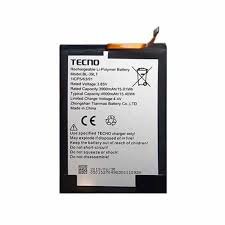
Tecno Spark 40 KM5 Battery Replacement in Kenya
The Tecno Spark 40 KM5 is a prominent entry in the Tecno smartphone lineup, known for its affordability and practical features. Positioned as a budget-friendly device, it boasts a sleek design and a variety of functionalities that cater to everyday smartphone users. Equipped with a vibrant display, the Tecno Spark 40 KM5 offers a 6.6-inch HD+ screen that renders visuals with clarity and sharpness, making it suitable for consuming media, browsing the web, and engaging with social media platforms.
Performance-wise, the smartphone is powered by a robust processor paired with substantial RAM, ensuring smooth multitasking and responsiveness. With an expandable storage option, users can easily accommodate their apps, photos, and other data, which enhances the overall user experience. Furthermore, the hardware is complemented by a set of cameras—both front and rear—that allow users to capture high-quality images, contributing to the device’s appeal among photography enthusiasts.
However, like all electronic devices, the battery health of the Tecno Spark 40 KM5 is vital for maintaining optimal performance. The device is equipped with a durable battery that supports extended usage time, but over time, battery longevity may diminish due to factors such as frequent charging cycles, usage patterns, and environmental conditions. It is important for users to monitor their device’s battery performance. Signs of battery degradation, such as rapid discharge or difficulty holding a charge, may indicate that a battery replacement is necessary. Recognizing these signs early can prevent performance interruptions and prolong the lifespan of the device. Understanding the significance of battery maintenance will be beneficial as we delve deeper into the guidelines and processes regarding battery replacement in the following sections.
Signs You Need a Battery Replacement
Identifying when your Tecno Spark 40 KM5 battery requires replacement is critical for maintaining optimal device performance. One of the most noticeable signs is battery swelling. This physical change can be observed as a bulge in the battery or the back cover of the phone. Swelling often indicates internal damage, which can pose safety risks and lead to further complications if not addressed promptly.
Another common indicator is rapid battery drainage. If you find that your phone depletes its charge significantly faster than it used to, it may signify that the battery no longer holds a charge efficiently. While software issues can also contribute to this problem, consistent rapid drainage typically warrants a closer inspection of the battery itself.
The inability of the Tecno Spark 40 KM5 to power on is another critical sign that a battery replacement may be necessary. If the phone fails to start despite being plugged into a charger and the charging indicator does not respond, the battery could be dead or damaged beyond repair. In such cases, a replacement is imperative to regain functionality.
Additionally, users might notice performance-related issues, such as the phone shutting down unexpectedly, even when there is a remaining charge. These sudden shutdowns can be frustrating and often point to underlying battery problems. Other symptoms may include overheating during charging or use, which is also indicative of a battery that could be nearing the end of its lifespan.
By being attentive to these signs, you can ensure that your Tecno Spark 40 KM5 continues to function effectively, enhancing your overall user experience. Recognizing and addressing battery issues early can prevent further complications and help maintain the integrity of your device.
Choosing the Right Replacement Battery
When it comes to replacing the battery of your Tecno Spark 40 KM5, it is crucial to consider several key factors to ensure optimal performance and safety. The first aspect to evaluate is the battery specifications, including capacity, voltage, and size. The ideal replacement battery should match these specifications to guarantee compatibility with your device. For the Tecno Spark 40 KM5, the original battery typically has a capacity measured in milliampere-hours (mAh), which indicates how long the battery can power the device under standard usage conditions. A higher capacity battery may provide extended usage time, but it must fit the device without compromising structural integrity.
Next, compatibility is another critical factor to consider when choosing a replacement battery. Not all batteries are created equal, and using a battery designed for a different model can lead to various issues, including malfunction or damage to the device. Therefore, it is advisable to consult the device’s user manual or the manufacturer’s website to ensure that the replacement battery is specifically designed for the Tecno Spark 40 KM5. Additionally, compatibility extends to the phone’s charging system; an incompatible battery may also affect charging speed and efficiency.
Lastly, investing in genuine or manufacturer-approved replacement parts is vital for maintaining the longevity and safety of your Tecno Spark 40 KM5. Generic or counterfeit batteries may seem appealing due to their lower prices, but they often lack the quality assurance provided by original parts. These inferior batteries may also pose safety risks, such as overheating or explosions. Therefore, it is always best to source replacement batteries from reputable suppliers who provide authentic Tecno products, ensuring that your device operates safely and efficiently for years to come.
Tools Needed for Battery Replacement
When embarking on the process of replacing the battery in a Tecno Spark 40 KM5, it is crucial to have the right set of tools at hand. Proper preparation will not only facilitate a smoother replacement experience but also help in preventing any potential damage to the device. Below is a detailed list of essential tools that you will require.
Firstly, a set of precision screwdrivers is necessary, particularly those that include Phillips and flathead screwdrivers. These tools are essential for removing the screws that hold the back cover of the Tecno Spark 40 KM5 securely in place. Opting for a screwdriver set with magnetized tips can be beneficial, as it helps in retrieving screws that may fall during the process.
Next, a plastic pry tool is highly recommended. This tool will enable you to safely separate the phone’s screen from the adhesive that bonds it to the device. Using a metal tool may risk damaging the casing or the internal components. Therefore, a plastic pry tool is a safer option. Additionally, you may consider using a suction cup to lift the screen gently, especially if it is tightly adhered.
Adhesive strips are also vital when replacing the battery. These strips will ensure that the new battery is securely affixed to the device. You can purchase these strips separately, or they may come included with the replacement battery depending on the supplier.
Lastly, do not forget to equip yourself with safety equipment, such as safety goggles and gloves. These items will protect your eyes and hands from any unexpected mishaps during the battery replacement process. Having all these tools ready will significantly increase the likelihood of a successful and safe Tecno Spark 40 KM5 battery replacement.
Step-by-Step Battery Replacement Guide
Replacing the battery in your Tecno Spark 40 KM5 can seem daunting, but with the right approach and tools, the process can be relatively straightforward. Begin by gathering the necessary tools, which typically include a screwdriver, a plastic prying tool, and a replacement battery specifically compatible with the Tecno Spark 40 KM5.
Commence the battery replacement process by powering off the device. This is crucial to prevent any electrical issues during the disassembly. Next, you will need to remove the back cover of the phone. Carefully insert the plastic prying tool around the edges of the back cover and gently lift it to detach. Take your time with this step to avoid damage to the casing.
After successfully removing the back cover, locate the battery compartment. You may notice screws securing the battery in place; if so, use the screwdriver to remove them. Keep these screws in a safe location, as you will need them during reassembly. Once the screws are removed, gently lift the battery out of its compartment using the prying tool, being cautious not to damage any surrounding components.
With the old battery removed, it’s time to install the new battery. Align the new Tecno Spark 40 KM5 battery in the compartment and press it down firmly to ensure a solid connection. Replace any screws that were previously removed, securing the battery in place. After this, carefully reattach the back cover by pressing it down until you hear a click, indicating that it is securely fitted.
Finally, power on your device to confirm that the installation was successful. If the phone powers on normally, congratulations! You have successfully replaced the battery in your Tecno Spark 40 KM5. Should you encounter any issues, reconsider each step for any missed components or connections. This guide aims to empower users with the tools necessary for a safe and effective battery replacement, ensuring that your device remains operational.
Post-Replacement Tips for Maintenance
After successfully replacing the battery in your Tecno Spark 40 KM5, maintaining its health and longevity is essential. Proper battery maintenance can prevent early wear and prolong its usable life. One of the first steps in maintaining your new battery is calibrating it. Calibration involves fully charging the battery to 100%, then using the device until it powers off due to low battery. Following this, recharge the battery back to 100% without interruption. Regular calibration ensures the battery management system correctly reads the battery’s charge levels, leading to improved performance.
Charging habits also play a significant role in the health of your battery. It is advisable to avoid frequent full discharges; instead, try to keep the battery level between 20% and 80% for optimal performance. Quick charging is convenient, but it can generate more heat, which may negatively affect battery longevity. Therefore, when possible, use a standard charger rather than a fast charger for day-to-day charging. Additionally, it is wise to unplug the charger as soon as the battery reaches full capacity, since prolonged charging at full capacity can cause strain on the battery cells.
Environmental factors can significantly impact battery performance. It is crucial to keep your device and its battery in a controlled environment, avoiding exposure to extreme temperatures. Battery performance can degrade in both excessively hot and cold conditions. Ideally, store the device in a cool, dry place, and avoid leaving it in cars on hot days or in cold environments. Regular cleaning of both the device and battery contacts can also promote better connectivity and energy transfer, thus enhancing the overall efficiency of the Tecno Spark 40 KM5’s battery. By following these maintenance tips, you can ensure a longer, more efficient life for your new battery.
Troubleshooting Common Issues Post-Replacement
After replacing the battery of the Tecno Spark 40 KM5, users may encounter several issues that could affect their device’s performance. Addressing these concerns requires an understanding of potential problems and their corresponding solutions.
One common issue is the device not charging. If the Tecno Spark 40 KM5 fails to charge, the first step is to check the charging cable and adapter for any damage. Using a different charging set can help determine whether the problem lies with the original accessories. Additionally, inspect the charging port on the device for any debris or discoloration that could interfere with the connection. If the port appears clean and functional, consider restarting the phone. A simple reboot can often resolve charging issues by refreshing the device’s systems.
Overheating is another concern that users may face post-replacement. It is crucial to ensure that the battery has been installed correctly. Incorrect installation can lead to physical damage or poor connection, causing the device to heat up. If the problem persists, check for any resource-heavy applications that may be consuming excessive power. Closing these applications or performing a factory reset can sometimes alleviate overheating issues. Additionally, allow the phone to rest for a short period to cool down during extended use.
Lastly, users may experience inconsistent performance after a battery replacement. If their Tecno Spark 40 KM5 exhibits lagging or unresponsive behavior, it may be due to software conflicts caused by the transition. Ensuring that the device’s software is updated can improve performance. If issues continue, conducting a hard reset or restoring the device to factory settings may be necessary to eliminate any problematic software that could impact functioning.
Where to Get Your Battery Replaced
When it comes to replacing the battery of your Tecno Spark 40 KM5, several options are available, each offering distinct advantages and disadvantages to consider. One of the most reliable choices is to visit authorized service centers. These centers are typically staffed by trained technicians who possess the expertise necessary to handle the intricacies of Tecno devices. Opting for an authorized service center often means you can benefit from genuine parts, which can assure both the quality of the battery and the overall performance of your smartphone post-replacement.
Another option is to seek out local, reliable repair shops. Often, these establishments can perform battery replacements at a lower cost compared to authorized centers. However, the quality of their components may vary, so it is crucial to choose a repair shop known for its reputation and customer satisfaction. Reviews and recommendations from previous customers can serve as a valuable resource when making this decision. It’s advisable to ask about the warranty on parts and services, as this can provide additional peace of mind.
Finally, a DIY approach may be appealing for those with a penchant for technology and repair skills. There are numerous online tutorials and guides available that detail the process of replacing the Tecno Spark 40 KM5 battery. While this method can be more cost-effective, it comes with risks, especially if you lack experience. Performing the replacement yourself could lead to potential damage to the phone, void any warranty, or even cause safety hazards if not done correctly. Therefore, caution is advised when considering this route.
Ultimately, the choice for battery replacement hinges on individual preferences and circumstances. Whether you opt for authorized service centers, trusted repair shops, or a DIY strategy, assessing the pros and cons of each option will lead to a satisfactory solution for your Tecno Spark 40 KM5 battery replacement needs.
Conclusion: Empowering Your Tecno Spark 40 KM5
In summary, maintaining the battery of your Tecno Spark 40 KM5 is crucial for ensuring optimal performance and longevity. A reliable battery not only sustains day-to-day functionality but also enhances the device’s overall user experience. Regular battery checks and prompt replacements can prevent sudden shutdowns and improve the efficiency of applications running on your smartphone.
The exploration of the Tecno Spark 40 KM5 battery replacement process demonstrated that even minor issues can escalate into more significant concerns if left unaddressed. By recognizing warning signs such as rapid battery drainage or overheating, users can take proactive steps to address these issues. Understanding how to replace the battery, while also adhering to storage and care guidelines, ensures that the device operates efficiently for an extended period.
Moreover, choosing high-quality replacement batteries is essential for maintaining the performance integrity of the Tecno Spark 40 KM5. Utilizing certified or original components helps avoid compatibility issues and ensures optimal functionality. By investing in a reliable battery, users can enjoy extended usage times, fewer interruptions, and an overall enhanced mobile experience.
Ultimately, empowering your Tecno Spark 40 KM5 through proper battery maintenance and timely replacement is vital for maximizing the device’s potential. A well-maintained battery can significantly contribute to the overall satisfaction of using your smartphone. Prioritizing these aspects will not only enhance performance but also promote a longer lifespan for your device, ensuring you make the most out of your Tecno Spark 40 KM5. By embracing these practices, users can confidently navigate their daily challenges without the worry of unreliable battery performance.

 Google Pixel Buds Pro
1 × KSh 22,500.00
Google Pixel Buds Pro
1 × KSh 22,500.00  Google Pixel 7a
1 × KSh 42,500.00
Google Pixel 7a
1 × KSh 42,500.00  Sony WH-1000XM5
1 × KSh 34,000.00
Sony WH-1000XM5
1 × KSh 34,000.00  OnePlus 13R 12GB/256GB
1 × KSh 60,000.00
OnePlus 13R 12GB/256GB
1 × KSh 60,000.00  Samsung Galaxy Tab A9
1 × KSh 13,500.00
Samsung Galaxy Tab A9
1 × KSh 13,500.00 


There are no reviews yet.