

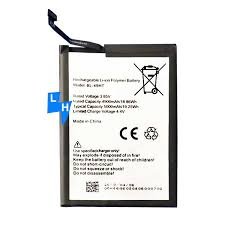
Tecno Spark 30c (KL5) Battery Replacement
Availability:In Stock!
KSh 2,500.00
CompareTecno Spark 30c (KL5) Battery Replacement in Kenya
The Tecno Spark 30C (KL5) is equipped with a robust battery that plays a crucial role in the overall functionality and performance of the device. This smartphone utilizes a Lithium-ion battery, which is renowned for its efficiency and longevity compared to conventional battery types. The specific battery capacity of the Tecno Spark 30C is rated at 5000 mAh. This impressive capacity ensures that users can enjoy extended screen time and seamless operation of applications without frequent recharging.
One of the most significant features of the Lithium-ion battery in the Tecno Spark 30C is its ability to retain a charge for longer periods, thereby enhancing the user experience. A healthy battery can support the device in executing multiple tasks, from running high-intensity apps to streaming media. Additionally, the efficiency of charging cycles is markedly improved, allowing users to recharge their smartphones quickly without compromising the overall battery lifespan.
Battery health is an essential aspect that can affect various elements of smartphone performance. As the battery ages, its capacity to hold a charge decreases, leading to shorter usage times between charges. This decline can result in diminished screen time, impacting the user’s ability to engage with applications and respond to notifications promptly. Regular battery maintenance and timely replacement when necessary are vital for preserving the performance of the Tecno Spark 30C.
Users are encouraged to monitor their device’s battery health actively, as it can directly influence app performance and responsiveness. Understanding these specifications not only helps in maximizing the smartphone’s potential but also highlights the importance of timely interventions like battery replacement for sustained optimal performance.
Signs You Need a Battery Replacement
Recognizing when your Tecno Spark 30C (KL5) requires a battery replacement is crucial for maintaining the optimal performance of your device. There are several common indicators that suggest it might be time to consider replacing your battery. One of the primary signs is the phone not holding a charge effectively. If you find that your device drains quickly despite being fully charged or requires frequent charging throughout the day, this could indicate a deteriorating battery.
Another significant warning sign is unexpected shutdowns. If your Tecno Spark 30C (KL5) powers off suddenly, even with a charge remaining, this can often be attributed to battery issues. Sudden shutdowns not only disrupt usage but can also lead to data loss, making it essential to address this problem swiftly.
Moreover, the physical condition of the battery itself is an important factor to monitor. Swelling is a critical sign that demands immediate attention. A swollen battery can pose safety risks, including potential leakage or, in severe cases, combustion. Therefore, it is advisable to inspect your device regularly for any visible swelling, especially when removing the battery cover.
Overheating is yet another indicator that your battery may need replacement. If your Tecno Spark 30C (KL5) becomes excessively warm during charging or usage, this could signify that the battery is faulty. Overheating can compromise the overall integrity of the phone and lead to further issues if not resolved promptly.
Ignoring these signs can lead to diminished functionality of your device, potentially resulting in a complete failure. By being proactive and addressing these symptoms, you can ensure that your Tecno Spark 30C (KL5) remains functional and reliable for your daily needs.
Tools Required for Battery Replacement
When planning to replace the battery of a Tecno Spark 30C (KL5), having the right tools is crucial for a successful and safe procedure. Below is a list of essential items you will need to facilitate the battery replacement process.
Firstly, a set of small screwdrivers, specifically a Phillips and a flat-head screwdriver, is important for accessing the device’s internal components. These tools allow you to effectively remove the screws securing the back cover of the smartphone, providing easier access to the battery compartment.
Next, prying tools are essential for safely prying open the device without causing damage to the casing. Plastic prying tools are recommended, as they minimize the risk of scratching or breaking any plastic components of the phone. Avoid using metal tools for this step, as they can cause irreversible harm.
Tweezers are another valuable tool in this process. A pair of precision tweezers will help you handle small screws and connectors without dropping them or losing them inside the smartphone. This precision ensures that the replacement battery and its connections are handled with care.
Of course, you will need a new replacement battery that is compatible with the Tecno Spark 30C (KL5). It’s advisable to purchase a battery from a reputable supplier to ensure quality and longevity. In addition, consider investing in a battery disposal kit or adhering to local guidelines for disposing of the old battery safely. Proper disposal is necessary, as lithium-ion batteries can be hazardous if not discarded properly.
By gathering these tools prior to beginning the replacement process, you can help prevent damage to your device while ensuring that the procedure goes smoothly. The right preparation will set the stage for successful battery replacement, making it a manageable task.
Step-by-Step Battery Replacement Process
Replacing the battery in your Tecno Spark 30C (KL5) can be a straightforward task if approached with care and precision. Begin by ensuring the device is powered off completely, as this prevents any accidental shocks or short circuits during the process.
Once powered off, utilize a plastic pry tool to carefully remove the back cover. Start from one corner and gently insert the tool to dislodge the clips holding the cover in place. It is crucial to take your time at this step to avoid breaking the clips or damaging the casing.
With the back cover removed, locate the battery connector, which is typically secured with adhesive or a small screw. If adhesive is present, gently heat the area using a hairdryer to soften it, making it easier to disconnect. Using appropriate tools, carefully unscrew or lift the connector without applying excessive pressure to surrounding components.
After disconnecting the battery, proceed to carefully remove it from its compartment. If the battery is tightly fitted, use a plastic prying tool to assist in lifting it out. It is important to handle it gently to avoid damaging any other parts within the device.
Preparing to install the new battery, ensure that it matches the specifications of the original. Place the new battery in the compartment and connect it to the motherboard, ensuring a secure fit. If adhesive is used, apply it carefully to prevent movement. Once installed, reattach the back cover by pressing down firmly until you hear the clips snap back into place.
Finally, power on your Tecno Spark 30C (KL5) to check that the new battery is functioning correctly. Regularly monitor the device for any abnormalities post-installation. Handling the battery replacement with care will help maintain the longevity of your device.
Post-Replacement Care and Optimization
After successfully replacing the battery in your Tecno Spark 30C (KL5), it is essential to adopt practices that ensure the optimal performance and longevity of the new battery. Initially, it is advisable to calibrate the new battery. This can be achieved by fully charging it to 100% and then allowing it to discharge completely to about 5% before charging it back to full again. This process helps the battery management system accurately assess the battery’s capacity and extends its overall lifespan.
In addition to calibration, consider adjusting your phone’s settings to conserve battery life. Reducing screen brightness, activating battery-saving modes, and limiting background app activity can significantly impact battery longevity. Features like adaptive brightness, which adjusts your screen’s light based on surroundings, can also help in minimizing power consumption. Lastly, disabling unnecessary notifications from apps is an underrated yet effective way to enhance battery efficiency.
Monitoring your battery health with dedicated applications is also beneficial. Apps that provide insights into battery usage can help identify power-hungry applications, allowing for adjustments to be made. Various apps are available that provide detailed insights into the battery status and can alert you when there’s an unusual decrease in battery performance. These monitoring tools can ensure you are aware of the battery’s condition, allowing for proactive measures if required.
Furthermore, it is critical to dispel common myths surrounding battery care. For instance, it is unnecessary and often counterproductive to let the battery run down to 0% regularly. This practice can harm lithium-ion batteries, reducing their lifespan. Instead, striving to keep the battery level between 20% and 80% can be more beneficial. Adhering to the proper charging habits and utilizing best practices will help ensure that your Tecno Spark 30C (KL5) battery remains healthy and efficient over time.
Where to Buy a Replacement Battery
Finding a replacement battery for the Tecno Spark 30C (KL5) can be accomplished through various channels, each presenting unique advantages and disadvantages. Navigating these options is crucial for ensuring the longevity and safety of your device.
Authorized retailers are often the first choice for purchasing a replacement battery. Buying from these genuine sources typically guarantees that the product is authentic, which increases the likelihood of optimal performance and safety. Furthermore, authorized retailers may provide customer support and warranty options, ensuring peace of mind. However, the primary downside is the elevated cost of purchasing from these sources compared to other alternatives.
Online marketplaces also present a popular option for acquiring a Tecno Spark 30C replacement battery. Websites such as Amazon or eBay often feature a wide selection at different price points, which can be particularly advantageous for budget-conscious consumers. Nevertheless, it is essential to diligently verify the seller’s ratings and reviews to avoid counterfeit products. Purchasing from an online marketplace may also come with less assurance if the battery fails due to a lack of warranty or customer support.
Third-party sellers, including independent electronics shops, may offer competitive pricing and a variety of battery options. While this can be an appealing route, it is crucial to ensure that the parts are compatible with the Tecno Spark 30C (KL5). Potential risks with this option include the possibility of acquiring a low-quality or counterfeit battery. To avoid this, it is vital to check for certifications and reviews that validate the seller’s credibility.
In conclusion, the process of purchasing a replacement battery for the Tecno Spark 30C (KL5) entails careful consideration of the sources available. Weighing the pros and cons of authorized retailers, online marketplaces, and third-party sellers will significantly impact the experience and outcome of the battery replacement process.
When to Seek Professional Help
Replacing a smartphone battery can often seem like a straightforward task for tech-savvy individuals. However, there are specific scenarios where users should seriously consider consulting a professional for the battery replacement of their Tecno Spark 30C (KL5). One of the principal reasons to seek expert assistance is a lack of technical skills. Not everyone possesses the requisite experience required for safely handling electronic components. Mishandling can lead to damaging the device further, which could incur additional costs.
Moreover, users should examine their warranty conditions before undertaking any DIY repairs. If the device is still under warranty, attempting to replace the battery independently may void the warranty, leaving users without coverage for future issues. Consulting a professional ensures that any work performed is done in accordance with warranty specifications.
Complications can also arise during the battery replacement process. For instance, adhesive materials used in modern smartphones can complicate disassembly, leading to potential damage to internal components if not handled properly. Additionally, if the internal circuits of the Tecno Spark 30C (KL5) have been compromised, a professional technician will have the expertise to identify and rectify these issues right away, preventing further damage.
In some cases, users may also encounter specialized tools that are necessary for a successful battery replacement. These tools can be costly and are often only needed for one-time use. Hence, consulting a professional can be more economical and safer in such situations. Making the right decision regarding battery replacement can save users time and money in the long run, ensuring their device remains functional and reliable.
User Experiences and Testimonials
The process of replacing the battery in the Tecno Spark 30C (KL5) has been met with varied user experiences, reflecting a mix of challenges and satisfaction post-replacement. Many users have reported that obtaining a replacement battery was straightforward, either through authorized service centers or trusted online retailers. This accessibility is often cited as a significant advantage for those needing to restore their phone’s functionality.
Numerous testimonials emphasize the ease of the replacement process itself. Users who opted for professional service at authorized centers highlighted that the technicians were skilled and efficiently handled the replacement, reducing the risk of damage during the process. Others who ventured into a DIY approach shared that, while the process required some patience and basic tools, the instructions available online facilitated a smoother experience. Many noted that a sufficient set of tools and an instructional video or guide made the task manageable.
Post-replacement, numerous users reported a marked improvement in their phone’s performance. A significant number stated that the new battery provided extended usage time, with some even reporting an increase in overall device speed. This newfound longevity allowed users to enjoy their devices without the constant worry of battery drainage. However, not all experiences were flawless. Some individuals encountered challenges during the installation, such as misalignment of the battery connectors or issues with adhesive. These challenges, while not common, served as invaluable lessons for those considering a battery replacement.
In observing the collective experiences of Tecno Spark 30C (KL5) users, it is evident that while there may be hurdles to overcome, the subsequent benefits of improved battery life and device performance are overwhelmingly valued. This insight aids potential users in weighing their options and preparing for the process of battery replacement.
Conclusion and Final Thoughts
As we conclude this guide on the Tecno Spark 30C (KL5) battery replacement, it is essential to reflect on the fundamental aspects discussed throughout the article. The battery is a vital component of any mobile device, including the Tecno Spark 30C, as it directly influences the performance and longevity of the device. Regular maintenance of the battery can prevent a decline in performance, leading to increased efficiency and user satisfaction.
Timely battery replacement is crucial when signs of wear, such as diminished charging capability or unexpected shutdowns, become evident. Understanding the right indicators for a battery replacement can help users avoid sudden inconveniences and maintain a seamless experience with their Tecno Spark 30C (KL5). This proactive approach allows users to plan for replacements rather than being caught off-guard by a failing battery.
Furthermore, staying informed about the battery specifications and the recommended practices for maintenance enhances the overall user experience. Knowledge regarding how to properly care for and replace the battery can lead to better decision-making, ensuring that the device operates optimally for a longer duration. With regular checks and an awareness of the battery’s health, users can significantly prolong the lifespan of their Tecno Spark 30C.
In light of the discussion above, we encourage every Tecno Spark 30C (KL5) user to take actionable steps towards battery upkeep. By monitoring performance and adhering to best practices, users will not only enhance their device’s functionality but also enjoy a more reliable and efficient usage experience. Ultimately, informed users are empowered users, and proactive battery management plays a pivotal role in maximizing the full potential of the Tecno Spark 30C.


There are no reviews yet.