Introduction to Tecno Pop 10 (KM4)
The Tecno Pop 10 (KM4) is a popular entry-level smartphone known for its affordability and functional features. Designed for users who seek a reliable device without the high price tag, the Tecno Pop 10 offers an array of specifications to meet everyday needs. It is equipped with a 6.6-inch display that provides a vibrant viewing experience, making it suitable for multimedia consumption and casual gaming. The device is powered by a robust processor that facilitates smooth performance for basic applications and multitasking.
When it comes to specifications, the Tecno Pop 10 boasts a quad-core processor, coupled with up to 2GB of RAM, which allows for efficient performance in various tasks. The smartphone also includes a capable camera setup, with a primary camera that captures decent quality photographs, essential for social media enthusiasts. Furthermore, the device has expandable storage up to 128GB, offering ample space for applications, files, and media, thus enhancing its usability.
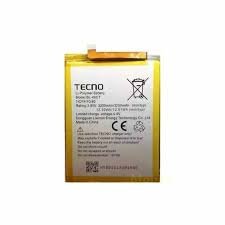
One critical aspect to consider is the health of the device’s battery. A smartphone like the Tecno Pop 10 (KM4) relies heavily on its battery performance to ensure a satisfying user experience. Over time, repeated charging cycles can affect battery longevity, leading to diminished capacity and reduced runtime between charges. Users may notice that their device does not hold a charge as effectively as it once did, indicating a potential need for a battery replacement. Maintaining battery health is vital, not only for convenience but also for optimizing overall device functionality. A well-maintained battery contributes to a smoother experience, allowing users to take full advantage of the Tecno Pop 10’s features without interruptions.
Signs Your Tecno Pop 10 Battery Needs Replacement
Identifying when your Tecno Pop 10’s battery is failing is crucial for maintaining optimal device performance. Several signs indicate that the battery may need replacement, and recognizing these early allows for timely intervention. One of the most common indicators is rapid battery drain. If you notice that your device discharges power significantly faster than it used to—perhaps within a few hours of moderate usage—this can be a strong sign of battery deterioration. This issue often arises from the battery’s age or decline in the ability to hold a charge effectively.
Overheating is another significant warning sign that your Tecno Pop 10 battery may be failing. If your phone frequently feels warmer than usual during charging or while in use, it might signify an internal issue. This abnormal heat can lead to not only discomfort but also potential damage to the device’s internal components. Therefore, monitoring the temperature of your phone is essential for determining the need for a battery replacement.
Swelling is a physical indicator that should never be ignored. If the back cover of your Tecno Pop 10 starts to protrude or the device itself appears to have ballooned due to battery expansion, immediate action is necessary. A swollen battery poses safety risks and could potentially lead to the battery leaking or rupturing.
Finally, slow charging can be another red flag. If your phone takes an unusually long time to reach a full charge, despite using the original charger and cable, the battery may not be accepting charge properly. This performance issue can significantly affect your experience with the device, making it less reliable for daily tasks.
Choosing the Right Replacement Battery
When it comes to replacing the battery of the Tecno Pop 10 (KM4), users have several options to consider, primarily OEM (original equipment manufacturer) batteries and third-party alternatives. Understanding the pros and cons of each type can significantly influence the longevity and performance of the device.
OEM batteries are produced by the same manufacturer as the original battery that came with the Tecno Pop 10. These batteries are designed to meet specific quality standards, ensuring compatibility and reliability. One primary advantage of choosing an OEM battery is that it typically offers optimal performance, as it is specifically engineered for the device. Furthermore, OEM batteries usually come with a warranty, providing peace of mind. However, the downside may be a higher price compared to third-party options.
On the other hand, third-party batteries are produced by independent manufacturers and can often be found at a lower price point. These batteries may support the Tecno Pop 10, but the quality can vary significantly. While some third-party batteries are of high quality and offer comparable performance to OEM options, others may fall short in terms of longevity or overall reliability. Furthermore, using a third-party battery could void the device’s warranty, adding an additional layer of risk.
Ultimately, the choice between an OEM and a third-party battery hinges on individual preferences and priorities. If performance and reliability are of utmost importance, investing in an OEM battery may be the wiser route. However, for users looking to save money, high-quality third-party options could also meet their needs. Regardless of the choice made, ensuring that the battery purchased is compatible with the Tecno Pop 10 is crucial for optimal performance.
DIY Battery Replacement Tools and Supplies
When engaging in a DIY battery replacement for your Tecno Pop 10 (KM4), having the right tools and supplies is crucial for a successful and damage-free process. The list of necessary tools includes precision screwdrivers, opening tools, adhesive, and appropriate safety gear.
First and foremost, a set of precision screwdrivers is essential. The Tecno Pop 10 is likely to have various screw types, typically Phillips and possibly Torx screws. A compatible screwdriver set will ensure you can address any screws without stripping them, which can lead to further complications during disassembly.
Next, an opening tool is indispensable for gently prying apart the device casing without causing damage to the delicate internal components. Various options exist, including plastic spudgers and nylon opening picks. These tools minimize the risk of scratching or cracking the exterior while allowing access to the battery compartment.
Adhesive is another key supply, specifically designed for electronic repairs. The battery in the Tecno Pop 10 may be secured in place with adhesive, making it necessary to have a reliable adhesive remover for a safe battery extraction. Post-replacement, applying new adhesive ensures that your device remains securely sealed, preventing dust and moisture intrusion.
Lastly, donning appropriate safety gear is vital during any DIY replacement. Safety glasses will protect your eyes from potential shard splinters, while anti-static wrist straps prevent electrostatic discharge from damaging electronic components. Assembling all the necessary tools and supplies before starting the replacement process not only streamlines the procedure but also significantly minimizes the chance of errors or damage.
Overall, a well-prepared DIY approach not only enhances the efficiency of the battery replacement task but also extends the life and functionality of your Tecno Pop 10.
Step-by-Step Guide to Replacing the Battery
Replacing the battery of your Tecno Pop 10 (KM4) can seem daunting, but by following this comprehensive guide, you can do it with confidence and ease. Before beginning the process, ensure you have the necessary tools at hand: a small Phillips screwdriver, a plastic spudger, and a replacement battery specifically compatible with the Tecno Pop 10 (KM4).
Start by powering down your device completely. This is crucial to prevent any electrical damage during the replacement. Once the device is off, use the Phillips screwdriver to remove the screws located on the back panel. Be sure to keep track of these screws, as you will need them later for reassembly.
Gently use a plastic spudger to pry open the back cover. It’s important to do this slowly and carefully to avoid damaging the casing. After the cover is removed, you’ll have access to the internal components of the Tecno Pop 10 (KM4). Locate the battery, which is secured with adhesive tape or clips.
Disconnect the battery from the motherboard by carefully lifting the connector with the spudger. Once disconnected, you can remove the old battery, taking care to pull it out gently to avoid damaging any surrounding components. Now, take your new battery and place it in the same position as the old one, ensuring that the connector aligns perfectly with the motherboard.
After securing the new battery, reconnect it by pushing the connector down into its socket. Then, it’s time to seal up your device. Replace the back cover and screw it into place using the screws you previously removed. Finally, power on your Tecno Pop 10 (KM4) to ensure the new battery is functioning correctly. If the device turns on without any issues, you have successfully replaced the battery.
Post-Replacement Care and Maintenance
After replacing the battery in your Tecno Pop 10 (KM4), it is essential to adopt best practices for care and maintenance to ensure optimal performance and longevity. One of the primary factors influencing battery longevity is charging habits. It is advisable to charge the device when the battery level drops to around 20%. Charging the battery fully and disconnecting it after it reaches 100% can help maintain its health, as continuously keeping it plugged in may lead to overheating and reduced efficiency over time.
Temperature management is another crucial aspect that impacts battery performance. Lithium-ion batteries, commonly used in modern smartphones, are sensitive to extreme temperatures. Ideally, the device should be used and stored in environments between 0°C and 35°C (32°F to 95°F). Avoid exposing the Tecno Pop 10 to very high temperatures, such as leaving it on a sunny dashboard or placing it near heating vents, since excessive heat can damage the battery’s cells and shorten its lifespan. Similarly, exposing the device to extremely cold temperatures can lead to performance issues and reduced battery capacity.
Besides physical care, adjusting certain software settings can significantly extend battery life. Disabling features such as background app refresh, location services, and push notifications for non-essential apps can conserve energy. Additionally, reducing screen brightness and enabling battery saver mode when the battery is low can minimize power consumption. Regularly updating the device’s software and apps can improve efficiency and overall performance, as manufacturers often optimize power management with new releases.
By implementing these care and maintenance practices after a battery replacement in your Tecno Pop 10, you can help ensure that your new battery remains in optimal condition for as long as possible, thus enhancing your user experience.
Troubleshooting Common Issues After Battery Replacement
Replacing the battery in your Tecno Pop 10 (KM4) can breathe new life into your device. However, it is not uncommon for users to experience certain issues following a battery replacement. Addressing these concerns promptly and effectively is crucial for the continued functionality of the device.
One of the most reported problems is the device not turning on after the battery replacement. This can occur due to loose connections or a poorly installed battery. To troubleshoot this, ensure that the battery is properly seated in its connector and that all connections are secure. Additionally, holding down the power button for an extended period (usually about 10-15 seconds) may help reset the device.
Another common issue is receiving incorrect battery percentage readings. After a battery replacement, the system might need to recalibrate to recognize the new battery properly. To do this, fully charge the battery to 100% and then let it drain completely until the device shuts off. Subsequently, recharge it back to full capacity without interruption. This process can assist the device in providing accurate battery metrics.
Charging difficulties can also arise after replacing the Tecno Pop 10 battery. If the device charges slowly or not at all, consider using a different charging cable or adapter, as these can influence charging speed and efficiency. Furthermore, inspect the charging port for any dirt or debris that may hinder connectivity. Cleaning it gently with a dry toothbrush or compressed air may resolve charging issues.
If these troubleshooting steps do not rectify the problems, it may be beneficial to consult a professional technician or customer support for further assistance. Being aware of these common issues can enhance user experience post-battery replacement and ensure that your Tecno Pop 10 continues to function optimally.
When to Seek Professional Help
Deciding when to consult a professional for your Tecno Pop 10 (KM4) battery replacement can significantly impact the outcome and safety of the process. Various factors should be considered before opting for a do-it-yourself approach. Firstly, assess your individual skill level and familiarity with smartphone repairs. If you possess limited technical knowledge or experience, it is advisable to seek the guidance of a trained technician. Attempting to replace the battery without adequate skills can lead to further damage to your device, ultimately resulting in higher costs for repairs.
Another critical aspect to consider is the warranty status of your Tecno Pop 10. If your smartphone is still under warranty, attempting a DIY battery replacement could void the warranty coverage. In such instances, it is prudent to consult a certified technician or the manufacturer’s service center to ensure any necessary repairs do not jeopardize your warranty. This precaution can facilitate access to guaranteed services and quality parts, providing peace of mind.
The complexity of the issue at hand also plays a vital role in determining whether to seek professional help. If you notice signs of swollen or leaking batteries, immediate action is required. Such conditions are hazardous and can cause damage not only to the device but also present safety risks to the user. In cases where complications arise during the battery replacement process, such as difficulty in disassembling the phone or problems with components beyond the battery itself, professionals equipped with specialized tools and expertise should be consulted.
In summary, evaluating your skill level, the warranty status of your device, and the complexity of the situation will assist in determining whether professional assistance for Tecno Pop 10 (KM4) battery replacement is warranted. Investing in professional services may save you time and expense in the long run, ensuring that your device operates efficiently and safely.
Final Thoughts on Tecno Pop 10 Battery Replacement
As we have explored throughout this guide on Tecno Pop 10 (KM4) battery replacement, the health of your device’s battery is crucial for optimal performance. A well-maintained battery ensures not only the longevity of your smartphone but also a smooth user experience. With the continuous advancements in mobile technology, the time comes when even the most reliable batteries lose their effectiveness. Thus, recognizing the signs of battery deterioration is essential for maintaining the quality of your Tecno Pop 10.
Timely battery replacement can significantly impact your device’s functionality. Delaying this essential action may lead to unmanaged battery drain, potential overheating, or even device malfunctions, which could hinder your daily activities. It is advisable to keep track of how long your battery lasts and to look out for any unusual behaviors. Addressing these issues promptly can prevent further damage and extend the life of your device.
Following proper procedures for battery replacement is also vital. Whether you opt for a professional service or choose to do it yourself, ensure that you adhere to safety practices and use compatible components. This not only guarantees a successful replacement but also safeguards your device against risks such as short circuits or damage to internal components. Furthermore, regular maintenance, such as occasional software updates and optimal charging habits, can enhance battery life and performance.
In conclusion, maintaining the battery health of your Tecno Pop 10 is paramount. By being proactive about replacement and observing best practices, you can ensure that your device remains efficient and reliable. Taking the necessary steps allows you to enjoy all the features that your smartphone has to offer without interruptions, ultimately providing a better user experience.

 Google Pixel Buds Pro
1 × KSh 22,500.00
Google Pixel Buds Pro
1 × KSh 22,500.00  Google Pixel 7a
1 × KSh 42,500.00
Google Pixel 7a
1 × KSh 42,500.00  Sony WH-1000XM5
1 × KSh 34,000.00
Sony WH-1000XM5
1 × KSh 34,000.00  OnePlus 13R 12GB/256GB
1 × KSh 60,000.00
OnePlus 13R 12GB/256GB
1 × KSh 60,000.00 


There are no reviews yet.