


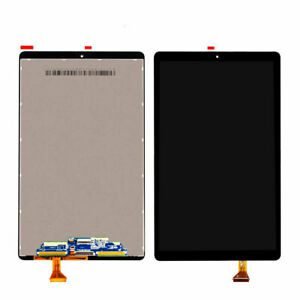
Samsung Galaxy M35 Screen Replacement
Availability:In Stock!
-
Original AMOLED display
-
Touch digitizer included
-
High resolution screen
-
Compatible with Samsung Galaxy M35
-
Durable glass protection
-
Precision fit design
-
Easy installation support
-
Available in multiple colors
-
Replacement part only
KSh 11,000.00
CompareSamsung Galaxy M35 Screen Replacement Description
The Samsung Galaxy M35, like many smartphones, is susceptible to various types of damages, particularly to its screen. Damage to the screen can occur due to accidental drops, exposure to harsh environments, or simply wear and tear from everyday use. One of the most common reasons for a screen replacement is the presence of cracks or shattered glass resulting from a fall. Even minor cracks can compromise the integrity of the device, affecting both vanity and functionality.
Another frequent issue that users encounter is scratches. Over time, the screen may accumulate scratches from being placed in pockets with keys or other abrasive materials. These scratches not only detract from the device’s appearance but may also interfere with the touch responsiveness of the screen, reducing overall usability.
Display malfunctions are another compelling reason for considering a screen replacement. Users may experience problems such as discoloration, flickering, or an unresponsive touch interface. Such issues often arise from internal damage or exposure to moisture. These malfunctions can impact not just the aesthetic aspect of the device but also hinder the user’s ability to interact effectively with applications, notifications, and essential functions.
Recognizing the signs that indicate a screen replacement is necessary can help maintain optimal smartphone performance. If the display is showing persistent defects, or if touch functions are impaired, it is critical to assess the situation promptly. Furthermore, continuing to use a device with a damaged screen can start to impact its performance, as well as lead to further damage. Therefore, being proactive about screen replacements can save users time and money in the long run.
DIY Screen Replacement vs. Professional Services
When faced with a damaged Samsung Galaxy M35 screen, users are often torn between performing a Do-It-Yourself (DIY) screen replacement or opting for professional repair services. Each approach carries distinct advantages and disadvantages, which are crucial to consider before making a choice.
A DIY screen replacement can be a rewarding experience, especially for those who enjoy hands-on work. It allows for considerable savings, as the costs associated with labor fees charged by professionals are avoided. To undertake this task, essential tools are required, such as a heat gun, plastic opening tools, a suction cup, and screwdrivers specific to mobile devices. Additionally, acquiring a high-quality replacement screen is paramount to ensure functionality and longevity following the swap. However, potential risks accompany this route. Improper disassembly can lead to further damage or void existing warranties. Moreover, not adhering to correct procedures could result in an inoperable device.
On the other hand, seeking professional repair services offers significant peace of mind. Technicians have the training and experience necessary to handle such repairs efficiently, minimizing the likelihood of errors. Most reputable services also back their work with warranties, which can provide protection against subsequent issues post-repair. Professional services typically ensure that high-quality parts are used, which is critical for maintaining the performance standards of the Samsung Galaxy M35. While the immediate expense may be higher compared to a DIY approach, the long-term benefits, including reliability and warranty assurances, often justify the investment.
Ultimately, the decision between DIY screen replacement and professional services hinges on individual skill levels, budget constraints, and the importance placed on device functionality. Assessing these factors can aid users in making an informed decision regarding their Samsung Galaxy M35 screen replacement needs.
Preparing for the Screen Replacement Process
Embarking on a screen replacement for your Samsung Galaxy M35 requires careful preparation to ensure a successful repair. The initial step involves gathering the necessary tools for the task. Essential tools typically include a small Phillips screwdriver, a plastic spudger, tweezers, and a suction cup. Additionally, having an appropriate replacement screen on hand is crucial. Purchase components from reputable vendors to avoid counterfeit parts that can affect the overall performance of your device.
Next, create a suitable workspace. Find a clean, well-lit area where you can operate without interruptions. It is advisable to work on a soft surface to prevent scratching the phone components. To keep track of small screws and parts, consider using a magnetic tray or a small container; this will help maintain organization and prevent loss of essential components during the replacement process.
Before proceeding with the actual replacement, it is vital to ensure that your Samsung Galaxy M35 is powered down. This step not only prevents electrical shock but also protects the internal components during the handling process. Furthermore, securing the device with a non-slip mat can help avoid accidental drops or slips while you work on it.
Importantly, backing up your data is crucial prior to starting the screen replacement. Use cloud services or external storage to ensure that all personal data, including contacts, photos, and important documents, are safely stored. In addition to backing up data, it is advisable to remove personal information and log out from accounts to safeguard your privacy, especially if the device will be handled by someone else during the repair process. Taking these precautions will help you mitigate any risks associated with data loss or unauthorized access.
Post-Replacement: Testing and Care Tips
After the Samsung Galaxy M35 screen replacement, it is crucial to conduct a series of tests to ensure that the new screen is functioning correctly. Begin by powering on the device to check if the display lights up properly. Look for any signs of flickering, discoloration, or dead pixels. Navigate through various functions such as adjusting brightness, rotating the screen, and testing touch sensitivity. It is essential that the screen responds accurately to touch inputs, so test different areas of the screen to confirm there are no unresponsive spots.
In addition to functionality, be observant for any physical irregularities. Inspect the borders of the screen carefully for any gaps or misalignments. A well-installed screen should sit flush against the frame without any noticeable separation. If there are any discrepancies reported during testing, it might indicate an improper installation or a defective screen. In such cases, promptly consult with a technician or the service provider to address the issue.
To maintain the new screen’s quality, consider applying a screen protector. This additional layer of protection can prevent scratches and reduce the risk of cracks due to accidental drops. Opt for a high-quality tempered glass screen protector for the best results. Furthermore, adopt safe handling practices; hold the phone with clean hands, avoid placing it in pockets with sharp objects, and use a microfiber cloth for cleaning. It is advisable to keep the phone in a designated case to provide extra protection against impacts.
If problems persist after the replacement, such as consistent flickering or unresponsive touch areas, seek professional assistance. It is better to address these issues quickly to avoid further damage. Consulting with qualified technicians ensures that your Samsung Galaxy M35 remains in optimal condition long after the screen replacement.



There are no reviews yet.