

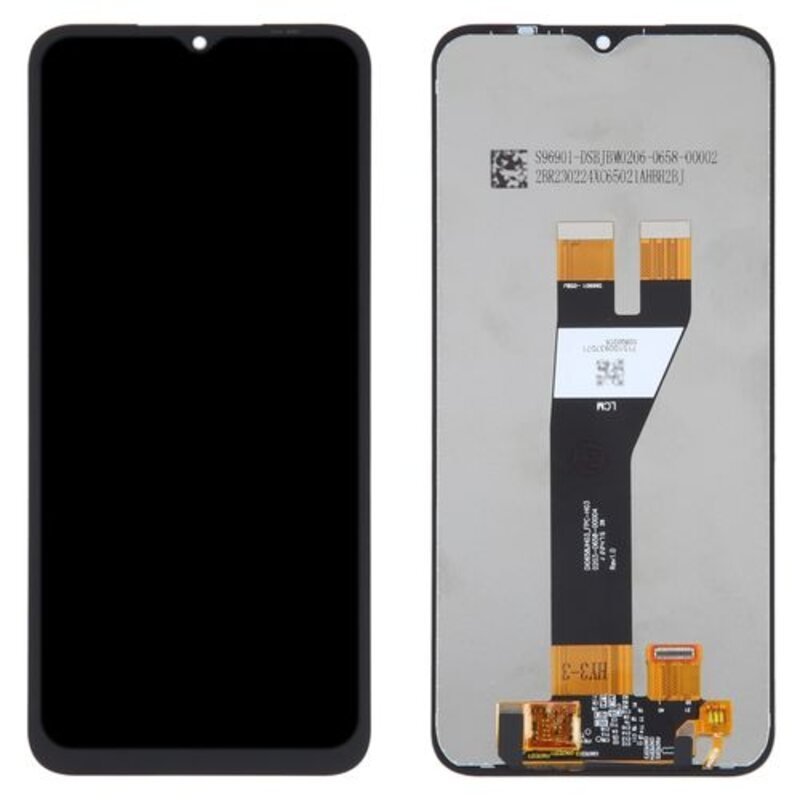
Samsung Galaxy A36 Screen Replacement
Availability:In Stock!
-
High-quality display
-
Touch functionality restored
-
Compatible with Galaxy A36
-
Durable glass panel
-
Precise fit and finish
-
Professional installation recommended
-
OEM standard replacement
KSh 11,000.00
CompareSamsung Galaxy A36 Screen Replacement Description
The screen of a Samsung Galaxy A36 serves as the primary interface through which users interact with their device. Consequently, the functionality and usability of the phone heavily depend on the condition of its screen. A damaged screen can significantly hinder the user experience, making activities such as texting, browsing, and watching videos near impossible. Users may find it challenging to read messages or see notifications clearly, which can lead to frustration and decreased productivity.
Moreover, a broken screen can affect various functionalities of the device. Touch responsiveness may become erratic, causing delays or errors in recognizing input commands. This compromise can disrupt essential functions, including answering calls, accessing applications, or navigating through settings. Users relying on their phone for work or personal tasks may find the device increasingly unreliable, impacting both their day-to-day activities and the efficient operation of the A36.
Ignoring screen damage may lead to more severe complications, escalating repair needs and costs. For instance, cracks can allow dust and moisture to infiltrate the internal components of the device, resulting in water damage or corrosion. Additionally, a cracked screen can cause internal damage to delicate electronic parts if the device is dropped or subjected to pressure. In some cases, ignoring a damaged screen may ultimately lead to complete device failure, requiring more extensive repairs or replacement. Thus, addressing screen issues promptly is vital to maintaining the long-term performance and usability of the Samsung Galaxy A36.
Safeguarding the functionality of your device not only enhances the user experience but also extends the lifespan of the smartphone. Therefore, understanding the importance of timely screen replacement can ultimately save users from unnecessary expenses and operational inconveniences.
Signs That You Need a Screen Replacement
The Samsung Galaxy A36, like any smartphone, is susceptible to a variety of issues that may necessitate a screen replacement. Recognizing the signs early can save you time and potentially prevent further damage to your device. One of the most obvious indicators that your phone’s screen may require replacement is the presence of visible cracks or chips. These imperfections can stem from accidental drops or collisions, significantly impairing the aesthetic appeal and functionality of your device. Even minor cracks can worsen over time, leading to more extensive damage.
Another crucial sign to consider is unresponsive touch sensitivity. If you find that certain areas of your screen do not respond to touch commands or require multiple attempts to register input, this is a clear indication that the screen might be malfunctioning. Touch sensitivity issues can severely hinder daily usage, making it imperative to assess if a replacement is necessary.
Moreover, distorted display colors can signal a more profound problem with the screen. When colors appear washed out, overly saturated, or exhibit inconsistent brightness, it may suggest that the display is failing. Such color distortion can detract from the overall user experience, impacting everything from photo viewing to gaming. Similarly, problems with brightness, such as flickering or an inability to adjust the display to preferred levels, can also signify the need for a screen replacement.
By paying close attention to these symptoms, Samsung Galaxy A36 users can effectively determine whether their device requires a screen replacement or if other repair options may suffice. Prompt recognition of these signs is essential in ensuring your Samsung Galaxy A36 remains functional and visually appealing.
DIY Screen Replacement Guide
Replacing the screen on your Samsung Galaxy A36 can be a rewarding task, offering both cost savings and a sense of accomplishment. To start, gather the necessary tools and materials, which include a heat gun or hairdryer, a small Phillips screwdriver, a plastic prying tool, tweezers, and a suction cup. Additionally, have a new replacement screen specifically designed for the Galaxy A36 and adhesive or glue for secure installation.
Before you begin, ensure to take safety precautions. It is crucial to power down your device and remove any external accessories such as SIM and memory cards. Working on a clean, flat surface reduces the risk of losing components and prevents damage to the device. Wear an anti-static wristband if possible, as this helps prevent static electricity discharge that could harm the internal parts.
Start by warming the edges of the screen slightly with your heat source to soften the adhesive. Once warm, use the suction cup to lift the screen gently. Be cautious while using the plastic prying tool to assist in separating the screen from the frame, as applying too much force might crack the screen or damage the device further. Once you safely remove the broken screen, disconnect the flex cables connecting it to the motherboard.
Now, install the new screen by carefully connecting the flex cables and applying adhesive around the edges of the screen for a snug fit. Make sure it aligns properly with the device’s frame. Afterward, press down firmly and reassemble your Samsung Galaxy A36, following the disassembly steps in reverse. It may be beneficial to allow the adhesive to cure before turning the device back on.
Throughout this process, challenges such as stubborn adhesive or fragile components may arise. Patience, combined with an understanding of your device’s structure, will help smooth the process and lead to a successful screen replacement. In conclusion, with the right tools, care, and attention to detail, the DIY screen replacement of your Samsung Galaxy A36 can be accomplished efficiently.
Professional Repair Services: When to Seek Help
When faced with a cracked or malfunctioning screen on your Samsung Galaxy A36, one of the most pressing decisions is whether to undertake the repair yourself or to seek professional assistance. While DIY repairs can be cost-effective and a personally rewarding experience, several factors should inform your decision. First, consider your own technical skills and familiarity with smartphone repairs. The intricacies of modern devices may pose significant challenges for inexperienced individuals, resulting in further damage and additional repair costs.
One of the primary advantages of engaging professional repair services is the guarantee of high-quality results. Expert technicians possess the required experience and access to specialized tools, ensuring that the screen is replaced correctly and efficiently. Furthermore, reputable repair services often provide warranty protection on the repairs performed. This means that should any issues arise post-repair, you are covered, offering peace of mind that a DIY approach may not afford.
To identify suitable professional repair services, start by researching established businesses in your area that specialize in Samsung products. Look for customer reviews and ratings to gauge past performance. It is prudent to ask questions such as the type of parts they use, whether they offer a warranty, and how long the repair will typically take. Understanding the costs involved is also crucial; professional screen replacement for a Samsung Galaxy A36 can vary widely based on location and repair shop but generally ranges from $100 to $300. Therefore, having a clear understanding of both the benefits and costs associated with professional screen replacement will greatly assist in making an informed decision.


There are no reviews yet.