


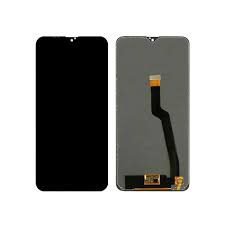
Oppo Reno 13 Pro screen replacement
Availability:In Stock!
-
Oppo Reno 13 Pro screen replacement
-
Original quality display
-
Touch functionality restored
-
High resolution support
-
Scratch-free glass
-
Professional installation recommended
-
Compatible with Oppo Reno 13 Pro only
KSh 4,000.00
CompareIntroduction to Oppo Reno 13 Pro
The Oppo Reno 13 Pro is a flagship smartphone that exemplifies cutting-edge technology, delivering a premium experience to its users. Launched with a sleek design, the device features a vibrant 6.55-inch AMOLED display, boasting a resolution of 2400 x 1080 pixels. The screen’s 90Hz refresh rate enhances the fluidity of animations and scrolling, making it an attractive option for media consumption and gaming alike.
Powered by the MediaTek Dimensity 1200 processor, the Reno 13 Pro ensures optimized performance complemented by 8GB or 12GB of RAM. This enables seamless multitasking, allowing users to run multiple applications simultaneously without lag. The internal storage options of 256GB or 512GB provide ample space for apps, photos, and videos, catering to varying user needs.
A significant feature of the Oppo Reno 13 Pro is its camera system, which includes a 64MP primary lens, an ultra-wide 8MP sensor, and a dedicated 2MP macro lens, enabling users to capture stunning images in diverse environments. The incorporation of advanced image processing algorithms further enhances the photographic experience. While the device boasts impressive hardware specifications, the importance of its display cannot be overstated; the screen serves as the primary interface for user interaction and reflects the quality of the overall experience.
Despite its advanced technology, users may encounter common issues related to the display, such as cracks or unresponsive touch features. Understanding the importance of screen replacement in maintaining the functionality and aesthetics of the Oppo Reno 13 Pro is essential for every user. Resolving screen-related issues promptly can ensure the longevity of the device while preserving user satisfaction. This guide aims to provide detailed insights into the screen replacement process, empowering users to make informed decisions regarding their Oppo Reno 13 Pro devices.
Common Screen Problems in Oppo Reno 13 Pro
The Oppo Reno 13 Pro, while known for its stunning display and advanced features, is not immune to screen-related issues that can affect usability and overall user experience. One of the most prevalent problems encountered by users is cracking. A drop or impact can lead to visible cracks along the screen’s surface, impacting both aesthetics and functionality. This issue typically requires immediate attention, as cracked screens may further deteriorate if exposed to moisture or dirt.
Another common problem is the presence of scratches. Given that many users frequently place their devices in pockets or bags alongside other items, it’s not unusual for the surface to become scratched over time. Scratches may not only detract from the device’s visual appeal but can also affect the touch sensitivity, making interactions less intuitive and enjoyable.
Screen dimming is another issue that Oppo Reno 13 Pro users may face. This condition can be caused by software glitches or hardware malfunctions. Users may notice that the brightness levels fluctuate unpredictably, making it difficult to read the display in various lighting conditions. While some software fixes may remedy this issue, persistent dimming may indicate a deeper problem with the display that could necessitate replacement.
Lastly, unresponsive touch is an issue that can significantly hinder the overall user experience. Users may find that certain areas of the screen do not respond to touch, rendering essential functions unavailable. This problem could stem from either an internal software conflict or damage to the digitizer. If the device becomes increasingly unresponsive, it is advisable to consider a screen replacement as a potential solution to restore functionality.
When to Consider Screen Replacement
Determining the right time to replace your Oppo Reno 13 Pro screen can be challenging, especially when faced with various degrees of damage. It is essential to evaluate the severity of the damage before making a decision. Minor scratches or small cracks may not necessitate an immediate screen replacement, as these types of damages could be inconsequential to the device’s overall functionality. In such cases, temporary fixes or screen protectors may suffice. However, if the damage extends significantly, such as multiple cracks or a shattered display, replacement should be considered promptly. Ignoring severe damage could not only hinder tactile feedback but may also impact the overall performance of the device.
Cost considerations are also an integral part of the decision-making process. Screen replacement costs vary depending on the service providers and the warranty status of your device. If the repair cost is relatively low compared to the overall value of the phone, it can be a worthwhile investment. That said, if the cost of replacement approaches that of purchasing a new device, you may want to weigh your options carefully before proceeding.
Moreover, using a damaged screen poses risks that should not be underestimated. A cracked or shattered display may lead to further complications, such as internal component damage or exposure to dust and moisture. This can ultimately compromise the functionality of your Oppo Reno 13 Pro and drive up potential repair costs later. Therefore, if you notice a significant decline in touch responsiveness, display clarity, or even functionality issues after damage has occurred, it is advisable to seek out a replacement. Prioritizing the care of your device will ensure its longevity and enhance your user experience, making timely screen replacement a prudent choice when faced with substantial damage.
DIY vs. Professional Screen Replacement
When faced with a broken Oppo Reno 13 Pro screen, one of the primary decisions users confront is whether to undertake a DIY screen replacement or hire a professional service. Each option carries distinct advantages and disadvantages that should be considered before making a choice.
Opting for a DIY screen replacement is often appealing due to its cost-effectiveness. Replacing the screen yourself can save money on labor costs, which can be significant if you choose a professional repair service. Furthermore, this approach can be particularly satisfying for those who enjoy hands-on projects and possess some technical skills. The tools required for a DIY repair typically include a heat gun, suction cup, and specific screwdrivers, which can often be found in repair kits tailored for smartphones. Such kits may include detailed instructions that simplify the process for inexperienced users.
However, engaging in a DIY repair does come with inherent risks. One major concern is the potential for further damage to the device if the replacement process is not performed correctly. Inexperience can lead to improperly attaching components or damaging internal parts during disassembly. Additionally, any mistakes made may void the warranty or ensure that future repairs become increasingly complicated and costly.
On the other hand, seeking professional help guarantees that the repair is performed by trained technicians, thereby significantly reducing the risk of additional damage. Many repair services offer warranties on their work, providing peace of mind regarding the reliability and quality of the repair. Nevertheless, hiring professionals tends to be more expensive than DIY methods, which can be a deterrent for budget-conscious individuals.
Ultimately, the decision between DIY and professional screen replacement for an Oppo Reno 13 Pro should be guided by one’s confidence in technical abilities, budget considerations, and the importance of device reliability.
Tools and Materials Needed for Screen Replacement
Replacing the screen of your Oppo Reno 13 Pro can be a meticulous process, necessitating the right tools and materials to ensure a successful repair. A well-planned toolkit not only facilitates the disassembly of the device but also ensures that the new screen is securely attached. Below is a list of essential tools and materials required for this undertaking.
Firstly, a set of precision screwdrivers, including Phillips and Torx screwdrivers, is essential. These tools are critical for removing the screws that hold the device together. Additionally, a plastic opening tool or a spudger will be useful for prying open the device without causing damage to its internal components. To effectively lift the screen away from the frame, a suction cup can also be invaluable, as it provides a firm grip and minimizes the risk of cracking the new display.
Moreover, you will need a replacement screen specifically designed for the Oppo Reno 13 Pro. It is advisable to source high-quality components to ensure the longevity and performance of your device. Many online retailers specialize in smartphone parts, or you can visit local repair shops for potential options.
Adhesive strips or glue are also pivotal in securing the new screen. The original adhesive might not retain its effectiveness after removal, making it critical to have reliable materials to ensure a good bond between the screen and the frame. Finally, consider utilizing an anti-static wrist strap to prevent damage from static electricity during the procedure.
In summary, gathering the appropriate tools and materials is the foundation of a successful screen replacement for the Oppo Reno 13 Pro. By utilizing the right equipment, you can enhance your chances of achieving a flawless repair while safeguarding your device’s integrity.
Step-by-Step Guide to Replace the Screen
Replacing the screen of your Oppo Reno 13 Pro can be a meticulous process, but with the right approach, it can be accomplished effectively. Begin by gathering all the necessary tools, including a suction cup, a plastic opening tool, a heat gun or hairdryer, and a replacement screen that is compatible with your device.
First, ensure that your device is powered off and gently remove the SIM card tray. This will prevent any accidental damage to the internal components. Use the heat gun or hairdryer on a low setting to warm up the edges of the screen. This will help soften the adhesive that holds the screen in place. Always keep the heat source at a safe distance to avoid overheating any part of the phone.
Once the screen is adequately warmed, attach the suction cup near the edge of the display. Slowly pull up on the suction cup while using the plastic opening tool to pry between the screen and the phone’s body. It is important to work carefully, ensuring that you do not apply too much force as this could damage the internal components.
As the display begins to lift, carefully slide the plastic opening tool around the edges to separate the adhesive evenly. Once the screen is removed, disconnect the ribbon cables that attach the display to the motherboard. Make sure to handle these cables gently, as they can be fragile.
Next, prepare your new screen for installation. Connect the ribbon cables securely and align the screen precisely with the phone’s frame. Press gently around the edges to ensure that the adhesive bonds effectively. Once secured, reinsert the SIM card tray and power on your device to test the new screen. By following these steps with caution, you can successfully replace the screen of your Oppo Reno 13 Pro, restoring its functionality.
Cost Analysis of Screen Replacement
The cost of replacing the screen on an Oppo Reno 13 Pro can vary significantly depending on various factors, including whether one opts for a DIY repair or seeks the assistance of professional services. For those considering a DIY approach, the cost typically ranges from $100 to $250. This estimate encompasses the purchase of replacement screens, which can cost between $70 to $200, depending on the quality and source of the parts. Additionally, tools for the repair, such as screwdrivers, pry tools, and adhesive, may add another $20 to $50 to the total costs.
On the other hand, employing the services of a professional repair technician will generally escalate the costs, often landing in the range of $200 to $400. This amount not only covers the price of the replacement screen but also the labor costs associated with the repair process. While opting for professional services may appear more expensive, it provides assurance regarding the quality of the repair and the safeguard against potential damages that might occur during a DIY attempt.
When considering replacement screens, users must also weigh the choice between original parts and aftermarket options. Original screens, which can be sourced from authorized dealers, usually range from $150 to $300 and provide a warranty along with guaranteed compatibility. In contrast, aftermarket screens, while significantly cheaper at prices as low as $70, may vary widely in quality, durability, and may lack warranty coverage. Hence, while they present a more budget-friendly option, the long-term implications of employing aftermarket parts should be duly considered.
In conclusion, the cost of screen replacement for the Oppo Reno 13 Pro is influenced by several variables including the repair method chosen, the type of parts utilized, and individual preferences regarding quality and professional assurance. Budgeting appropriately is essential to ensure satisfaction with the repair process and the device’s longevity.
How to Prevent Screen Damage in the Future
Screen damage can significantly impact the functionality and aesthetics of your Oppo Reno 13 Pro. To safeguard your device and extend the lifespan of its screen, adopting certain habits and protective measures is essential. Here are some practical tips that users can implement to prevent future screen damage.
Firstly, the implementation of a quality screen protector is highly recommended. Tempered glass or durable plastic screen protectors can absorb shocks from accidental drops, thereby preventing cracks and scratches. These protective layers not only enhance the screen’s durability but also maintain clarity and responsiveness, ensuring that the device remains user-friendly.
Additionally, investing in a robust protective case is crucial. Cases that offer substantial cushioning will absorb the impact from falls, protecting the screen from direct contact with hard surfaces. It is advisable to opt for cases with raised edges that provide extra protection for the screen when the device is laid flat on surfaces.
Moreover, handling practices significantly influence screen preservation. Users should be mindful of how they carry their devices. Avoid placing your phone in pockets with keys, coins, or other sharp objects, as this can lead to scratches or screen damage. It is also beneficial to develop the habit of placing the phone face-up on flat surfaces to further avoid risks of screen contact.
Lastly, it is prudent to avoid excessive exposure to extreme temperatures and humidity, which can weaken the screen’s integrity over time. Keeping the device in a stable environment reduces risks associated with screen malfunctions. By following these guidelines, Oppo Reno 13 Pro users can effectively minimize the risk of screen damage, ensuring their device remains in prime condition for longer periods.
Conclusion and Final Thoughts
Addressing screen issues on your Oppo Reno 13 Pro is not merely a matter of aesthetics; it impacts the overall functionality and user experience of the device. Throughout this blog post, we have explored various aspects related to screen replacement, including common types of damage, signs that your screen may need attention, factors influencing replacement costs, and the importance of choosing a professional service for the repair process. Each of these elements underscores the necessity of prompt action when faced with screen-related problems.
Timely repairs can prevent further complications that may arise from a cracked or malfunctioning screen. Neglecting these issues can lead to exacerbated damage, often resulting in higher repair costs or the need for complete device replacement. Additionally, understanding the different options available for screen replacement—whether through authorized service centers or third-party technicians—enables users to make informed decisions that align with their budget and trust in service quality.
Moreover, maintaining your Oppo Reno 13 Pro properly is crucial for prolonging its lifespan and ensuring optimal performance. Simple practices, such as using screen protectors and investing in durable cases, can significantly reduce the likelihood of screen damage. Therefore, it is advisable to weigh the options of repair carefully against the cost and time involved, as well as the potential benefits of replacing the screen with certified parts.
In conclusion, investing the time to address screen issues promptly leads to a more satisfactory ownership experience. By integrating preventative measures and being proactive about repairs, users can enjoy the full capabilities of their Oppo Reno 13 Pro without the complications associated with a damaged screen. Your decisions moving forward will ultimately contribute to the longevity and performance of your device.
Based on 0 reviews
Be the first to review “Oppo Reno 13 Pro screen replacement”
Related products
-
Screen Replacement
Samsung Galaxy A51 Screen Replacement
Color: Black
Manufacturer: SAMSUNG
Manufacturer code:GH82-21669A, GH82-21680A
Manufacturer title SVC ASSY SMT-OCTA(E/ZW),SM-A515F,CIS,SVC
Suitable for : Samsung A515FN/DS Galaxy A51
Content of delivery:As shown in the image
Packing :Boxed ,Service Pack
State:New
Warranty : No
SKU: n/a



There are no reviews yet.