

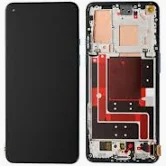
Oneplus Nord CE 3 Screen Replacement in Kenya
The OnePlus Nord CE 3 is a notable addition to OnePlus’s lineup of quality smartphones, designed specifically to offer a blend of performance, aesthetics, and affordability. With a powerful chipset, the device employs the Snapdragon 782G processor, which ensures smooth performance across various applications and multitasking scenarios. Coupled with up to 12GB of RAM, the Nord CE 3 can easily handle demanding tasks while providing an enhanced user experience.
When it comes to display, the device features a vibrant 6.74-inch AMOLED screen with a resolution of 2772 x 1240 pixels, delivering stunning visuals and an immersive viewing experience. The 120Hz refresh rate further enhances fluid scrolling and interactions, making it ideal for gaming and media consumption. In addition to its impressive specifications, the design elements of the Nord CE 3 stand out, characterized by a sleek and modern aesthetic, available in multiple color options to cater to diverse preferences.
As with any smartphone, the screen acts as the primary interface for users, making it a critical component of the device. A high-quality display is essential for enjoying the device’s full range of functionalities, from social media interaction to video streaming. Unfortunately, accidents can occur, leading to damaged screens. Therefore, understanding screen replacement is vital for maintaining the device’s functionality and ensuring longevity. Familiarity with the screen replacement process can save time and money, allowing users to enjoy their OnePlus Nord CE 3 without interruptions due to a malfunctioning display. The importance of a reliable protective case and screen protector cannot be overstated, as they play a significant role in safeguarding the device against potential damage.
Common Issues with OnePlus Nord CE 3 Screens
The OnePlus Nord CE 3 is a popular smartphone known for its sleek design and impressive display, but like any device, it is not immune to screen-related issues. Among the most common problems experienced by users are cracks, scratches, and various display malfunctions. Each of these issues can arise from a variety of everyday usage scenarios or accidents.
Cracks in the screen are often the result of unintentional drops, collisions, or significant pressure applied to the phone while it is in a pocket or bag. Even minor slips can lead to severe damage, especially if the device lands on a hard surface. On the other hand, scratches can occur from the phone being placed in close proximity to keys, coins, or other abrasive objects. Regular contact with these items can gradually degrade the screen, leading to a less aesthetically pleasing display and diminishing the overall user experience.
Display malfunctions encompass a range of issues, including flickering screens, unresponsive touch functionality, or discoloration. These problems can stem from physical damage, like a crack or impact, but may also arise due to manufacturing defects or issues with the device’s software. Users may notice signs such as abnormal color discrepancies or complete sections of the screen failing to respond to touch, which are critical indicators that a screen replacement might be necessary.
It is essential for users to regularly assess the condition of their OnePlus Nord CE 3 screens to identify any emerging problems. Timely detection of these issues can prevent further damage and aid in maintaining the device’s performance. If any of these signs become apparent, seeking a professional assessment or replacement can ensure the longevity and functionality of the smartphone’s display.
Preparing for Screen Replacement
When undertaking the task of replacing the screen on your OnePlus Nord CE 3, preparation is paramount. A well-organized approach can significantly increase the chances of a successful outcome. To begin, gather the necessary tools and materials. Essential items include a precision screwdriver set, which typically features both Phillips and flat-head screwdrivers suitable for mobile device repairs. Additionally, a plastic opening tool is indispensable for safely prying apart the phone without causing damage.
Another critical requirement is a high-quality adhesive designed for screen repairs. Products like UV glue or double-sided adhesive strips are popular choices among technicians. The use of an adhesive ensures that the new screen remains securely attached during normal usage. Furthermore, having an anti-static wrist strap can help prevent any electrostatic discharge, which could potentially harm sensitive internal components.
While preparing your workspace, seek a clean and well-lit environment. A cluttered or poorly illuminated area increases the risk of misplacing tiny screws or damaging delicate components. Utilizing a mat specifically designed for electronics can provide a stable surface, while also helping to keep small parts organized. Consider having a lint-free cloth on hand to manage any dust or debris that may collect during the process.
Prior to beginning the replacement, ensure all necessary materials are ready and that your device is completely powered down. Disconnect the battery to prevent any electrical mishaps. Having a checklist can be beneficial to ensure that you do not overlook any tools or steps. By meticulously following these preparatory steps, you will set the stage for a smoother screen replacement on your OnePlus Nord CE 3.
Step-by-Step Screen Replacement Process
Replacing the screen of your OnePlus Nord CE 3 may seem daunting, but with a systematic approach, you can accomplish it safely and efficiently. This guide will walk you through each step of the process, ensuring you handle your device with care and precision.
Begin by gathering necessary tools such as a heat gun, suction cup, plastic pry tools, and a set of precision screwdrivers. Before starting the replacement, ensure your OnePlus Nord CE 3 is powered off to prevent any electrical damage. If your device has a SIM card, remove it as well.
Next, apply gentle heat around the edges of the screen using the heat gun. This softens the adhesive that holds the screen in place, making it easier to detach. After a few seconds of heating, use the suction cup to create a small gap between the screen and the body of the device. Insert a plastic pry tool into the gap to carefully separate the screen from the frame. Take your time during this step to avoid damaging internal components.
Once the screen is detached, locate and disconnect the display cable. This is usually secured with a small connector that can be unfastened with the precision screwdriver. With the broken screen removed, it’s time to prepare the new screen for installation. Align the display connector with the motherboard and firmly secure it in place.
Carefully position the new screen onto the device, ensuring it aligns correctly with the frame. Apply gentle pressure around the edges to ensure the adhesive secures the screen properly. Once satisfied, reverse the disassembly steps. Reinsert any screws you removed earlier and reattach the back cover of your OnePlus Nord CE 3.
Finally, power on the device to check if the new screen functions correctly. Take a moment to test the touch response and display quality. If everything operates smoothly, you have successfully replaced the screen of your OnePlus Nord CE 3, restoring its full functionality and appearance.
Aftercare and Testing the New Screen
Once the screen replacement of the OnePlus Nord CE 3 is completed, it is crucial to follow specific aftercare procedures to maintain the integrity of the new screen and ensure optimal functionality. The first step is to clean the device gently. Use a microfiber cloth to wipe the screen, which helps remove any dust or fingerprints that may have accumulated during the replacement process. Avoid using harsh chemicals or abrasive materials, as these can damage the screen or other components.
Next, check for functionality to confirm that the new screen is operating as intended. Start by assessing the touch response. Gently tap multiple areas across the screen to verify that touch registers accurately without any dead zones. It is beneficial to perform various multitouch tests to ensure that the screen can handle gestures seamlessly.
Display clarity is another vital aspect to evaluate. Observe the screen closely for any strange discolorations, blurred areas, or pixel abnormalities. If you notice any inconsistencies, it may indicate a poor seal or misalignment during the installation process. Furthermore, make sure that the brightness settings on the device are functioning correctly and adjust them to confirm the screen’s responsiveness.
In addition to touch response and display clarity, check that all other components have been correctly reassembled. Test features such as the front camera, speakers, and sensors to ensure they operate seamlessly with the new screen. A comprehensive check will help identify any potential issues early, allowing for timely troubleshooting if necessary.
Lastly, it is advisable to give the new screen some time to settle in and avoid any abrupt physical stress during the first 24 hours of use. This allows for the adhesive used during installation to cure properly, optimizing the durability and longevity of your OnePlus Nord CE 3’s new screen. Performing these aftercare steps is essential for safeguarding your recent investment.
Costs Involved in OnePlus Nord CE 3 Screen Replacement
The decision to replace the screen of a OnePlus Nord CE 3 can have financial implications that vary based on several factors. When considering screen replacement, users generally face two primary options: performing the repair themselves or opting for professional repair services. Each choice comes with distinct cost considerations that are important to evaluate.
For those inclined to attempt a DIY screen replacement, costs often include the purchase of the replacement screen, which might range from $50 to $150, depending on the quality and sourcing. It is crucial to consider that while a lower-priced screen may save money upfront, it may not meet quality standards, potentially affecting the device’s functionality. Additionally, tools required for the repair, such as suction cups and screwdrivers, may add an extra $20 to $50. Therefore, the total expenditure for a do-it-yourself repair could range from $70 to $200.
Conversely, professional repair services generally involve more predictable costs but can vary widely based on the service center’s reputation and location. On average, users may expect to pay between $100 and $250 for labor and parts when utilizing a professional service. Some authorized service centers might offer warranties on their repairs, which could justify the higher costs compared to DIY options. Furthermore, using professional services eliminates the risks associated with improper installation, such as damage to other components.
Other factors that may influence the overall costs of screen replacement include the warranty status of the device and potential out-of-warranty service charges. Users are encouraged to weigh their options carefully, considering both the financial implications and personal confidence in completing the repair. This informed approach will lead to a more satisfactory resolution to their OnePlus Nord CE 3 screen issues.
DIY vs Professional Replacement: Pros and Cons
The decision to undertake a DIY screen replacement for a OnePlus Nord CE 3 or to seek professional assistance hinges on several critical factors, including skill level, time commitment, cost-effectiveness, and potential risks. Each approach presents distinct advantages and disadvantages that require careful consideration.
Opting for a DIY replacement can be particularly appealing for those with a moderate level of technical expertise. This method typically offers a cost-effective solution as it eliminates labor fees associated with professional services. With the availability of repair kits and instructional resources online, many users find the process manageable. Additionally, performing the task independently allows for greater control over the work, as one can operate at their convenience without the need for scheduling appointments. However, a significant downside to DIY replacement lies in the potential for mishaps. If users lack the necessary skills, they risk causing further damage to the device, leading to increased repair costs later on.
Conversely, choosing professional services for screen replacement provides several benefits, particularly in terms of skill and experience. Professional technicians possess the specific knowledge required to efficiently replace the screen while minimizing the risk of additional damage. This assurance can be crucial, especially for individuals who are not confident in their technical abilities. Furthermore, professional services often come with warranties, providing peace of mind regarding the quality of the repair. However, the primary drawback is the higher cost associated with labor, which can deter some users. Additionally, waiting for an appointment can be inconvenient and may prolong the period during which the device is unusable.
Ultimately, the choice between DIY and professional screen replacement for the OnePlus Nord CE 3 should be driven by a thorough assessment of the individual’s comfort level with technology, the urgency of the repair, and the overall financial implications involved.
Preventative Measures to Avoid Future Screen Damage
To maintain the integrity and longevity of the OnePlus Nord CE 3 screen, users can adopt several preventative measures that significantly reduce the risk of damage. One of the most effective methods is employing high-quality screen protectors. These thin, transparent layers safeguard the screen against scratches, smudges, and minor impacts. There are various types of screen protectors available, including tempered glass and plastic film. Tempered glass protectors, in particular, offer superior protection due to their strength and durability, making them an excellent choice for safeguarding the OnePlus Nord CE 3 display.
In addition to screen protectors, investing in a sturdy phone case is crucial. A well-designed case not only protects the screen but also shields the entire device from accidental drops and impacts. Cases come in multiple styles, including heavy-duty options for those who lead active lifestyles or slim-fit cases for minimalists. Selecting a case that offers enhanced corner protection can be particularly beneficial, as corners are the most vulnerable areas during falls. By combining a reliable case with a screen protector, users can form a robust defense against potential screen damage.
Furthermore, adopting careful usage habits plays a vital role in preserving the screen’s condition. Users should be mindful of where they place their devices, avoiding pockets or bags with sharp objects that could cause scratches. Additionally, users are advised to avoid placing their phone face down on surfaces, as this can lead to unsightly scratches. Lastly, when interacting with the device, using a gentle touch rather than applying excessive pressure can prevent wear and tear on the screen over time. Together, these habits and protective measures not only prolong the life of the OnePlus Nord CE 3 screen but also enhance the overall user experience.
Conclusion and Final Thoughts
In conclusion, understanding the screen replacement process for the OnePlus Nord CE 3 is vital for maintaining the longevity and functionality of your device. Throughout this guide, we have covered all essential aspects, from identifying common screen issues to exploring the various options available for replacement. Whether you choose to perform the replacement yourself or seek professional assistance, being adequately informed will ensure that your device operates optimally and remains aesthetically pleasing.
One of the key points highlighted in this discussion is the importance of addressing screen issues promptly. Features such as the vibrant display and responsiveness contribute significantly to the overall user experience. Neglecting to repair a cracked or malfunctioning screen can lead to further complications and potentially impact other components of the device. Therefore, regular inspections for damage and early interventions are highly recommended.
Furthermore, while considering a screen replacement, it is essential to weigh your options carefully. Whether it is genuine replacement parts or third-party alternatives, understanding the pros and cons of each will empower you to make an informed decision that suits your needs and budget. Always prioritize quality to ensure that your phone performs at its best post-repair.
Ultimately, taking proactive measures to maintain your OnePlus Nord CE 3 will not only enhance your usage experience but also extend the life of the device. Should you find yourself facing any screen-related issues, we encourage you to take action swiftly. With the right approach, your device can continue to serve you effectively for years to come.


There are no reviews yet.