

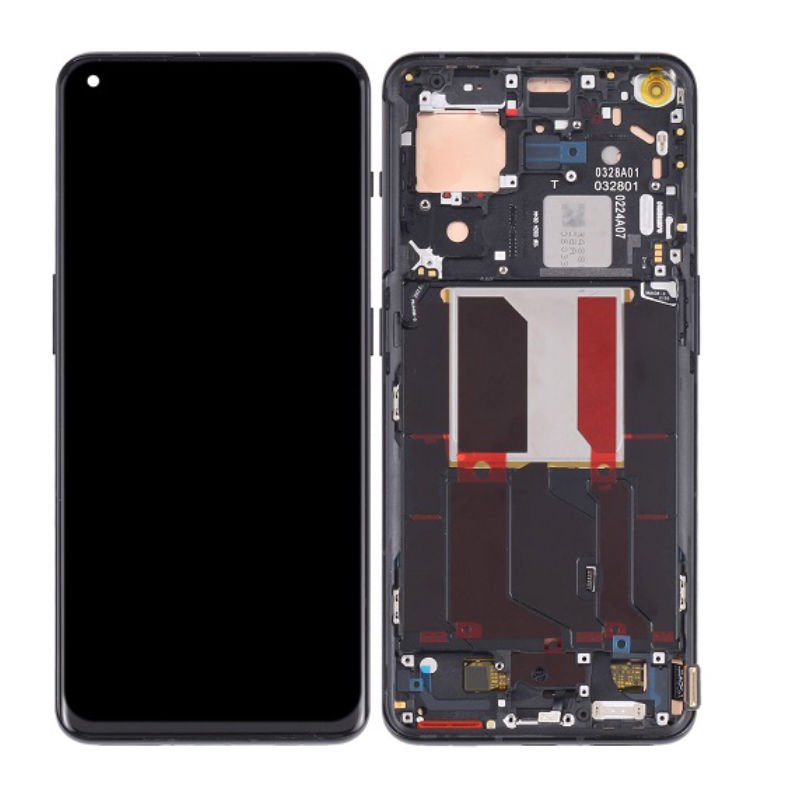
Oneplus Nord 5 Screen Replacement
Availability:In Stock!
-
OnePlus Nord 5 Screen Replacement
-
High-quality display replacement
-
Compatible with OnePlus Nord 5
-
Touch functionality supported
-
Precise fit and finish
-
Durable glass protection
-
Restores full screen performance
-
Professional installation recommended
KSh 13,000.00
CompareOneplus Nord 5 Screen Replacement Description
The OnePlus Nord 5 is equipped with a display that exemplifies modern smartphone technology, featuring a stunning 6.43-inch Fluid AMOLED screen. This screen offers vibrant colors and deep contrasts, contributing to an impressive viewing experience. With a resolution of 2400 x 1080 pixels, it ensures sharp images, making it ideal for streaming media, gaming, and general use. Notably, the OnePlus Nord 5 boasts a 90Hz refresh rate that allows for smoother scrolling and improved responsiveness, elevating user satisfaction during interactions with applications and when navigating through the interface.
The significance of the smartphone display cannot be overstated; it is a central component of user experience. A clear and high-quality screen enhances everything from video playback to browsing, making it a critical aspect for any user. However, like any component, the OnePlus Nord 5’s screen is susceptible to damage and wear. Common issues include cracks from accidental drops, scratches from daily usage, and display malfunctions, such as unresponsive touch areas. These problems can severely diminish functionality, making it imperative for users to understand the importance of maintaining the screen’s integrity.
In addition to physical damages, users may also experience software-related screen issues that can impact brightness levels, color accuracy, or overall functionality. Monitoring the health of the OnePlus Nord 5 screen is crucial, as a compromised display may lead to an unsatisfactory user experience. Therefore, maintaining this essential feature is paramount for users who rely on their devices for various tasks daily. Addressing potential screen issues promptly can safeguard the overall performance of the OnePlus Nord 5, ensuring a sustained premium user experience.
Signs You Need a Screen Replacement
The OnePlus Nord 5, much like any advanced smartphone, is susceptible to issues that may require a screen replacement over time. Identifying these signs early is crucial for maintaining optimal device performance. One of the most obvious indicators that your screen may need replacing is the presence of visible cracks or scratches. These physical damages not only affect the aesthetic appeal of the device but can also compromise its functionality. Even minor cracks can progressively worsen, leading to more functional problems and ultimately necessitating a complete screen replacement.
Another common sign is the appearance of black spots on the screen. These spots often indicate damage to the display panel and can result in an impaired viewing experience. Additionally, if you notice any discoloration, such as patches of green or yellow, it may signify that the display has deteriorated, which is another area that might warrant a screen replacement. Another key indicator is flickering. Unexplained flickering of the display can be an alarming sign that the integrity of your screen is under threat.
Moreover, touch sensitivity issues are a prevalent concern. If you find that the screen is unresponsive to your touch or requires excessive pressure to register inputs, it likely indicates damage to the digitizer, the component responsible for touch functionality. Sometimes, these issues might present themselves as erratic behavior where apps open unintentionally or where scrolling is uneven. It is essential to pay close attention to these symptoms, as they serve as critical indicators that professional help may be needed for a replacement. Addressing these screen-related problems promptly can go a long way in preserving the longevity of your OnePlus Nord 5.
DIY vs. Professional Screen Replacement
When faced with a damaged OnePlus Nord 5 screen, individuals often grapple with the decision to undertake a DIY repair or seek the assistance of a professional. Each option presents its own set of advantages and drawbacks, which are crucial to consider before proceeding.
Choosing a DIY approach can be appealing due to the potential cost savings and the sense of accomplishment it may provide. To successfully replace the OnePlus Nord 5 screen on your own, specific tools are required, including a heat gun, suction cup, tweezers, and a precision screwdriver set. Moreover, it is essential to possess a certain level of technical skill and familiarity with smartphone disassemblies. There are various online resources, including video tutorials and repair guides, which can assist in navigating this process. However, without proper expertise, there is a significant risk of inadvertently causing further damage to the device or voiding any existing warranty. Additionally, sourcing high-quality replacement screens can be challenging, raising concerns about the durability and functionality of the final product.
On the other hand, opting for professional screen replacement services offers several notable benefits. Professionals bring experience and specialized knowledge that ensure a thorough and reliable repair, minimizing the chance of error. Furthermore, many professional repair services provide warranties for their work and the parts used, offering peace of mind should future issues arise. The quality of components employed in professional repairs typically exceeds that of DIY solutions, as certified technicians often have access to OEM parts. In this context, the cost of employing professional services can be viewed as an investment in the longevity and performance of your OnePlus Nord 5.
Ultimately, the choice between DIY and professional screen replacement depends on a variety of factors, including budget, skill level, and the importance of warranty coverage. Consider weighing these elements carefully to determine the most suitable course of action.
Steps to Replace Your OnePlus Nord 5 Screen
Replacing your OnePlus Nord 5 screen can be a daunting task, but with the right tools and guidance, it can be accomplished successfully. To begin, gather all necessary tools including a heat gun or a hairdryer, a suction cup, plastic spudgers, and a Phillips screwdriver. It is crucial to ensure that you have a clean workspace and good lighting to facilitate the process.
Next, purchase a screen replacement that is compatible with the OnePlus Nord 5. Make sure to verify the part number and the specifications to avoid any mismatches. Many online retailers specialize in mobile parts, providing options that range in quality and price. Read customer reviews if available, as this may help you choose the right supplier.
Once you have the replacement screen and tools ready, the first step in the workflow is to power off the device. This is essential for ensuring safety while you work on your phone. After that, use the heat gun to gently warm the edges of the screen; this helps in loosening the adhesive that secures it. Carefully position the suction cup on the screen and gently pull to create a small gap for insertion of the plastic spudger. Slide the spudger around the edges to separate the screen from the frame.
After the damaged screen is successfully removed, you will need to disconnect the battery to prevent any power disruptions. Next, disconnect the screen assembly by carefully unfastening the flex cable and connectors. Now, align the new screen with the device, connect the flex cable, and reattach the battery. Once everything is in place, test the device to ensure the new screen is functioning properly.
Finally, seal the edges with adhesive and firmly press the screen into the frame to secure it. Be mindful of avoiding common mistakes like applying excessive force or misaligning the screen. Following these steps will ensure a seamless screen replacement for your OnePlus Nord 5.


There are no reviews yet.