

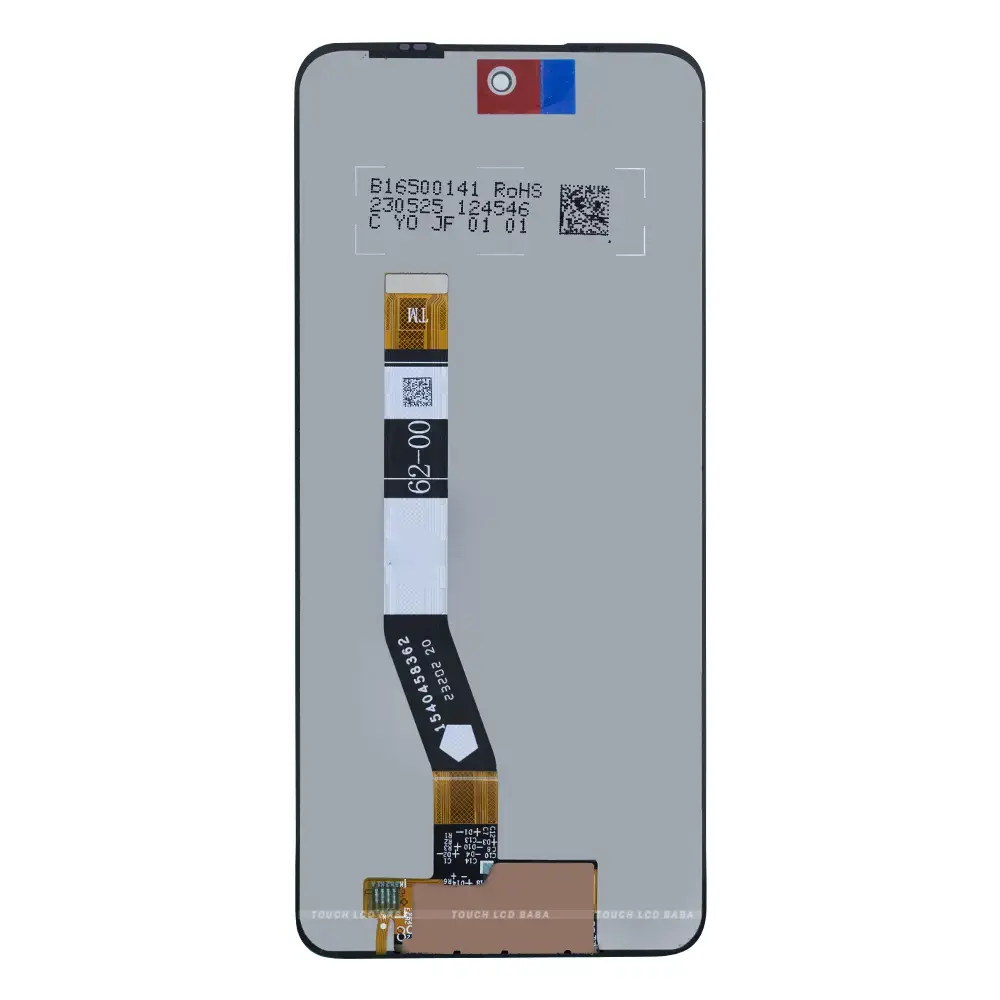
Motorola Moto G54 Screen Replacement
Availability:In Stock!
Motorola Moto G54 Screen Replacement Features
-
6.5-inch large display
-
IPS LCD screen technology
-
Full HD+ resolution (1080 × 2400 pixels)
-
Smooth 120 Hz refresh rate
-
Sharp and clear visuals with high pixel density
-
Responsive capacitive multi-touch support
-
Punch-hole design for front camera
-
Slim bezels for immersive viewing
-
Good brightness for indoor and outdoor use
-
Natural color reproduction suitable for daily use
KSh 3,500.00
CompareMotorola Moto G54 Screen Replacement in Kenya
The screen serves as the primary interface between the user and their Motorola Moto G54, making its integrity crucial for the overall functionality of the device. A damaged screen can substantially hinder the user’s experience, reducing visibility and responsiveness, and may even lead to further issues if not addressed promptly. Therefore, understanding the importance of screen replacement is essential for maintaining device performance and ensuring a seamless user experience.
Common reasons for requiring a screen replacement for the Motorola Moto G54 include accidental drops, prolonged exposure to extreme temperatures, or manufacturing defects. Each of these scenarios can lead to cracked glass, malfunctioning touch sensors, or distorted display quality, all of which significantly diminish the usability of the device. For instance, a crack in the screen can impede touch functionality, making it difficult to navigate applications, while a shattered display could obscure vital information altogether.
In addition to affecting device operation, a damaged screen can also contribute to increased repair costs if left untreated. As cracks widen or screen elements further detach, the damage can extend beyond just the glass, potentially impacting internal components. Repairing a Motorola Moto G54 screen timely can prevent additional damage and mitigate the costs associated with more extensive repairs down the line.
Moreover, a well-functioning screen enhances user satisfaction and interaction with the device. The visual experience, including vibrant colors and clear display quality, is crucial for tasks such as watching videos, browsing the web, or engaging with applications that rely heavily on graphic quality. For these reasons, a proactive approach to screen replacement is essential for any Motorola Moto G54 owner wishing to maintain optimal performance and engaging user experience.
Identifying Screen Damage
To maintain the functionality and value of your Motorola Moto G54, it is essential to promptly identify screen damage, as this can significantly affect usability. Common types of damage include cracks, LCD issues, and touch sensitivity problems. Recognizing these issues early can help determine whether repair or replacement is needed.
Cracks are one of the most visible forms of screen damage. They typically occur due to drops or impacts. A cracked screen may display visible lines or patterns, which can make it challenging to view content clearly. In more severe cases, cracks can propagate, leading to further damage and compromising the structural integrity of the device. Users should inspect their Moto G54 for any signs of cracks, especially around the edges or corners, as these areas are particularly vulnerable.
Additionally, issues with the LCD (Liquid Crystal Display) can manifest in several ways. Users may notice discoloration, vertical or horizontal lines, or sections of the screen that don’t display content as they should. These problems may arise from internal damage or exposure to moisture. LCD malfunction often requires professional assessment to determine if a simple fix can restore functionality or if replacement is necessary.
Touch sensitivity problems are another common issue that can arise with the Moto G54 screen. Users may experience lag or a complete lack of responsiveness when attempting to interact with their device. This issue can stem from software glitches or physical damage to the screen, which can impair its functionality. It is important to conduct a thorough diagnostic test to pinpoint the source of the touch sensitivity problems.
By familiarizing oneself with these common types of screen damage and learning how to recognize them, users can take the appropriate steps to repair their Moto G54 promptly. This proactive approach not only enhances the user experience but also prolongs the lifespan of the device.
DIY vs. Professional Repair
When it comes to replacing the screen of your Motorola Moto G54, individuals face a critical decision between undertaking a DIY (Do It Yourself) repair or seeking the assistance of professional technicians. Each approach has its distinct advantages and disadvantages, which warrant thoughtful consideration.
One significant advantage of DIY repairs is cost-effectiveness. By opting to replace the screen independently, you can save on labor charges that professional repair services typically include. Additionally, DIY kits for screen replacement are generally available at reasonable prices, which can further minimize total expenses. However, it is crucial to account for the potential costs of mistakes. If the DIY process incurs further damage to the device, expenses may escalate, eventually outweighing initial savings.
Skill level is another vital factor to consider when deciding between a DIY repair and a professional service. Successfully replacing your Motorola Moto G54 screen requires specific technical skills and tools. Individuals with prior experience in electronics repair may feel confident undertaking this task, but novices may find the process daunting and complicated. There are numerous online tutorials and resources available; however, they may not accommodate all intricacies of your specific device. Emphasis on following detailed instructions is paramount to minimize risks.
Another concern involves the risks associated with DIY repairs. Potential hazards may include voiding the warranty or damaging internal components of the device inadvertently. Professional repair services, on the other hand, not only promise expertise but often provide warranties on the work completed. These guarantees can offer peace of mind knowing that if issues arise following the repair, you have an avenue for recourse.
Ultimately, the decision between DIY and professional repair hinges on individual circumstances, particularly skill level and willingness to accept associated risks. Prioritizing a thorough understanding of both options is essential to making a well-informed choice that aligns with your needs.
Tools and Materials Needed
Replacing the screen of your Motorola Moto G54 requires a few essential tools and materials to ensure a successful and effective repair. This guide will outline the necessary items you’ll need to complete the screen replacement process efficiently.
Firstly, you will require a set of precision screwdrivers, particularly a Phillips #00 and a Torx T3, to safely remove the screws securing the phone’s casing and components. These screwdrivers are crucial as they allow for a secure grip and prevent potential damage to screws.
In addition to screwdrivers, a suction cup tool will help you easily lift the screen away from the body of the phone without causing any harm. It provides the necessary leverage, which is particularly beneficial when dealing with adhesive bondages. You may also consider using plastic opening tools to help detach the screen gently from the device, minimizing the risk of cracking the glass.
Next, strong adhesive glue is required when attaching the new screen securely. This adhesive will ensure that the screen stays affixed to the phone during regular use. Double-sided tape designed for mobile phone repairs is often ideal for this purpose, as it is specifically formulated to handle the slight flex and movements of the device without losing adhesion.
Of course, the most critical material for the repair is the replacement screen itself. It is essential to acquire a quality screen compatible with the Motorola Moto G54. Numerous online retailers specialize in smartphone parts, providing a range of options for replacement screens. Ensure you verify compatibility by checking the specifications before making a purchase.
Lastly, having a clean workspace free of static electricity will contribute to a smoother repair process. Static-free wrist straps can help prevent any static damage to the phone’s internal components. With these tools and materials gathered, you will be well-prepared to tackle the screen replacement of your Motorola Moto G54 effectively.
Step-by-Step Replacement Process
Replacing the screen of a Motorola Moto G54 requires careful attention to detail and adherence to safety precautions. Begin by powering off the device and remove any SIM cards and memory cards to prevent damage during the process. Ensure your work area is clean and organized, which will facilitate easier handling of small components.
The first step in the disassembly involves using a heat gun or a hairdryer to loosen the adhesive around the screen. Apply gentle heat for approximately 1-2 minutes before using a plastic opening tool to gently pry the screen away from the frame. Take care not to apply too much force, as this could crack the screen further.
Once the screen begins to lift, use a suction cup tool to create a more secure grip. Slowly continue to slide the plastic tool around the edges to separate the screen from the phone body. After fully detaching the screen, identify the ribbon cable connecting the display to the motherboard. Carefully lift the connector using a pair of tweezers to avoid damage.
Now, it is time to install the new screen. Position it carefully above the phone and connect the ribbon cable to the motherboard. Ensure it is aligned correctly before pressing gently into place. Once connected, take an adhesive solution specifically designed for mobile devices to secure the new screen. Apply it evenly along the edges to avoid any gaps.
Finally, reassemble the device by aligning the screen with the frame and pressing firmly, allowing the adhesive to set. Ensure all screws and components are securely replaced. Power on your Motorola Moto G54 to test the newly replaced screen. If everything functions correctly, your screen replacement is complete, restoring the functionality and aesthetic appeal of your device.
Troubleshooting Common Issues
When attempting a screen replacement for the Motorola Moto G54, various challenges may surface, which can hinder the process or affect the functionality of the device. Among the most common issues are screen alignment problems, touch sensitivity malfunctions, and potential software glitches that may arise following the replacement procedure. Addressing these concerns promptly and effectively is vital for restoring the optimal performance of your device.
Screen alignment is paramount when fitting a new display. Improper alignment can result in visible gaps or uneven edges, which not only affect aesthetics but may also impact functionality. To alleviate this issue, take time to carefully recheck the placement of the screen before securing it in place. Utilizing aligning tools or guides specifically designed for the Moto G54 can help ensure that the display is installed accurately, thus minimizing the risk of misalignment.
Another frequent challenge encountered during screen replacement is touch sensitivity. After replacing the screen, users might notice that the touch responsiveness is diminished or erratic. This can be a result of dust or debris getting trapped between the screen and the device’s frame, leading to contact issues. Before sealing the screen, ensure that the contact points are clean and free from any contaminants. Additionally, recalibrating the touch settings in the device’s software can provide further improvement in sensitivity.
Lastly, be aware of possible software glitches that may occur after a screen replacement. These may manifest as erratic behavior or unresponsive applications. If experiencing such issues, performing a soft reset or factory reset can often rectify underlying software conflicts. Always back up important data before proceeding with these resets to prevent data loss. Following these troubleshooting tips can significantly enhance your screen replacement experience with the Motorola Moto G54.
Aftercare and Maintenance Tips
Once the screen replacement of your Motorola Moto G54 is complete, it is essential to adopt proper aftercare and maintenance strategies to ensure the longevity of your new screen. By taking specific precautions and following maintenance tips, you can safeguard your device against damage and reduce the need for future repairs.
Firstly, consider investing in a quality screen protector. A tempered glass or high-quality film protector will offer an additional layer of defense against scratches, smudges, and minor impacts. These protectors are generally easy to apply and can significantly enhance the durability of your new display. Regularly check the condition of the screen protector and replace it if it becomes damaged or worn out.
Next, utilize a well-fitted case designed for the Moto G54. A sturdy case with reinforced corners and raised edges can help absorb shocks from accidental drops. When selecting a case, ensure that it allows for easy access to ports and buttons while providing sufficient protection from everyday hazards. Keeping your device enclosed in a case will also help maintain its aesthetic appeal and prevent dirt accumulation.
In addition, perform routine maintenance by cleaning the screen with a microfiber cloth. Avoid using paper towels or abrasive materials as they can scratch the surface. Instead, dampen the cloth with a screen-safe cleaner or distilled water to remove smudges and fingerprints without causing harm. Regular cleaning will not only enhance the appearance of the screen but also improve touch sensitivity.
Lastly, be cautious of how you handle your device. Avoid placing it in the same pocket or bag as sharp objects and refrain from using excessive force when tapping on the screen. By following these aftercare and maintenance tips, you can effectively prolong the life of your Motorola Moto G54’s new screen, ensuring optimal performance and minimizing the need for further replacements.
Cost Consideration of Replacement
When dealing with a cracked or damaged Motorola Moto G54 screen, understanding the costs associated with screen replacement is crucial. The choice between a DIY repair and enlisting a professional service can significantly affect the overall expense. Generally, DIY repairs offer a more economical option; however, they require a certain level of technical skill and the right tools. The price for a replacement screen itself usually ranges from $50 to $100, depending on the supplier and the quality of the screen. Additionally, if you’re opting for a DIY approach, the costs may increase when you factor in essential tools such as adhesive, opening picks, and screwdrivers, which can cost another $20 to $30.
On the other hand, if you decide to seek professional repair services, the costs tend to rise considerably, typically ranging from $100 to $250. Prices vary based on the repair shop’s reputation, location, and whether they employ original equipment manufacturer (OEM) parts or third-party components. It’s essential to note that some repair services offer warranties, which can provide peace of mind regarding the longevity of the repair. Furthermore, factors such as the cruciality of the repair time and convenience can justify the additional costs associated with professional services.
When assessing the overall cost, consider not only the price of the replacement screen or service but also the value of your time and potential downtime without the device. If you’re technically inclined and have experience with screen replacements, opting for a DIY repair may prove cost-effective. Conversely, if you’re unfamiliar with the process, the slight additional financial outlay of hiring a professional could ultimately save you time and ensure a proper installation. In light of these considerations, understanding your specific situation will help you make the most informed decision regarding your Motorola Moto G54 screen replacement.
FAQs About Moto G54 Screen Replacement
When considering a screen replacement for the Motorola Moto G54, potential users often have numerous questions. One common query pertains to warranty implications. Generally, if the Moto G54 is still under manufacturer warranty, conducting a DIY repair or utilizing a non-authorized service provider might void this warranty. It is advisable to consult the warranty terms and conditions initially to ascertain how a screen replacement may affect coverage.
Another frequent concern revolves around the time required for the screen replacement. The duration can vary significantly depending on whether a professional service is chosen or if the replacement is attempted personally. Professional services typically take anywhere from one to two hours to complete the replacement, factoring in the time required for quality assurance. Conversely, if one opts for a DIY approach, the time might be influenced by individual skill levels and the accessibility of tools. A careful review of instructional materials or tutorials is recommended to streamline the process.
Compatibility issues with aftermarket screens also raise questions among users. It is essential to ensure that any aftermarket screen selected for the Moto G54 meets specific compatibility criteria. While there are many options available, not all aftermarket screens guarantee the same quality and performance as the original parts. Detailed research into customer reviews and product specifications can aid in making informed decisions regarding the best screen replacement options. Additionally, securing a reliable warranty from the aftermarket supplier can provide peace of mind regarding the longevity and functionality of the replaced screen.
Ultimately, addressing these FAQs can greatly enhance the understanding of the Moto G54 screen replacement process and assist users in making informed choices. By focusing on warranty implications, estimated replacement times, and compatibility considerations, users can ensure a satisfactory outcome.



There are no reviews yet.