

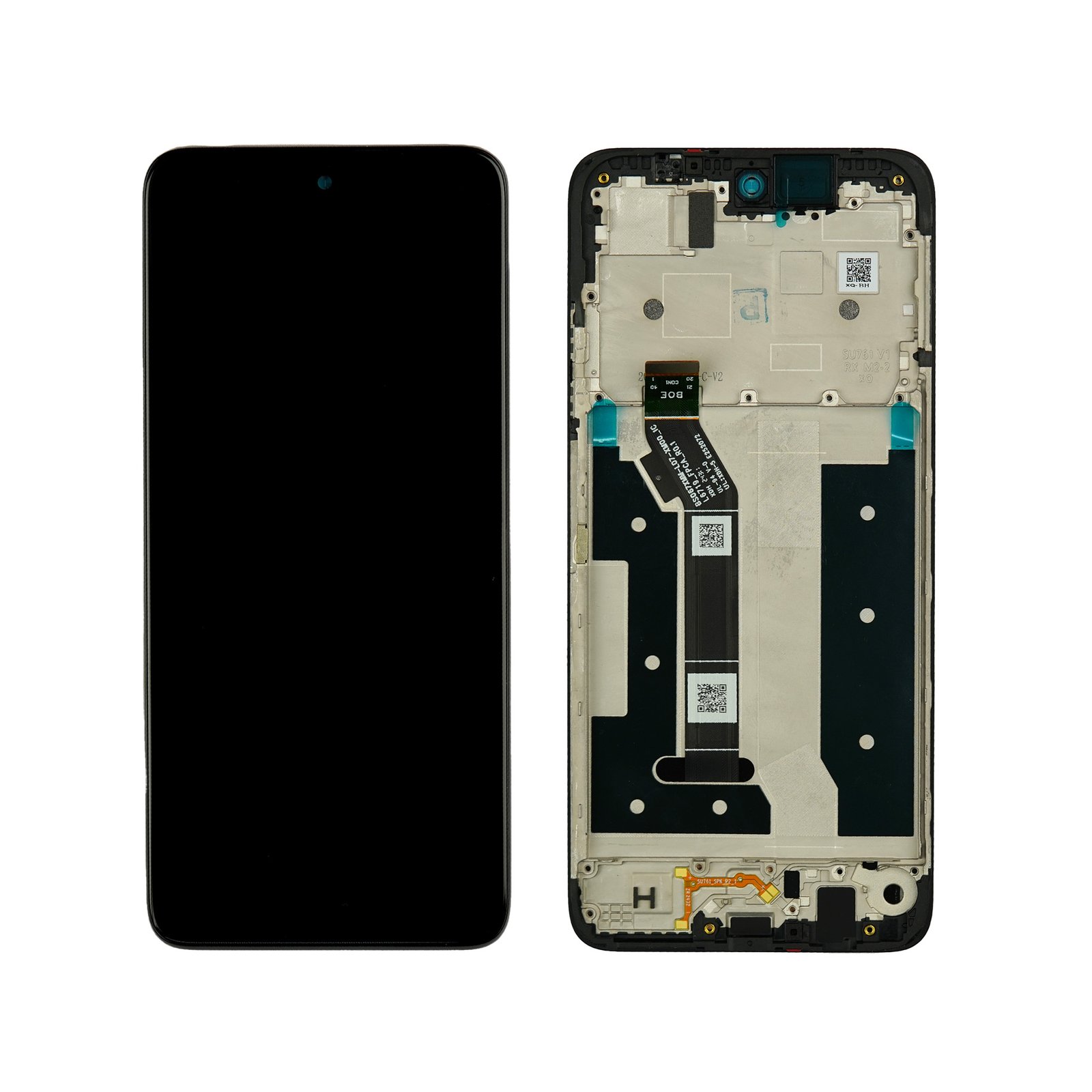
Motorola Moto G35 Screen Replacement
Availability:In Stock!
Motorola Moto G35 Screen Replacement Features
-
6.72‑inch large display
-
Full HD+ resolution (1080 × 2400)
-
IPS LCD panel with vivid color
-
120 Hz refresh rate for smooth motion
-
HDR10 support for better contrast
-
High peak brightness for outdoor visibility
-
Corning Gorilla Glass protection
-
20:9 aspect ratio
-
Wide screen‑to‑body ratio
KSh 3,000.00
CompareMotorola Moto G35 Screen Replacement in Kenya
The Motorola Moto G35 is a mid-range smartphone that has gained popularity among users for its remarkable blend of features, performance, and affordability. Released as part of Motorola’s renowned G series, the Moto G35 showcases a balanced architecture designed for both casual and power users alike. It is equipped with a 6.5-inch IPS LCD display that offers a resolution of 720 x 1600 pixels, ensuring vibrant and crisp visuals. The ample screen size enhances the user experience, whether for media consumption, gaming, or everyday tasks, making it a versatile choice for many.
At its core, the Moto G35 runs on a MediaTek Helio G37 processor, which efficiently manages performance while optimizing battery life. Coupled with up to 4GB of RAM and storage options reaching 128GB, the device demonstrates its ability to handle multitasking and app usage with ease. The inclusion of a triple-camera system allows users to capture stunning photographs, while the 5000mAh battery promises long hours of usage without the need for frequent recharging.
However, like any electronic device, the Moto G35 is susceptible to screen damage from drops or accidental impacts. The screen is one of the most critical components, as it serves as the primary interface for interactions. A damaged display can lead to diminished usability and hinder the overall user experience. Therefore, understanding the significance of maintaining a fully functional screen is essential for any Moto G35 owner. As such, it is often necessary for users to consider screen replacement as a viable solution to restore their device’s functionality and preserve its longevity.
Common Issues Leading to Screen Replacement
Smartphones are prone to a variety of issues, and the Motorola Moto G35 is no exception. One of the most prevalent problems that users encounter is screen damage, which can manifest in several forms, necessitating a screen replacement. Cracks and scratches are two of the most common issues, often resulting from accidental drops or encounters with hard surfaces. Even a small drop can lead to significant cracking, especially if the phone lands on an edge. Furthermore, scratches may not initially affect the functionality of the device, but they can worsen over time and impede the visual clarity of the screen.
In addition to physical damage, users frequently report touch sensitivity issues. Sometimes, the screen may not respond accurately to touches, leading to frustration during usage. This might occur due to wear and tear or exposure to moisture, which can interfere with the screen’s touch panel. Such problems not only degrade the user experience but can also prevent one from using essential features of the Moto G35.
Another critical issue is LCD damage, which can be caused by the aforementioned external factors or internal failures. If users notice discoloration, flickering, or a complete lack of display functionality, these are strong indicators that the LCD might need replacing. For example, a user might inadvertently cause a significant impact during a fall, leading to both a cracked screen and failing LCD. In this situation, a screen replacement becomes essential not merely for aesthetic reasons but for restoring the device’s overall performance and usability.
In light of these common issues, it is essential for owners of the Moto G35 to be aware of the risks associated with device mishandling and to act promptly when screen issues arise. Addressing these problems quickly can prevent further damage or costly repairs in the future.
Assessing the Damage: When to Replace the Screen
Assessing the damage to your Motorola Moto G35 screen is a crucial step in determining whether a repair or a complete screen replacement is warranted. Users should look for several indicators that signal the need for professional intervention. The most obvious sign of damage is a cracked or shattered screen. If the display of your Moto G35 has visible cracks, it can compromise the functionality and aesthetic of the device, making a replacement necessary, especially if the cracks affect the touch sensitivity.
Another key indicator is the presence of dead pixels or discoloration on the display. If your Moto G35 screen exhibits any persistent dark spots, streaks, or areas of discoloration that impair the viewing experience, it is a significant sign of underlying issues. These symptoms can arise from liquid damage or impact and often require a full screen replacement to restore the device to its original condition.
In addition to physical damage, performance issues such as unresponsive touch sensitivity can indicate that the screen has been compromised. If your Moto G35’s touchscreen fails to register inputs accurately or responds erratically, this could be a signal that the digitizer is damaged, necessitating a replacement. Furthermore, liquid spills can lead to malfunctioning displays. If you suspect moisture has penetrated the screen, it is advisable to seek help promptly to prevent further damage.
When assessing the damage, consider the age of the device and the cost of repair versus replacement. If the damage is extensive and the cost of repair approaches that of a new device, a complete screen replacement may be the most sensible option. Consulting with a professional technician can help you make an informed decision regarding your Moto G35 screen’s repairability.
DIY Screen Replacement: Tools and Materials Needed
Replacing the screen on your Motorola Moto G35 can be a manageable task if you have the right tools and materials. Ensuring you are adequately prepared is crucial to achieving a successful outcome. Below, we will outline essential tools and materials needed for this DIY screen replacement.
One of the most fundamental tools you will need is a precision screwdriver set. These sets typically include various sizes of Phillips and flathead screwdrivers, which will allow you to effectively remove the screws securing the screen to the device’s frame. Look for a set made specifically for electronics to ensure the tips fit securely without damaging the screws.
Next, you will require a plastic opening tool or spudger. This tool facilitates the gentle prying of the screen away from the frame without the risk of breaking the delicate components inside. Additionally, using a suction cup can assist in lifting the screen once the adhesive begins to loosen.
Adhesive is another critical material. Depending on your specific replacement screen, you may need double-sided adhesive tape or specialized glue designed for electronics. Ensure you choose a high-temperature adhesive that will withstand the heat generated during device usage.
Finally, sourcing a high-quality replacement screen is vital. Research reputable suppliers that offer genuine or OEM (Original Equipment Manufacturer) parts to avoid potential issues with fit and performance. Checking customer reviews and warranty policies can also guide your selection process.
In summary, having the correct tools and materials is essential for a successful DIY screen replacement on your Motorola Moto G35. Proper preparation can significantly affect the ease and effectiveness of the repair process.
Step-by-Step DIY Screen Replacement Guide
Replacing the screen on your Motorola Moto G35 may seem daunting, but with a systematic approach, it can be accomplished at home. This guide will walk you through each step, ensuring you understand the necessary procedures and safety precautions.
First, gather your tools. You will need a small Phillips screwdriver, a plastic prying tool, tweezers, and a replacement screen specifically designed for the Motorola Moto G35. Make sure to work in a clean and well-lit area to avoid losing any small components.
Begin by powering down the device and removing the SIM card tray. This prevents any potential damage to the card during the repair process. Next, use the Phillips screwdriver to remove the screws located around the phone’s perimeter. Store these screws in a safe location to avoid mixing them up.
Once the screws are removed, gently use the plastic prying tool to separate the back cover from the device. Take your time with this step, as applying too much pressure can crack the plastic. After separating the back cover, you’ll have access to the battery. Disconnect the battery connector using tweezers.
With the battery removed, focus on the screen assembly. Position the prying tool along the edges of the screen and carefully work your way around to detach it from the frame. If you encounter resistance, check for any remaining screws or clips that may be holding it in place.
After removing the damaged screen, align the new screen with the frame, ensuring all connectors fit snugly. Reconnect the battery and replace the back cover, followed by securing it with the screws you previously removed. Finally, power on your Motorola Moto G35 to verify that the new screen functions correctly.
By carefully following these steps and taking necessary precautions, you can efficiently replace the screen of your Motorola Moto G35 without professional assistance.
Professional Screen Replacement Services: Pros and Cons
When it comes to replacing the screen of your Motorola Moto G35, one option worth considering is professional screen replacement services. These services offer a range of benefits that can enhance the overall repair experience. One significant advantage is the quality assurance provided by professionals. Skilled technicians often possess the expertise and tools necessary to complete the replacement accurately, reducing the chances of future complications such as display issues or improper fitting.
Another benefit lies in the time efficiency of professional services. A reputable repair service can often complete the replacement in a matter of hours, enabling you to restore your device to full functionality without significant downtime. In addition, many professional services offer limited warranties on their work, ensuring that if any issues arise post-repair, you have recourse for further assistance. This can provide peace of mind, particularly for those concerned about the long-term performance of their device.
However, opting for professional screen replacement services also comes with its drawbacks. One major consideration is cost. Professional repairs can be substantially more expensive than DIY alternatives, especially if you are on a tight budget. This cost is attributed to labor and the use of high-quality replacement parts, which may not be as readily available in DIY kits.
Moreover, not all screen replacement services offer the same level of quality. It is vital to choose a reputable service provider, as lower-quality repair services may use subpar parts or lack the necessary experience, potentially leading to further issues down the line. Thorough research and customer reviews can be instrumental in finding a trustworthy service. Balancing these pros and cons will ultimately help you to make an informed decision that best suits your needs.
Cost Analysis: DIY vs. Professional Replacement
When considering a screen replacement for the Motorola Moto G35, one of the foremost factors to evaluate is the associated costs of undertaking the task yourself or opting for professional services. Each option presents its own financial implications, and understanding these can assist in making an informed decision.
For those inclined towards a do-it-yourself (DIY) approach, initial costs primarily encompass the replacement screen and the tools necessary for the replacement process. The screen can typically range from $40 to $100, depending on the quality and source. Additionally, tools like screwdrivers, prying tools, and adhesive may add another $20 to $50 to your budget. Therefore, individuals pursuing a DIY replacement should anticipate spending approximately $60 to $150 total, contingent upon the components chosen.
Conversely, hiring a professional technician for the replacement will generally incur higher costs. Labor fees can vary significantly based on location and the service provider chosen, with rates averaging between $50 to $100 per hour. When combined with the cost of the replacement screen, the total sum may exceed $150, placing it closer to $200 or more in some circumstances, particularly if there are any additional repairs needed or if the service comes with a warranty.
In evaluating both options, it becomes crucial to consider not only the financial aspects but also personal experience with electronic repairs, time investment, and potential risks associated with DIY projects. While a DIY screen replacement can be more budget-friendly, it requires a reasonable level of skill and confidence. Conversely, professional services, despite their higher price tag, offer expertise and typically ensure a correct installation. Ultimately, the choice between DIY versus professional replacement will hinge on individual priorities regarding cost, quality, and convenience.
Tips for Maintaining Your Moto G35 Screen Post-Replacement
Following a screen replacement for your Motorola Moto G35, it is crucial to implement strategies that will preserve the integrity of the new display. Proper care can extend the lifespan of your device and enhance its usability. Here are some essential tips to maintain your Moto G35 screen in optimal condition.
Firstly, consider investing in a high-quality screen protector. A tempered glass screen protector is particularly effective in preventing scratches and shattering while maintaining clarity and touch sensitivity. Ensure the protector is specifically designed for the Moto G35 model to ensure a perfect fit. Additionally, regularly replacing the screen protector when it becomes scratched or damaged can help maintain the overall look and functionality of your device.
Next, be mindful of how you store your Moto G35. Avoid placing the device in pockets or bags alongside sharp objects, such as keys or coins, which can lead to scratches on the screen. Instead, consider using a dedicated carrying case that provides both shock absorption and protection from external elements.
In addition to physical protection, it is also advisable to establish good usage habits. For instance, handling your Moto G35 with clean hands can prevent oil and dirt buildup on the screen, which can obscure visibility and degrade touch responsiveness. Regularly wiping the screen with a microfiber cloth can help maintain cleanliness without damaging the surface.
Furthermore, be cautious with exposure to extreme temperatures. Excessive heat or cold can affect not only the screen’s performance but also the internal components of the Moto G35. It is advisable to avoid leaving the device in direct sunlight or in very cold environments for extended periods.
By following these simple yet effective tips, you can greatly enhance the durability and functionality of your Moto G35 screen post-replacement. Adopting these maintenance practices will ensure that your device remains in excellent condition for years to come.
Conclusion: Making the Right Choice for Screen Replacement
In the journey to restore the functionality of your Motorola Moto G35, selecting the appropriate screen replacement method is crucial. As discussed, accurately assessing the extent of the damage to your device is the first step in this process. A cracked or shattered screen can not only hinder visibility but also impact the usability of the phone. Therefore, evaluating whether the damage is superficial or has affected the internal components will guide your decision on the next steps.
When considering your options, you have two primary routes: undertaking a do-it-yourself (DIY) approach or seeking professional repair services. The DIY route may be appealing for those with the right tools and skills, as it can offer a cost-effective solution. However, it requires thorough research and a steady hand. Conversely, professional services provide the benefit of expertise and may prevent further complications that could arise from improper handling. Understanding your comfort level with technical tasks is essential in making the right choice.
Ultimately, taking timely action is vital. Delaying the repair may result in more significant issues, which can lead to more costly repairs down the line. Whether you choose to repair your Moto G35 screen yourself or enlist the help of a professional, prioritizing the restoration of your device’s functionality ensures that you can continue to enjoy the benefits of your smartphone without prolonged interruptions. Each option has its merits, so weigh the pros and cons carefully, and proceed with a decision that aligns with your situation and capabilities.



There are no reviews yet.