

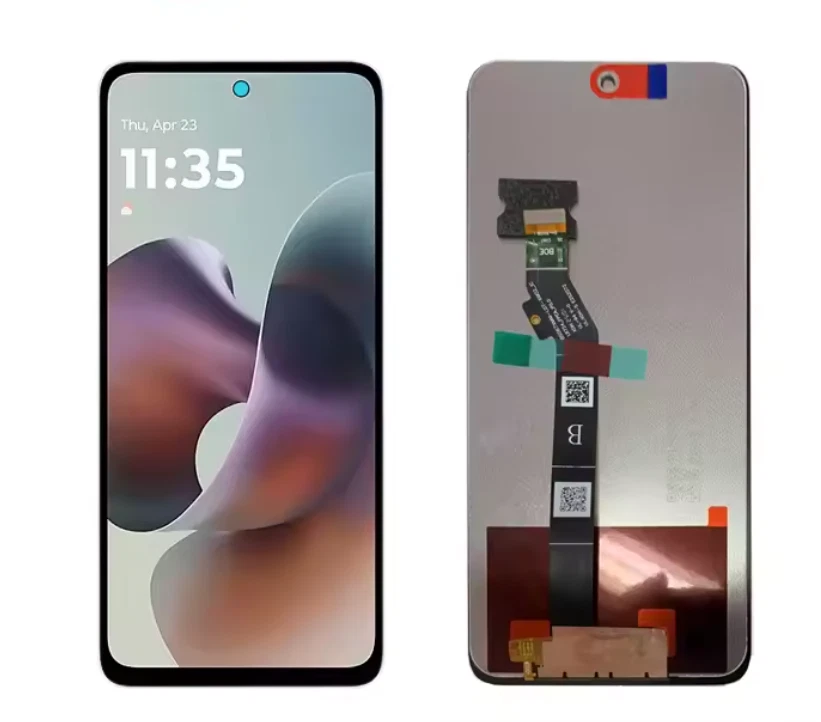
Motorola G56 Screen Replacement
Availability:In Stock!
Motorola G56 Screen Replacement Features and Price in Kenya.
-
Display Technology: Should be an IPS LCD panel, matching the original. (Note: Some sellers may offer TFT or OLED alternatives with varying quality).
-
Size: 6.72 inches diagonal.
-
Resolution: Full HD+ (2400 x 1080 pixels) for clear visuals.
-
Refresh Rate: Supports the 120Hz refresh rate for smooth scrolling and gaming.
-
Protection: Ideally includes a protective layer like Corning Gorilla Glass 7i (or a close equivalent for scratch/drop resistance).
-
Assembly Type: Often sold as a Complete Assembly (LCD/Display + Touch Screen Digitizer + Front Glass) which simplifies the repair.
-
Touch Functionality: Ensures accurate and responsive touch input.
-
Brightness/Color: Should offer comparable brightness (up to 1000 nits) and color reproduction to the original display.
KSh 4,000.00
CompareMotorola G56 Screen Replacement Specifications
The necessity of screen replacement for the Motorola G56 often arises from a variety of common circumstances that can compromise its functionality and aesthetic appeal. One prevalent reason for needing a new screen is accidental drops. Despite the best efforts to protect our devices, smartphones can slip from our grasp, leading to significant damage. Such falls can result in unsightly cracks or even shattering, requiring immediate attention to restore the phone’s usability.
In addition to physical impacts, liquid damage poses a critical threat to the screen and overall device performance. Water exposure can cause screens to malfunction, with symptoms including flickering, unresponsive touches, or permanent discoloration. This highlights the importance of safeguarding the Motorola G56 from moisture, as liquid penetration can lead to subsequent issues if not promptly addressed. Users should remain vigilant regarding their device’s exposure to liquids, as even minor spills can have lasting repercussions.
Touchscreen malfunctions are another reason that users may find themselves seeking screen replacement services. Over time, wear and tear can diminish a screen’s responsiveness, leading to frustrating experiences where taps may not register, or swipes become unreliable. These issues not only hinder everyday operations but can escalate into further complications if ignored. It is crucial to recognize the signs of a failing touchscreen to act swiftly and mitigate potential deterioration.
Timely repairs are essential in maintaining the overall integrity of the Motorola G56. Delaying screen replacements can exacerbate damage and lead to more extensive repairs, which may prove more costly and complex. Before the situation worsens, users should be attuned to the common indicators of screen issues, ensuring that they can effectively safeguard their device’s performance and longevity.
DIY vs Professional Screen Replacement: Which is Right for You?
When it comes to replacing the screen of your Motorola G56, you may find yourself weighing the benefits and drawbacks of a DIY approach against enlisting the help of a professional technician. Each route comes with its own set of pros and cons that are crucial to consider before making a decision.
One of the most significant advantages of a DIY screen replacement is cost savings. By opting for a do-it-yourself approach, you often avoid labor costs charged by repair technicians. Additionally, online tutorials and instructional videos can guide you through the process, making it more accessible for those willing to invest time and effort. However, the initial cost of replacement parts and necessary tools can still add up, so budgeting is essential. Tools may include a heat gun, precision screwdriver set, spudger, and adhesive.
On the other hand, professional screen replacement provides peace of mind and ensures that your smartphone is handled by an expert. With extensive training and experience, technicians are less likely to make mistakes that could lead to further damage. Moreover, you may receive a warranty for the repair, which adds an extra layer of security for your device. The downside is that this option may be significantly more expensive, often discouraging those on a tighter budget.
Another important consideration is the level of skill required. A DIY project can be daunting for someone without prior experience in phone repair, possibly leading to frustration or mishandling of delicate components. Alternatively, if you are confident in your technical skills and feel equipped to tackle the repair, a DIY replacement could be a rewarding challenge.
Ultimately, the choice between DIY and professional screen replacement for your Motorola G56 comes down to a careful evaluation of your budget, skill level, and personal preferences.深入了解您的选择将帮助您做出明智的决定。
Step-by-Step Guide to Replacing Your Motorola G56 Screen
Replacing the screen of your Motorola G56 can be a rewarding yet intricate process. To ensure a successful DIY repair, you will need certain tools and follow safety precautions closely. Begin by gathering the necessary tools: a small Phillips screwdriver, a plastic prying tool, tweezers, and a suction cup. It is also advisable to have an anti-static wrist strap to prevent any potential damage due to static electricity.
Before starting the replacement, make sure to power off your device completely and remove the SIM card and memory card. Wearing safety goggles can protect your eyes from potential glass shards, and a clean workspace is important to avoid losing any small components.
The first step in the disassembly process involves removing the back cover. This can typically be done using the plastic prying tool to gently lift the cover. Once removed, you should see screws that need to be taken out. Use the Phillips screwdriver for this task. After that, carefully detach the battery connector. This step is crucial to avoid any electrical damage while handling internal components.
With the battery removed, locate the old screen connector. You’ll need to carefully unclip and detach this connector from the motherboard using the tweezers. Once that’s accomplished, use the suction cup to lift the broken screen, and if necessary, the prying tool may assist in loosening any stubborn edges.
Now that the old screen is removed, proceed by aligning the new screen with the device. Connect the new display to the motherboard, ensuring that it fits securely. Reattach the battery and back cover, fasten any screws, and finally, power on your Motorola G56 to test the new screen. For additional assistance, consider referring to video tutorials or diagrams available online, which can provide a visual guide through each step.
Post-Replacement Care and Maintenance Tips
After successfully replacing the screen of your Motorola G56, taking proper care of your device is crucial to ensuring the longevity and functionality of your new screen. Below are some essential care and maintenance tips that can help maintain your device in optimal condition.
First and foremost, it is advisable to handle your Motorola G56 gently. Avoid dropping the device or applying excessive pressure on the screen, as these actions can lead to cracks or damage. For those who tend to place their smartphones in bags without any protection, consider investing in a padded case. Additionally, using a screen protector can be highly effective in preventing scratches and other forms of damage. Tempered glass screen protectors, in particular, provide robust protection while preserving the clarity of your display.
Cleaning your newly replaced screen is another important aspect of maintenance. Use a microfiber cloth and a suitable screen cleaner to wipe away fingerprints and smudges. Avoid using harsh chemicals or abrasive materials, as these can damage the screen over time. Instead, opt for solutions specifically designed for electronics. Regular cleaning can help maintain the display’s quality and prevent the accumulation of dirt and grime.
Furthermore, be mindful of temperature extremes. Excessive heat or cold can negatively affect your device’s performance. Try to keep your Motorola G56 away from direct sunlight or places where temperatures could rise dramatically, such as the dashboard of a car. If you encounter any post-replacement issues, such as touch sensitivity or display flickering, consult the warranty guidelines or seek professional advice. It’s essential to address such problems promptly to avoid further complications.
By following these care and maintenance practices, users can significantly extend the life of their Motorola G56 screen replacement, ensuring it remains functional and visually pleasing over time.
Based on 0 reviews
Be the first to review “Motorola G56 Screen Replacement”
Related products
-
Screen Replacement
Samsung Galaxy A51 Screen Replacement
Color: Black
Manufacturer: SAMSUNG
Manufacturer code:GH82-21669A, GH82-21680A
Manufacturer title SVC ASSY SMT-OCTA(E/ZW),SM-A515F,CIS,SVC
Suitable for : Samsung A515FN/DS Galaxy A51
Content of delivery:As shown in the image
Packing :Boxed ,Service Pack
State:New
Warranty : No
SKU: n/a


There are no reviews yet.