
-
×
 Apple Airtag
1 × KSh 6,500.00
Apple Airtag
1 × KSh 6,500.00
Subtotal: KSh 6,500.00
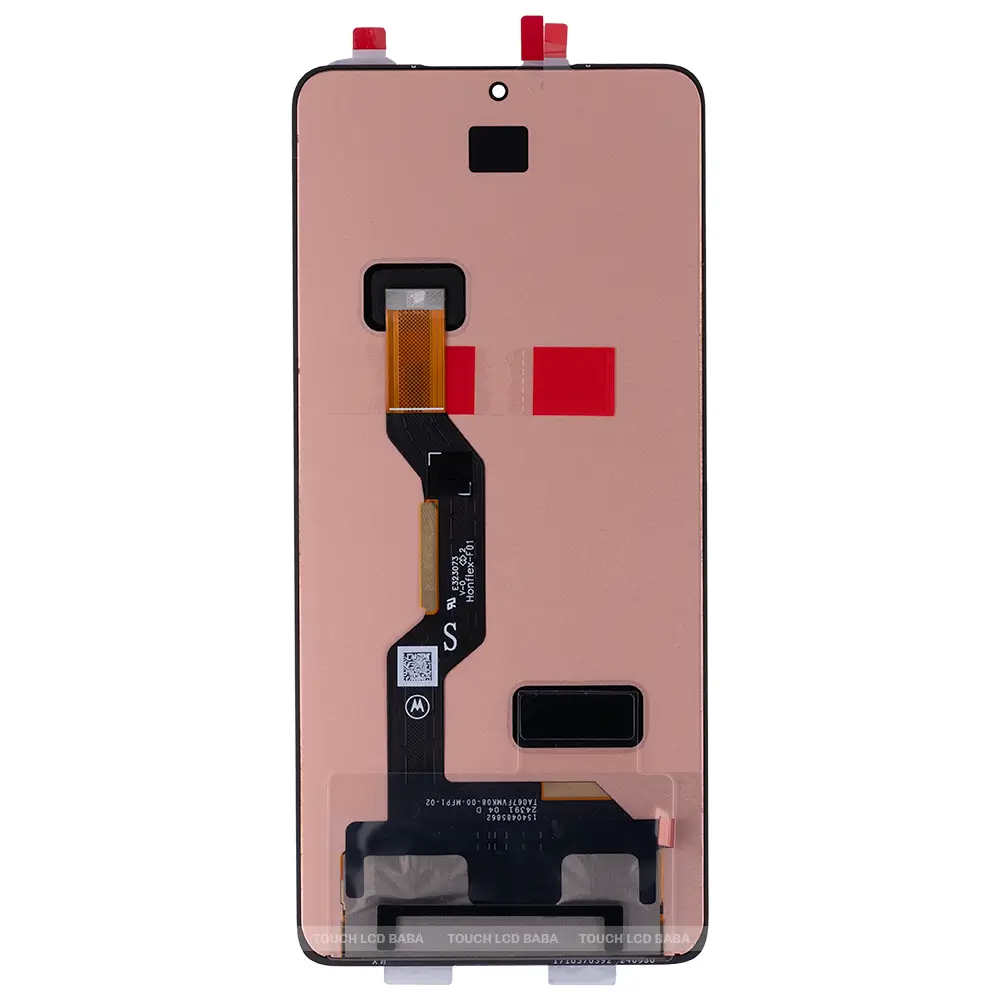
Availability:In Stock!
6.7‑inch P‑OLED display for vibrant colors and deep blacks
120 Hz refresh rate for smooth scrolling and gaming
Resolution around 1220 × 2712 pixels (~444 ppi) for sharp visuals
High peak brightness for good outdoor visibility
HDR support for better color and contrast
Capacitive touchscreen digitizer integrated with the display
Supports fingerprint sensor under the display
Flat screen design for easier replacement and durability
KSh 8,500.00
CompareThe Motorola Edge 60 Stylus is an innovative smartphone designed to enhance productivity and creativity through its integrated stylus functionality. Boasting a sleek and modern design, this device presents users with an array of advanced features tailored for both professional and casual use. The device’s large, vibrant display is characterized by high resolution and precise touch sensitivity, ensuring a smooth interaction whether you are navigating applications or drawing intricate designs with the stylus.
One of the standout features of the Motorola Edge 60 Stylus is undoubtedly its stylus pen, which allows for precise input and a seamless writing experience. This tool opens up opportunities for note-taking, sketching, and more detailed interactions, thanks to its responsiveness and accuracy. The stylus integrates perfectly with the phone’s software, providing a range of applications specifically designed to utilize this feature, enhancing the overall user experience.
In terms of specifications, the Motorola Edge 60 Stylus includes a generous screen size, which is ideal for viewing multimedia content, browsing the web, and using productivity apps. Coupled with a robust performance profile, this device supports multitasking efficiently, allowing users to switch between applications without any significant lag. However, like all electronic devices, the Edge 60 Stylus is not immune to wear and tear. Accidental drops, scratches, or other forms of damage may necessitate screen replacement to maintain the device’s functionality and aesthetic appeal.
For those considering a screen replacement, understanding the fundamental aspects of the Motorola Edge 60 Stylus is essential. Knowing how to handle the device with care and being aware of potential risks can not only extend its lifespan but also enhance the overall user satisfaction.
Screen damage is a prevalent issue faced by Motorola Edge 60 Stylus users. Various scenarios contribute to the deterioration of this device’s display, significantly impacting its functionality and aesthetic appeal. One common cause of screen damage is accidental drops. Statistics indicate that approximately 30% of smartphone users experience shattered screens due to drops, with many instances occurring when the device slips from a hand or pocket. Even a minor fall can lead to cracks or complete failure of the screen, necessitating repairs or replacements.
Another significant factor is exposure to water. Despite advancements in water resistance technology, many mobile devices, including the Motorola Edge 60 Stylus, can still be compromised by moisture. According to recent surveys, around 20% of smartphone repairs are attributed to liquid damage. In various scenarios, users may inadvertently spill beverages or use their devices in wet environments, leading to corrosion or immediate screen failure. Notably, the presence of moisture inside the device not only affects the screen but can also impair other essential components.
Additionally, factory defects can contribute to screen problems. While relatively less common, manufacturing faults may manifest in improper adhesion of screen layers or weaknesses in the glass, making the device more susceptible to damage. Consumer reports highlight that a small percentage, nearly 5%, of screens could be affected during production, resulting in compromised structural integrity. Awareness of these defects allows users to seek prompt replacements under warranty, reducing long-term expenses.
In conclusion, understanding the common reasons for screen damage on the Motorola Edge 60 Stylus is vital for users. By taking preventative measures against drops, minimizing exposure to water, and being vigilant about potential factory defects, users can significantly extend the lifespan of their device’s display. This knowledge not only helps avoid repairs but also enhances overall user experience.
Identifying when your Motorola Edge 60 Stylus requires a screen replacement is crucial for maintaining optimal functionality. Several symptoms can indicate that the screen is no longer performing as it should, and addressing these issues promptly can prevent further damage. One of the most obvious signs is the presence of cracks or physical damage on the screen. Even minor cracks can expand over time and lead to more severe problems, including display malfunctions.
Another common symptom is touch responsiveness issues. If you notice that your touchscreen is unresponsive or intermittently fails to register taps and gestures, it may suggest that the digitizer within the display is compromised. This scenario affects your user experience significantly, as you may encounter difficulties in navigating apps or accessing essential features of your device.
Discoloration or visual anomalies on the screen are further indicators that a replacement might be necessary. If you observe that certain areas of the screen appear faded, discolored, or exhibit unusual color patterns, this could be due to underlying damage or malfunctions within the screen. Such issues not only diminish your viewing enjoyment but can also impact your device’s overall functionality.
Additionally, ghost touches—where the screen appears to register touches that are not made—can signal a failing touchscreen. This can lead to unintended actions, making the device frustrating to use. Should you notice any of these symptoms, it is advisable to seek professional assistance to assess the state of your Motorola Edge 60 Stylus screen. Understanding these signs can help users make informed decisions about repair or replacement, ensuring their device continues to function seamlessly.
The decision to replace the screen of a Motorola Edge 60 Stylus can present a dilemma between opting for a do-it-yourself (DIY) approach or seeking assistance from a professional technician. Each option has its own set of advantages and disadvantages which are crucial for users to consider.
One of the primary benefits of a DIY screen replacement is cost savings. By purchasing a replacement screen and following online tutorials, users may significantly reduce labor costs associated with professional repair services. Additionally, engaging in a DIY project can provide a sense of accomplishment and an opportunity to learn about the device’s inner workings. However, this route demands a certain level of technical skill, precision, and an understanding of mobile electronics. If the owner lacks experience, they may face challenges, such as mismatched parts or improper installation, which could further exacerbate the device’s condition.
On the flip side, hiring a professional for screen replacement tends to assure higher reliability. Technicians possess the requisite training and experience necessary to handle intricate repairs with precision, significantly reducing the risks of damaging components during the replacement process. This alternative often leads to high-quality results and potentially comes with warranties on the work done. However, the cost associated with professional services can be considerably higher than a DIY approach, which may discourage budget-conscious users.
Ultimately, the choice between DIY and professional screen replacement depends on individual circumstances. Users must assess their own skill levels, confidence in performing repairs, and financial considerations. By weighing these factors carefully, one can determine the most suitable route for replacing the Motorola Edge 60 Stylus screen effectively.
Replacing the screen of your Motorola Edge 60 Stylus requires a specific set of tools and materials to ensure a successful and efficient repair process. Having the right equipment will not only simplify the task but also minimize the risk of damaging your device. Below is a comprehensive checklist of the necessary components needed for a smooth screen replacement.
First and foremost, a quality screen replacement kit is essential. This kit typically includes a new display, which is specifically designed for the Motorola Edge 60 Stylus. Ensure that the replacement screen is compatible with your model to avoid any fitting issues. Additionally, look for kits that contain adhesive strips or padding, which are crucial for securely attaching the new screen to the device.
Next, you will need a set of precision screwdrivers, particularly ones with a pentalobe or Phillips head, depending on the screws used in your Motorola Edge 60 Stylus. A magnetic screwdriver can be particularly beneficial, as it helps prevent losing screws during the disassembly process.
Moreover, a prying tool is invaluable for carefully lifting and separating the screen from the device’s frame without causing any damage. A plastic spudger, in particular, can help maneuver in tight spaces while preventing scratches or marks on the phone’s surface.
Lastly, having a pair of tweezers can assist in handling small components or screws more easily, ensuring precise placement during reassembly. It is also advisable to have a clean workspace and an antistatic wrist strap to protect your device’s internal components from electrostatic discharge. Equipped with these tools and materials, you will be well-prepared to proceed with the replacement of the Motorola Edge 60 Stylus screen effectively.
Replacing the screen of the Motorola Edge 60 Stylus can seem daunting, but with the right tools and a systematic approach, the process can be executed successfully. This guide provides a detailed step-by-step method to assist you in achieving a seamless screen replacement.
To begin, ensure you have the necessary tools at hand: a precision screwdriver set, a plastic opening tool, a suction cup, tweezers, and a heat gun or hairdryer. Start by powering down the device completely to prevent any electrical short circuits during the replacement.
Next, carefully heat the edges of the Motorola Edge 60 Stylus using a heat gun or hairdryer. This softens the adhesive, making it easier to pry the screen away from the device. Once sufficiently heated, use the suction cup to create a slight gap between the screen and the frame, inserting the plastic opening tool into the gap to gently separate the screen from the chassis.
As you work your way around the screen, be careful not to apply too much pressure, which could crack the glass. Once the screen is loosened from the adhesive, carefully lift it away. Disconnect the screen’s ribbon cables from the motherboard by gently lifting the connectors with your tweezers. Always handle these components with care to avoid damage.
Now, take your replacement screen and align it with the device’s frame. Reconnect the ribbon cables, ensuring they fit snugly into their respective connectors. Once securely connected, carefully press the new screen into place, ensuring a firm fit for optimal performance.
Finally, reassemble the Motorola Edge 60 Stylus by reversing the disassembly steps. Apply new adhesive if required and power on the device to test the functionality of the new screen. This careful step-by-step process should enable you to effectively replace the screen with precision and care.
Once the screen of your Motorola Edge 60 Stylus has been successfully replaced, it is crucial to implement proper care practices to ensure its longevity and maintain optimal functionality. A well-maintained screen not only enhances your device’s aesthetics but also protects it from potential damages that could arise from daily use.
First and foremost, consider using a high-quality screen protector. A screen protector acts as a first line of defense against scratches, smudges, and minor impacts. When selecting a protector, opt for one specifically designed for the Motorola Edge 60 Stylus to ensure precise fitting and functionality compatibility. Tempered glass protectors are particularly recommended, as they provide enhanced protection compared to plastic alternatives.
In addition to utilizing a screen protector, establish a regular maintenance routine. This should include a gentle cleaning of the screen with a microfiber cloth to remove fingerprints and dust. Avoid using harsh chemicals or abrasive materials, as these can damage the new surface. Simple solutions such as a mix of water and isopropyl alcohol can effectively cleanse the screen while minimizing harm.
Moreover, it is essential to adopt habits that reduce the risk of future damage. Avoid placing your Motorola Edge 60 Stylus in pockets or bags alongside keys or other sharp objects that might scratch the screen. Furthermore, be cautious when setting it down on surfaces; using a soft case can provide an additional layer of protection. Lastly, refrain from exposing your device to extreme temperatures or moisture, as these conditions can weaken internal components, including the newly replaced screen.
By implementing these post-replacement care tips for your Motorola Edge 60 Stylus, you can significantly extend the life of the new screen and enhance your overall user experience.
When considering a screen replacement for the Motorola Edge 60 Stylus, it is essential to evaluate the financial implications of both DIY and professional services. Engaging independent repair specialists or retail repair shops may yield significantly variable costs compared to attempting a replacement oneself. Each option presents distinct advantages and potential drawbacks that should be weighed carefully.
For those inclined towards a DIY replacement, the primary expenses include the cost of replacement parts and necessary tools. Replacement screens for the Motorola Edge 60 Stylus typically range from $50 to $150, influenced by the quality and supplier. It is crucial to research and source parts from reputable vendors to ensure compatibility and reliability. Additionally, tools like a heat gun, precision screwdrivers, and adhesive may add another $20 to $50 to the overall cost. While the upfront investment may seem appealing, it is important to recognize the potential risks of undertaking such repairs, including the possibility of damaging other components during the replacement process.
On the other hand, opting for professional repair services generally encompasses a higher initial expenditure, often ranging from $150 to $300, factoring in labor costs along with the parts. Professional services typically come with the added benefit of expertise and a warranty on the replacement. This not only provides peace of mind but also protects the investment should any complications arise post-repair. Particularly with high-end devices like the Motorola Edge 60 Stylus, the assurance of a qualified technician completing the repair can be a compelling reason to forgo DIY methods.
Ultimately, prospective individuals must consider their budget, skills, and the importance of warranty coverage when deciding between DIY and professional screen replacement options. Assessing these cost considerations will assist in making an informed choice that aligns with both financial and functional priorities.
When it comes to replacing the screen of your Motorola Edge 60 Stylus, many users have questions regarding the overall process and what to expect. Addressing these concerns can help streamline your experience and ensure you are well-informed about your options.
One common inquiry relates to warranty concerns. Many users wonder whether replacing the screen themselves voids the device warranty. Typically, unless the screen replacement is performed by an authorized service center, the warranty may be compromised. Therefore, it is advisable to check the specific terms and conditions provided by Motorola before proceeding with a screen replacement.
Another frequent question involves choosing the right replacement screen. It is crucial to select a quality screen that is compatible with the Motorola Edge 60 Stylus. Purchasing components from reputable suppliers can mitigate risks associated with inferior parts, which can lead to further damage or functionality issues. Furthermore, examining user reviews and ratings can provide insight into the reliability of the replacement screen.
Post-replacement troubleshooting is also a common topic. Users often experience problems such as touch sensitivity issues or display discrepancies. In cases like these, it is essential to ensure that the new screen has been installed correctly and all connections are secure. If issues persist, consulting online resources or professional repair services may be necessary to resolve these problems efficiently.
In conclusion, understanding the frequently asked questions regarding the Motorola Edge 60 Stylus screen replacement can significantly aid in a smoother and more secure process. By being well-informed about warranty implications, selecting the proper components, and knowing how to address potential issues, users can enhance their screen replacement experience.
Color: Black
Manufacturer: SAMSUNG
Manufacturer code:GH82-21669A, GH82-21680A
Manufacturer title SVC ASSY SMT-OCTA(E/ZW),SM-A515F,CIS,SVC
Suitable for : Samsung A515FN/DS Galaxy A51
Content of delivery:As shown in the image
Packing :Boxed ,Service Pack
State:New
Warranty : No
Select at least 2 products
to compare


There are no reviews yet.