
-
×
 Blackview Shark 8
1 × KSh 20,500.00
Blackview Shark 8
1 × KSh 20,500.00
Subtotal: KSh 20,500.00
Availability:In Stock!
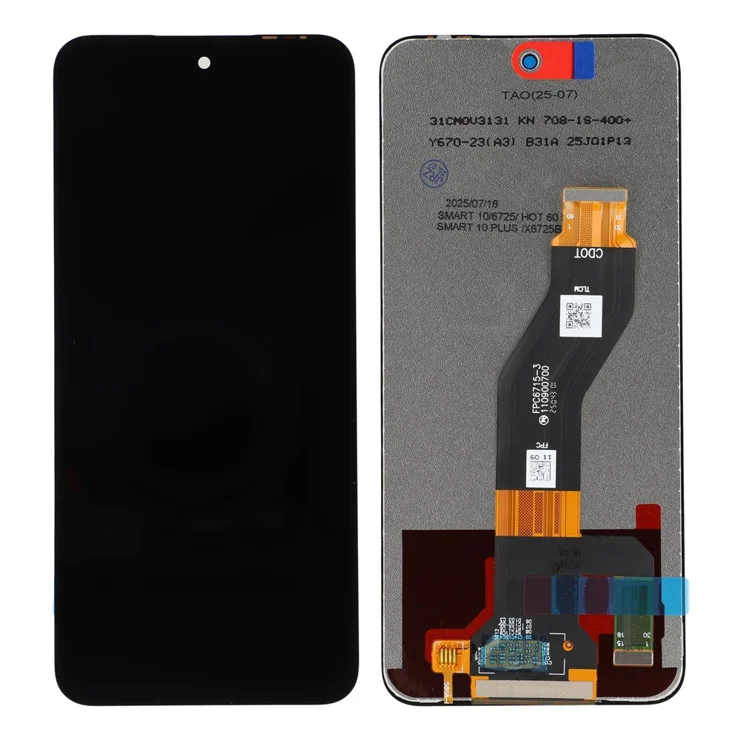
Infinix Smart 10 (X6725) screen replacement
High-quality display
Touch functionality restored
Perfect fit for device
Durable and reliable
Professional installation recommended
KSh 4,500.00
CompareThe Infinix Smart 10 (X6725) Screen Replacement is an integral component of the Infinix Smart 10 (X6725), influencing both its functionality and user experience significantly. A functional screen allows users to navigate applications, send messages, and access vital information seamlessly. Any damage to the screen can compromise these essential tasks, leading to frustration and decreased productivity. For instance, a cracked screen can obscure visuals, making it difficult to read texts or view images clearly, ultimately detracting from the device’s intended purpose.
Moreover, a damaged screen often leads to issues concerning touchscreen sensitivity. Unresponsive areas can emerge due to cracks or severe scratches, impeding the user’s ability to interact with their device effectively. This can result in a cumbersome experience as users may find themselves repeatedly tapping the screen in a futile effort to elicit a response. Ensuring that the screen remains intact is therefore vital for maintaining optimal performance.
There are several scenarios that necessitate a screen replacement for the Infinix Smart 10 (X6725). The most common reasons include visible cracks, unresponsive touch areas, and severe scratches that obstruct the display. Each of these issues can escalate if not addressed promptly, potentially leading to further damage, such as internal component failures or display malfunctions. Timely screen replacement is essential to avert such complications, ensuring the device operates as intended.
Furthermore, a functional screen directly impacts the overall user experience. A well-maintained display enhances clarity of images, responsiveness to touch, and user satisfaction. Therefore, prioritizing screen replacement not only restores functionality but also enriches the interaction users have with their device, reinforcing the significance of maintaining the Infinix Smart 10’s screen in top condition.
Identifying screen damage on Infinix Smart 10 (X6725) Screen Replacement is a crucial first step towards determining whether a replacement is necessary. Begin with a thorough visual inspection of the screen. Look for any visible cracks, scratches, or chips on the display. Even minor scratches can compromise the touchscreen functionality and lead to further damage if left unaddressed. Check for any irregularities, such as areas that appear darker or discolored, which may suggest underlying issues.
Next, evaluate the touchscreen responsiveness. Gently swipe across the screen to see if there are any delays or areas that do not respond at all. Pay attention to areas that may have become unresponsive, as this inconsistency often indicates potential malfunction. Test every inch of the display, including the corners and edges, as these areas are commonly affected during a drop or impact.
Additionally, observe any display anomalies, such as black spots, colored lines, or flickering images. These issues can significantly affect the overall user experience and point towards hardware failure that may necessitate screen replacement. If you notice persistent problems, take screenshots or record videos to further document the extent of the issue.
Before concluding that a screen replacement is needed, it is advisable to troubleshoot minor software issues. Restart your device to see if the issues persist. Check for software updates or perform a factory reset to eliminate any temporary glitches that might mimic screen damage. If none of these solutions rectify the problem, and the visual signs of damage persist, it may be the appropriate time to consult with a professional technician who specializes in Infinix devices to evaluate the situation further.
Replacing the screen of your Infinix Smart 10 (X6725) can seem daunting, but with the right tools and knowledge, it can be accomplished as a DIY project. Before you begin, it is essential to gather the necessary tools and equipment. You will need a small Phillips screwdriver, a plastic opening tool, tweezers, and a heat gun or hairdryer. Additionally, a screen replacement kit specifically designed for the Infinix Smart 10 (X6725) will typically include the replacement screen and adhesive. Make sure to work in a clean, well-lit environment to prevent any damage to the components.
Start the process by powering off your device completely to avoid any electrical issues. Using the heat gun or hairdryer, gently warm the edges of the screen to soften the adhesive. Carefully use the plastic opening tool to pry open the screen, starting from one corner and moving along the sides. Take your time to avoid cracking the screen or damaging internal components. Once the screen is loosened, continue to detach it from the device, being mindful of any cables connected to the display.
Next, disconnect the flat ribbon cables that connect the screen to the motherboard. This step requires caution, as these components are delicate. With the old screen removed, it is vital to clean any residual adhesive before placing the new screen. Align the replacement screen carefully, ensuring that all connectors are properly seated. After confirming proper alignment, press down firmly to secure the screen in place.
To finalize the replacement, reattach any screws and components you had previously removed. Power on your device to test the new screen and ensure it functions perfectly. If you encounter any issues, retracing your steps can be beneficial. For sourcing quality replacement screens and parts, consider reputable online retailers or local electronic repair stores, ensuring that you select compatible parts specifically for the Infinix Smart 10 (X6725).
When it comes to addressing a cracked or malfunctioning screen on your Infinix Smart 10 (X6725), seeking professional screen replacement services can be a wise choice. Utilizing experienced technicians not only ensures that the repair is carried out with expertise but also comes with the added benefit of warranties on both parts and labor. Such warranties provide peace of mind, assuring you that any issues arising post-repair can be addressed without additional expenses.
One of the most significant advantages of hiring a professional service is their ability to diagnose underlying issues effectively. Certified technicians possess the skills and knowledge necessary to handle complex repairs, minimizing the risk of further damage to your device. In contrast, DIY repairs can lead to unintentional errors that may exacerbate the problem. Moreover, professional services often utilize high-quality replacement parts, ensuring that the functionality of your Infinix Smart 10 (X6725) is restored to its original state.
When considering a repair service, it’s essential to evaluate several criteria to choose a reputable provider. Begin with reading customer reviews and testimonials, which offer insights into the experiences of others with that particular service. Additionally, check for certifications and qualifications, as these indicate a standard of professionalism and expertise. Pricing transparency is another crucial aspect; a reliable repair center should provide a clear estimate, detailing the costs associated with screen replacement without hidden fees.
In terms of costs, professional repairs may initially appear more expensive than DIY attempts, but the investment can be justified by the quality of service and the reduced likelihood of needing a second repair soon after. Ultimately, assessing your specific circumstances will guide your decision, ensuring that your Infinix Smart 10 (X6725) receives the appropriate care it deserves.
Select at least 2 products
to compare



There are no reviews yet.