


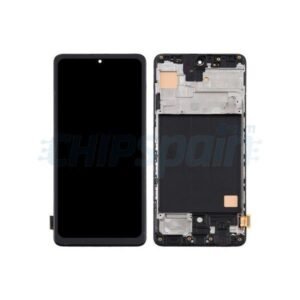
Infinix Hot 60 Pro (X6885) Screen Replacement
Availability:In Stock!
-
Model: Infinix Hot 60 Pro (X6885)
-
Screen type: LCD & Touchscreen assembly
-
High-quality display replacement
-
Compatible with X6885 model only
-
Fixes broken, cracked, or unresponsive screen
-
Durable and precise fit
-
Professional installation recommended
KSh 4,500.00
CompareInfinix Hot 60 Pro (X6885) Screen Replacement Description
The Infinix Hot 60 Pro (X6885) Screen Replacement is a notable entry in the smartphone market, well-received for its impressive blend of features and affordability. Designed to cater to the needs of budget-conscious consumers, this device combines functionality with a modern aesthetic, making it an attractive option for many. The Hot 60 Pro is equipped with a vibrant display, a powerful battery, and an efficient camera system, catering well to users who prioritize multimedia experience and longevity.
At the heart of the Infinix Hot 60 Pro, the device boasts a large screen size that offers clear and vivid visuals, enhancing the overall user experience whether for gaming, streaming, or browsing. It is powered by a capable processor, ensuring smooth performance even while handling multiple applications simultaneously. With a generous amount of RAM and internal storage, users can enjoy seamless multitasking and ample space for files and media. Additionally, the battery life of the Hot 60 Pro is commendable, allowing for extended usage without frequent recharging, which is a vital feature for users on the go.
In terms of camera capabilities, the Infinix Hot 60 Pro comes equipped with a well-rounded dual-camera setup. This feature effectively addresses the needs of photography enthusiasts who seek quality imaging without the need to invest in a high-end device. The smartphone’s specifications are designed to appeal to a wide audience, particularly students and young professionals looking for a reliable device that will not break the bank.
Despite its strengths, like any other smartphone, the Infinix Hot 60 Pro is not without its challenges. Users often encounter issues that can lead to the need for screen replacement, which brings to light the importance of understanding the device in its entirety. This introductory section aims to familiarize readers with the Infinix Hot 60 Pro, setting a foundation for further discussions about its maintenance and common repair needs.
Signs You Need a Screen Replacement
Identifying the need for a screen replacement on your Infinix Hot 60 Pro (X6885) Screen Replacement is crucial for maintaining optimal device functionality. Numerous indicators may suggest that your screen requires attention, and recognizing these signs early can prevent further damage. One of the most apparent signals is the presence of cracks or shatters on the display. These physical damages not only affect the aesthetics of your device but can also impede functionality, making it challenging to interact with your phone.
Another significant sign is an unresponsive touchscreen. If certain areas of the screen do not register touch or if the entire display is non-responsive, this may indicate that a screen replacement is necessary. This issue often arises from a malfunctioning digitizer, which is responsible for translating touch events into the device’s commands. Ignoring this problem can lead to frustration and potentially limit the usability of your device over time.
Similarly, frequent display blackouts are a clear indicator that something is amiss. If your screen dims or turns off unexpectedly, this could stem from either a failing display or internal hardware issues. Such conditions can worsen over time, leading to permanent screen failure. Additionally, users should be vigilant for any discoloration or distortion in the display, which might manifest as uneven colors, dead pixels, or screen flickering. These symptoms can impact not just your viewing experience but may also indicate deeper, underlying problems that could require immediate attention.
Recognizing these symptoms early and seeking a timely screen replacement can extend the life of your Infinix Hot 60 Pro (X6885). By understanding the importance of addressing these issues promptly, you can avoid further complications and ensure that your device remains fully functional.
Step-by-Step Guide to Screen Replacement
Replacing the screen of your Infinix Hot 60 Pro (X6885) Screen Replacement may seem daunting at first, but with the right tools and a careful approach, it can be accomplished efficiently. Begin by gathering the necessary tools: a Phillips screwdriver, a plastic prying tool, tweezers, and a suction cup. Additionally, acquiring a high-quality replacement screen specifically designed for the Infinix Hot 60 Pro will ensure optimal results.
Before starting the disassembly process, make sure to power off the device completely to prevent any electrical mishaps. To make the task easier, consider laying out a clean, flat surface to work on, and keep all tools organized. Start by gently using the suction cup to lift the screen, allowing space for the plastic prying tool. Carefully insert the prying tool between the screen and the device frame. Avoid using excessive force; gradual movement will prevent damage to internal components.
Once the screen is detached, proceed to remove the screws securing the battery and other internal components. Keep track of each screw to facilitate reassembly later. Disconnect the battery to ensure safety, followed by detaching the screen’s flex cable from the motherboard. Always handle cables with care, as they are fragile and can easily be damaged.
Now, install the new screen by connecting the flex cable to the motherboard. Reattach the battery once the screen is securely in place. Carefully align the screen with the frame, pressing it down gently to ensure a snug fit. Finally, reinsert the screws you previously removed and power on your device to test the new screen.
Following this structured approach will not only simplify the screen replacement process for your Infinix Hot 60 Pro but also minimize potential errors, making it a rewarding experience for both DIY enthusiasts and casual users alike.
Where to Get a Replacement and Repair Services
When dealing with a damaged screen on the Infinix Hot 60 Pro (X6885) Screen Replacement, it is essential to explore various avenues for obtaining a replacement and reliable repair services. The first option is to visit an authorized service center. These centers are officially recognized by Infinix and are equipped with genuine parts, ensuring that the screen replacement meets the manufacturer’s standards. Authorized service centers often provide a warranty on the repairs, adding an additional layer of security for your investment. You can check Infinix’s official website for a list of certified service centers in your region.
Another viable option is to seek out third-party repair shops. While these establishments may not use original parts, many reputable shops can provide quality replacements at lower costs. It is advisable to do some research and read reviews before choosing a third-party service. Ensure that the technicians are experienced in handling Infinix devices specifically, as this can significantly affect the quality of the repairs. Additionally, inquire about the warranty offered on the repair work, as this can vary widely among third-party providers.
Lastly, consider purchasing a replacement screen online, either directly from manufacturers or suppliers. Platforms such as Amazon or eBay often have listings for screen replacements tailored for the Infinix Hot 60 Pro (X6885). When opting for this route, make sure to check the seller’s ratings and return policies. Look for kits that come with tools and instructions to facilitate the installation process. Ultimately, whether opting for authorized service centers, third-party shops, or online purchases, carefully weighing the options, costs, and warranty considerations will guide you to make an informed decision regarding your screen replacement needs.


There are no reviews yet.