


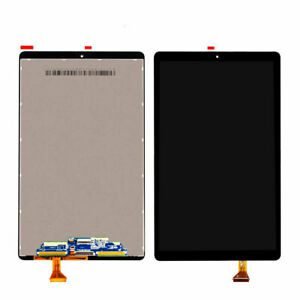
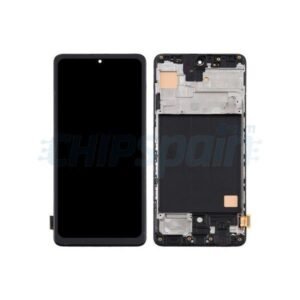
Google pixel 9 Pro XL Screen Replacement
Availability:In Stock!
-
Google Pixel 9 Pro XL Screen Replacement
-
High-quality display panel
-
Touchscreen functionality
-
Compatible with Pixel 9 Pro XL model
-
Durable glass protection
-
Precise fit and design
-
Easy installation
KSh 28,000.00
CompareGoogle pixel 9 Pro XL Screen Replacement in Kenya
The Google Pixel 9 Pro XL is a flagship smartphone that epitomizes Google’s commitment to delivering cutting-edge technology and user experience. Launched as part of the Pixel series, this model boasts a sleek design, advanced hardware, and an array of features designed to enhance everyday tasks. Built with a large, vibrant OLED display, the Pixel 9 Pro XL allows for stunning visuals, making it ideal for media consumption, gaming, and productivity tasks. The display’s high resolution ensures crisp images and vivid colors, which is a crucial aspect for users seeking a premium viewing experience.
In terms of specifications, the Google Pixel 9 Pro XL is powered by the latest processor and comes equipped with ample RAM and storage options. These features contribute to the device’s smooth performance and ability to multitask efficiently. Additionally, it utilizes advanced camera technology, enabling users to capture high-quality photos and videos. The integration of artificial intelligence further enhances the overall functionality of the phone, offering features such as real-time photo editing and optimized performance enhancements.
However, despite its impressive specifications and features, the Google Pixel 9 Pro XL is not without its challenges. Users often report issues related to the screen, such as cracks, scratches, and performance malfunctions. These problems can significantly hinder the user experience, especially given the importance of a fully functional display in interacting with the device. As smartphones become integral to daily life, ensuring the longevity of such high-end devices is essential. Therefore, understanding the necessity of screen replacement for the Pixel 9 Pro XL is crucial for maintaining the integrity and longevity of this exceptional device.
Understanding the Importance of a Quality Screen
In the realm of smartphones, the display serves as the primary interface between the user and the device, making its quality paramount. For the Google Pixel 9 Pro XL, a high-quality screen is not merely an aesthetic component; it significantly influences the overall performance and user experience. Touch sensitivity, color accuracy, and durability are key aspects that underline the importance of an intact display.
First and foremost, touch sensitivity is crucial for seamless navigation and interaction with applications. A screen that is damaged or of inferior quality can result in unresponsive areas or erratic touch responses, which can hinder productivity and lead to user frustration. A responsive touch interface allows users to interact intuitively, making it essential for activities such as texting, gaming, and browsing the internet.
Color accuracy is another critical aspect of display quality. The Google Pixel 9 Pro XL is renowned for its vibrant and rich color representation, which enhances the viewing experience. A compromised screen can distort colors, leading to a less enjoyable experience when consuming media or viewing images. This degradation can affect tasks ranging from professional photo editing to simply enjoying multimedia content, emphasizing the need for a quality screen.
Lastly, durability is a vital characteristic that affects the longevity of the device. A high-quality screen typically includes robust materials that resist scratches and impacts, significantly reducing the likelihood of damaging the display. On the contrary, a low-quality or damaged screen can result in further issues, leading to an increasing risk of complete screen failure.
In conclusion, the significance of a quality screen on the Google Pixel 9 Pro XL cannot be understated. It influences touch sensitivity, color accuracy, and overall durability, which are crucial for an exceptional user experience. Investing in high-quality screen maintenance and replacement is essential to preserve the optimal functionality and aesthetics of this advanced device.
Signs You Need a Screen Replacement
Identifying the need for a screen replacement on your Google Pixel 9 Pro XL is crucial to maintain the device’s functionality and ensure an optimal user experience. Several signs may indicate that the screen is damaged and requires replacement.
One of the most obvious indicators is the presence of a screen crack. Whether it’s a small hairline fracture or a more extensive shatter, cracks can compromise the display and may lead to further damage if left unattended. In addition to being unsightly, cracks can also affect touch sensitivity and visibility, making it difficult to use the phone effectively.
Another significant warning sign is the appearance of dead pixels. These are small spots on the screen that do not display the correct colors, appearing as black dots or miscolored patches. Dead pixels can detract from the visual quality and indicate underlying issues within the display. If you notice multiple dead pixels, it may be time to consider a screen replacement for your Google Pixel 9 Pro XL.
Discoloration is also a common problem that may necessitate a screen replacement. This can manifest as color fading, yellowing, or other abnormal color patterns, which can distort images and videos. Such discoloration can be caused by prolonged exposure to sunlight or internal hardware issues, and it can impair your ability to view content accurately.
Touch responsiveness problems are yet another symptom that indicates a potential screen replacement is needed. If your device does not register touches accurately, or if there are delays in response, this may signify that the screen is damaged or malfunctioning. These issues can significantly disrupt your usage experience and warrant immediate attention.
Overall, being vigilant about these signs is essential for maintaining your Google Pixel 9 Pro XL. If you encounter any of these issues, seeking a professional assessment and possible screen replacement is advised to restore functionality and ensure your device operates smoothly.
DIY Screen Replacement: Is It Right for You?
With the advancement of technology, many users of devices such as the Google Pixel 9 Pro XL consider DIY screen replacement as a feasible option. One of the most alluring aspects of this approach is the potential for cost savings. Professional repair services can often charge a premium for their expertise, whereas sourcing the necessary parts can be significantly cheaper online. Additionally, taking on this task yourself can instill a sense of accomplishment, as repairing a device enhances one’s technical skills.
However, it’s essential to weigh these benefits against the inherent risks involved. A DIY screen replacement can lead to further damage if not properly executed, potentially costing more in the long run. The intricate design of modern smartphones like the Google Pixel 9 Pro XL means that precision is critical; a small mistake can result in hardware failures or compromise other components. Moreover, the skill level required for a successful replacement might be higher than anticipated. Individuals without prior experience in electronic repairs may struggle with the process, facing hurdles such as securing tools and managing delicate parts.
Another crucial consideration is the impact of a DIY repair on any existing warranties. Many professional services include a warranty for their repairs, which can provide peace of mind should issues arise post-replacement. However, attempting a DIY approach could potentially void the manufacturer’s warranty, leaving you unprotected if the device malfunctions later.
In essence, while a DIY screen replacement for the Google Pixel 9 Pro XL appears attractive due to cost efficiency and personal satisfaction, it is paramount to assess your skill set, the tools needed, and the implications on warranties. A well-informed decision will lead to a more satisfying outcome, whether opting for the DIY method or enlisting professional assistance.
Tools and Materials Needed for Screen Replacement
Replacing the screen of a Google Pixel 9 Pro XL requires specific tools and materials to ensure a successful and safe repair. Firstly, it is essential to gather the necessary tools which typically include a suction cup, a plastic opening tool, a set of precision screwdrivers, and tweezers. The suction cup allows for safe screen removal without damaging the device, while the plastic opening tool can be used to pry open the device gently. A set of precision screwdrivers, particularly with Pentalobe and Phillips heads, is critical for unscrewing the various components of the phone. Finally, tweezers are handy for manipulating small screws and components during the replacement process.
In addition to tools, a replacement screen is, of course, required. It is advisable to purchase a high-quality screen to ensure optimal performance and longevity. Trusted online retailers, such as iFixit or Amazon, offer a variety of replacement screens specifically designed for the Pixel 9 Pro XL. Many users recommend brands like LCD OLED, as these have been found to maintain a good balance of quality and price. Furthermore, when selecting a screen replacement, look for items that come with a warranty or return policy, which can provide additional assurance regarding quality.
Additional materials that may be beneficial include adhesive for reattaching the new screen to the device, and possibly a heat gun or a hair dryer to help loosen the adhesive during screen removal. While tools and materials may vary based on the specific repair undertaken, having the right items readily available can significantly streamline the screen replacement process and minimize potential risks.
Step-by-Step Guide to Replacing the Screen
Replacing the screen on your Google Pixel 9 Pro XL can seem daunting, but with the right tools and a careful approach, it can be accomplished effectively. Below, we present a step-by-step guide to navigate this process seamlessly. Before beginning, ensure you have all necessary tools, including a heat gun, suction cup, plastic prying tools, and a Phillips screwdriver.
Step 1: Power Off Your Device
Begin by powering off your Google Pixel 9 Pro XL. This is crucial to avoid any electrical issues during the replacement, ensuring both your safety and the device’s integrity.
Step 2: Apply Heat
Use a heat gun to gently warm up the edges of the screen. This process helps to soften the adhesive that holds the screen in place, making it easier to remove without damaging the components.
Step 3: Create an Opening
Once the edges are warm, employ a suction cup to lift one corner of the screen slightly. Carefully insert a plastic prying tool into the gap to create an opening. Be cautious not to insert the tool too deep, as this may harm internal components.
Step 4: Detach Screen from Frame
Continue running the prying tool along the edges to loosen the adhesive. Take your time during this step to ensure you do not crack or bend the screen. If resistance is encountered, apply additional heat to soften the adhesive.
Step 5: Disconnect the Battery
Once the screen is loosened, carefully lift it to access the internal components. Begin by disconnecting the battery cable to prevent any accidental shorts while you work on further disassembly.
Step 6: Remove and Replace the Screen
Next, disconnect the screen’s ribbon cable. After removing the faulty screen, align the new display correctly and connect the ribbon cable securely. Reattach the battery before sealing the device back up.
By meticulously following these steps, you can successfully replace the screen of your Google Pixel 9 Pro XL. This detailed guidance emphasizes caution and precision; thoroughly consider safety to achieve the best results.
Professional Repair Options
When it comes to replacing the screen of your Google Pixel 9 Pro XL, seeking professional repair services can significantly impact the outcome. A reputable repair service will have trained technicians skilled in handling delicate smartphone components. Thus, it is crucial to research and identify reliable service providers in your area. Look for services that offer genuine parts specifically for the Google Pixel 9 Pro XL, as this can affect the quality of the repair and the longevity of the screen replacement.
The average cost for a Google Pixel 9 Pro XL screen replacement varies based on the provider and location, but generally ranges from $200 to $300. It is advisable to obtain quotes from multiple repair shops to gauge the market rate. Keep in mind that the lowest price might not always equate to the best quality, so consider the service’s reputation. Some shops offer discounts for students or military personnel, which can help reduce overall costs.
Turnaround times for screen replacements typically range from one to three days, depending on the complexity of the repair and the availability of parts. Some establishments even provide same-day service for urgent repairs. If you are considering a repair service, inquire about their turnaround times to manage your expectations accurately.
Warranties can also be a deciding factor in choosing a repair service. Look for providers that offer at least a 90-day warranty on their work, which signifies confidence in their quality. A warranty can provide peace of mind, ensuring that if any issues arise post-repair, the service provider will cover them at no additional cost. By carefully selecting a professional repair service, you can ensure a successful screen replacement for your Google Pixel 9 Pro XL, maintaining the device’s functionality and appearance.
Cost of Screen Replacement: DIY vs Professional
When it comes to replacing the screen of your Google Pixel 9 Pro XL, one of the primary considerations is the associated costs. Two main options exist: undertaking a DIY screen replacement or hiring a professional service. Each choice carries its unique financial implications that prospective users should evaluate carefully.
For a DIY approach, the first expense to consider is the cost of the replacement screen. As of October 2023, the price for a genuine Google Pixel 9 Pro XL screen replacement typically ranges from $150 to $250, depending on the retailer and the quality of the part. Additionally, tools required for the replacement—such as screwdrivers, suction cups, and prying tools—can cost anywhere from $20 to $50. It is essential to factor in potential shipping costs if the parts are ordered online. Furthermore, the DIY route carries the risk of unexpected complications such as adhesive issues or compatibility concerns, possibly leading to additional expenses and frustration.
On the other hand, opting for professional screen replacement services usually comes with higher upfront costs. Service providers often charge between $200 and $400, inclusive of both parts and labor. This option is generally recommended for those who prefer a hassle-free experience, as technicians can swiftly manage the replacement, often providing warranties for their workmanship. However, individuals should inquire about the specific costs involved, such as diagnostics or additional fees for expedited service.
In conclusion, when deciding between DIY or professional screen replacement for your Google Pixel 9 Pro XL, it is crucial to weigh both the initial costs and potential unforeseen expenses. A decision should be made based on your comfort level with DIY repairs and the importance you place on ensuring a dependable outcome.
Tips for Avoiding Future Screen Damage
The Google Pixel 9 Pro XL is renowned for its impressive display, but screen damage can significantly diminish its functionality. To ensure the longevity of your device’s screen, implementing certain preventive measures is essential. One of the most effective ways to protect your screen is by using a high-quality screen protector. These thin, transparent films act as a barrier against scratches, fingerprints, and minor impacts, significantly reducing the likelihood of damage. There are various types of screen protectors available, including tempered glass and flexible films, each offering different levels of protection.
Another vital preventive measure involves proper handling techniques. Users should avoid placing their device in the same pocket or bag as sharp objects, such as keys or coins, which can cause scratches. When holding the phone, it is advisable to use a secure grip, keeping it away from the edges where it might slip. Additionally, when setting the phone down, always place it screen-side up on soft, flat surfaces to minimize the risk of accidental damage.
Storage methods also play a crucial role in screen preservation. It is advisable to invest in a protective case that is specifically designed for the Google Pixel 9 Pro XL. Such cases provide not only an outer layer of defense against drops and bumps but also often include raised edges that prevent direct contact between the screen and flat surfaces. Furthermore, when not in use, store the device in a dedicated compartment or pouch that shields it from external pressure and environmental hazards. By adopting these practices, users can mitigate the chances of future screen repairs, allowing them to enjoy their Google Pixel 9 Pro XL to its fullest potential.


There are no reviews yet.