

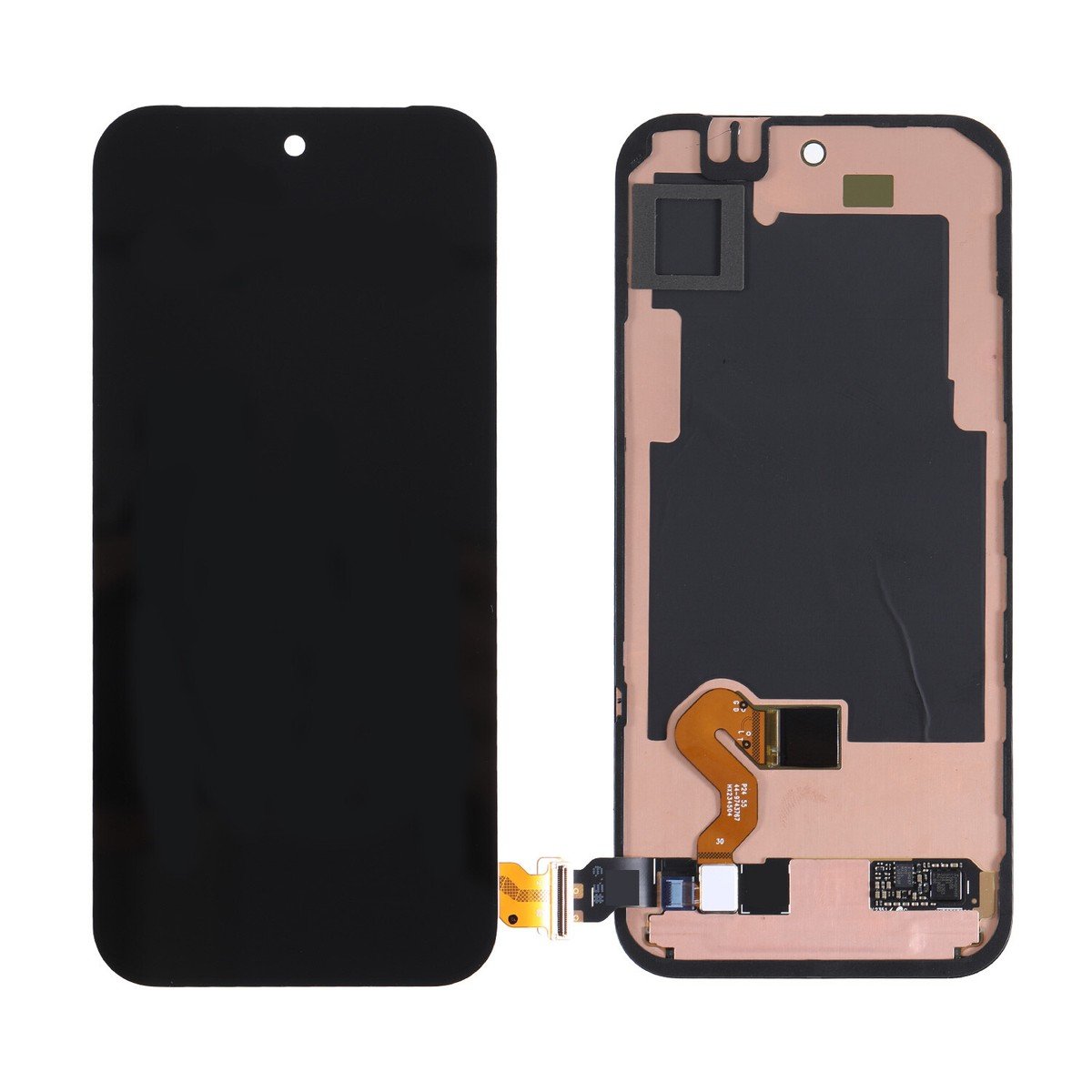
Google pixel 9 Pro Screen Replacement
Availability:In Stock!
- Google Pixel 9 Pro Screen Replacement
- Compatible with Pixel 9 Pro
- High-quality display panel
- Touchscreen functionality
- Precise fit and design
- Durable glass protection
- OEM-grade replacement
KSh 15,500.00
CompareGoogle pixel 9 Pro Screen Replacement and Repair in Kenya
The Google Pixel 9 Pro, launched as a flagship model, is distinguished for its advanced features and robust performance. It is crafted to cater to the needs of modern smartphone users who prioritize not only functionality but also design aesthetics. The device showcases a sleek and elegant form factor, combined with a range of color options that appeal to a diverse user base. With a display that boasts high resolution, the Pixel 9 Pro delivers vibrant visuals, making it an ideal choice for media consumption, gaming, and photography.
The smartphone is equipped with the latest Android operating system, which enhances its usability and performance. Key features of the Google Pixel 9 Pro include a powerful processor, extensive storage options, and a state-of-the-art camera system that excels in capturing high-quality images even in challenging lighting conditions. These attributes contribute to its popularity among tech enthusiasts and casual users alike, solidifying its position in a highly competitive market.
However, alongside its impressive specifications and design, the importance of the screen cannot be overlooked. The screen serves as the primary interface for user interaction, and any damage to this vital component can significantly impede functionality. A cracked or shattered display can not only disrupt everyday tasks but also impact features such as touch sensitivity, clarity, and overall user experience. Therefore, understanding the necessity of screen maintenance and the options available for replacement is crucial for Pixel 9 Pro owners. Maintaining an impeccable display is key to fully enjoying the extensive capabilities that this remarkable smartphone has to offer.
Signs Your Pixel 9 Pro Needs a Screen Replacement
Recognizing the need for a screen replacement on your Google Pixel 9 Pro is essential for maintaining not only the aesthetics of your device but also its functionality. Several indicators can signal that your screen is in need of urgent attention. First and foremost, physical damage such as cracks or deep scratches is a clear sign that a replacement is imminent. Even minor cracks can worsen over time, impairing the touchscreen’s performance. As the device is frequently used for various tasks, ensuring that the screen is not compromised is vital.
Another significant symptom to watch for is decreased touch responsiveness. If your Pixel 9 Pro begins to exhibit lag or fails to respond to swipes and taps, it may be time to consider a replacement. This issue can arise from internal damage rather than just surface cracks, potentially indicating that the digitizer responsible for touch functionality is failing. Ignoring such symptoms can lead to frustrating experiences when navigating apps or accessing critical features of your device.
Furthermore, display issues such as discoloration or flickering can also signify that your screen needs replacement. A pixelated or discolored display affects not only the visual appeal of your device but can also hinder your ability to perform tasks effectively. Perhaps you may notice vertical or horizontal lines that disrupt the viewing experience. Such graphical anomalies typically reflect underlying hardware problems that could warrant a screen replacement to restore the device’s optimal performance.
In conclusion, keeping an eye out for these signs can help you determine when your Google Pixel 9 Pro screen requires replacement. Addressing these issues promptly ensures that your device functions efficiently while also preserving its structural integrity.
Official vs. Third-party Screen Replacement Services
When considering screen replacement for the Google Pixel 9 Pro, users often find themselves between two prominent options: utilizing official Google services or seeking out third-party repair shops. Each alternative presents unique advantages and disadvantages that can significantly impact both the cost and quality of replacement.
Official Google services typically provide a higher level of assurance regarding the quality and authenticity of the replacement parts. Many users opt for this route due to peace of mind that the parts used in the repair are genuine, thereby maintaining the device’s integrity and performance. Additionally, official repairs often come with a warranty that covers potential defects, which can further minimize long-term risks associated with the replacement process.
On the other hand, third-party repair services often offer a more cost-effective solution for screen replacements. These shops can provide competitive pricing, sometimes at a fraction of the cost of official services. However, the trade-off may include variations in part quality. While many reputable third-party services utilize high-quality components, the risk of using inferior or non-genuine parts remains a concern. This potential compromise on quality could affect the performance and longevity of the device.
It is essential to consider warranty implications when choosing between these two options. Official repairs generally ensure that the manufacturer’s warranty remains intact, while opting for third-party services may void existing warranties or reduce coverage from Google. Ultimately, users are advised to assess their priorities—whether it is cost savings or assurance of quality and warranty—before making a decision on the best screen replacement service for the Google Pixel 9 Pro.
DIY Screen Replacement: What You Need to Know
For tech-savvy users considering a DIY screen replacement for their Google Pixel 9 Pro, familiarity with the process and the necessary tools is essential. The first step in this undertaking is to gather the required equipment. Key tools include a heat gun or hairdryer to soften adhesive, a suction cup for lifting the screen, a set of precision screwdrivers, and plastic prying tools to avoid damage to internal components. Additionally, a clean and spacious work environment is recommended to minimize the risk of losing small parts or creating further damage during the replacement process.
Before commencing the screen replacement, it is critical to turn off the device and disconnect the battery. Safety precautions should be taken seriously. Wearing anti-static wrist straps can prevent static electricity from damaging sensitive components. Users should also ensure they are working in a well-lit area, and it is advisable to have a camera or smartphone handy for documenting the original assembly for reference during reassembly.
Once prepared, the replacement process can begin. The first step involves applying heat around the edges of the screen to loosen the adhesive. Carefully using a suction cup, users can create a gap to insert plastic prying tools, gradually working their way around the screen to detach it. After the screen is removed, the battery should be disconnected to prevent any electrical accidents while proceeding with the replacement. It is crucial to take note of wire placements and small components during disassembly, as this will aid in a smooth reinstallation of the new screen.
Throughout the process, users should proceed with caution, acknowledging potential pitfalls such as excessive heat application and mishandling fragile components. Following the steps closely, while keeping emotions in check, will enhance the likelihood of a successful DIY screen replacement without the need for professional intervention.
Cost Factors for Screen Replacement
When considering a screen replacement for the Google Pixel 9 Pro, various cost factors come into play that potential repair customers should be aware of. Understanding these components can help in budgeting for the repair and exploring options to minimize expenses.
Firstly, the price of the replacement screen itself serves as a critical factor. Official Google parts tend to be more expensive than third-party alternatives. Authenticity often comes at a cost, as OEM (Original Equipment Manufacturer) displays may offer better compatibility and reliability. Depending on where you source the part, prices can fluctuate significantly, ranging from around $100 to $300 in some cases.
Secondly, labor costs associated with screen replacement can vary widely based on the technician’s expertise and the local market rates. A specialized repair shop may charge between $50 and $150 for labor, depending on geographical location and the complexity of the job. It is advisable to inquire about the technician’s experience with Google Pixel models, as this can impact both the repair quality and the overall cost.
Additionally, potential hidden fees should not be overlooked. Some repair services may add charges for diagnostic tests, usage of premium tools, or handling specific issues like water damage that might be obscured upon initial inspection. Receiving a detailed estimate before committing to a repair is crucial for avoiding unexpected costs later on.
To find the best deals, consider comparing prices from multiple repair shops, checking for warranties on both parts and labor, and exploring online platforms for DIY options. Researching customer reviews can also provide insights into the quality of service provided by different establishments. Balancing quality and cost is essential for ensuring a satisfactory screen replacement for your Google Pixel 9 Pro.
Aftercare Tips Post-Screen Replacement
Once you have successfully replaced the screen of your Google Pixel 9 Pro, it is crucial to follow a set of aftercare tips to maintain the integrity and performance of the new display. Proper post-repair care can significantly prolong the lifespan of your device’s screen and prevent further issues. One of the first recommendations is to avoid exposing the device to extreme temperatures. High heat or cold can adversely affect the adhesive used during installation, leading to lapses in functionality.
Additionally, it is a good practice to avoid moisture or exposure to liquids for at least 24 hours after the replacement. Ensure the device remains dry to allow the adhesive to cure completely. Investing in high-quality protective accessories is also paramount. Using a tempered glass screen protector not only safeguards against scratches but also provides an additional layer of shock absorption. Coupled with a robust case, such as a rugged or heavy-duty option, these accessories can help protect your Google Pixel 9 Pro from drops or impacts, which are common causes of screen damage.
Furthermore, it is advisable to refrain from pressing hard on the screen or engaging in activities that could lead to unnecessary strain on the display. Each new screen replacement comes with its own set of vulnerabilities. Regular maintenance checks on the device can also catch early signs of wear or damage. Lastly, avoid using the device if it exhibits any unusual behavior, such as flickering or sensitivity issues, and seek professional assistance promptly. Adhering to these aftercare tips can ensure that your Google Pixel 9 Pro remains in optimal condition, thus enhancing your overall user experience and extending the device’s longevity.
Warranty Implications of Screen Replacement
The warranty implications of replacing the screen on your Google Pixel 9 Pro are crucial for users to understand. When a device is under warranty, any unauthorized repairs, including do-it-yourself (DIY) screen replacements, can potentially void the warranty. It is important to consider that manufacturers generally stipulate conditions under which the warranty remains valid, and any modification or repair not carried out by an authorized service center might violate these conditions.
Authorized service replacements, on the other hand, are performed by designated technicians trained to handle your device. Utilizing this option typically maintains the warranty coverage. Google provides guidelines on what actions may or may not affect your warranty, emphasizing that only repairs performed by certified technicians are recognized. Consequently, if your screen needs replacement, opting for an authorized service may be more beneficial in the long run. This route not only ensures the work is done correctly but also helps in safeguarding your warranty against future claims. In most cases, authorized repair services will use original parts, preserving the quality and functionality of your device.
For those contemplating DIY replacements, it is essential to keep in mind the risks involved, which extend beyond warranty issues. Improper installations can lead to further damage, affecting performance and ultimately requiring more costly repairs. Therefore, if maintaining warranty coverage and ensuring proper functionality are priorities, seeking authorized services for your Google Pixel 9 Pro screen replacement is advisable. The peace of mind gained from a certified repair can outweigh the temptation of undertaking DIY fixes, providing a more reliable solution for your device’s needs. Understanding these implications is vital for making informed decisions about your device repair options.
Customer Experiences: Reviews and Testimonials
The experience of undergoing a screen replacement for the Google Pixel 9 Pro can vary significantly between individuals, and customer reviews often highlight a diverse range of perspectives. Many users who opted for professional repairs report satisfaction with the results. One frequent remark is the efficiency and effectiveness of the repair service, with many stating that their device looks and functions as if it were brand new following the replacement. A common experience mentioned is the clear communication from technicians about the process and expected turnaround time, which adds to the overall customer satisfaction.
On the other hand, those who have attempted a DIY screen replacement often share contrasting experiences. While some successfully managed to replace their screens, they often emphasized the technical skills required for a successful outcome. Users who faced difficulties commonly cite issues with alignment, adhesive troubles, or challenges in reconnecting internal components. Feedback on instructional videos and guides suggests that while there are many resources available, the complexity of the task might still require a fair bit of troubleshooting. Indeed, some DIYers recommend practicing caution, as any mistakes could lead to additional costly repairs.
Testimonials also reveal a clear divide in cost, with professional services generally costing more than DIY methods. However, many users highlight that paying for professional assistance was worth the investment, as it not only guarantees quality repairs but often comes with warranties for the replaced screens. On the flip side, customers choosing DIY options appreciate the sense of accomplishment that comes with successfully completing the task themselves, though sometimes at the risk of damaging their devices further.
Ultimately, understanding these varied experiences can aid potential Google Pixel 9 Pro users in making informed decisions regarding screen replacements. Balancing cost, convenience, and risk are crucial elements in selecting the right approach for individual needs.
Conclusion and Final Thoughts
In this guide to the Google Pixel 9 Pro screen replacement, we have covered essential aspects that can assist users in making informed decisions about their device’s maintenance. From assessing the types of screen damage that may require replacement to evaluating repair options, we have emphasized the need for careful consideration before proceeding. Understanding the repair process, including DIY solutions and professional repair services, provides users with a clearer picture of their choices. Moreover, we discussed the associated costs, as well as warranty implications, which are crucial factors in the decision-making process.
The longevity and performance of your Google Pixel 9 Pro are significantly influenced by how you manage and maintain your device. It is imperative for users to practice good habits, such as using protective cases and implementing screen protectors, to safeguard against potential damage. Regular maintenance can drastically reduce the likelihood of accidents that would necessitate a screen replacement. Additionally, recognizing the signs of wear and tear can lead to early interventions, allowing for repairs that might be less intensive and more cost-effective.
Ultimately, the critical takeaway from this discussion is that while screen replacement may sometimes be unavoidable, it is best approached with a thorough understanding of the implications. All options should be weighed carefully, considering both immediate needs and future device care. By investing time in proper maintenance and utilizing the information provided in this guide, users can extend the lifespan of their Google Pixel 9 Pro and optimize its performance, thus enhancing their overall experience with the device.
Based on 0 reviews
Be the first to review “Google pixel 9 Pro Screen Replacement”
Related products
-
Screen Replacement
Samsung Galaxy A51 Screen Replacement
Color: Black
Manufacturer: SAMSUNG
Manufacturer code:GH82-21669A, GH82-21680A
Manufacturer title SVC ASSY SMT-OCTA(E/ZW),SM-A515F,CIS,SVC
Suitable for : Samsung A515FN/DS Galaxy A51
Content of delivery:As shown in the image
Packing :Boxed ,Service Pack
State:New
Warranty : No
SKU: n/a



There are no reviews yet.