


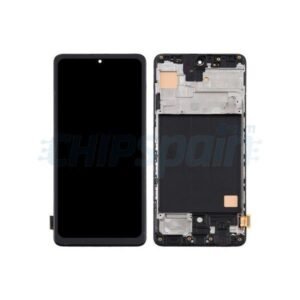
Google Pixel 8a Screen Replacement
Availability:In Stock!
- Compatible with Google Pixel 8a
- High-quality LCD & touchscreen
- Restores display clarity and touch response
- Durable glass protection
- Precise fit and easy installation
- Available in multiple colors
- Supports fingerprint and face unlock features
KSh 16,000.00
CompareGoogle Pixel 8a Screen Replacement and Repair in Kenya
The Google Pixel 8a, like any modern smartphone, is susceptible to various forms of screen damage, necessitating the need for screen replacement in certain situations. Understanding these circumstances can help users make informed decisions on whether to seek professional assistance or attempt a DIY repair. One of the most common scenarios leading to screen damage is accidental drops. A sudden fall can cause cracks or shatters, compromising the integrity of the device. Such physical damage can affect touch sensitivity and display functionality, presenting a significant hindrance to everyday use.
Another prevalent cause of screen damage stems from pressure-related incidents, where the device is either sat upon or compressed in a tight space, leading to cracks or a broken screen. Additionally, exposure to liquids can be detrimental to the Google Pixel 8a’s screen. Despite having water-resistant features, prolonged exposure to moisture can lead to issues including screen malfunction, discoloration, or complete failure. Users should remain vigilant regarding moisture exposure and ensure that their device is adequately protected during water-related activities.
The implications of a damaged screen extend beyond aesthetics; a cracked or broken screen directly impacts the functionality of the device. Users may experience difficulties in touchscreen responsiveness, which can hinder their ability to access apps or respond to messages efficiently. In many cases, screen damage may necessitate immediate action. It is essential to evaluate the extent of the damage carefully. If the screen shows minor surface scratches, a DIY fix may suffice, employing screen protectors or specific repair kits. However, for extensive cracks or functional issues, it is advisable to consult a professional repair service to restore the device to optimal working condition.
How to Assess Screen Damage
Assessing the screen damage on your Google Pixel 8a Screen Replacement is crucial for understanding whether you can repair the issue yourself or if a professional screen replacement is necessary. Begin by performing a visual inspection of the screen. Look for any obvious cracks, scratches, or signs of discoloration. Pay particular attention to the edges, as cracks may часто initiate from here and progress inward. If you notice any visual deformities, it could indicate a deeper issue that requires attention.
Next, check the touchscreen responsiveness. Ensure that your device is powered on, and test various areas of the screen by swiping and tapping. If you experience any delays or unresponsive sections, it signifies potential damage that may not be visible externally. Make a note of any inconsistencies, as they could aid in determining the extent of the problem later. If certain areas of your display fail to respond or inaccurately registers touches, it may suggest that the digitizer has been compromised, warranting further action.
Additionally, assess the display quality by examining its brightness, clarity, and color accuracy. Turn off the display and observe if there are any persistent spots or discoloration while the screen is inactive. If discoloration seems to fluctuate with the brightness level, or if there is a shadow effect present, this could indicate underlying damage, often resulting in the need for a screen replacement.
Finally, gather all of this information and determine if the damage is repairable or if it necessitates a full screen replacement. If the touch functionality is severely affected or if there are extensive visual damages, it is advisable to consider getting a new screen. Understanding the extent of your Google Pixel 8a’s screen damage can significantly aid in deciding the best course of action for repair or replacement.
DIY Screen Replacement: Tools and Steps
Replacing the screen of your Google Pixel 8a can seem daunting, but with the right tools and a clear step-by-step approach, it can be accomplished at home. To begin, you’ll require specific tools designed for mobile device repair. Essential tools include a precision screwdriver set, tweezers, a plastic opening tool, and a suction cup. Additionally, having high-quality adhesive such as double-sided tape or liquid adhesive will be crucial for securely affixing the new screen to the device.
Before initiating the replacement process, it is vital to ensure that you have a replacement screen that is compatible with the Google Pixel 8a. These can typically be purchased from reputable online retailers or electronic parts stores. Furthermore, prioritize safety by disconnecting the device from any power source and working in an area that is free of static electricity. Wearing an anti-static wrist strap can further reduce the risk of damaging internal components.
The first step in the screen replacement process involves turning off your Google Pixel 8a Screen Replacement and removing the SIM card tray. Next, utilize the suction cup to gently lift the screen from the device frame, applying a plastic opening tool to assist in loosening the edges. Carefully detach any flex cables that connect the screen to the motherboard during this step to prevent any accidental damage. After the old, damaged screen is removed, clean the surface of the device thoroughly.
Prepare your new screen by ensuring that all connectors are free of dust and lint. Once the components are clean, carefully align the new screen with the device and reconnect the flex cables. Once securely attached, apply the adhesive and press the screen gently into place. Finally, reassemble your phone by securely placing the back cover and reinserting the SIM card tray.
With these comprehensive steps, replacing the screen of your Google Pixel 8a can be achieved successfully, restoring functionality and extending the life of your device.
Professional Repair Services: When to Consider Them
Repairing a damaged screen on your Google Pixel 8a can be a daunting task, leading many to contemplate whether to pursue a DIY approach or seek professional repair services. Choosing the right path often hinges on several factors including cost, warranty, and the complexity of the repair itself. While DIY repairs may seem cost-effective at first glance, they may not always provide long-term satisfaction or durability.
Cost comparisons also merit careful consideration. While undertaking the repair personally could potentially save money, it is essential to account for the quality of parts used and the tools required. Professional repair services typically employ high-quality, genuine replacement parts which can significantly enhance the longevity of the repair. Moreover, these services often come with a warranty, offering peace of mind that DIY repairs may lack. If the replacement screen fails, a professional warranty ensures that you won’t incur additional costs.
Additionally, the advantages of professional repairs extend beyond mere material quality. Technicians skilled in this craft bring invaluable expertise to the table, reducing the risk of further damage during the repair process. The precision and knowledge possessed by these professionals assure reliable outcomes that can often surpass those achieved in DIY attempts. Furthermore, employing professional services conveniently saves your time, enabling you to avoid the trial-and-error phase that DIY repairs commonly entail.
In summation, while there are enticing reasons to consider a DIY screen replacement on your Google Pixel 8a, the benefits of seeking professional repair services, including quality assurance, warranty coverage, and efficient execution, often render them the more prudent choice. Weighing these factors can assist you in making an informed decision suited to your specific circumstances.



Delphia –
tropez casino
References:
https://monjournal.xyz/
Delphia –