

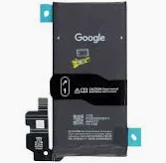
Google Pixel 8a Battery Replacement
Availability:In Stock!
-
Google Pixel 8a battery replacement
-
High-quality compatible battery
-
Restores battery life and performance
-
Professional installation recommended
-
Reliable and durable replacement option
KSh 4,000.00
CompareGoogle Pixel 8a Battery Replacement Description
The Google Pixel 8a battery is a critical component that significantly impacts the device’s overall performance and user experience. This smartphone is equipped with a lithium-ion battery, which is known for its high energy density, longer lifespan, and low self-discharge rates. Typically, the battery contains a capacity of around 4,385 mAh, which provides substantial power to support the device’s extensive features and functionalities throughout the day.
On average, the battery life of the Google Pixel 8a can offer approximately 24 hours of usage under normal conditions, depending largely on individual patterns of use, including app usage, screen brightness, and connectivity settings. However, as with most rechargeable batteries, users may notice a decline in performance over time. Factors such as frequent charging cycles, temperature fluctuations, and age can exacerbate this degradation, leading to reduced efficiency and capacity.
Recognizing early signs of battery failure is crucial to prevent further damage to the Google Pixel 8a. Common indicators of a failing battery include rapid drainage of battery percentage, overheating during use or charging, and unexpected shutdowns even when the battery meter shows a sufficient charge. Users may also experience slow charging times and a noticeable decrease in device performance. Proactive identification of these symptoms can facilitate timely interventions, such as replacement, ultimately extending the overall lifespan of the device.
In essence, understanding the specifications and typical lifespan of the Google Pixel 8a battery, along with acknowledging the signs of wear and decline, is essential for maintaining optimal device performance. Users are encouraged to monitor their battery health closely and take necessary action when signs of failure become apparent.
Preparing for the Replacement
Before embarking on your journey to replace the Google Pixel 8a battery, it is imperative to gather the necessary tools and materials to ensure a smooth procedure. The first essential step is to back up all data stored on your device. This ensures that any important files, photos, or settings are not lost during the battery replacement. Utilize cloud services or a computer for this process; both options provide reliable storage for your valuable information.
Next, ensure that the Google Pixel 8a is powered down completely. This is a crucial safety measure to prevent electrical shock and damage to the device. After powering it off, begin assembling the tools you will need. Typically, a small Phillips screwdriver, a plastic opening tool, and a suction cup are necessary for accessing the battery compartment. For optimal efficiency, consider using an anti-static wrist strap, which will help to prevent static electricity from damaging your phone’s components.
Choosing a high-quality replacement battery is vital for the prolonged life and functionality of your device. It is advisable to always opt for OEM (Original Equipment Manufacturer) batteries or those from reputable brands that specialize in phone components. These batteries not only match the specifications of your Google Pixel 8a but also ensure safety and reliability. Check online marketplaces, authorized retailers, or specialty electronic stores for procurement.
Before starting the replacement, double-check the compatibility of the new battery with your specific device model. Additionally, familiarize yourself with the replacement process by reviewing instructional videos or guides. Preparedness is key to minimizing errors during the procedure and safeguarding your device against unintentional damage.
Step-by-Step Battery Replacement Process
Replacing the battery in your Google Pixel 8a can be a relatively straightforward task if you follow the right steps carefully. Begin by gathering your tools, which should include a small Phillips screwdriver, a plastic prying tool, and a suitable replacement battery. Ensure you have a clean workspace and good lighting to enhance visibility during the process.
Start by turning off your Google Pixel 8a to prevent any electrical issues during the replacement. Next, carefully heat the edges of the device with a heat gun or hairdryer to soften the adhesive that holds the back cover in place. Using your plastic prying tool, gently pry open the back cover, starting at one corner and gradually working your way around the device. Take your time here to avoid damaging the casing.
Once the back cover is removed, you will see the battery connected to the motherboard. Locate the battery connector, which is usually held in place with a small screw. Using your Phillips screwdriver, remove this screw and gently detach the battery connection from the motherboard. Be cautious while handling these components to prevent any unintentional damage.
Now, remove the old battery from its compartment. If it is stuck due to adhesive, gently apply more heat and carefully pry it out. Insert the new battery into the same compartment, ensuring it is aligned correctly. Reconnect the battery to the motherboard by attaching the connector, followed by securing it with the previously removed screw.
Finally, replace the back cover of the Google Pixel 8a, ensuring you press firmly to secure it back in place. Power on the device to verify that it is functioning properly with the new battery. Remember to recycle the old battery in accordance with local regulations. Following these steps will ensure a successful battery replacement, revitalizing your device for continued use.
Post-Replacement Care and Maintenance
After the successful replacement of the Google Pixel 8a battery, ensuring optimal battery performance and longevity becomes crucial. One of the primary practices involves adopting proper charging habits. It is advisable to avoid letting the battery deplete completely before recharging, as lithium-ion batteries, which power the Pixel 8a, tend to degrade faster when subjected to deep discharge cycles. Instead, aim to recharge the battery when it reaches around 20% capacity, which can help prolong its lifespan.
Another important aspect of maintaining the battery life is managing software settings effectively. The Google Pixel 8a comes equipped with a Battery Saver mode, designed to minimize background activity and extend usage time when battery levels are low. Utilizing this feature when necessary can optimize performance significantly. Additionally, disabling unused features like Bluetooth, location services, and data synchronization can reduce power consumption, allowing for a more efficient use of battery resources.
Regular maintenance checks are also essential for ensuring the device functions optimally. Monitor battery health by checking for any unusual behavior, such as overheating during regular usage or rapid discharging. These symptoms may indicate that further issues could exist beyond the new battery replacement. Keeping the software updated is likewise crucial, as updates often come with optimizations that can enhance battery life and improve overall device performance.
Lastly, it is important to recognize when to seek professional assistance. If persistent problems arise, such as charging issues or erratic behavior that hadn’t existed before the battery replacement, consulting a qualified technician or authorized service center may be necessary. This proactive approach can not only safeguard the longevity of the Google Pixel 8a but also ensure a seamless user experience.



Jenny –
References:
0ahukewidnn3tqnnnahusgk0khuthadwq4dudcas|hormone cortisone function
References:
http://118.195.247.122:8418/jacquettathorn
Jenny –