

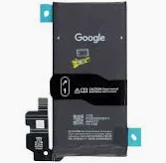
Google pixel 8 Battery Replacement
Availability:In Stock!
-
Compatible with Google Pixel 8
-
High-capacity lithium-ion battery
-
OEM quality replacement
-
Long-lasting performance
-
Supports fast charging
-
Safe and durable design
-
Restores original battery life
-
Easy installation fit
KSh 4,000.00
CompareGoogle pixel 8 Battery Replacement in Kenya
The battery is a fundamental component of any smartphone, including the Google Pixel 8, and its performance directly influences the device’s overall functionality. Over time, batteries experience wear and tear, leading to a decline in capacity and efficiency. Recognizing the importance of battery replacement becomes crucial for users aiming to maintain optimal device performance. A degraded battery can significantly affect various aspects of a smartphone, including battery life, reliability, and user satisfaction.
One of the most telling signs that a battery replacement may be necessary is a noticeably diminished battery life. If users find themselves charging their devices more frequently throughout the day or if the battery percentage drops at an unexpected rate, this is an indication that the battery is losing its ability to hold a charge. Furthermore, unexpected shutdowns can occur when the battery cannot supply the required power to the device, leading to frustrating interruptions during usage.
Another critical factor is the overall device performance, which often deteriorates alongside battery health. As the battery ages, it may struggle to deliver adequate power to the phone’s components, resulting in sluggish performance or lag during operation. This not only detracts from the user experience but can also hinder productivity, making timely battery replacement an essential consideration for Google Pixel 8 users.
Awareness of these signs allows users to take proactive measures in addressing battery-related issues. Regularly monitoring battery health and performance can help in making informed decisions about replacement, ensuring that the device remains functional and efficient. Ultimately, understanding the importance of battery replacement is key to prolonging the lifespan of the Google Pixel 8 and enhancing the overall user experience.
Signs Your Google Pixel 8 Needs a Battery Replacement
Recognizing the signs that your Google Pixel 8 may require a battery replacement is crucial for maintaining optimal device performance. One of the most obvious symptoms is rapid battery drainage. If you notice that your phone’s battery percentage drops significantly within a short period, even with minimal usage, it may indicate that the battery is aging and losing its capacity to hold charge effectively. Many users report that their Pixel 8 necessitates frequent charging throughout the day, which can be a clear indicator of battery deterioratio…
Overheating is another critical sign that can’t be overlooked. If your Google Pixel 8 becomes excessively hot during regular use or while charging, this heat can be attributed to a malfunctioning battery. Overheating might not only lead to discomfort but can also damage other components within the device, increasing the urgency for a battery replacement. It’s essential to monitor temperature levels during operations, especially if these spikes become frequent.
Battery swelling is a serious concern and often one of the most alarming signs that a battery replacement is needed. If you notice that your Pixel 8’s screen is bulging or if the back cover appears raised, it could indicate that the battery is swelling. This situation can compromise the structural integrity of the phone and may pose safety risks. Users are advised to handle such cases with caution and seek professional assistance promptly.
Lastly, having to undergo frequent charging cycles can be frustrating. If you find yourself consistently charging your Google Pixel 8 multiple times a day for regular usage, this pattern suggests that battery life has diminished significantly. Implementing these observations can aid users in identifying issues more effectively, ensuring that necessary actions are taken to maintain the performance and longevity of their devices.
Preparing for Battery Replacement
When considering a Google Pixel 8 battery replacement, it is essential to begin with prudent preparation. The first step involves gathering the necessary tools and materials. Typically, you will require a small Phillips screwdriver, a plastic prying tool, and a suction cup to facilitate the removal of the back cover safely. Additionally, having a magnetic mat can help keep small screws organized during the process, reducing the risk of misplacing them.
Before commencing with the actual battery replacement, it is crucial to back up your device. Ensuring that all critical data such as contacts, photos, and important documents are securely backed up can prevent potential data loss during the replacement process. Utilize Google’s built-in backup features or third-party applications to safeguard your information effectively. This step will not only protect your data but also provide peace of mind as you move forward with the battery replacement.
It is also important to carefully evaluate the risks involved with a self-replacement versus seeking professional assistance. While many individuals successfully perform DIY repairs, there is a risk of damaging internal components if not executed correctly. A common alternative is to consult a professional technician, which usually ensures a safer approach and typically includes a warranty on the work performed. Weighing these options based on your comfort level and expertise is advisable.
Moreover, adhering to safety tips and precautions is paramount during the replacement process. Always work in an environment free from static electricity, as it can damage sensitive electronic components. Wearing an anti-static wrist strap can mitigate this risk. Additionally, ensure that the device is powered off and disconnected from any power source before proceeding with the replacement to avoid electric shocks. By following these preparatory steps meticulously, you can enhance the efficiency and safety of your Google Pixel 8 battery replacement task.
DIY Battery Replacement: A Step-by-Step Guide
Replacing the battery of your Google Pixel 8 can be a rewarding project that not only extends the life of your device but also enhances your technical skills. For those who prefer to tackle this task themselves, a clear and concise process is essential. Below is a detailed, step-by-step guide to successfully replacing your Google Pixel 8 battery.
Before commencing the replacement, gather the necessary tools. You will need a heat gun or hairdryer, a plastic spudger, a Phillips screwdriver, tweezers, and a replacement battery specific to the Google Pixel 8. Optionally, a suction cup tool can facilitate the opening of the device without causing damage.
To ensure a safe environment, turn off your phone and remove any SIM cards or memory cards. Next, apply heat around the edge of the phone to loosen the adhesive that holds the display in place. Utilizing a suction cup, gently lift the screen, then insert a plastic spudger to carefully detach the display from the frame. It is crucial to proceed slowly to avoid cracking the screen or damaging the internal components.
Once the display is removed, locate the battery connector and use the Phillips screwdriver to remove any screws securing the battery. Carefully disconnect the battery and extract it from its compartment using tweezers. Insert the new Google Pixel 8 battery in its place, making sure to connect the battery connector securely.
After the new battery is in place, reattach the display by aligning it properly and pressing it back into position. Ensure that all components are securely fastened and turn on your device to verify that the installation was successful. Should any issues arise during this process, refer to online forums or guides for additional support. Carrying out this battery replacement task can save you time and money while enhancing your understanding of device maintenance.
Where to Get a Replacement Battery
When it comes to replacing the battery of your Google Pixel 8, several avenues are available to ensure you obtain a quality replacement. Each option carries its own set of advantages and disadvantages, which can significantly impact your overall experience.
Firstly, the most reliable approach would be to obtain a replacement battery through official retail channels. Google offers replacement batteries through their online store or authorized retailers. Purchasing directly from the manufacturer guarantees compatibility and quality assurance, as these batteries are designed specifically for the Pixel 8. However, this option may come at a higher price compared to others.
Another viable option includes visiting authorized service centers. These centers specialize in the repair and maintenance of Google devices and can provide genuine replacement batteries. Utilizing an authorized service center ensures that the technicians have received proper training and will perform the replacement without compromising the integrity of your device. Nevertheless, turnaround times for service can vary based on the location and the center’s workload.
For those seeking a more flexible approach, online marketplaces provide an abundance of options for purchasing replacement batteries. Websites like Amazon or eBay offer various third-party batteries that may appeal to budget-conscious consumers. It is crucial, however, to scrutinize seller ratings and product reviews to ensure the quality of the battery you are purchasing. While online options may be more affordable, they often come with the risk of compatibility issues or subpar performance.
In summary, obtaining a replacement battery for your Google Pixel 8 can be accomplished through different channels, each with its respective pros and cons. Whether you choose the reliability of official retail channels, the expertise of authorized service centers, or the affordability of online options, it is imperative to prioritize quality to ensure your device continues to perform optimally.
Professional Battery Replacement Services
When it comes to replacing the battery of your Google Pixel 8, there are circumstances that warrant seeking professional assistance rather than opting for a DIY replacement. Many users may feel confident in their ability to handle such repairs, but there are substantial advantages to enlisting expert help. Primarily, professional battery replacement services ensure that the integrity of your device remains intact while adhering to manufacturer guidelines. This careful approach mitigates the risks associated with improper handling, which can lead to further damage of your phone.
One significant benefit is the protection offered by warranties. Often, DIY repairs can void any existing warranty on your devices. By utilizing professional services, you are more likely to maintain your warranty coverage, especially if the servicing is completed through authorized centers. Experts in these service centers are trained specifically for handling the nuances of Google Pixel devices, ensuring that issues are diagnosed and resolved accurately.
Additionally, these professionals bring a wealth of experience to the table. They are adept at replacing batteries while ensuring that all components function properly post-replacement. Such expertise provides peace of mind, knowing that your phone is in capable hands. Moreover, safety should always be a priority when dealing with electronic repairs. Trained technicians are knowledgeable about the correct procedures for battery disposal and can prevent hazards associated with lithium-ion batteries, such as leaks or explosions.
There are various reputable service providers available that specialize in battery replacements for Google Pixel 8 devices. Many offer quick turnaround times and promise original parts to maintain the quality and performance of your device. By opting for professional services, you ensure a seamless battery replacement experience backed by warranties and expert care.
Troubleshooting Common Issues Post-Replacement
Replacing the battery in your Google Pixel 8 can significantly enhance its performance and lifespan; however, users may sometimes face difficulties even after a successful replacement. Understanding these common issues and how to address them can ensure a smooth experience with your device.
One prevalent issue users encounter is the battery not charging properly. If your Google Pixel 8 fails to charge after the battery replacement, check the charging cable and adapter. Using a different power source can help determine whether the issue lies within the battery itself or the charging accessories. Additionally, inspect the charging port on the device for any debris or lint that could obstruct the connection. A gentle cleaning with a soft brush can often resolve this issue.
Another frequent problem is incorrect battery calibration. Sometimes, the device may not accurately reflect the remaining battery percentage, leading to unexpected shutdowns. To recalibrate, fully charge your Google Pixel 8 to 100%, then use it until it shuts down due to low battery. After that, allow it to charge uninterrupted back to 100%. This process can help the system recalibrate its understanding of the battery’s capacity.
Prolonged shutdowns can pose a significant inconvenience after a battery replacement. If the device powers off even with a seemingly full battery, it may indicate a deeper issue, potentially related to the installation process. In such cases, revisiting the steps of the replacement may prove beneficial. Ensuring all connections are secure and that there are no software issues can help resolve this problem.
By addressing these common issues proactively, users can regain the full functionality of their Google Pixel 8 and maximize its performance post-battery replacement.
Maintaining the Health of Your New Battery
After replacing the battery of your Google Pixel 8, it is vital to implement certain maintenance practices to ensure its longevity and optimal performance. One of the primary strategies involves adopting optimized charging habits. It is recommended to avoid letting your battery drain completely to 0% or charging it up to 100% consistently. Ideally, keeping your battery between 20% and 80% during daily use can significantly minimize stress on the battery cells, thereby extending its lifespan. Consider charging your device when it reaches around 30%, and unplugging it when it hits about 80% capacity. This practice can help maintain good health for your replacement battery.
In addition to charging habits, regular software updates can greatly enhance battery efficiency. Google frequently releases updates that can help in optimizing battery management algorithms. These updates not only address technical issues but also include improvements in power consumption for various applications. Therefore, it is advisable to keep your Google Pixel 8 updated with the latest software version. Enabling automatic updates is a useful feature that ensures you do not miss vital enhancements that could affect your battery’s performance.
Moreover, certain settings adjustments can further help in sustaining the health of your new battery. For instance, activating battery saver mode during periods of low usage can significantly reduce power consumption. Limiting background processes and app activity when not in use also aids in preserving battery life. Disabling location services and notifications for applications that do not require constant updates can free up valuable energy. By following these best practices, you can promote the durability and efficiency of your newly replaced Google Pixel 8 battery, ensuring you get the most out of your device.
Conclusion: Making Informed Decisions
In conclusion, the process of battery replacement for the Google Pixel 8 can be approached in various ways, each with its own set of advantages and considerations. Throughout this guide, we have illuminated the factors that should influence your choice between a DIY battery replacement and seeking professional help. A well-informed decision hinges not only on your technical skill level but also on evaluating the risks associated with each method.
Undertaking a DIY approach can be an appealing option for those who possess the necessary tools and confidence in their abilities. However, it is crucial to understand the potential implications, such as voiding warranties or inadvertently causing further damage to the device. The procedure requires a careful approach, considering that the internal components of the Google Pixel 8 are sensitive and intricate.
On the other hand, reaching out to professionals for battery replacement can provide peace of mind. Technicians typically possess the expertise and experience to execute the replacement process efficiently, thereby minimizing the risk of complications. While this option may incur higher costs, it often guarantees quality service and a reliable outcome without the stress of a DIY effort.
Ultimately, your decision should reflect your personal comfort with technical tasks and the resources available to you. It is also advisable to take feedback from others who have gone through similar experiences. We encourage readers to share their insights or ask questions in the comments below, fostering a community of information exchange as we strive to empower each other in making sound choices regarding our Google Pixel 8 devices.


There are no reviews yet.