


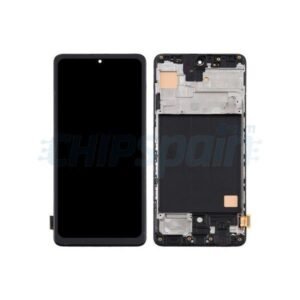
Google pixel 10 pro Xl Screen Replacement
Availability:In Stock!
- Google Pixel 10 Pro XL Screen Replacement
- High-quality display panel
- Touch sensitivity support
- Full HD+ resolution
- Durable glass protection
- Compatible with Pixel 10 Pro XL model
- Easy installation design
KSh 26,500.00
CompareGoogle pixel 10 pro Xl Screen Replacement and Repair in Kenya
The screen of a smartphone is one of its most crucial components, serving as the primary interface for user interaction. For devices like the Google Pixel 10 Pro XL, the importance of screen integrity cannot be understated. It not only ensures aesthetic appeal but also influences functionality and usability. A damaged screen can severely hinder the user experience, making it essential to understand the importance of screen replacement.
There are several common reasons why users may find themselves in need of a screen replacement for their Google Pixel 10 Pro XL. Accidental drops are perhaps the most frequent cause, often resulting in cracks or shatters that can render the device unusable. Similarly, scratches can accumulate over time, leading to annoying visual impediments that can detract from the enjoyment of using the device. Additionally, exposure to water or other liquids can cause significant damage that may necessitate a complete screen replacement.
Addressing screen damage promptly is vital for several reasons. First, a damaged screen can pose risks beyond mere inconvenience, such as cutting fingers or potentially causing further internal damage if shards of glass become dislodged. Secondly, ignoring the need for a screen replacement can lead to more expensive repairs down the line, as additional components may suffer due to prolonged exposure to adverse conditions. Lastly, a functional and intact screen enhances the overall performance of the device, ensuring that users can fully utilize the features available on the Google Pixel 10 Pro XL.
In light of these factors, understanding the screen replacement process—including the tools required and the options available—becomes imperative for all Google Pixel 10 Pro XL users. This knowledge will empower them to make informed decisions regarding the maintenance and repair of their devices.
Signs Your Google Pixel 10 Pro XL Needs a Screen Replacement
The Google pixel 10 pro Xl Screen Replacement is a sophisticated device, but like any electronic gadget, its screen may encounter various issues over time. Recognizing the signs that indicate a potential need for screen replacement is vital to maintaining the device’s integrity and functionality. One of the most apparent indicators is physical damage. This includes visible cracks, chips, or scratches on the screen. Such damage not only affects the aesthetic appeal of the device but can also compromise the display’s functionality. If the damage is severe, it may become increasingly challenging to interact with the screen, leading to further complications.
Display issues are another common sign one should monitor. Users may experience discoloration, which manifests as blotchy or faded areas on the screen. Flickering is another prevalent issue; a screen that continually flickers indicates that something is amiss, potentially requiring professional inspection or replacement. Pixels that remain unresponsive are also a concerning signal. If certain areas of the screen do not respond to touch, it suggests that the digitizer might be damaged. Testing the responsiveness of the display across its entirety can help one gauge the extent of this issue.
Functionality problems are often interconnected with the physical and display issues already outlined. Besides unresponsive touch, users should be attentive to any unusual behavior, such as random screen interactions or gestures not initiated by the user. These symptoms can imply significant underlying problems necessitating urgent attention. When experiencing any of these signs, it is crucial to assess the severity of the damage and consider consulting a professional repair service, especially if the damage is impacting daily usage. Addressing these signs promptly can help extend the lifespan of your Google Pixel 10 Pro XL device.
DIY Screen Replacement: What You Need to Know
Replacing the screen on your Google pixel 10 pro Xl Screen Replacement can be a daunting task, but many users opt for a do-it-yourself (DIY) approach. This method comes with several advantages, primarily cost savings. Hiring a professional technician can be expensive, often burdening the user with high labor charges in addition to parts costs. By undertaking the repair independently, users can significantly reduce the overall expense, making it a financially viable option for many.
Moreover, executing a DIY screen replacement offers a rewarding learning experience. Users can familiarize themselves with the intricate components of their device, enhancing their understanding of smartphone mechanics and repair techniques. This knowledge can be beneficial not only for future repairs but also for general technical competence, empowering users to tackle additional issues without professional help.
However, potential risks accompany a DIY approach. The Google Pixel 10 Pro XL features delicate components that may be easily damaged without appropriate care. Users who lack experience in smartphone repairs might inadvertently worsen the situation, leading to irreparable damage or voiding their warranty. Therefore, it is crucial for individuals to honestly assess their technical skills before embarking on this project. If you are confident in your aptitude for precision tasks, and possess basic tools such as a digital screwdriver, spudger, and adhesive, a DIY replacement might be within reach.
Furthermore, numerous online resources, including video tutorials and guides, can provide step-by-step instructions to streamline the process. That said, being fully informed about the requirements and risks involved in the screen replacement is vital. Understanding the potential consequences will ultimately help you decide whether the DIY route is suitable for your skills and comfort levels.
Essential Tools and Parts for Replacement
Undertaking a screen replacement for the Google Pixel 10 Pro XL requires a precise array of tools and parts to ensure a successful repair. First and foremost, the primary component needed is a compatible replacement screen. It is crucial to source a high-quality screen to maintain the device’s functionality and display integrity. Reputable suppliers, both online and in physical locations, include Amazon, eBay, and specialized electronic parts retailers, which often provide detailed descriptions and compatibility guarantees.
To facilitate the replacement process, certain tools are essential. A set of screwdrivers, specifically a Phillips #00 and a Torx T5, is needed to remove the screws securing the device’s casing. A nylon spudger or pry tool enables the safe separation of the screen from the device without risking damage to the delicate components within. Additionally, a suction cup is beneficial for lifting the screen off the body, especially if it is adhered with adhesive material.
It is also advisable to have a pair of tweezers at hand for handling small screws and delicate components during the replacement. An anti-static wrist strap can further protect sensitive electronic parts from static electricity, which can be detrimental to the internal circuitry of the device. For those who prioritise an organized workspace, having a magnetic mat or small containers for screws can prevent loss of parts during the repair process.
In summary, obtaining the correct tools and parts is foundational to effectively replacing the screen of the Google Pixel 10 Pro XL. By ensuring you have a reliable source for the replacement screen and the appropriate tools, you can achieve a successful repair that restores the device to its optimal working condition.
Step-by-Step Guide to Replace the Screen
Replacing the screen on a Google Pixel 10 Pro XL is a task that requires careful execution and adherence to certain safety protocols. Follow these detailed steps to ensure a successful replacement.
First, begin by powering down your Google Pixel 10 Pro XL. This is crucial to prevent any electrical accidents during the replacement process. Once the device is completely off, use a heat source such as a heat gun or hairdryer to gently warm the edges of the screen. This softens the adhesive, making it easier to separate the screen from the body. Take care to apply heat evenly to avoid damaging any internal components.
Next, using a plastic pry tool, carefully slide it between the screen and the frame to create a small opening. Gradually work your way around the edges, being cautious not to apply excessive force that could crack the display. Throughout this process, ensure that you do not penetrate too deep, as this may damage internal parts of the device.
Once the screen is detached, disconnect the battery before proceeding to remove the broken screen. Use a specialized screwdriver to unscrew the components securing the display connector and disconnect the cable. After the old screen is entirely removed, it’s time to prepare your replacement screen. Align the new display with the frame and connect the cable previously detached.
After securely fastening the components together, reconnect the battery and power on your Pixel 10 Pro XL. Check that the new screen functions properly before sealing it with adhesive. Finally, to complete the process, gently press the screen back into the frame, ensuring it is secure. This methodical approach aids in avoiding common mistakes and ensures a safe screen replacement procedure for your Google Pixel 10 Pro XL.
Professional vs. DIY: Making the Right Choice
When faced with a damaged Google Pixel 10 Pro XL screen, one of the most critical decisions users must make is whether to pursue a professional replacement service or attempt a do-it-yourself (DIY) repair. Each option has its own set of advantages and drawbacks that can greatly influence the outcome of the repair process.
Engaging a professional service typically guarantees a high standard of repair. These experts possess specialized knowledge and experience, ensuring that the screen is replaced correctly and efficiently. Professional services also provide warranties for their work, which can offer peace of mind in case issues arise post-repair. However, depending on the repair shop’s reputation and your geographical location, costs can vary significantly, with professional replacements often comprising the higher end of the price spectrum.
On the other hand, a DIY repair might seem appealing, particularly for budget-conscious individuals. Attempting the repair oneself can potentially save considerable amounts of money spent on service fees. Furthermore, favorable online tutorials and readily available replacement parts enable tech-savvy users to tackle such repairs confidently. Nevertheless, it is essential to weigh this option carefully against potential risks, including the possibility of further damaging the device, voiding warranties, or injuring oneself during the process due to lack of proper tools and expertise.
Additionally, time commitment is another vital factor to consider. Professional services can often complete a screen replacement within hours, minimizing inconvenience. Conversely, DIY repairs may consume more time, especially for those unaccustomed to electronics handling.
Ultimately, users must assess their budget, technical skills, and risk tolerance before making a decision on whether to opt for professional assistance or a DIY approach for their Google Pixel 10 Pro XL screen replacement.
Costs Involved in Screen Replacement
Replacing the screen on a Google Pixel 10 Pro XL can vary significantly in cost depending on whether one chooses a DIY approach or opts for professional service. The DIY method often attracts users looking to save on expenses, but it requires some technical skill and comfort with electronics.
For individuals considering the DIY route, the primary costs include the replacement screen itself and any tools needed for the repair. As of October 2023, replacement screens typically range from $150 to $300, depending on the source and quality of the part. Essential tools, such as a screwdriver set, suction cup, and plastic prying tools, might add another $20 to $50. Therefore, total DIY costs may range from approximately $170 to $350, factoring in the parts and tools required.
Conversely, utilizing a professional repair service can provide assurance and expertise but often comes at a higher price. The typical service fees for screen replacement in authorized service centers are between $300 and $500. This includes not just the cost of the screen, but also the labor charges, which can sometimes exceed $100 per hour. Some services may also offer additional benefits, such as warranties on the repair work and device checks for underlying issues, which might justify the higher price for many users.
Ultimately, the choice between DIY and professional service hinges on budget, skill level, and time. Understanding these costs upfront can help Google Pixel 10 Pro XL users make informed decisions about their screen replacement options, ensuring they choose the route that best aligns with their needs and resources.
Maintaining Your Screen Post-Replacement
After the successful replacement of your Google Pixel 10 Pro XL screen, maintaining its integrity and functionality becomes paramount. Proper care can extend the lifespan of your device’s display while keeping it visually appealing. One of the fundamental steps is to apply a high-quality screen protector. A tempered glass or a flexible film screen protector can shield the screen from scratches, smudges, and minor impacts, preserving its clarity and touch sensitivity.
Moreover, it is advisable to avoid subjecting the screen to excessive pressure or heat. This includes not placing heavy objects on top of the device or leaving it in extreme temperatures, such as a hot car or direct sunlight. Such conditions can compromise the adhesive that secures the screen, potentially leading to delamination or other serious issues. Consider utilizing a protective case designed specifically for the Google Pixel 10 Pro XL, as it can provide additional cushioning and further safeguard the display from unintentional drops.
Regular cleaning of the screen is also essential. Use a microfiber cloth slightly dampened with water or a gentle screen-cleaning solution to wipe the screen. Avoid using harsh chemicals or abrasive materials that could scratch or damage the screen surface. Additionally, while cleaning, do not apply too much pressure; a gentle touch is often more effective and safer for maintaining the integrity of your replacement screen.
Finally, staying mindful of how you use your device can contribute significantly to screen longevity. Try to minimize exposure to environments that may introduce dirt, dust, or moisture to the screen. By adhering to these best practices, your Google Pixel 10 Pro XL screen can remain in excellent condition for a prolonged period, ensuring a superior user experience.
Conclusion: Taking the Next Steps
In summarizing the crucial aspects of the Google Pixel 10 Pro XL screen replacement process, it becomes evident that careful consideration is paramount before proceeding. Users must weigh their options thoroughly, deciding whether to embark on a DIY approach or to enlist professional assistance. The choice often boils down to one’s level of technical skill, comfort with tools, and willingness to undertake the risks associated with disassembling electronic devices.
It is essential to recognize the significance of proper maintenance for the Google Pixel 10 Pro XL. Regular upkeep can minimize the likelihood of screen damage and enhance the device’s lifespan. Users should adopt careful handling practices, utilize protective cases, and ensure they are informed about the best ways to safeguard their device. Such proactive measures not only prevent harm but also contribute to the overall performance of the phone.
For those contemplating a DIY screen replacement, it is advisable to conduct thorough research and familiarize oneself with the necessary tools and replacement parts. Online resources, tutorials, and step-by-step guides can be invaluable in aiding this process. However, it is crucial to understand that if any uncertainty arises, it is better to seek professional services to avoid potentially damaging the device further.
Ultimately, whether one opts for a self-repair or chooses to enlist the help of a technician, ensuring that the replacement is performed correctly is vital. This not only restores the functionality of the Google Pixel 10 Pro XL but also serves as a step towards prolonging its usability. Embracing these considerations will undoubtedly lead to a more informed decision, making it easier to navigate the challenges of screen replacement.



There are no reviews yet.