
-
×
 Amazfit GTR 4
1 × KSh 24,000.00
Amazfit GTR 4
1 × KSh 24,000.00
Subtotal: KSh 24,000.00
Availability:In Stock!
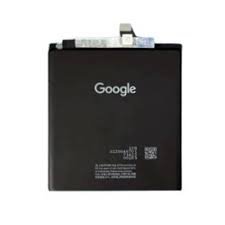
Google Pixel 10 Pro XL Battery Replacement
Original high-capacity battery
Durable and reliable performance
Compatible with Pixel 10 Pro XL model
Restores long-lasting power
Safe and efficient installation
KSh 4,500.00
CompareThe Google Pixel 10 Pro XL is a highly regarded smartphone known for its advanced features and impressive performance. One of the critical aspects of maintaining such a device is ensuring that the battery remains in good health. As with any smartphone, battery life tends to diminish over time due to regular usage and the aging process. This decline may lead to shortened usage times, unexpected shutdowns, and overall decreased performance. Therefore, understanding the battery replacement process is essential for users who wish to prolong the life and efficiency of their devices.
It is important to recognize the signs that indicate a battery replacement may be necessary. Some common symptoms of a declining battery include a rapid decrease in charge, overheating during use or charging, and trouble charging altogether. Additionally, if the device frequently displays a low battery alert despite being plugged in, it may be time to consider a new battery. Addressing these signs quickly can help prevent further complications, such as data loss or complete device failure.
When opting for a battery replacement, it is vital to choose the correct replacement battery designed specifically for the Google Pixel 10 Pro XL. Selecting a high-quality battery can make a significant difference in maintaining the smartphone’s performance and longevity. An inferior battery may not only provide subpar performance but can also pose safety risks, including swelling or leaks. Therefore, users are encouraged to seek genuine parts from reputable sources, ensuring their device continues to function optimally for years to come. Understanding these essential considerations surrounding battery health and replacement can empower users to make informed decisions regarding their Google Pixel 10 Pro XL.
The Google Pixel 10 Pro XL has garnered attention for its advanced features and capabilities; however, it is not immune to battery-related issues that can hinder optimal performance. One of the most common problems users encounter is rapid battery draining. This phenomenon can be attributed to various factors, including the usage of resource-intensive applications and background processes that continue to run even when the device is idle. Frequent updates to applications, along with the operating system, can also introduce new functionalities that inadvertently increase power consumption.
Overheating is another prevalent concern for Pixel 10 Pro XL users. Excessive heat can affect not only the performance of the battery but also its longevity. High temperatures can result from prolonged usage during intense tasks such as gaming or video streaming, as well as environmental factors like exposure to direct sunlight. If users notice their device becoming excessively warm during regular operation, it may signal an underlying issue that needs to be assessed.
Furthermore, some users may experience swollen batteries, which can be indicative of battery degradation or manufacturing defects. A swollen battery poses safety risks and can even lead to damage to the device itself. It is essential to address any physical changes to the battery promptly to avoid potential hazards.
Software updates play a crucial role in managing battery health as they often include optimizations and fixes for known issues. However, certain updates can have unintended consequences, leading to increased battery drain. Users should remain vigilant about their app usage and device settings, as these can significantly influence battery lifespan and overall performance. Ultimately, understanding the common battery issues associated with the Google Pixel 10 Pro XL can empower users to take the necessary steps to maintain their devices effectively.
Identifying the right time to replace your Google Pixel 10 Pro XL battery is crucial for maintaining optimal performance. As smartphones age, battery efficiency may diminish, leading to a variety of issues that users should be aware of. Recognizing the symptoms that indicate a potential need for battery replacement can help enhance your device’s longevity and functionality.
One of the most common signs that it may be time for a battery replacement is unexpected shutdowns. If your Pixel 10 Pro XL unexpectedly powers down, even when the battery shows a reasonable charge level, it could be indicative of declining battery health. In such cases, the battery may no longer be able to hold a charge correctly, necessitating replacement.
Another prominent symptom to watch for is diminished charging capacity. Users may notice that their device takes a longer time to charge or that the battery drains faster than usual after a full charge. This could result from battery wear and tear. If charging times significantly exceed previous levels, or if the phone struggles to maintain power throughout the day, a battery replacement should be considered.
Additionally, if your Pixel 10 Pro XL displays consistent warning messages regarding battery health, this is a clear indication that the battery may need to be replaced. Most modern smartphones, including the Google Pixel 10 Pro XL, include built-in diagnostics that can alert users to battery-related issues. Ignoring these warnings can lead to further degradation of performance.
In summary, if you experience unexpected shutdowns, diminished charging capacity, or receive battery health warnings, it may be time to consider a replacement for your Google Pixel 10 Pro XL battery. Addressing these issues promptly can enhance the performance and longevity of your device.
When it comes to replacing the battery in a Google Pixel 10 Pro XL, users often face the dilemma of whether to undertake the task themselves or seek professional assistance. Each option comes with its own set of benefits and drawbacks, which merit careful consideration.
One of the most compelling reasons for pursuing a DIY battery replacement is the potential cost savings. Replacement batteries can often be purchased online or at local retail shops for a fraction of the price charged by authorized service centers. Furthermore, engaging in a DIY approach allows for complete control over the replacement process, including the timing and environment in which the work is conducted. However, this method can require specific tools, such as screwdrivers, prying tools, and possibly a heat gun. The absence of these tools could lead to additional costs, potentially offsetting any savings achieved by not going to a professional.
On the other hand, professional battery replacement services typically guarantee quality and reliability, as technicians are trained and experienced in handling such tasks. Utilizing a professional service can also provide peace of mind, ensuring that the replacement is executed without damaging the device. Additionally, many service centers offer warranties on their work, which can further protect the investment. However, this convenience often comes with a higher price tag, which may not appeal to budget-conscious consumers.
Skill level is another pivotal factor. While replacing a battery may seem straightforward, the Google Pixel 10 Pro XL incorporates delicate components that require careful handling. Those with minimal technical experience may find the process daunting, leading to potential mistakes that could cause further damage. This risk is less pronounced when entrusting the task to professionals who have the expertise to manage such tasks efficiently.
Ultimately, the decision between DIY and professional battery replacement hinges on individual circumstances, including budget, technical skill, and the importance of warranty coverage post-service. Each route provides distinct advantages, making it essential to weigh your options carefully before proceeding.
For a successful DIY battery replacement in the Google Pixel 10 Pro XL, having the right tools and materials is essential. This ensures that the process is efficient and minimizes the risk of damage to your device. Below is a detailed list of the necessary items.
First and foremost, a set of precision screwdrivers is required. These screwdrivers, particularly those with Phillips and Pentalobe tips, are vital for safely removing the screws that hold the device together. It is advisable to use a magnetic mat to organize screws as you work, preventing any loss during the replacement.
In addition, a plastic opening tool or spudger is important for prying open the device without damaging its surface. Avoid metal tools where possible, as these can scratch the screen or casing. A suction cup can also facilitate the initial separation of the screen from the body, providing a helpful grip.
Another critical item is adhesive to secure the new battery in place. When you replace the battery, the old adhesive may no longer be effective. Therefore, it’s advisable to have some double-sided adhesive strips on hand. This will ensure that the new battery is firmly held in the compartment without any risks of movement or dislodgment.
Finally, obtaining a compatible replacement battery for the Google Pixel 10 Pro XL is crucial. Ensure that the battery is of high quality and preferably from a reputable supplier. Using an inferior battery can lead to performance issues or further complications.
By assembling these tools and materials prior to starting the replacement process, you will be positioned for a more straightforward and successful battery replacement in your Google Pixel 10 Pro XL.
Replacing the battery in your Google Pixel 10 Pro XL may seem daunting, but by following this detailed step-by-step guide, you will be able to accomplish it successfully. Begin by ensuring you have a suitable replacement battery, specialized tools for disassembly, and a clean workspace to prevent any damage while working on your device.
First, power off your Google Pixel 10 Pro XL completely to ensure safety while working on the device. Next, you will need to remove the back cover. Utilize a heat gun or a hairdryer to gently warm the edges, as this will soften the adhesive. Then, using a plastic prying tool, carefully slide it into the seam between the back cover and the phone chassis. Slowly work your way around the device to detach the cover without breaking it.
Once the back cover is removed, detach the battery connector from the motherboard. This is usually located near the bottom of the device and requires a gentle lift to free it. After disconnecting, locate the screws securing the battery in place. Using a Phillips screwdriver, remove these screws carefully to avoid stripping them.
Now you can gently lift the battery out of the compartment. Exercise caution, as batteries can be fragile or potentially hazardous. Dispose of the old battery responsibly, following local regulations. Place the new battery in the compartment and reconnect the battery connector to the motherboard, ensuring it is seated properly.
After successfully replacing the battery, it is time to re-seal your Google Pixel 10 Pro XL. Replace the back cover by aligning it carefully and pressing down firmly to seal the adhesive. Finally, turn on the device to test the new battery. Ensure it charges properly and that everything functions as expected. With these steps, you can effectively replace your battery and maintain your device’s performance.
After replacing the battery in your Google Pixel 10 Pro XL, it is essential to conduct a series of tests to ensure that the new battery operates correctly and meets your expectations. The process begins with checking the battery health using specific applications available on the Google Play Store. These apps provide insights into the battery’s current condition, including charge cycles, capacity, and voltage. Look for applications that offer detailed statistics and diagnostics to get an accurate assessment of your battery’s performance.
In addition to using battery health apps, it is advisable to optimize your phone’s settings post-replacement. Adjusting settings can significantly enhance battery performance. For instance, reducing screen brightness, limiting background data usage, and disabling location services when not in use can prolong battery life. Enabling battery saver mode during critical times can also contribute to efficient power usage. It’s important to familiarize yourself with the battery optimization features in the settings menu of your device, as these can aid in maintaining the health of your new battery.
Once the battery replacement has been accomplished and optimizations applied, monitor your battery usage over the following days. Observe how quickly the battery drains under different usage scenarios—such as gaming, browsing, and streaming—compared to your old battery. A consistent pattern of performance will help determine if the new battery meets expectations. If you notice rapid depletion of charge or irregular behavior, it may indicate that further investigation is necessary. Keeping track of any anomalies in battery performance helps ensure that your new battery is functioning as intended and allows you to take action if it is not.
When it comes to the battery replacement for your Google Pixel 10 Pro XL, several common queries arise that can aid users in navigating the process effectively. One frequent concern is the duration of the battery replacement. Typically, if you opt for professional services, the replacement can take anywhere from 30 minutes to a few hours, depending on their workload and the specific procedures they follow. However, if you are considering a DIY approach, it may take longer, especially if you are unfamiliar with the components of the device.
Another pertinent question many users have is what actions to take if the new battery isn’t functioning properly. In situations where the replacement battery fails to hold a charge, first ensure all connections are secure and that the replacement was conducted correctly. If problems persist, it’s advisable to consult with the technician or the manufacturer for further assistance. There can be various reasons for malfunctioning batteries, including faulty components or compatibility issues, which might necessitate further troubleshooting.
Concerns about warranty implications are also common. Replacing the battery yourself or using unauthorized services may void the warranty of the Google Pixel 10 Pro XL. It is essential to verify the terms and conditions laid out by the manufacturer. If you are concerned, opting for an official service center typically ensures that your device remains covered under warranty, provided you have not previously engaged in unauthorized repairs. Many manufacturers now offer extended warranty options, which cover battery replacements, further alleviating user concerns about potential costs in the future.
In summary, understanding these aspects of the battery replacement process can significantly ease the transition for users of the Google Pixel 10 Pro XL. Addressing your concerns proactively can lead to a smoother experience and prolonged device lifespan.
As technology continues to advance, maintaining the battery health of devices such as the Google Pixel 10 Pro XL has become increasingly important. The battery replacement process, while straightforward, requires careful attention to ensure that the device continues to function optimally. As outlined in previous sections, it is essential to use high-quality replacement batteries and tools to avoid potential complications during the replacement process.
After replacing the battery, users should take specific steps to promote longevity and maintain overall battery health. Primarily, it is advisable to avoid extreme temperatures, as both heat and cold can adversely affect battery performance. Charging your device with the appropriate charger and not allowing it to completely deplete too often can significantly extend the battery’s functional lifespan. Moreover, utilizing battery-saving features and apps on the Google Pixel 10 Pro XL can further enhance the efficiency of the new battery, allowing users to make the most of their device.
It is crucial for users to monitor the performance of their Google Pixel 10 Pro XL post-replacement. Keeping an eye on charging times and battery drain can help identify any potential issues that may arise after a battery swap. If users notice irregularities, it is advisable to consult a professional or refer back to the manufacturer’s guidelines for further intervention.
By following these recommendations and maintaining regular check-ups on battery health, users can significantly maximize the usability of their Google Pixel 10 Pro XL. Through proactive management, one can ensure that their device remains a reliable tool for their daily needs, prolonging its overall functionality and performance for years to come.
Select at least 2 products
to compare


There are no reviews yet.