

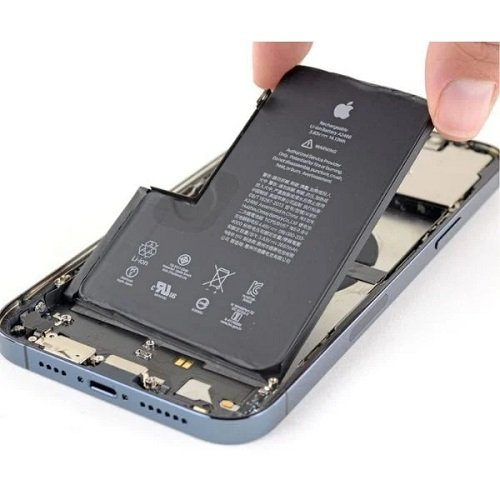
Apple Iphone 17 Pro Max Battery Replacement
Availability:In Stock!
-
Model: Apple iPhone 17 Pro Max
-
Service: Battery Replacement
-
Genuine Apple battery
-
High-capacity Li-Ion technology
-
Restores original performance
-
Optimized for iOS efficiency
-
Supports fast charging
-
Professional installation required
-
Maintains safety and reliability
-
Warranty on replaced battery
KSh 10,000.00
CompareApple Iphone 17 Pro Max Battery Replacement Description
The iPhone 17 Pro Max comes equipped with a high-capacity lithium-ion battery, specifically designed to support its advanced performance features. This model boasts an impressive battery capacity, enabling extended usage time compared to its predecessors. With a power capacity of approximately 4,400 mAh, users can experience significant improvements in battery longevity, particularly during demanding tasks such as gaming, video streaming, and multitasking.
One of the notable advantages of the iPhone 17 Pro Max battery is its optimized performance. Apple has integrated software algorithms that enhance battery efficiency, thereby extending the overall lifespan of the battery. Features such as low-power mode and adaptive brightness help in managing power consumption according to user needs. It is important to monitor battery health to ensure that the device maintains peak performance. As with any rechargeable battery, its capacity tends to decline over time due to everyday usage and charge cycles.
Several signs indicate that a battery replacement may be necessary. Users may notice diminished battery life, unexpected shutdowns, or the device failing to hold a charge. Moreover, if the iPhone frequently displays the “Service Recommended” message or if the battery health percentage falls below 80%, it is advisable to consider a battery replacement. The performance can also vary depending on application usage; for instance, resource-intensive apps like gaming or augmented reality applications may cause the battery to deplete at a faster rate compared to basic functions like texting or calling.
Understanding how battery performance is affected by usage scenarios and settings will empower users to make informed decisions regarding their devices. By managing settings and being aware of battery health, users can enhance their overall iPhone experience while ensuring that their iPhone 17 Pro Max remains operational for an extended period.
When Should You Consider Battery Replacement?
As an integral component of any smartphone, the battery’s performance directly affects the overall user experience with the device. Understanding when to consider a battery replacement for your Apple iPhone 17 Pro Max is crucial for maintaining optimal performance. Users often notice specific indicators that signal the need for intervention.
One of the most common symptoms is reduced battery life. If the device barely makes it through a typical day of usage and requires frequent charging, this may be a clear indication that the battery is aging. Users might find that their iPhone drains faster than usual, even when using less power-intensive applications. For example, activities such as browsing and texting should not excessively deplete the energy levels, which suggests that some underlying issues may need to be addressed.
Another alarming sign is unexpected shutdowns. If the iPhone turns off unexpectedly, even when the battery indicator suggests there is charge remaining, it could indicate that the battery can no longer sustain the energy demands of the device. Such occurrences not only disrupt productivity but can also lead to data loss if the device shuts down while in use.
Additionally, if users experience significantly slower performance, such as lagging applications and delayed responses, this could be attributed to battery health. Older batteries may struggle to provide the necessary voltage for peak performance, leading to an overall sluggish experience. Apple advises users to regularly check their battery health by accessing the settings on their device; this feature provides vital information regarding the battery’s condition.
Before committing to a battery replacement, it is advisable to employ strategies to prolong battery life. Adjusting settings like reducing screen brightness, disabling background app refresh, and managing location services can positively influence battery longevity. Recognizing these indicators and acting swiftly can enhance the usage experience of the iPhone 17 Pro Max.
Options for Replacing Your iPhone 17 Pro Max Battery
When it comes to replacing the battery of your iPhone 17 Pro Max, users have a variety of options to consider. Each choice presents distinct advantages and disadvantages that can influence your decision-making process. The most secure option is to utilize Apple’s official battery replacement services. This involves sending your device to Apple or taking it to an Apple Store, where trained technicians will handle the replacement. The primary benefits include assurance of quality parts and maintenance of your warranty. However, this service may come at a premium price point, which could be a consideration for budget-conscious users.
Another alternative is to approach an Apple Authorized Service Provider (AASP). These locations, while not directly affiliated with Apple, follow the same guidelines and use genuine Apple components. This option often provides a compromise between cost and quality, as service fees may vary while still adhering to Apple’s standards. Choosing an AASP can also be a more convenient option for those who may not have direct access to an Apple Store.
On the other hand, third-party repair services offer another viable solution. These options tend to present lower costs, making them appealing for new iPhone 17 Pro Max users or those seeking a quick fix. It is crucial, however, to carefully consider the potential risks associated with this choice, such as the use of non-genuine parts, which may compromise device functionality and void any existing warranty. For users comfortable with technical repairs, DIY battery replacement kits are also available. While cost-effective, one should weigh the technical expertise required against the possibility of damaging the device.
Ultimately, when deciding which replacement method to pursue, evaluate the trade-offs among cost, quality, warranty implications, and your personal comfort level with technology.
Step-by-Step Guide to DIY Battery Replacement
Replacing the battery of your iPhone 17 Pro Max can be a rewarding task when done correctly. This step-by-step guide is designed to assist you in successfully executing this operation. First, gather the necessary tools: a pentalobe screwdriver, a Phillips screwdriver, a spudger, a suction cup, and a new battery compatible with the iPhone 17 Pro Max. Ensure you also have isopropyl alcohol and microfiber cloth for cleaning purposes.
Before beginning, take essential safety precautions. Power off your device completely to prevent any electrical damage or personal injury. Working in a well-lit area with minimal distractions is advisable to keep focus while conducting the replacement.
Once prepared, follow these steps for the battery replacement:
- Remove the Pentalobe Screws: At the bottom of the device, there are two screws next to the charging port. Use the pentalobe screwdriver to remove these screws and safely store them.
- Utilize the Suction Cup: Place the suction cup near the charging port. Pull slightly to create a small gap between the screen and the rear housing.
- Insert the Spudger: Carefully slide the spudger into the gap to gently lift the screen from the device. Take care not to insert too deeply to avoid damaging internal components. Repeat this around the edges of the device.
- Disconnect the Battery: Locate the battery connector, gently lift the battery from its socket using the spudger, and fully disconnect it.
- Replace the Battery: Remove the old battery from its compartment and replace it with the new battery, connecting the battery connector securely.
- Reassemble the Device: Carefully align the screen back onto the device and press until it snaps into place. Finally, reinsert the pentalobe screws to secure the screen.
After successful battery replacement, power on your device to ensure functionality. If you encounter any issues, double-check the connections and seating of the new battery. Remember, proceeding slowly and methodically can significantly reduce the chance of making errors during the process. Following this guide should empower you to replace your iPhone 17 Pro Max battery with confidence.


There are no reviews yet.